Introduction
Cloud AI is used to run artificial intelligence tools through internet-based data centers instead of only on a local computer, phone, or company server. In the United States, people use cloud AI to write and summarize text, analyze data, recognize images, power chatbots, detect fraud, predict demand, and automate routine work.
Cloud AI combines three parts:
- AI models that find patterns or create content.
- Cloud computing resources that provide storage and processing power.
- Internet access or software connections that let people and apps use those models.
A small business may use cloud AI to answer customer questions. A hospital may use it to organize records, subject to strict privacy rules. A retailer may use it to forecast sales. A developer may connect an AI model to a website or mobile app.
The main benefit is access to powerful tools without buying and maintaining large amounts of hardware. The main trade-offs are cost, privacy, internet dependence, security, and the risk of incorrect results.


What does cloud AI mean?
Cloud AI means artificial intelligence delivered through a cloud service. The AI model and much of the computing work run in a remote data center. Users access the service through a web app, software development kit, or application programming interface, often called an API.
For example, when a user sends a question to an online AI assistant, the request may travel to a cloud data center. The service processes the request, generates a result, and sends the answer back.
Cloud AI can include:
- Machine learning, which finds patterns in data.
- Generative AI, which creates text, images, audio, video, or code.
- Computer vision, which analyzes photos and video.
- Speech AI, which converts speech to text or creates spoken audio.
- Predictive analytics, which estimates likely future events.
- Natural language processing, which helps computers understand human language.
- Recommendation systems, which suggest products, videos, songs, or actions.
The term “cloud” does not mean the data floats in the air. It means the software and computing resources run on servers managed in remote data centers.
Cloud AI compared with local AI
Local AI runs on a device or private server. Cloud AI runs mainly on remote infrastructure.


| Factor | Cloud AI | Local or on-device AI |
|---|---|---|
| Processing | Remote data centers | Local computer, phone, or server |
| Internet need | Usually required | Often works offline |
| Hardware cost | Usually lower at the start | May require special hardware |
| Speed | Depends on internet and service load | Depends on the device |
| Data control | Data may leave the device | Data can stay local |
| Scaling | Easier to increase capacity | Requires more local hardware |
| Maintenance | Provider manages much of it | User or company manages it |
Many systems use a hybrid model. Sensitive or time-critical tasks may run locally, while larger tasks use cloud AI.
What is cloud AI used for?
Cloud AI is used for tasks that involve large amounts of data, complex models, or changing workloads. Its uses range from simple office work to large-scale scientific research.
1. Customer service and chatbots
Companies use cloud AI to answer common customer questions, search help articles, and route support requests. A chatbot can explain return rules, check order status, or help a user find the right form.
Cloud AI can also summarize a support call and suggest a reply for a human agent. This can reduce manual work, but a human should handle complex, sensitive, or disputed cases.
A good support system should:
- Identify when it is unsure.
- Show or link to approved information.
- Transfer difficult cases to a person.
- Avoid making promises that the company cannot keep.
- Protect account and payment information.
2. Writing, editing, and summarizing
People use cloud AI to draft emails, rewrite text, summarize reports, create outlines, and adjust reading level. Students, workers, marketers, and public agencies may use these tools for first drafts or routine language tasks.
The output still needs review. Cloud AI can invent facts, misread a source, or remove an important detail from a summary. It works best as a writing assistant, not as an automatic source of truth.
3. Data analysis and business forecasts
Cloud AI can examine sales records, website activity, customer messages, and other business data. It may help find trends, classify records, or estimate future demand.
Common uses include:
- Sales forecasting.
- Inventory planning.
- Customer grouping.
- Fraud detection.
- Churn prediction.
- Equipment failure alerts.
- Budget and demand analysis.
A prediction is not a guarantee. A forecast can fail when the data is incomplete, the market changes, or past patterns no longer apply.
4. Image and video analysis
Computer vision tools use cloud AI to examine images and video. Businesses may use them to identify objects, read text, inspect products, or organize media files.
Examples include:
- Reading license plates where legally permitted.
- Finding defects in manufactured goods.
- Scanning documents with optical character recognition.
- Counting products on shelves.
- Sorting images by subject.
- Detecting changes in satellite or aerial images.
Organizations must follow privacy, employment, and civil rights rules when using facial recognition or other systems that affect people.
5. Speech recognition and translation
Cloud AI can turn speech into text, translate languages, identify speakers, and create synthetic speech. These tools support call transcripts, captions, meeting notes, voice assistants, and accessibility services.


Accuracy may drop because of noise, accents, technical terms, overlapping speakers, or poor microphones. Important transcripts should be checked before they become official records.
6. Software development
Developers use cloud AI to explain code, generate test cases, find possible bugs, create documentation, and convert code between programming languages.
These tools can speed up routine work. They can also produce insecure code, use an incorrect library, or repeat licensed code without enough context. A developer must test the result and review its security and licensing implications.
7. Personalized recommendations
Streaming services, online stores, news sites, and education platforms use AI to suggest content or products. The system may compare a person’s activity with patterns from similar users.
Recommendations can improve discovery, but they may also create narrow content loops or reflect biased data. Companies should give users meaningful controls where appropriate.
8. Healthcare support
Cloud AI may help organize medical records, transcribe visits, support medical image analysis, or identify patterns for research. It can also assist with scheduling and administrative work.
Healthcare uses require special care. A cloud AI output is not automatically a diagnosis or treatment plan. Organizations must review applicable federal and state requirements, protect health information, and keep qualified professionals involved in clinical decisions.
9. Cybersecurity and fraud detection
Security teams use cloud AI to examine login events, network traffic, files, and transaction patterns. The system may flag unusual activity or prioritize alerts.
This can help analysts handle large volumes of events. Yet false alarms and missed threats remain possible. AI should support a broader security program that includes access controls, logging, software updates, backups, and human review.
10. Research and scientific computing
Universities, laboratories, and companies use cloud AI to process large datasets and run models that would be difficult to operate on ordinary computers. Examples include weather modeling, drug research, astronomy, climate analysis, and genomics.
The cloud is useful when a project needs large amounts of computing for a limited period. The team still needs sound data, repeatable methods, and independent checks.

How does cloud AI work?
Cloud AI usually follows a simple request-and-response process.
- A person or application sends data to an AI service.
- The cloud service authenticates the request.
- The service sends the data to a model.
- The model processes the input.
- The service returns a result.
- The application stores, displays, or acts on that result.
A company may use a managed AI service from a provider such as Amazon Web Services, Google Cloud, or Microsoft Azure. These services can provide ready-made models, tools for training models, data storage, security controls, and monitoring.
The main cloud AI layers
Infrastructure supplies servers, storage, and networking. AI workloads often need specialized chips, such as graphics processing units or other accelerators.


Data systems store and prepare information. Data may need cleaning, labeling, formatting, and access controls before a model can use it.
Models perform tasks such as classification, prediction, generation, or recognition.
Applications connect the model to a website, business process, mobile app, or internal tool.
Governance covers security, privacy, testing, access, logging, and human oversight.
A strong system treats the model as one part of a larger process. Better model output cannot fix poor data, unclear instructions, or weak security controls.

What are the benefits of cloud AI?
Cloud AI can make advanced computing easier to access, but the benefits depend on the task and the service design.
Lower hardware demands
A company may not need to buy a large server cluster. It can use cloud resources when needed and reduce them when demand falls.
This is most useful for uneven workloads. A business that needs high processing power only a few hours each week may avoid paying for unused hardware.
Faster development
Cloud providers offer prebuilt tools for language, vision, speech, and prediction. Developers can build a prototype without creating every model from the beginning.
This does not remove the need for testing. It can shorten the path from an idea to a working trial.
Easier scaling
A cloud service can often handle more users or more data by adding computing resources. The exact limits depend on the provider, service tier, region, and account settings.
Scaling does not always reduce cost. A popular application can create a large bill if requests, storage, or data transfers are not monitored.
Access to specialized infrastructure
Cloud providers operate data centers with hardware designed for demanding AI workloads. This can give smaller teams access to tools they could not easily build on their own.
Centralized management
A cloud platform can provide identity controls, logs, model versions, usage reports, and deployment tools. These features can help an organization manage AI across several applications.


What are the disadvantages and risks of cloud AI?
Cloud AI creates practical risks that users should consider before sending data or making decisions.
Privacy and data exposure
Data sent to an AI service may leave the user’s device and be processed by a third party. The exact handling depends on the service agreement, settings, location, retention rules, and applicable law.
Do not upload confidential information until you know:
- What data the service receives.
- Where the data is processed.
- How long it is retained.
- Whether it is used to improve a model.
- Who can access it.
- How it can be deleted.
- What breach notices and security terms apply.
For U.S. organizations, the relevant rules may include sector-specific requirements such as HIPAA, the Gramm-Leach-Bliley Act, the Family Educational Rights and Privacy Act, state privacy laws, and employment or consumer protection rules. The correct rule depends on the data and the organization.
Incorrect or biased results
AI can produce a confident answer that is wrong. A model may also perform less accurately for groups or situations that were poorly represented in its training data.
Use extra review when the result affects:
- Health or safety.
- Employment.
- Housing.
- Credit or insurance.
- Education.
- Legal rights.
- Public benefits.
- Access to essential services.
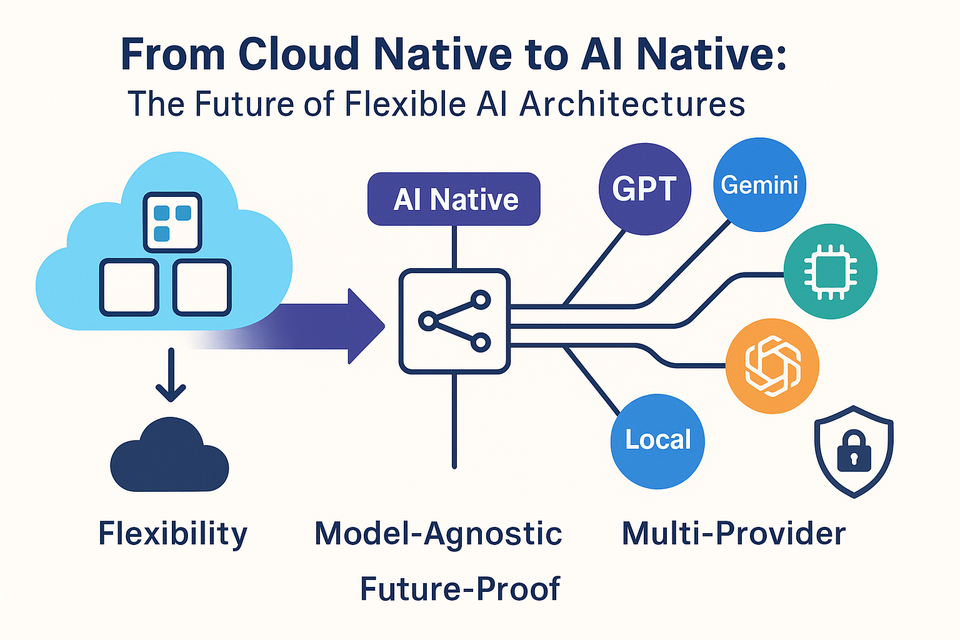
Vendor dependence
An application may become tied to one cloud provider’s API, data format, or model. Moving later can be costly.
Teams can reduce this risk by documenting their system, saving important data in portable formats, testing alternatives, and avoiding unnecessary dependence on provider-specific features.
Downtime and internet dependence
A cloud AI tool may become slow or unavailable. Network failures can also stop an application from working.
For critical systems, plan for service outages. Options may include a manual process, a local backup model, delayed processing, or a second provider.
Unclear costs
Cloud AI costs may include:
- Model requests.
- Input and output data.
- Storage.
- Training.
- Data transfer.
- Monitoring.
- Staff review.
- Security and compliance work.
A cheap test can become expensive at high volume. Set usage limits, alerts, and approval rules before launch.

Is cloud AI safe to use?
Cloud AI can be safe for many tasks when the system is designed and managed well. No cloud AI service is automatically safe for every type of data or decision.
A practical safety review should ask:
- What is the harm if the model is wrong?
- Does the task involve personal, regulated, or secret data?
- Can a qualified person review the result?
- Can the organization explain or audit the decision?
- What happens if the service fails?
- Can the user correct or challenge the result?
The National Institute of Standards and Technology AI Risk Management Framework provides a useful structure for managing AI risks. Its ideas include understanding risks, measuring system performance, managing known issues, and establishing governance.
For general work, do not paste passwords, private keys, Social Security numbers, full medical records, or confidential business plans into an AI tool unless the organization has approved the service and its controls.
How much does cloud AI cost?
Cloud AI pricing varies by provider, model, region, request size, storage, and usage. Some services charge per request. Others charge by tokens, processing time, stored data, or model training.
A simple planning formula is:
Estimated monthly cost = request volume × average cost per request + storage + data transfer + monitoring + human review
Hypothetical example
Suppose a company handles 50,000 AI requests each month. If the average model charge is $0.01 per request, the model cost would be:
50,000 × $0.01 = $500 per month
That estimate does not include storage, application hosting, staff review, security tools, or data transfer. Actual pricing must come from the selected provider’s current pricing page.
The best way to control cost is to run a small pilot. Measure:
- Requests per day.
- Average input and output size.
- Response time.
- Error rate.
- Human review time.
- Cost per completed task.
- Cost of incorrect results.
A cheaper model may be suitable for simple classification. A more capable model may be worth the extra cost for complex work. The right choice depends on accuracy, speed, privacy, and the consequence of failure.

Cloud AI, edge AI, and hybrid AI: Which should you use?
The best approach depends on where data is created, how fast a result is needed, and how much control the organization requires.
| Use cloud AI when… | Use local or edge AI when… | Use hybrid AI when… |
|---|---|---|
| You need flexible computing power | The device may lose internet access | Some data must stay local |
| You process large datasets | Response time must be very low | You need both speed and scale |
| You want managed AI tools | Data cannot leave the site | A local filter can reduce cloud data |
| Demand changes over time | The task is simple and repeatable | Cloud models handle complex cases |
An edge system processes data near the source, such as a camera, factory machine, vehicle, or phone. A hybrid system may detect sensitive information locally, then send only a limited result to the cloud.
Do not choose cloud AI only because it is popular. Match the design to the task, data, budget, and failure risk.

How to choose a cloud AI service
Start with the use case, not the model name. Write down the task, input data, desired output, acceptable error rate, and review process.
Then compare services using these questions:
Capability
Can the service complete the task with acceptable accuracy? Test it with real examples that represent normal and difficult cases.
Privacy
Review the provider’s data processing terms, retention settings, encryption details, access controls, and regional options. Do not rely on a general statement that a service is “secure.”
Reliability
Check service limits, documented availability commitments, rate limits, backup options, and outage procedures.
Cost
Estimate total cost at both pilot and production volume. Include human review and failure handling.
Integration
Confirm that the service works with your software, identity system, data format, and required region.
Governance
Look for logging, version control, evaluation tools, access permissions, and ways to monitor changes in model behavior.
Exit options
Know how to export data and replace the model if prices, terms, performance, or availability change.

Common mistakes when using cloud AI
Several mistakes make cloud AI less useful or less safe.
Sending sensitive data too soon
Test with synthetic or redacted data first. Add real data only after privacy and security teams approve the design.
Treating generated content as verified fact
Require source checks for claims that matter. AI can draft a response, but a person or trusted system should verify key facts.
Skipping a baseline
Compare the AI system with the current manual process. A model that looks impressive may not save time or reduce errors.
Measuring only accuracy
Track cost, speed, fairness, user satisfaction, false positives, false negatives, and the time needed for review.
Launching without a fallback
Create a manual path before the AI system goes live. Users should not be trapped when the model fails.
Ignoring model updates
A provider may change a model, limit, or default setting. Keep records of important versions and retest after major changes.
Giving the model too much authority
Use the least access needed. An AI assistant that can read data does not always need permission to delete files, approve payments, or change accounts.

FAQs about cloud AI
Is ChatGPT cloud AI?
A web-based AI assistant such as ChatGPT is an example of cloud-delivered AI. The service processes requests on remote computing infrastructure. The exact data controls depend on the account type, settings, and current provider terms.
Does cloud AI require an internet connection?
Most cloud AI tools require an internet connection because requests travel to remote servers. Some applications combine cloud AI with on-device features so that limited tasks can work offline.
Can cloud AI work with private company data?
It can, but the company must review the service terms, security controls, retention rules, access permissions, and applicable laws first. A private cloud account does not automatically make every use lawful or risk-free.
Is cloud AI better than local AI?
Neither is always better. Cloud AI is often easier to scale and can support larger models. Local AI can offer more control, lower network dependence, and better privacy for some tasks.
How can a small business start with cloud AI?
Choose one low-risk task, such as drafting internal summaries or sorting non-sensitive support requests. Use sample data, define a success measure, set a spending limit, and require human review before expanding the system.
Key takeaways
- Cloud AI runs artificial intelligence services on remote computing infrastructure.
- Common uses include chatbots, writing, forecasting, image analysis, speech tools, software development, cybersecurity, and recommendations.
- Its main strengths are flexible scale, lower hardware needs, and access to managed AI tools.
- Its main risks include privacy exposure, incorrect results, bias, outages, vendor dependence, and unexpected costs.
- Use local or hybrid AI when offline work, low delay, or strict data control matters.
- Start with a small pilot, use approved data, measure the full cost, and keep human review for high-impact decisions.
Conclusion
Cloud AI is best understood as a way to access AI models and computing power through internet-based services. It can help a U.S. business or individual complete routine work, study large datasets, support customers, and build new software without owning a large AI infrastructure.
The right use is not the one with the most advanced model. It is the one that solves a clear problem while protecting data, controlling cost, measuring results, and giving people a safe way to review or correct the output. Start small, test with realistic examples, and expand only when the evidence supports it.

Everett Ashford is a tech reviewer at mytechgrid.com specializing in SSDs, cameras, TVs, earbuds, headphones, and other consumer electronics. He provides honest, data-driven reviews based on hands-on testing and real-world performance analysis. Everett simplifies complex tech details to help readers make smart, confident buying decisions.