Introduction
For people in the United States, open source AI models offer a way to run chatbots, coding tools, image systems, and research projects without sending every prompt to a commercial cloud service. You can use many models on a personal computer, a private server, or a U.S.-based cloud platform.
Some models are truly open source. Others publish their model weights but use custom licenses. That difference matters if you plan to use a model in a business, change its code, or build a paid product.
Some well-known open source or openly licensed AI models include Mistral 7B, Mixtral, Qwen2.5, DeepSeek-R1, Microsoft Phi-3, OLMo, Falcon, and BLOOM. Llama, Gemma, and many Stable Diffusion releases are often called open source, but their licenses may not meet the strict definition used by the Open Source Initiative.

What does “open source AI model” mean?
An open source AI model usually gives the public access to important parts of the system, such as:
- Model weights
- Source code
- Training or evaluation information
- A license that permits reuse
- Documentation for running or adapting the model
The term is not always used consistently. Many companies call a model “open source” when they only release the trained weights. A more accurate term for those systems is open-weight model.
Open source vs. open weight
| Type | What is available? | Typical limits |
|---|---|---|
| Fully open model | Code, weights, documentation, and sometimes training data | Data may still have copyright or privacy limits |
| Open-weight model | Trained weights and some code | The training data and full training process may remain private |
| Source-available model | Some source code is published | The license may restrict commercial use or redistribution |
| Closed model | Access is mainly through an API or private app | Users cannot freely inspect or run the model |
The distinction is practical. A model may be free to download but still restrict:
- Commercial use
- Redistribution
- Fine-tuning
- Use above a certain number of users
- Use in high-risk settings
- Use with certain services or products
Always read the model card and license before using a model in a U.S. business, school, health system, government project, or customer-facing product.
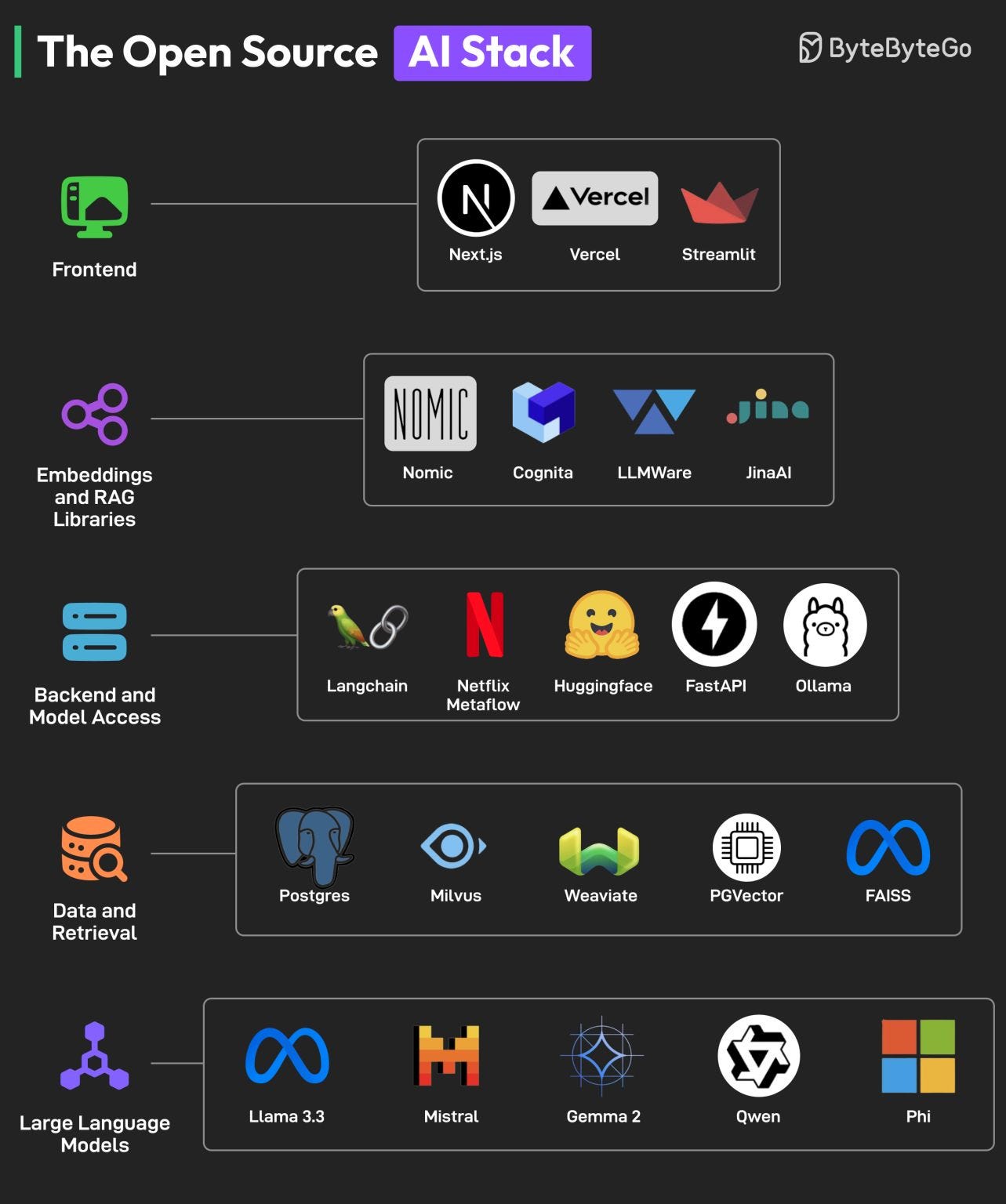
Popular open source and open-weight AI models
The best model depends on your task, hardware, language needs, and license requirements. The list below separates models with broadly permissive licenses from models that are better described as open weight.
Mistral and Mixtral
Mistral 7B is a compact language model from Mistral AI. Its Apache 2.0 license made it popular for local use, research, and commercial software.
Mixtral 8x7B uses a mixture-of-experts design. It has several expert networks, but only some are used for each token. This can provide strong results while reducing the amount of computation used for each response.
Mistral models are useful for:
- Local chat assistants
- Text classification
- Summarization
- Coding support
- Retrieval-augmented generation
- Private business applications
The main trade-off is hardware. Larger Mistral models need more memory, especially when used without quantization.
Official information is available through the Mistral AI documentation and model pages on Hugging Face.
Qwen2.5
Qwen2.5 is a family of language models from Alibaba Cloud’s Qwen team. The family includes small models for local computers and larger models for demanding work.
Qwen2.5 models are used for:
- General chat
- Coding
- Mathematics
- Structured output
- Multilingual tasks
- Document analysis
Many Qwen2.5 releases use the Apache 2.0 license. However, check the exact model card because a model family can contain different variants with different terms.
Qwen also offers vision-language models that can work with images and text. These can help with tasks such as reading charts, examining screenshots, and extracting information from documents.
See the Qwen model collection for the exact version, license, size, and supported features.
DeepSeek-R1
DeepSeek-R1 is a reasoning model released under an MIT license. It became widely known for its ability to handle multi-step math, coding, and logic tasks.
A reasoning model may spend more time producing internal steps before giving an answer. This can help with hard problems, but it may also make responses slower and more expensive to run.
DeepSeek-R1 is a good fit for:
- Mathematics
- Programming
- Technical problem solving
- Research prototypes
- Testing reasoning workflows
The model can produce confident but incorrect answers. Check calculations, code, citations, and factual claims before relying on its output.
DeepSeek also released smaller distilled versions. These versions are based on other model families, so their licenses and behavior may differ. Review the exact model page rather than assuming every DeepSeek release has the same terms.
See the DeepSeek official GitHub repository for documentation and links.
Microsoft Phi-3 and Phi-3.5
Phi-3 is a family of small language models from Microsoft. The models are designed to provide useful results with less hardware than very large systems.
Small models can be useful when you need:
- Offline operation
- Low memory use
- Fast responses
- An embedded assistant
- A model for a laptop or edge device
Phi models are available in several sizes and formats. Some versions support text only, while others support vision or longer context windows.
Microsoft released many Phi models under the MIT license. Still, check the license for the specific version and review Microsoft’s acceptable-use requirements.
Find current releases in the Microsoft Phi collection on Hugging Face.
OLMo
OLMo, developed by the Allen Institute for AI, aims to provide more of the research process than many commercial model releases. Depending on the release, this can include model code, weights, training details, evaluation tools, and related data resources.
OLMo is especially useful for:
- Academic research
- Reproducible experiments
- Model transparency work
- Fine-tuning studies
- Learning how language models are trained
OLMo may be a better choice than a popular closed or partly open model when transparency is your main goal. Even so, “open” does not mean every training record is free of copyright, privacy, or data-quality concerns.
The Ai2 OLMo project provides project information and links to releases.
Falcon
Falcon is a language model family created by the Technology Innovation Institute. Falcon models have been used for chat, text generation, research, and local deployment.
Different Falcon releases have different capabilities and license terms. Some well-known releases use permissive licenses, while newer or specialized versions may have separate conditions.
Falcon can fit users who want:
- A non-U.S.-company model option
- Local text generation
- Research access
- A range of model sizes
Do not select Falcon based only on its name. Check the exact version, parameter count, quantized format, license, and model card.
See the TII Falcon collection for current releases.
BLOOM
BLOOM is a multilingual language model created through the BigScience research project. It supports many languages and was developed with broad international research participation.
BLOOM can help with:
- Multilingual text generation
- Language research
- Cross-language experiments
- Academic projects
BLOOM uses the BigScience Responsible AI License rather than a simple permissive license such as MIT or Apache 2.0. That license includes conditions and responsible-use terms.
BLOOM is therefore open and accessible, but it is not the same as a model with unrestricted commercial reuse.
Learn more at the BigScience BLOOM page.
Llama
Llama, from Meta, is one of the most widely used model families for local AI applications. Llama models are available in many sizes and have a large ecosystem of tools, adapters, tutorials, and quantized files.
Llama is often described as open source, but Meta uses a custom community license rather than a standard OSI-approved open source license. The license can include acceptable-use rules and special conditions for larger services.
Llama is useful for:
- Local chat
- Coding assistants
- Fine-tuning
- Retrieval systems
- Prototyping
- Research
It may be a practical choice, but businesses should read the exact Meta license before deployment.
The Meta Llama website provides access and license information.
Gemma
Gemma is a family of lightweight models from Google. Gemma models are designed for local and developer use and are available in several sizes.
Gemma can work well for:
- Small applications
- Text generation
- Classification
- Coding experiments
- On-device or private deployments
Google provides model weights and documentation, but Gemma uses Google’s own terms rather than a standard Apache or MIT license. That means it is safer to call Gemma an open-weight model.
Review the Gemma terms and the exact model card before commercial use.
Stable Diffusion
Stable Diffusion models generate images from text prompts and can also support image editing, inpainting, and related tasks.
Popular releases include Stable Diffusion 1.5, Stable Diffusion XL, and later Stability AI models. Their licenses are not identical. Some allow broad use, while newer releases may include commercial thresholds, usage rules, or different conditions.
Stable Diffusion is useful for:
- Concept art
- Product mockups
- Illustrations
- Image editing
- Local creative tools
- Research into image generation
Do not assume that every checkpoint found online has the same rights. A model may also contain fine-tuning data or artwork with separate legal concerns.
Check the Stability AI licensing information and the license attached to the exact model file.
Which open source AI model should you choose?
Choose based on the task first, then compare license, size, speed, and quality. The largest model is not always the best model for a real application.
| Need | Models to consider | Main reason |
|---|---|---|
| Small local chatbot | Phi-3, Qwen2.5 small models, Gemma small models | Lower memory needs |
| General local text work | Mistral 7B, Qwen2.5, Llama | Mature tools and broad use |
| Coding | Qwen2.5-Coder, DeepSeek-R1, Phi models | Strong code and reasoning options |
| Math and reasoning | DeepSeek-R1, Qwen reasoning models | Designed for multi-step tasks |
| Multilingual work | BLOOM, Qwen, Aya-related releases | Broad language support |
| Image generation | Stable Diffusion releases | Local image generation ecosystem |
| Transparent research | OLMo, BLOOM | More research material is available |
| Commercial software | Apache- or MIT-licensed models | Simpler reuse terms, subject to review |
This table is a starting point, not a performance ranking. Results can change with prompts, fine-tuning, quantization, context length, and evaluation data.
Match model size to your hardware
Model size is often shown by parameter count, such as 7B or 14B. “B” means billion parameters.
As a rough guide:
- A 3B to 4B model may run on many modern laptops after quantization.
- A 7B to 8B model may need around 5 to 8 GB of memory in a low-bit format, plus memory for the operating system and application.
- A 14B model often needs more memory and may run better on a computer with a dedicated GPU.
- Larger models may require a high-end GPU, several GPUs, or a cloud server.
These are estimates, not guarantees. The exact need depends on the model format, context size, operating system, inference tool, and number of users.
Quantization reduces the number of bits used to store model values. It can make local use possible, but it may reduce quality in some tasks.
Match the license to your project
For a personal experiment, many models may work. For a paid product, license review becomes a required step.
Before deployment, record:
- The exact model name and version.
- The model license.
- Any acceptable-use rules.
- Whether commercial use is allowed.
- Whether redistribution is allowed.
- The licenses of adapters, datasets, and code.
- Any privacy or security requirements.
A permissive model license does not remove other duties. You may still need to handle copyright, personal data, consumer protection, accessibility, and sector-specific rules.
How to run an open source AI model
You can run many models through a desktop tool, a Python library, or a server framework.
Option 1: Use a local desktop tool
Tools such as Ollama, LM Studio, and GPT4All can make local model testing easier.
A typical process is:
- Install the tool from its official website.
- Confirm that your computer meets the model’s memory needs.
- Download a model listed by the tool.
- Start a chat or local API.
- Test the model with a small, non-sensitive prompt.
- Check response speed, accuracy, and memory use.
- Read the model license before wider use.
Do not download unknown model files from random websites. A model file can be large, and a modified package may create security risks.
Option 2: Use Python and Transformers
Developers can use Hugging Face Transformers to load compatible models.
This approach gives more control over:
- Prompt templates
- Tokenization
- Fine-tuning
- Device selection
- Quantization
- Batch processing
- Evaluation
You will usually need Python, a compatible version of PyTorch, enough storage, and a GPU for larger models. CPU use may work for small models but can be slow.
Option 3: Run a model server
For an application with several users, tools such as vLLM or llama.cpp can expose a local or private API.
A server setup should include:
- Authentication
- Rate limits
- Log controls
- Input validation
- Output filtering
- Model version tracking
- Resource monitoring
- A plan for updates and rollback
Private hosting can reduce data exposure, but it does not make an application automatically secure. Prompts, uploaded files, logs, and generated content still need careful handling.

What are the limits and risks?
Open models provide control, but they also shift more work to the user. You are responsible for testing, updates, security, and license compliance.
Accuracy
A model can produce false facts, fake sources, incorrect code, and weak legal or financial advice. A local model can be just as confident as a cloud model while having fewer safety controls.
Use human review for decisions that affect:
- Employment
- Housing
- Credit
- Education
- Health
- Legal rights
- Public benefits
- Personal safety
Privacy
Local inference may keep prompts on your device, but privacy depends on the full setup. Check:
- Whether the tool sends telemetry
- Where logs are stored
- Whether crash reports include prompt data
- Which extensions can access files
- Who controls the server
- Whether backups are encrypted
Do not paste Social Security numbers, medical records, passwords, or confidential business data into a model unless your organization has approved the system.
Security
Treat model output as untrusted input. This matters when a model can call tools, read files, send email, browse the web, or run code.
Use separate permissions for:
- File access
- Network access
- Shell commands
- Database actions
- Account credentials
A model should not receive broad system access just because it can generate useful text.
Licensing
Model licenses may not cover:
- Training data
- Fine-tuning data
- Generated images
- Third-party adapters
- Code copied from the output
- Names, faces, or copyrighted characters
Keep a simple software bill of materials for each project. Record model files, versions, licenses, and download sources.

Common mistakes when choosing an open model
Calling every downloadable model “open source”
Download access does not prove that a model is open source. Check the license and what the creator actually released.
Choosing by parameter count alone
A larger model may give better results on one task but need more memory and run more slowly. Test several models with the prompts your application will use.
Ignoring the model card
The model card may describe language limits, known weaknesses, intended uses, evaluation results, and safety concerns. Read it before deployment.
Using a general chatbot for a high-risk decision
A general model is not automatically suitable for medical, legal, employment, or financial decisions. Use qualified review and domain controls.
Forgetting updates
A local model can become outdated. Track new versions, security notices, dependency changes, and license revisions.
Assuming local means private
A local interface may still use cloud features, telemetry, plugins, or remote downloads. Verify the data path.
Frequently asked questions
Is ChatGPT an open source AI model?
No. ChatGPT is a commercial product built around models that OpenAI does not release as fully open source systems. Users access it mainly through an app or API.
Is Llama truly open source?
Llama is commonly called open source, but Meta uses a custom license. It is more precise to describe Llama as an open-weight model with specific usage terms.
What is the best open source AI model?
There is no single best model for every task. Qwen2.5 and Mistral are strong general options, Phi models suit smaller devices, DeepSeek-R1 targets reasoning, OLMo supports transparent research, and Stable Diffusion serves image generation.
Can I use open source AI models for business?
Often, yes, but the answer depends on the exact model license and your use. Check commercial-use rights, redistribution rules, acceptable-use terms, data rights, and third-party components before launch.
Can I run an open model without a GPU?
Yes. Small and quantized models can run on many CPUs. The trade-off is speed. Larger models usually perform better with a compatible GPU or a server with enough memory.
Conclusion
Open source AI models give U.S. developers, researchers, schools, and businesses more control over cost, data, customization, and deployment. Strong options include Mistral, Qwen2.5, DeepSeek-R1, Phi-3, OLMo, Falcon, BLOOM, Llama, Gemma, and Stable Diffusion.
The key is to separate open source from open weight. Pick a model by task, hardware, accuracy, privacy needs, and license—not by popularity alone.
A practical next step is to choose one small model, run the same five test prompts through two or three candidates, and record quality, speed, memory use, and license terms before building further.

Everett Ashford is a tech reviewer at mytechgrid.com specializing in SSDs, cameras, TVs, earbuds, headphones, and other consumer electronics. He provides honest, data-driven reviews based on hands-on testing and real-world performance analysis. Everett simplifies complex tech details to help readers make smart, confident buying decisions.