Introduction
People across the United States can use artificial intelligence (AI) to save time, organize tasks, learn new skills, and make daily decisions. Common uses include writing emails, planning meals, comparing products, summarizing documents, creating study plans, and preparing for meetings.
The best approach is to treat AI as a helpful assistant, not as a final authority. Give it clear instructions, check important facts, and avoid sharing private information. Used with care, AI can handle routine work while you keep control of the final decision.

What Is AI, and How Can It Help in Daily Life?
AI is software that can find patterns, make predictions, understand language, or create text, images, audio, and code. Generative AI is a type of AI that creates new content in response to a prompt.
A prompt is the instruction or question you give an AI tool. For example:
“Create a simple five-day dinner plan for two adults in Chicago. Keep each meal under 30 minutes and use a $100 grocery budget.”
AI tools may help with:
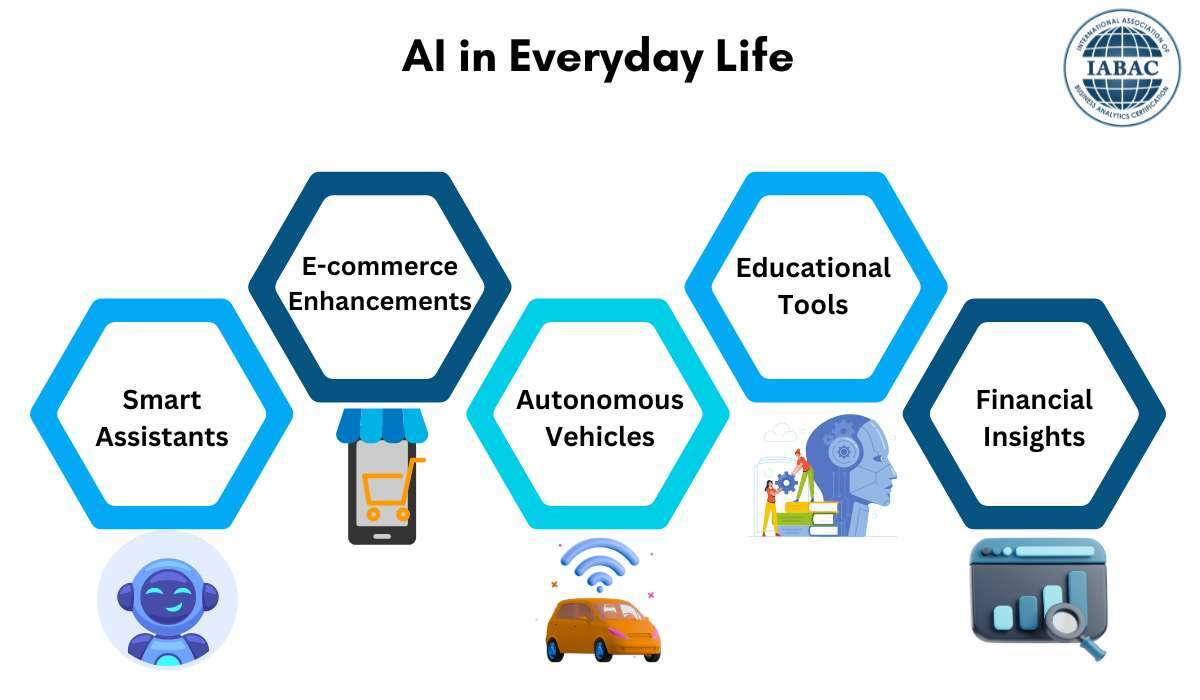
- Planning: Daily schedules, trips, meals, workouts, and shopping lists
- Writing: Emails, letters, résumés, reports, and social posts
- Learning: Explanations, quizzes, flashcards, and practice exercises
- Organization: Notes, task lists, meeting summaries, and reminders
- Research: Topic overviews, comparison tables, and questions to ask
- Creativity: Stories, gift ideas, design concepts, and photo edits
- Accessibility: Captions, text simplification, translation, and voice tools
AI does not “know” facts in the same way a person does. It generates an answer from patterns in data and the information available to it. That means it can sound sure while still being wrong.
AI is useful for tasks, not blind trust
AI works best when the task has a clear goal and when you can review the result. It is less suitable when a mistake could cause serious harm.
For example, AI can help you prepare questions for a doctor. It should not replace a doctor’s diagnosis. It can explain general tax terms. It should not make a final decision about your tax filing without review from a qualified tax professional when the issue is complex.
The Best Way to Start Using AI
Start with one small task that you repeat often. This gives you a clear way to judge whether AI saves time or creates more work.
Good first tasks include:
- Turning rough notes into a clean email
- Building a grocery list from a few recipes
- Explaining a difficult school or work topic
- Creating a weekly schedule
- Summarizing a long article that you already have permission to use
- Brainstorming gift ideas within a budget
- Rewriting a message in a calmer or friendlier tone
Choose a tool that matches the task. A text chatbot may help with writing and planning. A voice assistant may help with hands-free reminders. A document tool may help summarize files. A photo tool may help remove backgrounds or improve image quality.
Before you begin, check:
- What information the tool collects
- Whether it uses your prompts to improve its service
- Whether you can turn off training or history features
- Whether the tool has a free or paid limit
- Whether your device and web browser support it
- Whether your employer or school allows its use
Tool features change often. Review the provider’s current privacy policy and settings before adding personal data.

How to Write Better AI Prompts
A clear prompt usually produces a more useful answer. You do not need special code. You need to explain the task, the context, and the result you want.
Use this simple prompt pattern:
Task + context + limits + format + review request
Example prompt
Weak prompt:
“Plan my week.”
Stronger prompt:
“Create a weekly plan for a remote worker in Texas. Include eight hours of work on weekdays, three 30-minute workouts, grocery shopping on Saturday, and two hours of family time each evening. Show the plan in a simple table. Leave 30 minutes of free time between major tasks.”
The stronger prompt gives the AI more useful direction. It also sets limits that help you judge the answer.
Prompt tips that work well
State the role or point of view
“Act as a patient writing tutor.”
This can guide the tone and level of detail. It does not turn the tool into a licensed professional.
Give the audience
“Explain this topic to a ninth-grade student.”
Set a format
“Give me five bullet points and one example.”
Add limits
“Use plain English. Keep the answer under 300 words.”
Ask for assumptions
“List any assumptions you made before giving the plan.”
Ask for questions first
“Before you answer, ask me the three questions that would most improve the result.”
Request a review
“Check the answer for unclear claims, missing steps, and facts that need verification.”
A reusable prompt template
“Help me with [task]. The context is [key details]. The result is for [person or purpose]. Use [tone and format]. Follow these limits: [time, budget, length, or other rules]. Separate facts from suggestions, and tell me what I should verify.”

Practical Ways to Use AI at Home
AI can support many home tasks, but you should still check costs, safety instructions, and local rules.
Plan meals and grocery shopping
Tell the tool:
- How many people you are feeding
- Your budget
- Dietary needs
- Foods you already have
- The number of meals
- The time available for cooking
Example:
“Make a five-day dinner plan for a family of four. Use chicken, beans, rice, frozen vegetables, and eggs. Keep each meal under 35 minutes. Avoid peanuts. Create a grocery list grouped by store section.”
Check labels yourself for allergies. AI may miss cross-contact risks, serving sizes, or changes in product ingredients.
Create a home maintenance list
AI can help turn a general goal into a checklist:
“Create a seasonal home maintenance checklist for a single-family home in Minnesota. Separate tasks for inside and outside. Mark tasks that may need a licensed professional.”
Do not rely on AI alone for electrical, gas, structural, roofing, or major plumbing work. A wrong instruction can cause injury or property damage.
Organize household spending
You can ask AI to group expenses that you enter manually:
“Group these monthly expenses into housing, food, transport, health, debt, and optional spending. Do not change any numbers. Show totals for each group.”
Remove account numbers, passwords, full Social Security numbers, and other sensitive details. Check every total against your bank or budgeting records.
Plan trips in the United States
AI can help build a draft itinerary based on:
- City and dates
- Travel style
- Mobility needs
- Budget
- Interests
- Driving limits
Verify opening hours, ticket prices, road conditions, weather, and reservation rules on official websites. AI may use old or incorrect information.
Ways to Use AI at Work
AI may help with routine office tasks, but workplace rules come first. Some employers restrict AI use or prohibit employees from entering confidential information into public tools.
Draft emails
You can provide the main points and ask for a tone:
“Rewrite this message in a polite and direct tone. Keep the meaning unchanged. Do not add promises or deadlines that are not in the original.”
Read the final email before sending it. AI may make the message sound stronger than you intended or add details that are not true.
Summarize your own notes
AI can turn notes into:
- A short summary
- A task list
- A list of open questions
- A meeting agenda
- A follow-up email
Use this prompt:
“Turn these meeting notes into three sections: decisions, assigned tasks, and unresolved questions. Do not infer decisions that are not stated.”
Prepare for meetings
Ask AI to create questions from a document or project brief. You can also ask it to identify unclear terms, risks, or missing data.
The final judgment should come from the people who understand the project. AI can spot possible issues, but it may not understand company history, customer needs, or legal duties.
Improve a résumé
AI can help make a résumé clearer and match it to a job description. Do not let it invent jobs, degrees, awards, skills, or results.
A safe prompt is:
“Improve the wording of this résumé using only the facts included. Do not add achievements. Point out any claims that need numbers or proof.”
Use AI for coding or spreadsheets
AI can explain formulas, write simple scripts, and help find errors. Test all code before using it with real data.
Never assume that AI-generated code is secure. Check permissions, data handling, and possible errors. For business systems, have a qualified developer review important code.

How Students and Families Can Use AI Safely
AI can support learning when it helps a student understand a topic rather than simply submit an answer.
Useful study tasks include:
- Explaining a difficult idea in simpler words
- Creating practice questions
- Giving feedback on a draft
- Building flashcards
- Comparing two viewpoints
- Creating a study schedule
- Practicing a language
A student might ask:
“Explain photosynthesis in simple terms. Then give me five questions without answers so I can test myself.”
Ask the AI to show the reasoning process in a learning-friendly way, but verify the facts with class materials and trusted sources. Schools and colleges may have rules about AI-generated work. Students should follow those rules and clearly disclose AI help when required.
Parents should also check age rules, privacy settings, and the type of data a child may enter. A child should not share a home address, school schedule, passwords, or private family details with an AI tool.
Using AI for Health, Money, Legal, and Safety Questions
AI can help you prepare, but high-stakes decisions need stronger checks.
Health
AI may help you:
- Turn symptoms into questions for a clinician
- Explain common medical terms
- Organize a medication list
- Prepare for an appointment
- Create a general wellness plan
Do not use AI to confirm a diagnosis or decide whether urgent symptoms can wait. Contact a health professional or emergency service when the situation may be serious.
For medical information in the United States, use trusted sources such as:
Money
AI can explain terms such as interest, credit utilization, or loan fees. It can also help build questions for a bank, lender, or financial adviser.
Check every number and assumption. Do not share full account details, passwords, Social Security numbers, or private tax documents with a general AI chatbot.
For consumer finance information, consult the Consumer Financial Protection Bureau.
Legal issues
AI can help you organize facts or create questions for an attorney. It cannot provide a reliable substitute for legal advice about your specific situation.
Laws vary by state and may change. A lawyer should review matters such as lawsuits, immigration, criminal charges, contracts, custody, estate planning, and business liability.
Safety and emergencies
Do not use AI as the first source during an emergency. Call 911 in the United States when immediate help is needed. Use official local alerts and instructions for severe weather, fires, public safety threats, and evacuation orders.

Privacy Rules for Everyday AI Use
The safest rule is simple: share the least amount of personal information needed to complete the task.
Do not enter:
- Passwords or security questions
- Full Social Security numbers
- Bank or credit card numbers
- Medical record numbers
- Private legal documents
- Confidential work files
- A child’s full name, address, or daily routine
- Information covered by a nondisclosure agreement
You can often remove private details before asking for help. Replace names with labels such as “Client A” or “Family Member 1.” Use a general age range instead of a full birth date.
Review privacy settings
Look for controls related to:
- Chat history
- Model training
- Data retention
- Connected apps
- Voice recordings
- Location access
- Camera and microphone access
- Account deletion
A tool may still need some data to provide its service. Read the provider’s current terms before using it for sensitive work.
Watch for AI-powered scams
Scammers can use AI to make messages, voices, and images seem more real. Be cautious when a message:
- Creates urgent pressure
- Requests gift cards or wire transfers
- Asks for a password or verification code
- Comes from an unusual address or number
- Tells you to bypass normal company rules
- Uses a voice or video that seems familiar but unexpected
Verify the request through a separate contact method. Do not trust a voice or image alone as proof of identity.
How to Check an AI Answer
Use a stronger review process when the information affects health, money, work, school, safety, or reputation.
A five-step fact-check
- Identify the claim. What exact statement are you relying on?
- Check the date. Could the information have changed?
- Find a primary source. Use an official government, school, company, court, or professional source when suitable.
- Compare more than one reliable source. Look for differences in dates, locations, and conditions.
- Ask a qualified person when the risk is high. A professional can apply context that AI may miss.
Be careful with invented citations. Ask the AI to provide the title, author, date, and link for each source, then open the source yourself. A citation that looks real may still be wrong.
Signs that an AI answer needs review
- It gives exact numbers without a source
- It uses confident language but no conditions
- It cites a link that does not support the claim
- It mixes laws from different states
- It gives outdated product prices or rules
- It changes names, dates, or amounts from your notes
- It recommends a risky action without warning
- It refuses to show assumptions
A Simple Daily AI Workflow
A reliable routine has four stages:
- Choose: Select a task that is clear and low risk.
- Prompt: Give context, limits, and the format you want.
- Review: Check facts, numbers, tone, and missing details.
- Decide: Keep, edit, or reject the result.
For example, suppose you need to plan a weekend in Seattle:
- Choose: Create a two-day itinerary.
- Prompt: Give dates, budget, interests, transportation, and mobility needs.
- Review: Check venue hours, tickets, travel time, and weather.
- Decide: Adjust the plan based on official information.
This workflow prevents a common mistake: accepting a polished answer before checking whether it fits real life.
Common Mistakes to Avoid
Asking vague questions
“Help me with my budget” gives the tool too little context. State the time period, categories, goal, and limits.
Sharing too much information
More data does not always create a better answer. Remove private details unless they are essential.
Accepting the first answer
Ask for a second version, a shorter plan, or a list of assumptions. Then compare the result with trusted information.
Treating confidence as proof
A fluent answer can still contain errors. Tone is not evidence.
Using AI to deceive
Do not use AI to impersonate someone, create false records, submit dishonest schoolwork, or hide important facts from customers or employers.
Ignoring permission and copyright
Do not upload or reproduce material that you do not have the right to use. Check workplace, school, platform, and publisher rules.
Automating high-impact decisions
Do not let an AI tool make final decisions about hiring, housing, credit, medical care, benefits, or legal rights without appropriate human review and applicable rules.
Which AI Tool Should You Use?
The right tool depends on the job, not on a single “best” brand.
| Your goal | Useful tool type | Main check |
|---|---|---|
| Draft or revise text | General AI assistant | Accuracy and tone |
| Study a topic | Learning assistant | Source quality and school rules |
| Organize documents | Note or document assistant | Permission and privacy |
| Set reminders | Voice assistant or task app | Device access and accuracy |
| Analyze a spreadsheet | Spreadsheet AI feature | Formula and number checks |
| Create images | Image generation or editing tool | Rights, consent, and labels |
| Translate text | Translation tool | Meaning, names, and local context |
Choose tools with clear privacy controls, transparent limits, and features that match your needs. A free tool may be enough for simple tasks. A paid tool may offer higher limits or extra features, but cost does not guarantee accuracy.
Key Takeaways
- Start with one small, repeated task.
- Use clear prompts with context and limits.
- Ask AI to state its assumptions.
- Check important facts with trusted sources.
- Keep private and confidential data out of general tools.
- Use human professionals for high-stakes decisions.
- Treat AI as an assistant, not an authority.
- Review the final result before acting on it.
Frequently Asked Questions
Is AI safe to use every day?
AI can be useful for low-risk tasks when you protect your privacy and review the result. Safety depends on the tool, the data you share, and the decision you make from the answer.
Can AI replace a doctor, lawyer, teacher, or financial adviser?
No. AI may help you prepare questions or understand basic terms, but it may miss important facts and cannot take professional responsibility for your situation.
What should I never share with an AI chatbot?
Avoid passwords, financial account details, full Social Security numbers, private medical records, confidential business information, and identifying details about children. When possible, remove names and other details before you ask for help.
How can I tell if an AI answer is wrong?
Check dates, numbers, names, citations, and legal or local details. Compare important claims with primary sources. Ask a qualified professional when an error could cause harm or financial loss.
Can I use AI at work or school?
That depends on the rules of your employer, school, instructor, client, or licensing body. Follow disclosure, privacy, originality, and data-use requirements. Do not submit made-up work or confidential information.
Trusted U.S. Resources
For practical guidance, start with official sources:
- National Institute of Standards and Technology AI Risk Management Framework
- Federal Trade Commission guidance on artificial intelligence
- Consumer Financial Protection Bureau
- MedlinePlus
- Federal Trade Commission consumer advice
Conclusion
The most useful way to use AI in daily life is to give it routine tasks while keeping human control over important choices. Start small, write clear prompts, protect your personal data, and verify anything that affects your health, money, work, education, rights, or safety.
Your next step is simple: choose one low-risk task you repeat each week, ask AI to help with it, and review the result before you use it.

Everett Ashford is a tech reviewer at mytechgrid.com specializing in SSDs, cameras, TVs, earbuds, headphones, and other consumer electronics. He provides honest, data-driven reviews based on hands-on testing and real-world performance analysis. Everett simplifies complex tech details to help readers make smart, confident buying decisions.