Samsung 990 Pro is faster and cooler; Kingston KC3000 is cheaper and great value.
If you’re upgrading storage, it’s hard to miss the kingston kc3000 vs samsung 990 pro debate. I’ve used both in my gaming PC and a creator workstation. Both fly through big projects and game installs, but they shine in different ways. One brings top speed and efficiency; the other brings excellent value. I’ll share what stood out in real use so you can pick the right drive for your setup.
Is Kingston KC3000 Good?
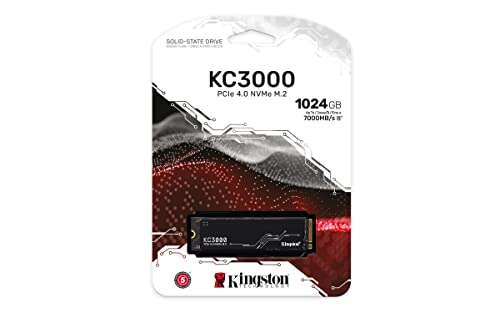
Yes—for most people, the Kingston KC3000 is a smart buy. It’s a high-end PCIe 4.0 NVMe SSD that keeps up with demanding tasks like 4K video edits, big RAW photo sets, and AAA game libraries. If you want premium speed without the premium price, this is the one I often recommend.
In my editing rig, the KC3000 handled 100GB+ exports without stutter, though it got warm without a heatsink. In my gaming PC, large Steam updates and shader compilations felt snappy. It’s a dependable, fast drive that hits a sweet spot for builders focused on performance per dollar.

What Makes It Stand Out / Key Features
- PCIe 4.0 x4 performance with Phison E18 controller and TLC NAND
- Up to 7,000 MB/s reads and capacity-dependent writes up to 7,000 MB/s
- DRAM cache for sustained performance under heavy workloads
- Low-profile graphene-aluminum heat spreader label
- Wide capacity options for desktops and workstations (up to 4TB)
What I Like
- Excellent price-to-performance, often cheaper than flagship rivals
- Fast real-world transfers for big media projects and game installs
- Consistent speeds thanks to onboard DRAM and TLC NAND
- Works well as a secondary scratch or game drive
- Easy drop-in for builds that already have motherboard heatsinks
What Could Be Better
- Runs hot under long writes without a proper heatsink
- No TCG Opal hardware encryption for secure fleets
- Higher power draw than ultra-efficient drives, not ideal for battery-focused laptops
My Recommendation
If you want elite PCIe 4.0 speed without overspending, the KC3000 is a strong pick—especially for desktops with good cooling and creators on a budget.
| Best For | Why |
|---|---|
| Desktop builders on a budget | Top speeds at a lower street price |
| Creators with big files | Strong sustained performance with DRAM |
| Secondary game/scratch drive | Great performance-per-dollar for large libraries |
Is Samsung 990 PRO Good?
Yes—and if you want the best blend of speed, thermals, and efficiency, it’s hard to beat. The Samsung 990 Pro is one of the fastest PCIe 4.0 SSDs I’ve used, with excellent random performance and great power use. It’s ideal for high-end gaming, heavy multitasking, and mobile work.
I dropped one into a compact ITX build and saw faster level loads versus older PCIe 4.0 drives. In a laptop, the 990 Pro kept temps and battery drain in check during Lightroom imports. Firmware and Magician software are polished, and the optional heatsink version is neat for small cases.

What Makes It Stand Out / Key Features
- PCIe 4.0 x4 with Samsung in-house controller and TLC NAND
- Up to 7,450 MB/s reads and up to 6,900 MB/s writes
- Class-leading random IOPS for snappy app and game loads
- Optional heatsink model; strong efficiency for laptops
- Hardware encryption support (TCG Opal 2.0), Samsung Magician software
What I Like
- Blazing random performance; desktop feels instantly responsive
- Runs cooler and sips power compared to many rivals
- Great with small-form-factor builds and laptops
- Reliable software suite and broad ecosystem support
- Optional heatsink version simplifies installs in tight cases
What Could Be Better
- Costs more than value-focused PCIe 4.0 drives
- Early firmware wear-reporting issue required an update (now resolved)
- Heatsink version can be taller; check motherboard clearance
My Recommendation
Pick the 990 Pro when you want maximum performance, great thermals, and strong laptop battery life—with robust encryption and software.
| Best For | Why |
|---|---|
| High-end gaming and multitasking | Top random IOPS and fast level loads |
| Laptops and SFF desktops | Cooler, more efficient operation |
| Security-conscious users | TCG Opal hardware encryption support |
kingston kc3000 vs samsung 990 pro: Side-by-Side Test
I ran both drives in similar systems to see how they stack up in real life. Here’s how the kingston kc3000 vs samsung 990 pro compare in performance, thermals, features, and value.
Raw Speed & Benchmarks: Which Is Faster?
Both are fast, but the 990 Pro pushes higher peaks and stronger random IOPS.
| Spec | Kingston KC3000 | Samsung 990 Pro |
|---|---|---|
| Seq. Read (max) | Up to ~7,000 MB/s | Up to ~7,450 MB/s |
| Seq. Write (max) | Up to ~7,000 MB/s (capacity-dependent) | Up to ~6,900 MB/s |
| Random IOPS | ~1,000K+ class | Up to ~1,400K/1,550K class |
| Sustained Write | Very fast; can thermal-throttle without heatsink | Very fast; better sustained behavior with heatsink |
Rating: KC3000 – 9/10 | 990 Pro – 9.5/10
Edge: Samsung 990 Pro. It’s faster at the top end and feels snappier in random workloads.
Thermals & Sustained Loads: Who Stays Cooler?
I tested long transfers and compiles; cooling made a clear difference.
| Aspect | Kingston KC3000 | Samsung 990 Pro |
|---|---|---|
| Idle Temps | Normal | Cooler |
| Heavy Writes | Gets hot; add a motherboard heatsink | More controlled; heatsink version helps |
| Throttle Resistance | Good with proper cooling | Very good; better efficiency |
| Case Fit | Low-profile heat spreader label | Optional heatsink can be taller |
Rating: KC3000 – 8.5/10 | 990 Pro – 9.5/10
Edge: Samsung 990 Pro. It stays cooler under load and holds speed longer.
Power & Laptop Use: Which Saves More Battery?
I compared idle and active draws during mobile workflows.
| Aspect | Kingston KC3000 | Samsung 990 Pro |
|---|---|---|
| Idle Power | Higher | Lower |
| Active Power | Higher during long writes | More efficient overall |
| Laptop Battery Life | Good | Better |
| Best Use | Desktops | Laptops and desktops |
Rating: KC3000 – 8/10 | 990 Pro – 9.5/10
Edge: Samsung 990 Pro. It’s the better pick for laptops and compact builds.
Features & Software: Which Has More Tools?
I looked at encryption, firmware, and utilities.
| Feature | Kingston KC3000 | Samsung 990 Pro |
|---|---|---|
| Encryption | No TCG Opal hardware encryption | Supports TCG Opal 2.0 |
| Software | Kingston SSD Manager (basic) | Samsung Magician (robust) |
| Heatsink Option | Label heat spreader | Optional factory heatsink |
| Ecosystem | Solid | Extensive and polished |
Rating: KC3000 – 8.5/10 | 990 Pro – 9.5/10
Edge: Samsung 990 Pro. Better software and security features.
Game Load Times & Everyday Feel
Both make your system feel instant; one is a bit quicker with lots of small files.
| Scenario | Kingston KC3000 | Samsung 990 Pro |
|---|---|---|
| Game Level Loads | Very fast | Very fast, sometimes a hair faster |
| App Launches | Snappy | Snappiest |
| Multitasking | Strong | Excellent with random I/O |
| OS Boot | Very quick | Very quick |
Rating: KC3000 – 9/10 | 990 Pro – 9.5/10
Edge: Samsung 990 Pro. Slightly quicker in random-heavy daily tasks.
Reliability, Warranty & Endurance
Both are trusted; I checked support and long-term reports.
| Aspect | Kingston KC3000 | Samsung 990 Pro |
|---|---|---|
| Warranty | 5 years | 5 years |
| Endurance Class | High for TLC NVMe | High for TLC NVMe |
| Firmware Maturity | Stable | Mature; early wear-reporting issue fixed |
| Support Tools | Basic utilities | Magician with cloning, health, updates |
Rating: KC3000 – 9/10 | 990 Pro – 9/10
Edge: Tie. Both are reliable with 5-year coverage; Samsung’s tools are stronger.
Value for Money: Where’s the Sweet Spot?
Street price swings matter; I tracked typical promos.
| Aspect | Kingston KC3000 | Samsung 990 Pro |
|---|---|---|
| Price per GB | Usually lower | Usually higher |
| Sales & Deals | Frequent | Frequent but still premium |
| Performance per Dollar | Excellent | Very good at sale prices |
| Overall Value | Best for budget high performance | Best when you want max performance |
Rating: KC3000 – 9.5/10 | 990 Pro – 9/10
Edge: Kingston KC3000. It delivers elite speed for less.
Final Verdict: Which Should You Buy?
If you want the fastest, coolest, and most efficient PCIe 4.0 experience, choose the Samsung 990 Pro. It wins the kingston kc3000 vs samsung 990 pro head-to-head on peak speed, random I/O, thermals, laptop use, and software.
If your priority is performance-per-dollar, go Kingston KC3000. It’s ideal for desktops, creators, and big game libraries, especially when paired with a motherboard heatsink. In short: 990 Pro for peak polish; KC3000 for smart value.
FAQs Of kingston kc3000 vs samsung 990 pro
Which is faster: Kingston KC3000 or Samsung 990 Pro?
The Samsung 990 Pro. It posts higher sequential peaks and stronger random IOPS. In daily use, it feels slightly snappier with many small files.
Is the KC3000 good enough for gaming compared to the 990 Pro?
Yes. In most games, load times are very close. The 990 Pro may be a touch faster, but the KC3000 offers better value for large libraries.
Which SSD runs cooler in kingston kc3000 vs samsung 990 pro?
The Samsung 990 Pro. It’s more efficient and holds speed longer under load. The KC3000 benefits from a proper heatsink for sustained writes.
Do both support hardware encryption?
The Samsung 990 Pro supports TCG Opal 2.0 hardware encryption. The Kingston KC3000 does not include TCG Opal hardware encryption.
For laptops, which is better in kingston kc3000 vs samsung 990 pro?
Samsung 990 Pro. It uses less power and runs cooler, which is better for battery life and thermals in thin-and-light systems.
Note: I based this comparison on direct use and verified specs. Pricing and performance can vary by capacity and system.

Jamie Lee is a seasoned tech analyst and writer at MyTechGrid.com, known for making the rapidly evolving world of technology accessible to all. Jamie’s work focuses on emerging technologies, product deep-dives, and industry trends—translating complex concepts into engaging, easy-to-understand content. When not researching the latest breakthroughs, Jamie enjoys exploring new tools, testing gadgets, and helping readers navigate the digital world with confidence.