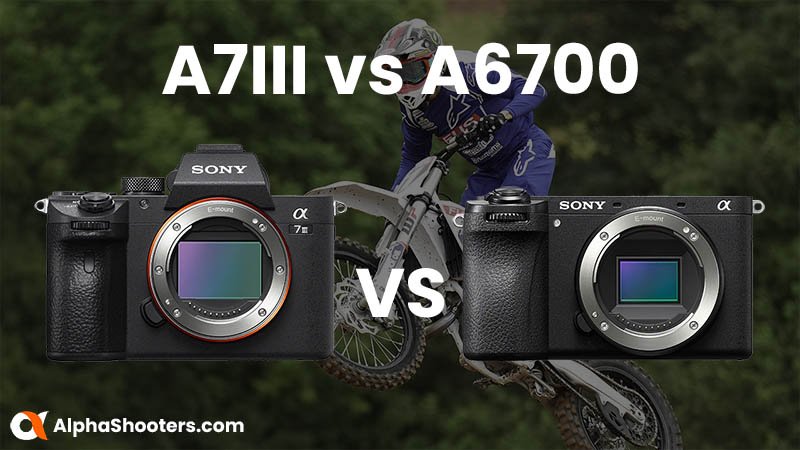
A6700 equals modern features; A7III still wins on full-frame low-light and dynamic range.
I’ve tested both cameras in real shoots and taught others to choose gear. This guide explains how to compare Sony A6700 vs A7III for content creators. I break down sensors, autofocus, video, size, lenses, workflow, and real-world tips so you can pick the right camera for your work.
Sensor, image quality, and low-light performance
- Sensor size matters. A7III has a full-frame sensor. A6700 uses an APS-C sensor. Full-frame gives shallower depth of field and better low-light headroom.
- Resolution is similar for everyday use. Both will give sharp stills and clean video for social and client work.
- Dynamic range favors the A7III in many real-world tests. You get more recoverable highlight and shadow detail on the full-frame sensor.
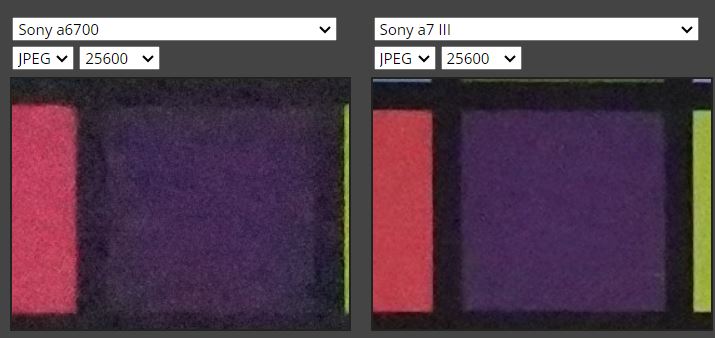
- Noise control is typically better on the A7III at high ISO. The APS-C A6700 still performs well and often surprises in daylight and controlled light.
- For telephoto reach, the A6700’s crop factor gives extra apparent reach, useful for wildlife or sports when you don’t want big lenses.
How to compare Sony A6700 vs A7III for content creators here means weighing size and reach against low-light and depth-of-field needs. If you shoot studio portraits or night events, A7III has the edge. If you need a compact rig or more reach from smaller lenses, the A6700 shines.

Autofocus, tracking, and stabilization
- Both cameras offer modern eye and face detection. The A6700 benefits from a newer AF engine and often locks faster on small subjects.
- The A7III has proven, reliable AF in a wide range of shooting conditions. It is still very solid for run-and-gun work.
- Both bodies include in-body image stabilization. Stabilization helps handheld video and low-shutter photos. Expect similar results with stabilized lenses.
- For fast-moving subjects, the A6700’s updated AF can be more responsive in many user tests. But full-frame sensor advantages still help the A7III with subject separation.
When you are deciding how to compare Sony A6700 vs A7III for content creators, focus on the type of motion you shoot. The A6700 can be easier for quick autofocus on faces in busy frames. The A7III helps isolate subjects and maintain cleaner backgrounds.
Video capabilities and real-world shooting
- Both cameras handle 4K video. They are solid for YouTube, Instagram, and client work.
- The A6700 offers newer video conveniences and menu options. That can make daily shooting faster.
- The A7III’s color and film-like look remain popular with editors and clients. Many creators prefer its natural roll-off for skin tones.
- Heat and recording limits can affect long sessions. Test your specific settings and accessories, like external recorders or fans, if you plan long takes.
- Audio options and flip screens matter for vloggers. Check mic ports, headphone jacks, and screen articulation when you compare them for your workflow.
How to compare Sony A6700 vs A7III for content creators on video comes down to workflow needs. If you run-and-gun and want newer video tools, the A6700 may speed you up. If you grade heavily and want full-frame cinematic feel, the A7III stays strong.

Size, handling, lenses, and ecosystem
- Body size: A6700 is smaller and lighter. A7III is larger but still portable.
- Lenses: A7III works with the full-frame lens lineup. That gives more options for shallow depth of field and wide apertures.
- APS-C lenses for A6700 are smaller and often cheaper. You can mount full-frame lenses on both with adaptors, but balance and reach change.
- Weight and travel gear matter. If you travel light, the A6700 simplifies your bag. If you want creative depth-of-field control, the A7III and full-frame glass pay off.
When comparing how to compare Sony A6700 vs A7III for content creators, consider the lenses you already own, and the look you want. Lenses shape images more than cameras do.
Battery life, menus, and ergonomics
- Battery life is good on both bodies. The A7III is known for strong real-world battery life with one battery often lasting a full shoot.
- Menus: Sony menus can be deep. The A6700 has some modern menu tweaks. Spend time customizing buttons and My Menu to speed work.
- Grip, dials, and physical controls matter during fast shoots. Try both in hand before you buy when possible.
How to compare Sony A6700 vs A7III for content creators includes testing each in your hands. Comfort affects speed and confidence on set.

Price, value, and resale
- The A7III launched as a higher-priced model but has fallen in price over time. It offers long-term value thanks to its full-frame sensor.
- The A6700 is more budget-friendly for creators who want modern features without full-frame costs.
- Resale value: A7III bodies tend to hold value because pro users demand full-frame. A6700 also keeps value but expect slightly more depreciation.
When you compare how to compare Sony A6700 vs A7III for content creators, align budget with long-term goals. Buying a body that matches your lens plan saves money later.

Which camera is best for these creators?
-
Vloggers and solo content creators
- A6700: Lighter and easier to handle. Great for handheld, travel, and fast setup.
- A7III: Use it if you want a cinematic look and can handle bigger lenses.
-
Wedding and event shooters
- A7III: Better low-light and depth for event work. Full-frame helps for dim receptions.
- A6700: Backup or second body for reach and compactness.
-
Travel and street creators
- A6700: Favors small kits and long reach without big tele lenses.
- A7III: Better if you prioritize ultimate image quality and low-light shots.
-
Commercial and studio work
- A7III: Preferred for consistent grade and client deliverables.
- A6700: Fine for product and tight studio setups where reach or size matters.
How to compare Sony A6700 vs A7III for content creators often ends with matching the camera to the job. Think about lens choices, the look you want, and how often you move.
Workflow, editing, and storage
- File sizes: Full-frame RAW and high-bitrate video can tax storage and editing machines. Plan drives and backups.
- Color grading: The A7III’s latitude gives more room in post. The A6700 exports files that grade well with less effort.
- Editing speed: Use proxies for heavy 4K workflows. This helps deliver on time.
- Backup routine: 3-2-1 rule works — three copies, two types of media, one offsite.
When you learn how to compare Sony A6700 vs A7III for content creators, remember the camera is one piece of a system. Fast cards, backups, and editing methods shape your output as much as body choice.

My hands-on tips and common mistakes
- Test settings before client work. I once shot an event without testing color profile and had a long grade session. Do not skip tests.
- Use small primes for low-light work on A7III. They make the most of full-frame.
- On the A6700, try compact zooms for travel. You keep weight down and reach up.
- Pay attention to shutter sound and focus noise if recording run-and-gun interviews. Use an external mic when sound matters.
- Keep a spare battery and a small gimbal for both bodies. It saves shoots.
How to compare Sony A6700 vs A7III for content creators becomes simple when you think about what you will shoot daily. Test, adapt, and choose the camera that reduces friction in your workflow.
Frequently Asked Questions of How to compare Sony A6700 vs A7III for content creators
Is the A6700 better than the A7III for video?
Both are strong for video. The A6700 has newer video features and quick menus. The A7III gives a fuller, cinematic look thanks to full-frame.
Which camera is better in low light?
The A7III generally performs better in low light because of its full-frame sensor. The A6700 still handles low light well for many content tasks.
Can I use the same lenses on both cameras?
Yes. Full-frame lenses work on both. APS-C lenses work best on the A6700. Adaptors let you mix mounts when needed.
Which is better for travel creators?
A6700 is lighter and more compact, which helps on long trips. The A7III is a great choice if you prioritize image quality over kit size.
Do both cameras have good autofocus for vlogging?
Yes. Both have strong face and eye AF. The A6700 can be quicker in some fast-paced scenes, but either model is reliable for vlogging.
Will switching from A6700 to A7III require new skills?
The basics stay the same. You will learn different depth-of-field control and lens handling. The transition is quick for most creators.
Conclusion
Choose the camera that fits your daily needs. If you want a compact, modern tool that speeds up run-and-gun work, the A6700 is a smart pick. If you need top low-light performance, wider dynamic range, and a more cinematic full-frame look, the A7III is the workhorse to choose. Use this guide on how to compare Sony A6700 vs A7III for content creators to map your shooting habits to gear. Try both bodies when you can, test your lenses, and pick the setup that makes shooting easier and more fun. Leave a comment with your use case, or subscribe to get more gear guides and hands-on tips.

Jamie Lee is a seasoned tech analyst and writer at MyTechGrid.com, known for making the rapidly evolving world of technology accessible to all. Jamie’s work focuses on emerging technologies, product deep-dives, and industry trends—translating complex concepts into engaging, easy-to-understand content. When not researching the latest breakthroughs, Jamie enjoys exploring new tools, testing gadgets, and helping readers navigate the digital world with confidence.