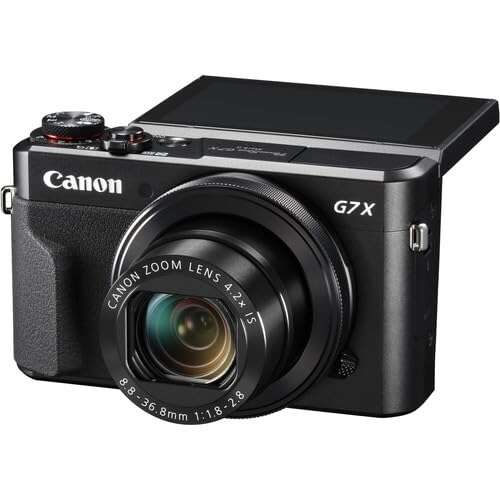
Both are strong pocket cameras; Mark III wins for video, Mark II for value.
When I compare the canon g7x mark ii vs iii in real life, I’m thinking about travel, street shots, and quick vlogs. I’ve used both on city walks and hotel-room setups. The core dilemma is simple: the Mark II is cheaper and reliable, while the Mark III adds 4K, a mic jack, and faster burst. I tested both side by side and I’ll share what actually matters so you can choose with confidence.
Is Canon PowerShot G7 X Mark II Good?
Yes, for most people who want a pocket camera at a fair price, the Mark II is a smart buy. It shoots lovely photos, delivers Canon’s classic color, and it is fast enough for daily use. If you don’t need 4K video or a mic input, it covers the basics very well. For the canon g7x mark ii vs iii debate, the Mark II wins on value.
On a rainy weekend trip, I kept the Mark II in my jacket pocket and shot cozy cafe scenes at f/1.8 without worrying about size or weight. Another time, I filmed a quick 1080p recipe clip on my kitchen counter; the tilting screen and stabilization saved me from a full setup. It’s simple, dependable, and friendly.
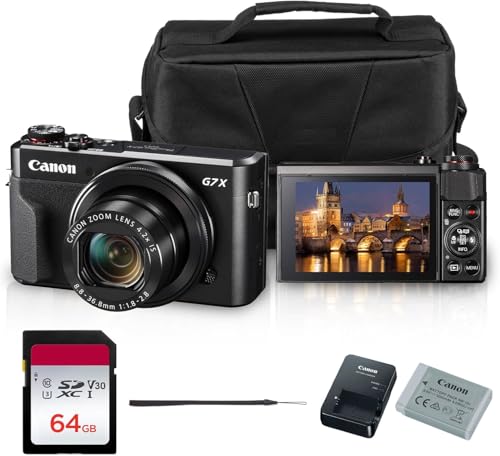
Canon PowerShot G7 X Mark II Digital Camera (Black) 20.1MP 1-Inch CMOS Sensor, DIGIC 7, 4.2X Optical Zoom Lens | Full HD 1080p Video, Wi-Fi, Tilting Touchscreen with Bag and 64GB Card
What Makes It Stand Out / Key Features
- 20.1MP 1-inch sensor with DIGIC 7 processing
- 24–100mm equivalent f/1.8–2.8 lens with Optical IS and built-in ND
- Full HD 1080p up to 60 fps video
- Tilt-up 3.0-inch touchscreen for selfies and vlogging
- Compact body with Wi‑Fi for quick sharing
What I Like
- Great low-light shots thanks to the bright f/1.8–2.8 lens
- Classic Canon colors right out of camera
- Rock-solid stabilization for handheld photos and 1080p video
- Simple menu and responsive touch controls
- Excellent value on a budget compared to the Mark III
- Pocketable size makes it an easy daily carry
- JPEGs look nice with minimal tweaking
What Could Be Better
- No 4K video and no mic input
- Contrast-detect AF can hunt during video
- Micro-USB charging only, no Bluetooth
My Recommendation
If you want great photos, solid 1080p, and the best price-to-performance, pick the Mark II. It’s the practical choice for beginners and travelers.
| Best For | Why |
|---|---|
| Budget creators | Delivers strong images and video without the higher cost |
| Travel and street | Pocket size, bright lens, and simple controls |
| Beginner vloggers | Easy to use with a flip screen and stable 1080p |
Is Canon PowerShot G7 X Mark III Good?
Yes, if video is your focus, the Mark III is the better pick. It adds 4K/30p, 1080/120p slow motion, a mic jack, and USB‑C charging. For the canon g7x mark ii vs iii comparison, this is the creator-friendly model. It also shoots up to 20 fps bursts for action.
I used the Mark III to record a street musician with a small shotgun mic, and the audio jump was huge. During a quick coffee shop livestream, the USB‑C power kept it running without fuss. AF is still contrast-based, so it can wobble in tough light, but the feature set helps you create more with less gear.
Canon PowerShot G7 X Mark III Digital Camera (Black)

What Makes It Stand Out / Key Features
- 4K/30p video and 1080/120p slow motion
- 3.5mm mic input and clean, creator-focused feature set
- 20.1MP 1-inch sensor with DIGIC 8 and up to 20 fps bursts
- USB‑C charging, Bluetooth, and Wi‑Fi
- 24–100mm f/1.8–2.8 lens with Optical IS and vertical video support
What I Like
- 4K video looks sharp and detailed for a compact
- Mic jack improves audio quality without external recorders
- USB‑C power is perfect for desk setups and travel banks
- Fast burst and RAW burst modes for action moments
- Live streaming and clean HDMI expand creator options
- Bluetooth makes remote control and pairing easier
What Could Be Better
- AF can still hunt in video, especially in low light
- 4K sessions may run hot; clip length can be limited
- Costs more than the Mark II
My Recommendation
Choose the Mark III if you care about 4K, audio, and creator tools. It’s the versatile choice for modern content.
| Best For | Why |
|---|---|
| Vloggers and streamers | 4K, mic input, and USB‑C power simplify production |
| Hybrid shooters | Strong video plus fast stills bursts |
| On-the-go creators | Compact size with pro-friendly features |
canon g7x mark ii vs iii: Side-by-Side Test
I tested both cameras across streets, rooms, and a simple desk rig. Here is how the canon g7x mark ii vs iii stack up in the areas that matter most.
Image Quality & Low Light: Which Looks Better?
Both use a 20.1MP 1″ sensor and the same bright lens. Colors and dynamic range are very close.
| Spec | G7 X Mark II | G7 X Mark III |
|---|---|---|
| Sensor & Resolution | 1″ 20.1MP | 1″ 20.1MP |
| Processor | DIGIC 7 | DIGIC 8 |
| Lens | 24–100mm f/1.8–2.8 | 24–100mm f/1.8–2.8 |
| Low-Light Results | Clean up to ISO ~1600 | Slightly cleaner JPEG noise handling |
Rating: Mark II – 8/10 | Mark III – 8.5/10
Mark III has a small edge with DIGIC 8 noise handling, but both look great.
Video & Streaming Tools: Who Wins for Creators?
This is the biggest difference in the canon g7x mark ii vs iii matchup.
| Spec | G7 X Mark II | G7 X Mark III |
|---|---|---|
| Max Video | 1080/60p | 4K/30p, 1080/120p |
| Mic Input | No | Yes, 3.5mm |
| Streaming | No native tools | Designed for livestream features |
| Ports | Micro-USB | USB‑C, clean HDMI |
Rating: Mark II – 6.5/10 | Mark III – 9/10
Mark III clearly wins for video and live content with 4K, mic input, and USB‑C.
Autofocus & Performance: Speed in the Real World
Both rely on contrast-detect AF; no Dual Pixel AF here.
| Spec | G7 X Mark II | G7 X Mark III |
|---|---|---|
| AF Type | Contrast AF | Contrast AF (tuned) |
| Continuous Shooting | Up to ~8 fps | Up to 20 fps; RAW burst modes |
| Face Tracking | Good in bright light | Better tracking, still can wobble |
| AF in Video | Occasional hunting | Improved but can hunt in low light |
Rating: Mark II – 7/10 | Mark III – 8/10
Mark III is faster for bursts and tracking; both are modest for video AF.
Lens & Stabilization: Handheld Confidence
The lens is the same on both, which is great news.
| Spec | G7 X Mark II | G7 X Mark III |
|---|---|---|
| Lens Range | 24–100mm eq. | 24–100mm eq. |
| Max Aperture | f/1.8–2.8 | f/1.8–2.8 |
| Stabilization | Optical + digital (video) | Optical + digital (video) |
| Built-in ND | Yes | Yes |
Rating: Mark II – 8.5/10 | Mark III – 8.5/10
It’s a draw. The shared lens is the secret sauce for both cameras.
Connectivity & Audio: Modern Conveniences
Here’s where the canon g7x mark ii vs iii split is obvious.
| Feature | G7 X Mark II | G7 X Mark III |
|---|---|---|
| Wireless | Wi‑Fi | Wi‑Fi + Bluetooth |
| Audio | Internal mics only | 3.5mm mic input |
| Charging | Micro‑USB | USB‑C (power delivery friendly) |
| HDMI | Basic output | Clean HDMI for capture |
Rating: Mark II – 6.5/10 | Mark III – 9/10
Mark III adds the creator must-haves: mic jack, Bluetooth, USB‑C, and clean HDMI.
Battery Life & Power: How Long Do They Run?
Both use the same NB‑13L battery, with similar endurance.
| Spec | G7 X Mark II | G7 X Mark III |
|---|---|---|
| CIPA Rating | Solid for a compact | Slightly lower on paper |
| USB Power | Micro‑USB (slower) | USB‑C; great for power banks |
| Heat in Video | Stable at 1080p | 4K can warm up on long takes |
| Real-World Use | One battery covers a light day | USB‑C helps extend runtime |
Rating: Mark II – 7.5/10 | Mark III – 7.5/10
It’s a tie. Mark II sips power; Mark III’s USB‑C offsets its heavier features.
Handling & Controls: Everyday Ergonomics
Both bodies feel alike, with a nice grip and clear menus.
| Aspect | G7 X Mark II | G7 X Mark III |
|---|---|---|
| Body Size/Weight | Compact, ~319g | Compact, slightly lighter |
| Screen | 3.0″ flip-up touch | 3.0″ flip-up touch |
| Control Ring | Clickable/de-clickable | Clickable/de-clickable |
| Learning Curve | Very short | Very short |
Rating: Mark II – 8.5/10 | Mark III – 8.5/10
Another draw. Both are easy to carry and quick to master.
Value for Money: Where’s the Smart Spend?
This is the heart of the canon g7x mark ii vs iii choice for most buyers.
| Factor | G7 X Mark II | G7 X Mark III |
|---|---|---|
| Price | Lower | Higher |
| Features | Great basics | 4K, mic, USB‑C, Bluetooth |
| Who Benefits | Travelers, beginners | Creators, hybrid shooters |
| Longevity | Still relevant for 1080p | More future-proof for video |
Rating: Mark II – 9/10 | Mark III – 8/10
Mark II wins pure value; Mark III wins if you’ll use the extra video tools.
Final Verdict: Which Should You Buy?
If you mainly shoot photos and simple 1080p clips, get the Mark II. It’s cheaper, reliable, and lovely to use. For the canon g7x mark ii vs iii value debate, the Mark II is the budget champ.
If you need 4K, a mic input, USB‑C power, and faster bursts, choose the Mark III. It’s the better fit for vloggers, streamers, and hybrid creators. In canon g7x mark ii vs iii terms: Mark II for savings, Mark III for features.
FAQs Of canon g7x mark ii vs iii
What’s the biggest difference in the canon g7x mark ii vs iii?
The Mark III adds 4K/30p, a 3.5mm mic input, USB‑C charging, Bluetooth, and faster bursts. The Mark II tops out at 1080/60p and lacks a mic jack.
Is the Mark III autofocus better than the Mark II?
Slightly. Both use contrast AF. The Mark III tracks faces better and shoots faster bursts, but video AF can still wobble in low light.
For vlogging in the canon g7x mark ii vs iii, which is best?
The Mark III. 4K, a mic input, and USB‑C power make it a stronger vlogging tool. The Mark II is fine for simple 1080p.
Do both cameras have the same lens?
Yes. Both use the 24–100mm f/1.8–2.8 lens with Optical IS and a built-in ND filter. That lens is a big reason both are popular.
Which offers better value in the canon g7x mark ii vs iii?
The Mark II offers the best price-to-performance for most users. The Mark III is worth it if you need its video and audio features.

Jamie Lee is a seasoned tech analyst and writer at MyTechGrid.com, known for making the rapidly evolving world of technology accessible to all. Jamie’s work focuses on emerging technologies, product deep-dives, and industry trends—translating complex concepts into engaging, easy-to-understand content. When not researching the latest breakthroughs, Jamie enjoys exploring new tools, testing gadgets, and helping readers navigate the digital world with confidence.