Open the aperture, move closer, or use a longer lens to blur backgrounds.
If you want creamy bokeh or front-to-back sharpness, you need control. I’ll show you how to change depth of field on camera with clear steps, real settings, and simple checks. I have coached beginners on set and in workshops. This guide brings that hands-on experience to you, so you can master how to change depth of field on camera with ease and confidence.

Understanding depth of field
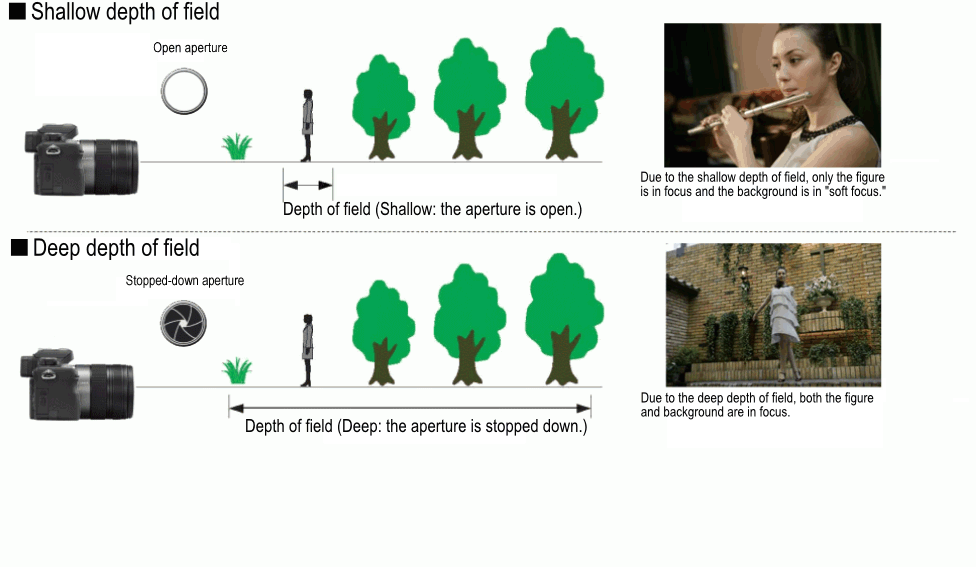
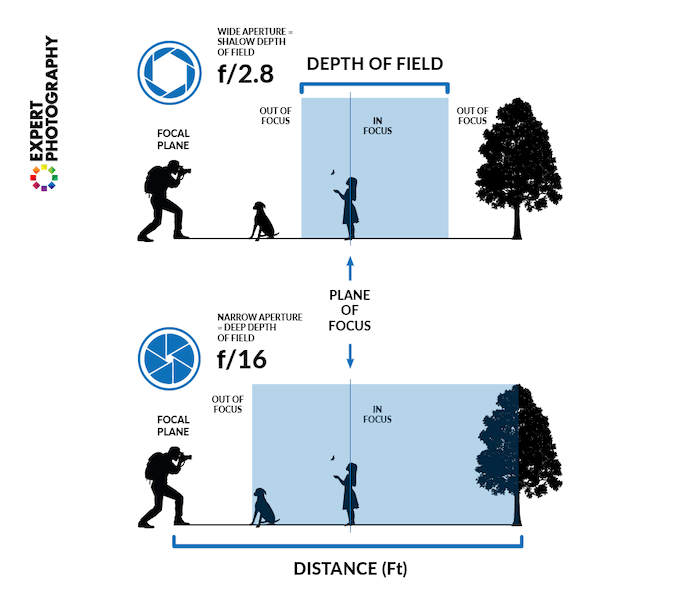
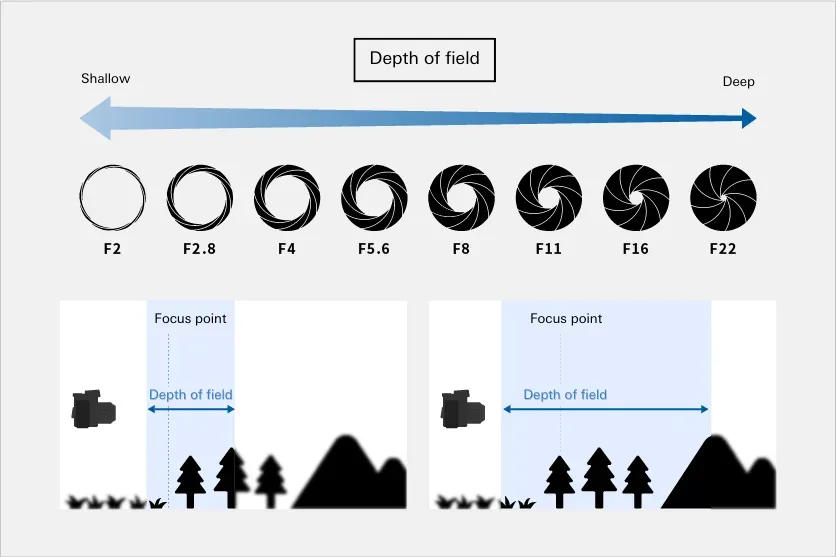
Depth of field is the zone that looks sharp in a photo. It can be very thin. It can be very deep. It depends on aperture, distance, focal length, and sensor size. That is the full picture.
Think of it like a slice of focus. A thin slice gives soft backgrounds. A thick slice gives detail across the frame. Learn how each lever changes that slice.
The goal is control. Portraits often need a thin slice. Landscapes often need a thick slice. This is the core idea behind how to change depth of field on camera.

The four levers that control depth of field
You have four main controls. Each one matters. Learn how they interact.
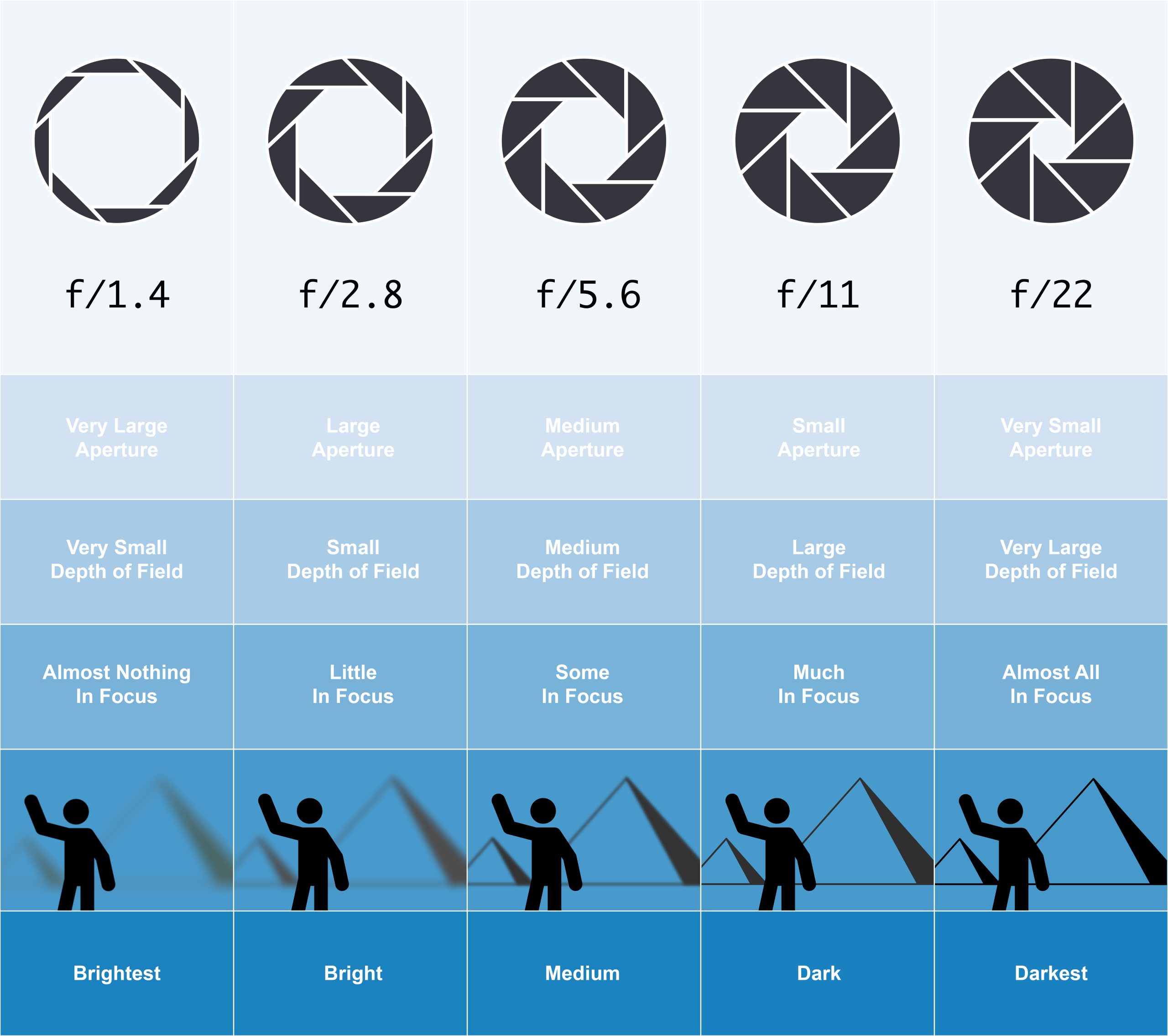
• Aperture or f-stop. Lower f-numbers like f1.8 give a shallow depth of field. Higher f-numbers like f11 give a deep depth of field.
• Subject distance. Move closer for a shallower look. Step back for more depth.
• Focal length. Longer lenses show less depth at the same distance. Short lenses show more. If you match framing by backing up with a longer lens, depth looks similar, but the background blur grows because the background is magnified.
• Sensor size. Larger sensors need longer focal lengths for the same framing. That often yields shallower depth at the same f-number.
Small note on optics. Focus falls off faster in front than behind the focus point. The distribution shifts with distance and aperture. This is why careful focus matters at wide apertures.
Use these levers together. That is the practical way to learn how to change depth of field on camera.
Step-by-step: how to change depth of field on camera in any mode
Follow these quick steps. They work on DSLR, mirrorless, and many phones.
For shallow depth of field and strong blur:
- Set Aperture Priority to A or Av. Choose f1.8 to f2.8 on a fast lens. Use f4 if light is very bright or the lens is slower.
- Move closer to your subject. Fill more of the frame.
- Use a longer focal length if you have one. Try 85 mm or 105 mm for portraits.
- Place your subject away from the background. More distance adds more blur.
- Focus on the eye for portraits. Use single-point AF for control.
For deep depth of field and full scene sharpness:
- Stay in A or Av and set f8 to f11. For very deep need, try f16.
- Step back a bit to reduce magnification.
- Use a shorter focal length, like 16 to 35 mm.
- Focus a third into the scene. Use hyperfocal distance for landscapes.
- Use a tripod if the shutter slows down.
Pro tip from the field. At a wedding, I keep two lenses ready. An 85 mm at f1.8 for soft backgrounds. A 24 mm at f8 for the dance floor scene. This quick swap makes it easy when I need to know how to change depth of field on camera fast.
If light is harsh, add an ND filter to keep wide apertures. If light is low, raise ISO or slow the shutter while on a tripod. This is a simple way to master how to change depth of field on camera in any light.
Using camera modes and tools
Camera modes help you work fast.
• Aperture Priority A or Av. Pick the f-number. The camera picks the shutter. Great for depth control.
• Manual M with Auto ISO. You lock shutter and aperture. ISO floats. This is strong in events.
• Program with program shift. Nudge the dial to pick a wider or narrower aperture.
• Depth of field preview button. Press it to see the change in the viewfinder.
• Focus peaking on mirrorless. It marks sharp edges. Good for manual focus at wide apertures.
• Back-button focus. It helps lock focus and recompose with less risk.
These tools speed up how to change depth of field on camera during real jobs.
Lens and gear choices that affect depth of field
Your lens choice shapes the look.
• Fast primes. 35 mm f1.4, 50 mm f1.8, 85 mm f1.8. These give smooth blur and strong subject pop.
• Macro lenses. Very shallow at close range. Use focus rails or stop down to f8 or f11.
• Zooms. Modern zooms at f2.8 can blur well, and they are flexible.
• ND filters. Keep apertures wide in bright light. Essential for video bokeh at 1/50 shutter.
• Tripod. Useful at f11 or f16 when shutter speeds drop.
Pick gear based on the job. This gear-first plan makes it simple to decide how to change depth of field on camera before you even start.
Real-world scenarios and settings
Use these tested starting points. Then adjust for light and taste.
Portraits with creamy background:
• Aperture at f1.8 to f2.8.
• 85 mm lens if you have it.
• Keep the subject far from the background.
Group photos where all faces must be sharp:
• Aperture at f5.6 to f8.
• Step back. Use 35 to 50 mm.
• Align faces in the same plane when you can.
Landscapes with front-to-back detail:
• Aperture at f8 to f11.
• Use a wide lens like 16 to 24 mm.
• Focus about one third into the scene or use hyperfocal.
Macro of flowers or food:
• Aperture at f5.6 to f11.
• Add light or a tripod to avoid blur.
• Use focus stacking if needed.
These recipes are a reliable way to think about how to change depth of field on camera in the field.
Smartphone and mirrorless tips for depth of field
Phones fake blur with software. Mirrorless cameras use real optics. Use both well.
• On phones, use Portrait mode and increase the blur strength with care. Check edges like hair and glasses.
• On phones with Pro mode, tap Pro. Set the lowest f-number if the phone has a variable aperture. Move closer to increase blur.
• On mirrorless, use subject detect AF for eyes. It helps at f1.4 where focus is thin.
• On both, create space. More distance to the background boosts blur fast.
If you shoot on the go, these tips show how to change depth of field on camera even without a big kit.
Common mistakes and how to fix them
Here are problems I see all the time. Here is how to solve them.
• Missed focus at wide apertures. Use single-point AF on the eye. Take two or three frames.
• Busy or bright backgrounds. Move your subject. Change your angle. Add distance to the background.
• Soft images at high f-numbers. Diffraction can soften at f16 and beyond. Try f8 to f11.
• Motion blur when stopped down. Raise ISO or use a tripod.
• Flat backgrounds with long lenses. Add depth with layers or side light.
Avoid these traps and you will learn how to change depth of field on camera with fewer bad shots.
Troubleshooting and quick checks
Run these fast checks on set.
• Check shutter speed. Keep it fast enough for handholding. As a guide, use 1 over focal length or faster.
• Zoom in on playback. Check eyes and edges for sharpness.
• Use the depth of field preview or live view at the set aperture.
• Watch for focus shift when stopping down. Many modern lenses handle it, but test yours.
• Verify stabilization is on for handheld and off on tripod.
These checks save shoots. They also keep you sharp on how to change depth of field on camera when the clock is ticking.
Frequently Asked Questions of how to change depth of field on camera
What is the fastest way to blur the background?
Open the aperture to a low f-number and move closer. If you can, use a longer lens and add background distance.
How to change depth of field on camera without changing aperture?
Move closer to the subject or step back. Switch to a longer or shorter focal length and adjust framing.
Does sensor size change depth of field?
Yes, larger sensors give a shallower look at the same framing and f-number. That is because they use longer focal lengths for the same view.
Why is my photo soft at f16 or f22?
Diffraction can soften fine detail at very high f-numbers. Use f8 to f11 for a sharp result unless you need extra depth.
How do I keep a group sharp in low light?
Raise ISO and use f5.6 to f8. Add light if needed, and put faces in the same plane.
What is hyperfocal distance and when should I use it?
It is the focus distance that gives the deepest sharpness to infinity at a set f-number. Use it for landscapes and cityscapes.
Conclusion
Depth of field is a simple set of levers you can master. Use aperture, distance, focal length, and sensor size with intent. Test, adjust, and check focus in the field.
Start today with one scene. Shoot wide open, then stop down, and compare. Apply what you learn on the next shoot. If this helped, subscribe for more guides, ask a question below, and share your best tip on how to change depth of field on camera.

Jamie Lee is a seasoned tech analyst and writer at MyTechGrid.com, known for making the rapidly evolving world of technology accessible to all. Jamie’s work focuses on emerging technologies, product deep-dives, and industry trends—translating complex concepts into engaging, easy-to-understand content. When not researching the latest breakthroughs, Jamie enjoys exploring new tools, testing gadgets, and helping readers navigate the digital world with confidence.