Mount into multiple steel studs using heavy-duty toggles or a plywood backer for safe support.
I’ve hung dozens of TVs on metal frames and I’ll walk you through how to hang tv on steel studs step by step. You’ll get practical tips, tool lists, and the exact anchors and methods that work. I’ll share what I learned the hard way so you avoid common mistakes and keep your TV secure and level.
Tools and Materials You’ll Need
Start with the right gear. Here’s what I always have on the job:
- Stud finder rated for metal studs
- Drill with metal bits and a driver
- Screwdriver set
- Tape measure and level
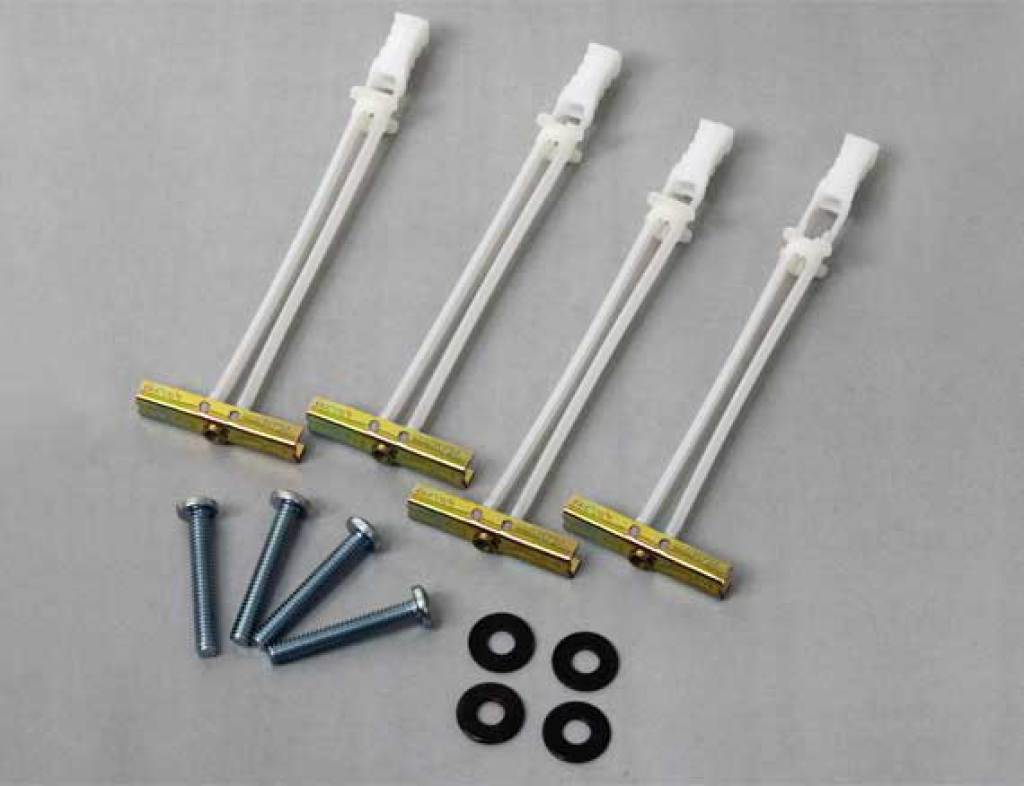
- Heavy-duty toggle bolts or self-drilling metal anchors
- Mounting bracket rated for your TV weight
- Plywood backer (optional) and lag bolts
- Safety glasses and gloves
Using the correct hardware matters a lot when you learn how to hang tv on steel studs. Cheap anchors fail. Buy rated anchors and follow manufacturer specs.

Understand Steel Stud Strength and Load Limits
Steel studs are lighter and thinner than wood. They flex more and can’t hold screws the same way. Knowing the weight of your TV and mount is key. Check mount weight ratings and add a safety margin. When you learn how to hang tv on steel studs you must match anchors to load. If unsure, spread the load across multiple studs or use a plywood backer.
How to Locate and Prepare Steel Studs
Finding studs in metal framing is different from wood. Use these steps:
- Run a metal-stud capable stud finder across the wall to mark centers.
- Confirm with a small pilot drill or magnet to find the stud edges.
- Mark the height and center for your mount’s keyhole holes.
- Measure twice before drilling.
A clear layout is crucial when you plan how to hang tv on steel studs. I once misread a stud line and had to patch several drywall holes. Don’t rush this step.
Anchor Options for Steel Studs
Pick anchors based on stud gauge and TV weight:
- Heavy-duty toggle bolts work well for medium weights and hollow studs.
- Self-drilling metal anchors are fine for light to medium TVs.
- Ribbed molly bolts can be used but check ratings closely.
- Plywood backer with lag bolts into studs distributes load best for heavy TVs.
When you decide how to hang tv on steel studs, toggles and backers are the most reliable choices. I prefer toggles for rentals and plywood backers for permanent installs.

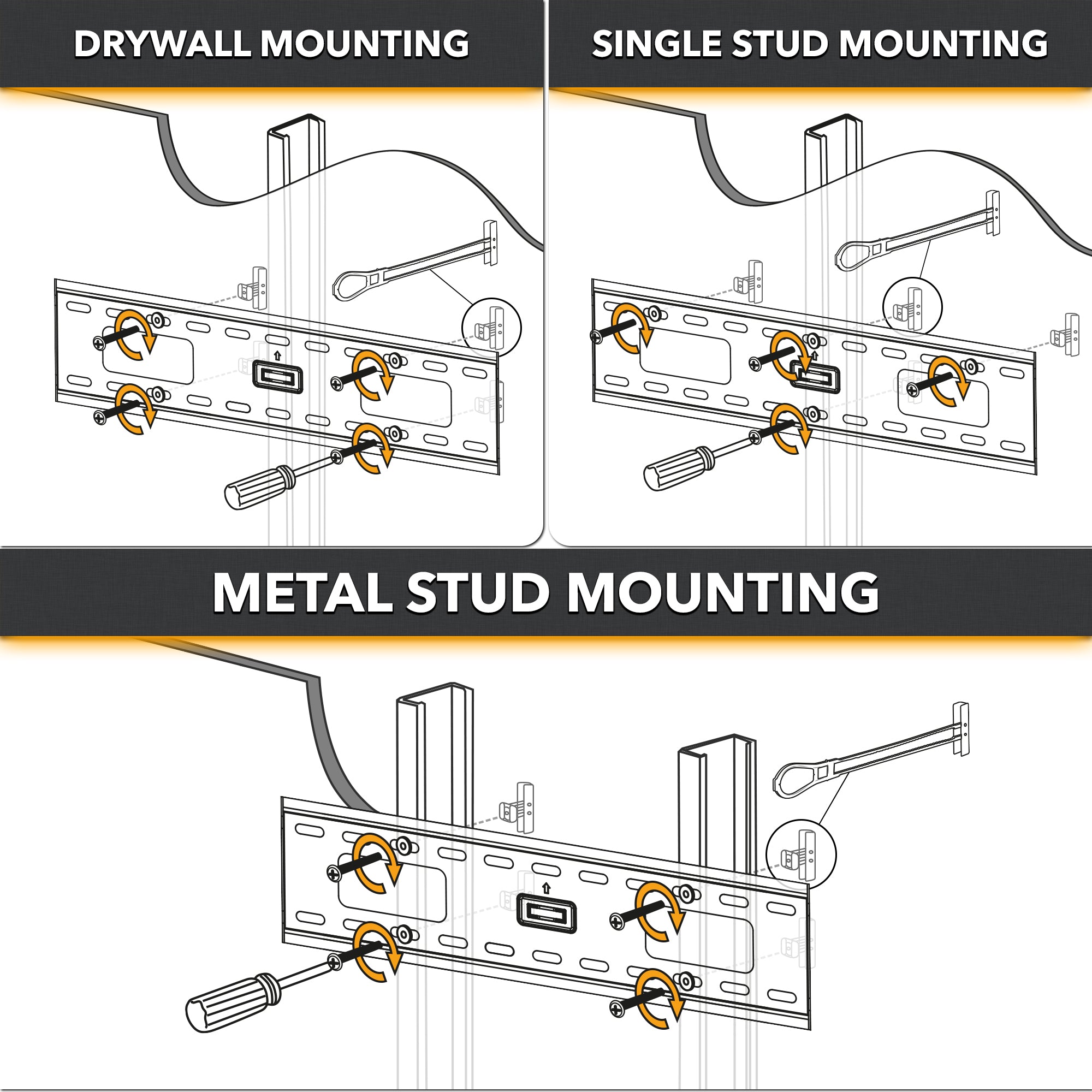
Step-by-Step: How to Hang TV on Steel Studs
Follow this clear sequence for a secure mount:
- Choose mounting height and mark wall center.
- Locate and mark at least two studs. Aim for two studs spaced by your mount’s bracket width.
- Hold the wall bracket and mark pilot holes at stud centers. Use a level to confirm alignment.
- Pre-drill pilot holes with a drill bit sized for your anchors. Keep the drill straight to avoid ripping drywall.
- Install anchors: push toggles through and tighten slowly, or insert self-drilling anchors as per instructions.
- Fasten the wall bracket to the anchors. Tighten to snug, not over-torqued.
- Attach TV plate to the TV. Get help to lift and hang the TV on the wall bracket.
- Lock the TV in place and check level and stability. Tug gently to confirm.
This step-by-step process shows exactly how to hang tv on steel studs safely. I always test by applying weight with my hands before walking away.

Alternative Methods: Plywood Backer and Mounting Rails
If you want extra security or have a heavy set, consider these options:
- Plywood backer: Install a 3/4-inch plywood sheet between drywall and finish. Screw it into multiple studs and mount the TV to the plywood.
- Mounting rails: Use a horizontal steel rail secured to several studs. Hang the TV bracket on the rail for even load distribution.
- Ceiling or freestanding mounts: When wall options are poor, use ceiling mounts or furniture stands.
Using a plywood backer is my go-to for heavy TVs. It feels like adding a stud across the wall. It takes more work but gives peace of mind when you learn how to hang tv on steel studs.

Wiring and Cable Management
Don’t forget power and AV cables:
- Plan routes for power and HDMI before drilling final holes.
- Use in-wall rated power kits if running power behind walls; follow electrical codes.
- Use cable raceways or wall plates to keep lines tidy and code-compliant.
Proper cable management completes any installation and makes your setup look professional. It also reduces strain on connectors when you manage wires correctly while you hang tv on steel studs.

Safety Tips and Building Compliance
Stay safe and follow rules:
- Check local building codes for in-wall power and cable runs.
- Never exceed anchor or stud load ratings.
- Use eye protection and work with a partner for lifting.
- If unsure, consult a pro or structural engineer for heavy or complex installs.
Safety matters when learning how to hang tv on steel studs. I once stopped a project and called an electrician when I found unexpected wiring. It was the right call.

Troubleshooting and Common Mistakes
Watch for these pitfalls and fixes:
- Problem: Bracket wiggles. Fix: Use stronger toggles or add a plywood backer.
- Problem: Anchors pull through drywall. Fix: Spread load across more studs or use rail systems.
- Problem: Stud location off by an inch. Fix: Re-check with magnet and stud finder, then patch and re-drill.
- Problem: TV tilts after mounting. Fix: Loosen, re-level, and re-tighten to proper torque.
Avoid these errors when you learn how to hang tv on steel studs. I learned to measure three times before drilling after one bad fit cost me time and patching.
Frequently Asked Questions of how to hang tv on steel studs
How heavy of a TV can I mount to steel studs?
You can mount most TVs if you use the right anchors or a plywood backer. Check the mount and anchor weight ratings and allow a safety margin.
Are toggle bolts better than self-drilling anchors for steel studs?
Toggle bolts generally offer stronger hold for hollow studs and medium loads. Self-drilling anchors can work for lighter TVs and thinner studs.
Can I mount a TV to only one steel stud?
Mounting to one stud is possible for small TVs, but it concentrates stress. For safety and long-term stability, use two studs or a backer for larger TVs.
Do I need to cut drywall to install a plywood backer?
Yes, you must remove drywall to place the plywood backer between studs. This is more work but gives the strongest support for heavy TVs.
Is it okay to conceal power and HDMI cables inside the wall?
You can hide cables, but follow local electrical code and use in-wall rated cables and kits. For power, use a code-compliant in-wall power kit or consult an electrician.
Conclusion
You can securely hang a TV on steel studs with the right plan, anchors, and care. Start by finding studs, pick anchors that match weight, and consider a plywood backer or rail for heavy sets. Take your time, use the right tools, and test the mount before you finish. Try the method that fits your wall and gear, and share your results or questions below.

Everett Ashford is a tech reviewer at mytechgrid.com specializing in SSDs, cameras, TVs, earbuds, headphones, and other consumer electronics. He provides honest, data-driven reviews based on hands-on testing and real-world performance analysis. Everett simplifies complex tech details to help readers make smart, confident buying decisions.