You can often find turned-off earbuds by tracking their last Bluetooth location and searching likely spots.
I’ve helped dozens of people find earbuds that were powered down. This guide explains practical steps and tools for how to find lost bluetooth earbuds that are turned off. I combine field-tested search tactics, app-based tracking tips, and prevention strategies so you can recover earbuds faster and avoid future losses.
Why turned-off earbuds are hard to find
Turned-off earbuds do not broadcast Bluetooth signals. That means real-time locating tools cannot "ping" them. They only leave clues: the last known Bluetooth connection, the charging case behavior, and where you likely used them.
Knowing these limits shapes a smarter search. You focus on last-seen data, the charging case, and physical search patterns. This realistic view shortens search time and prevents wasted steps.

Step-by-step search strategy to find turned-off earbuds
Follow this clear, prioritized plan when learning how to find lost bluetooth earbuds that are turned off.
-
Check last-seen device data
- Open your phone’s Bluetooth settings or the earbuds’ companion app.
- Look for "last connected" time and location clues.
- Note the timestamp to narrow down where you were.
-
Inspect the charging case and pockets
- Look in coat pockets, bags, drawers, and laundry baskets.
- Check the earbud case — sometimes one earbud is inside and the other nearby.
- Try charging the case to see if earbuds pair when powered.
-
Retrace recent routes step by step
- Walk the path you took during the last known connection.
- Check seats, tables, and pockets where you stopped.
- Ask people who were with you if they noticed earbuds.
-
Use environmental logic
- Search where you last removed audio: desk, gym locker, bedside.
- Pay attention to quiet zones where you might have set them down.
- Consider where you answered a call, which often prompts removal.
-
Systematically search rooms
- Sweep each room top to bottom: surfaces, under cushions, and behind objects.
- Check beneath furniture and inside appliance edges.
- Use a flashlight at low angles to spot small reflections.
This step-by-step approach increases your odds while saving time. It also reduces panic and repeated random searching.
:max_bytes(150000):strip_icc()/lightblue-bluetooth-tracker-2c0e508a83694bbe8117f3ece3a61857.png)
Use apps and last-seen features effectively
Many earbuds and phones keep a last-known connection record. Use these digital clues when figuring out how to find lost bluetooth earbuds that are turned off.
- Check the earbuds’ official app for last-seen location or timeline.
- Use your phone’s Bluetooth history to see the last time it paired with the earbuds.
- If you use Find My or a similar ecosystem tracker, check the last reported spot and time.
- Look at map history in your phone (if enabled) to find where you were when the earbuds last connected.
These digital breadcrumbs won’t show a live location for powered-off earbuds. Still, they often point you to the room, building, or street where you left them. Treat that clue as a high-probability search area.

Bluetooth scanners, signals, and third-party tools
Even when earbuds are off, surrounding tech can help reveal where you left them. Here’s how to use tools wisely for how to find lost bluetooth earbuds that are turned off.
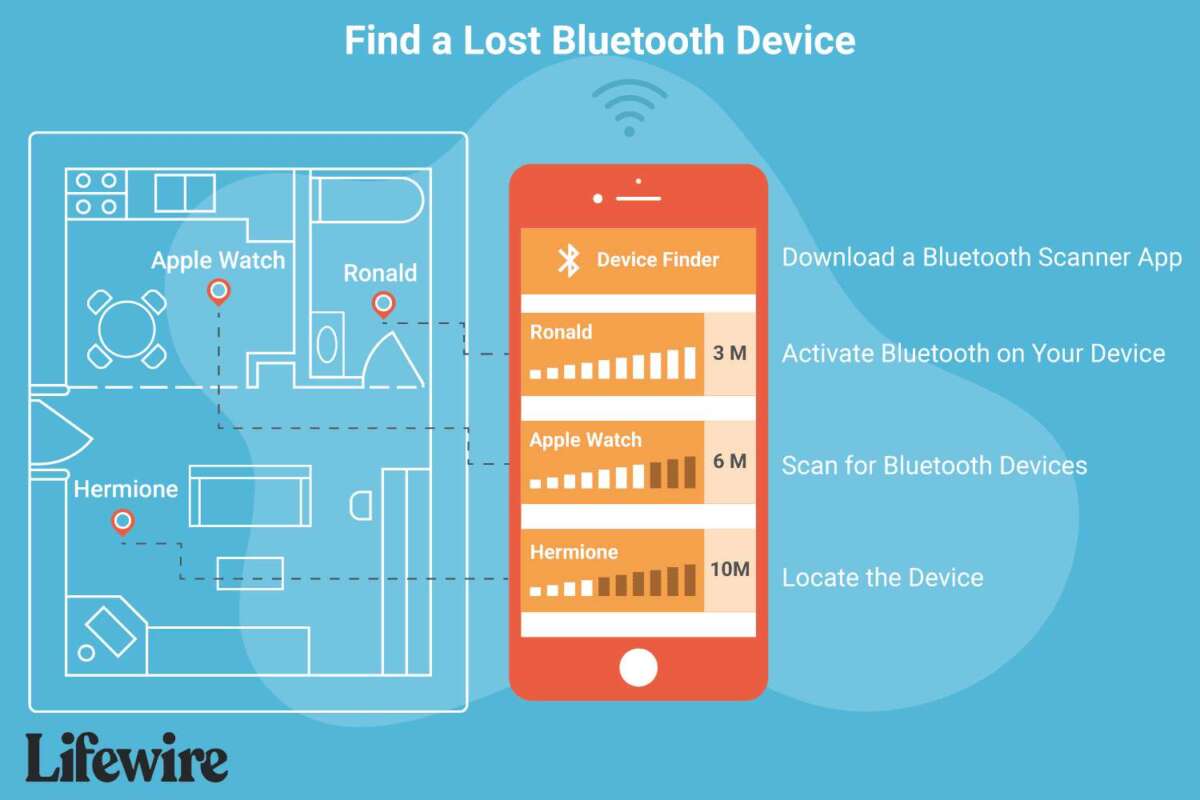
- Use Bluetooth scanner apps to confirm the earbuds are still off and not in stealth mode.
- Try a signal-strength scanner in the area that matches your last-seen time to detect faint connections if they were only briefly asleep.
- Check nearby devices like laptops or car systems that may have paired records.
- Consider a metal detector or RF meter for small metallic parts if you suspect loss outdoors.
Third-party scanners rarely locate truly powered-off earbuds, but they confirm whether the earbuds are active. That confirmation directs your next steps.
Physical search tactics and places people often miss
Small items hide in predictable spots. When you want to know how to find lost bluetooth earbuds that are turned off, check these commonly overlooked places.
- Inside couch cushions and between seat creases.
- Under car seats, in cup holders, and in seat seams.
- Inside pockets of pants, jackets, and bags you used recently.
- Under beds, behind dressers, and in the laundry hamper.
- On top of high shelves or inside drawers you briefly opened.
Use a methodical grid search. Start at one corner of a room and sweep in straight lines. This prevents retracing the same area and missing tiny gaps.
What to do if they’re in the charging case or if case is empty
The charging case often reveals what happened. Follow these checks when working out how to find lost bluetooth earbuds that are turned off.
- Open the case and inspect for one or both earbuds. A single missing earbud often fell near where you last sat.
- Plug the case into power. If the earbuds were inside but off, charging may make them reconnect and appear in apps.
- Listen for rattle sounds in the case when you shake it gently. That can confirm a loose earbud inside.
- If the case is empty, expand your search outward from the last known spot, focusing on surfaces and floor areas.
Treat the case as an information source. It tells you whether earbuds are with you or likely left behind.
Prevention and tech to help next time
Keeping earbuds from getting lost is often easier than recovering them. These steps reduce future searches for how to find lost bluetooth earbuds that are turned off.
- Enable location and last-seen tracking in the earbuds’ app and your phone.
- Attach a slim Bluetooth tracker to the earbud case for separate locating.
- Create a daily home spot for your case, like a bowl or charger tray.
- Consider earbuds with built-in “find” features that flash or chime when near a paired phone.
Small habits and small tech choices lower the risk of losing power-off earbuds and make recovery much simpler.
Tools and tech worth buying
Invest in a few reliable items to improve recovery chances when figuring out how to find lost bluetooth earbuds that are turned off.
- Bluetooth trackers sized for cases, which report last seen via a network.
- A compact key-fob tracker you can attach to your bag or case.
- A slim LED flashlight for scanning dark nooks.
- A phone app that logs Bluetooth connections and timestamps.
These tools do not guarantee a find, but they provide more data points and reduce search time.
Personal experience and lessons learned
I once lost a pair of earbuds that were turned off in a coworking space. I used the paired phone’s last connection time and retraced my five most recent stops. Within 20 minutes I found one earbud under a meeting table and the other in a potted plant nearby.
Key lessons I learned:
- Pause and breathe. Panic makes you skip obvious places.
- Use data first — last-seen time is gold.
- Search logically, not randomly. Cover zones in order.
These habits helped me and many readers recover lost earbuds faster.
Frequently Asked Questions of how to find lost bluetooth earbuds that are turned off
How can I tell where my earbuds were last connected?
Check your phone’s Bluetooth settings or the earbuds’ companion app for a last-connected time or location. That info points to when and roughly where the earbuds were last active.
Can Bluetooth scanner apps find earbuds that are turned off?
No. Bluetooth scanner apps can only detect active signals. They can confirm whether earbuds are off and whether a weak signal exists nearby.
Will charging the case help locate powered-off earbuds?
Yes. If earbuds are inside the case, charging can power them on and reconnect to your phone, making them appear in tracking apps. Try charging the case in a quiet spot.
Are Bluetooth trackers useful for earbuds?
Yes. Attaching a tracker to the case is a very effective preventive step. Trackers report the last known location and can alert you when you leave the case behind.
What should I do if I can’t find my earbuds after searching?
Widen the search to places you visited that day and ask staff or lost-and-found departments. If earbuds remain missing, consider enabling stronger tracking for next time and replacing the unit.
Conclusion
Finding turned-off earbuds is often about smart searching, not luck. Use last-seen data, inspect the charging case, retrace steps, and perform a calm, methodical sweep of likely spots. Combine practical tools like trackers and good habits to reduce future loss.
Take action now: check your earbuds’ app settings, add a tracker to your case, and create a daily home for your earbuds. Share your recovery stories or questions below to help others learn faster.

Everett Ashford is a tech reviewer at mytechgrid.com specializing in SSDs, cameras, TVs, earbuds, headphones, and other consumer electronics. He provides honest, data-driven reviews based on hands-on testing and real-world performance analysis. Everett simplifies complex tech details to help readers make smart, confident buying decisions.