Start by checking Bluetooth, the Bose app, and nearby places where you last used them.
I’ve helped friends and clients recover earbuds and over-ear sets. I know how to find lost Bose headphones fast. This guide walks you through clear steps. You will learn simple checks, apps to use, search tricks, and prevention tips. Read on for proven, practical ways to find lost Bose headphones with confidence and speed.

Why Bose headphones get lost
Bose headphones are light and easy to carry. That makes them simple to misplace. Small cases, loose cables, and crowded pockets hide them. Busy days and quick moves make loss more likely. You might disconnect and set them down. Or they fall between couch cushions.
Knowing common scenarios helps you search smart. Think of where you last used them. Replay your last hour in your head. That often points straight to the missing pair. Using a method reduces panic and speeds recovery.

Immediate steps to take when you realize your Bose headphones are missing
Act fast. Short time windows make finding them easier. Follow this order:
- Check Bluetooth on your phone or device. If headphones show connected, they are nearby.
- Open the Bose app or Bluetooth settings. Look for the device name and signal indicator.
- Return to the last place you used them. Look at surfaces, pockets, and under furniture.
- Call out or make a sound if they are in a room with echo. Quiet helps you hear any faint audio cues.
- Retrace your steps slowly. Stop at each place and scan visually.
If you do these things right away, you often find them within minutes. Stay calm and methodical. Panic scatters your focus and slows you down.
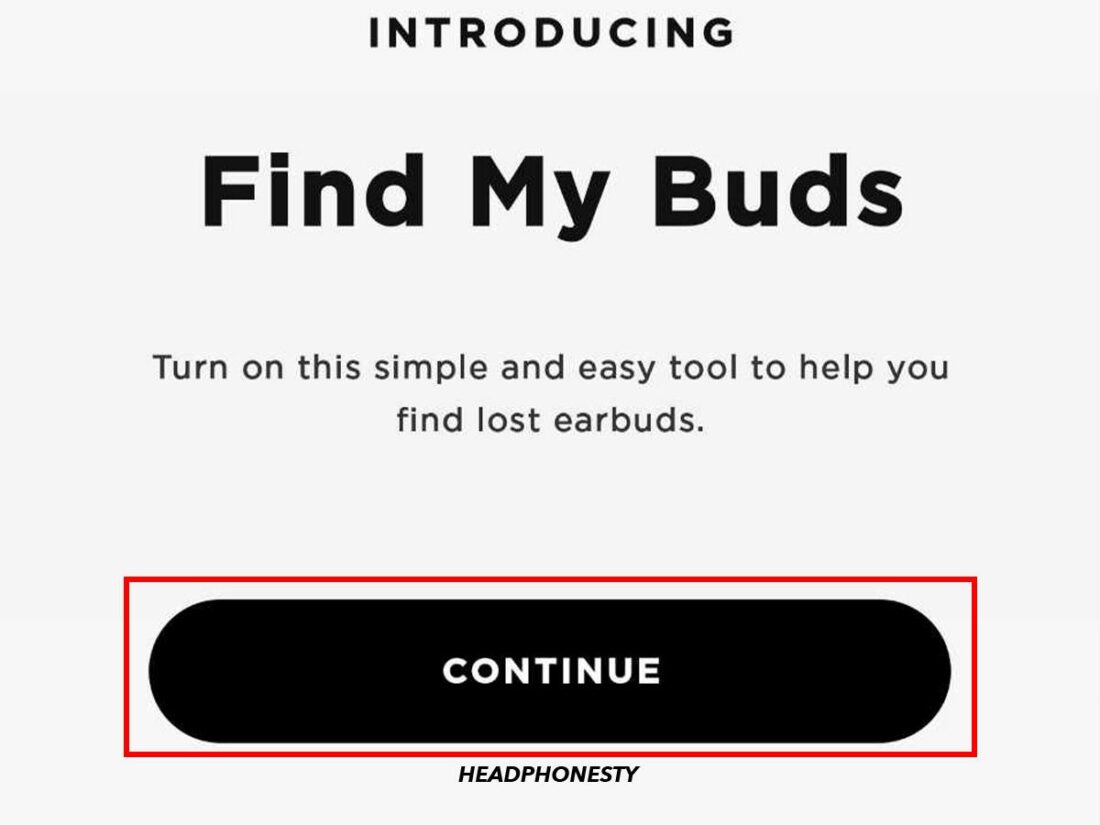
Use Bose and phone tracking features
Bose offers built-in tools and the app that help. Your phone also has useful features.
- Bose Connect / Bose Music app
- Open the app to see device status and last connection info.
- Some models show a last seen location. Use it as a starting point.
- Bluetooth device scan
- Check Bluetooth list on your phone. Nearby devices may show signal strength.
- Move slowly in the area and watch signal change. Closer equals stronger signal.
- Find My / Find My Device (phone features)
- If you used headphones with a phone that tracks devices, check the last known location.
- This gives you a map point to begin your search.
- Third-party Bluetooth trackers
- If you paired a tracker to the case, use that tracker’s app to locate them.
When I helped a client find Bose earbuds, the Bose app showed they last connected in the living room. That clue saved time. Use apps first. They give clear data you can act on.
Smart search techniques for home and public places
How you search matters more than how long you search. Use these focused methods.
At home
- Zero in on likely zones: couch, bed, jacket pockets, bags, and work desk.
- Use a flashlight at a low angle to catch reflections on plastic and metal.
- Move cushions and then vacuum under them. Pay attention to the vacuum bag or bin.
- Check laundry baskets and recent clothes for earbuds or cases.
In cars and taxis
- Check seat creases, under mats, and between seats.
- Look in glove compartments, center consoles, and cup holders.
At work, gym, or cafe
- Retrace your path step by step.
- Ask staff to check lost and found or storage shelves.
- Use polite signs or a short post in a community chat or group.
On public transit
- Contact the transit authority’s lost and found right away.
- Provide a clear description: model, color, case marks, and last known stop.
These techniques work for both small earbuds and larger Bose over-ear models. I once found headphones stuck between a sofa frame and a wooden slat by shining light at an angle. Small tricks like angled light save a lot of time.
Contacting lost and found, and asking for help
Asking for help multiplies your chance to recover items. Do this early.
- Report to local lost and found
- Give clear details: model, color, serial number if available, and last seen area.
- Ask people who were nearby
- Be polite and specific. Offer a contact number or email.
- Use social media and community boards
- Post a short note with a photo if you have one. Mention where and when you lost them.
- Check online marketplaces
- Some items end up listed. If you suspect theft, don’t confront anyone; involve authorities.
When I lost a pair once at an airport, staff found them in 24 hours after I filed a report. Persistence and calm communication help.
Preventing future losses: habits and gear
Prevention beats searching. Build habits and add small gear.
Daily habits
- Always store headphones in the same pocket or case.
- Make a quick checklist before leaving places: phone, keys, headphones.
- Keep the case visible on a table when not in use.
Useful gear
- Use a Bluetooth tracker on the case or strap.
- Buy a bright or unique case for visibility.
- Attach a short lanyard or clip to the case.
Tech habits
- Keep the Bose app and firmware updated.
- Register your headphones with Bose or retailer when possible.
- Pair a tracker to the case if your model supports it.
These small moves make them easier to spot and harder to lose. I clipped a tracker to my case after a stressful loss. It saved me both time and stress later.
Troubleshooting when tracking fails
Sometimes tech does not help. Here’s what to try next.
- Power and battery issues
- Dead batteries mean no Bluetooth signal. Charge the case and headphones, then retry.
- Interference and false signals
- Wireless noise can hide signals. Move to a quieter area and scan again.
- Multiple similar devices nearby
- Confirm device name and look for unique identifiers. Try pairing briefly to verify.
- If stolen or permanently lost
- File a police report if theft is suspected.
- Check insurance or credit card protections that cover lost goods.
I once chased a weak Bluetooth signal in a mall only to find the case had zero charge. Charging first often clears confusion and saves time.
Frequently Asked Questions of how to find lost bose headphones
How can I tell if my Bose headphones are nearby?
Check Bluetooth on your phone and the Bose app. A connected status or strong signal means they are close.
Can the Bose app show the exact location?
Some Bose apps show the last connected location. Exact live tracking is limited, but last known points help narrow searches.
What if my headphones are out of battery?
Charge the case and headphones first. A dead device cannot broadcast, so charging may restore the signal and help you locate them.
Should I contact lost and found immediately?
Yes. Report right away with specific details. Airports, cafes, and transit services often return items quickly.
Can a Bluetooth tracker help find the case?
Yes. A tracker attached to the case can provide real-time location and sound alerts, making it easier to find lost Bose headphones.
What if I think they were stolen?
File a police report and share serial numbers and photos. Avoid confronting suspected thieves and let authorities handle it.
Conclusion
Finding lost Bose headphones is about acting fast, using the right tools, and searching smart. Start with Bluetooth and the Bose app, retrace your steps, and ask for help when needed. Build simple habits and use a tracker to prevent repeat losses. Try one clear step right now—check the last device connection, charge the case, or call a nearby lost and found. If this guide helped, subscribe, leave a comment, or share your recovery story to help others.

Everett Ashford is a tech reviewer at mytechgrid.com specializing in SSDs, cameras, TVs, earbuds, headphones, and other consumer electronics. He provides honest, data-driven reviews based on hands-on testing and real-world performance analysis. Everett simplifies complex tech details to help readers make smart, confident buying decisions.