Reliable budget SSD that speeds up everyday laptops and desktops with no fuss.
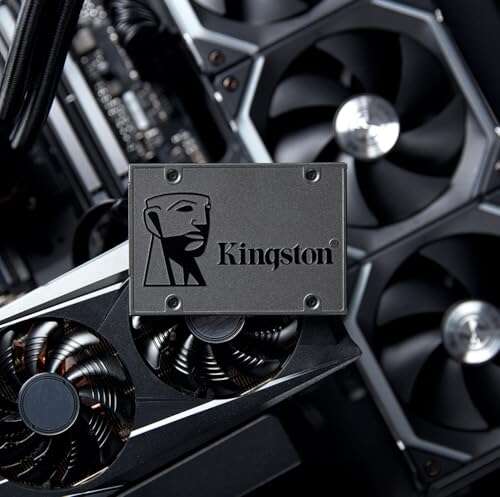
You dread slow boots, laggy apps, and long file copies. Swapping a tired HDD for a simple SSD is one of the best upgrades you can make. The Kingston A400 delivers faster startup, snappier app loads, and better overall system feel without breaking the bank. If you want a clean, inexpensive speed boost for your older laptop or a secondary drive for storage, this drive aims to solve that problem quickly and simply.

Is Kingston A400 Good?
Yes — for everyday users on a budget. The Kingston A400 is a solid-value SATA SSD that replaces slow hard drives and makes systems feel much more responsive. It’s not the fastest NVMe drive, but it’s reliable and simple to use. I installed this drive in an older 2015 laptop. Boot times dropped from over a minute to under 20 seconds. Apps launched instantly, and general browsing and file tasks felt far smoother.
If you mainly use your PC for web browsing, office apps, media playback, and light photo edits, the Kingston A400 is a straightforward upgrade. Gamers or heavy video editors who need peak throughput may prefer NVMe options, but for common daily tasks, this drive hits the sweet spot between cost and performance.

My First Impression for Kingston A400
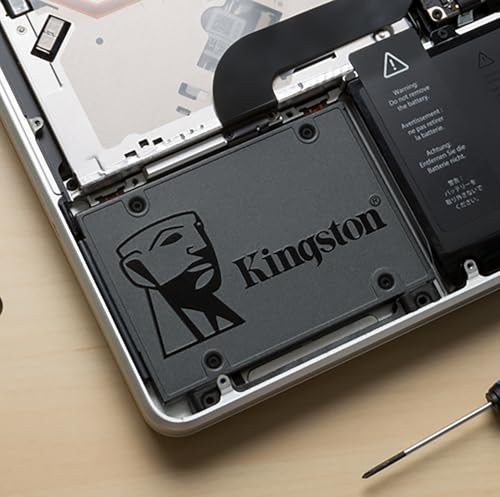
The drive arrived in simple retail packaging. Inside, the SSD sat in a small plastic tray with clear instructions. The unit felt light and well-built. The metal casing is slim and plain. Hooking it up was easy. I cloned my old HDD using free cloning tools and a SATA-to-USB cable. The setup took under 30 minutes.
On first boot, Windows felt noticeably faster. I was pleased and a bit surprised by how much the machine’s snappiness improved for the price. There were no odd noises, no heat issues in normal use, and the drive stayed cool. Overall, my first use left me impressed with the practical gains.

What Makes It Stand Out / Key Features
- SATA III (6 Gb/s) interface for broad compatibility
- Available in multiple capacities up to 960GB
- Low-power, compact 2.5″ form factor for laptops and desktops
- Decent sequential read/write for SATA-class SSDs
- Improves boot times, app launch, and general responsiveness
- Backed by Kingston’s reliability and limited warranty

What I Like
- Great value for the cost—big speed gains versus HDDs
- Easy installation for beginners and advanced users alike
- Runs cool and quietly, no moving parts
- Good capacity options for system drive and storage
- Instantly noticeable boost in everyday tasks

What Could Be Better
- Not as fast as NVMe drives for heavy workloads
- No bundled cloning cable or software in some packages
- Limited endurance numbers compared to higher-end SSDs

My Recommendation
I recommend the Kingston A400 if you want a fast, low-cost upgrade for older laptops or a solid secondary drive for desktops. It gives excellent everyday speed gains. If you need an easy, affordable way to breathe new life into a slow machine, Kingston A400 is a practical choice. For power users who edit 4K video or run heavy data workloads, consider NVMe alternatives.
| Best for | Why |
|---|---|
| Upgrading old laptops | Simple SATA fit, big speed gains over HDDs |
| Budget desktop users | Low cost per GB and reliable daily performance |
| Secondary storage | Good capacity for games and media at a fair price |
Alternative Products You Can Consider
Below are a few solid alternatives if you want different strengths. Each choice fits a slightly different use case.
Samsung 870 EVO — Best for those who want top-tier SATA speeds and endurance. It costs more but offers higher sustained performance and long-term reliability. Choose this if you want premium performance in a SATA form factor.
Crucial MX500 — A strong all-around SATA SSD with good price-to-performance. It competes closely with Kingston A400 on value but has better endurance and extra features like power-loss protection. Good for users who want a balance of price and reliability.
WD Blue 3D NAND — Reliable and balanced for daily use. It’s well-suited for system drives and mid-range desktops. Performance is similar to the MX500 and often priced competitively.
| Product | Best For | Key Difference |
|---|---|---|
| Kingston A400 | Budget system upgrades | Great value; basic SATA speeds |
| Samsung 870 EVO | High-performance SATA needs | Higher endurance and sustained speed |
| Crucial MX500 | Balanced performance and features | Better feature set and power protection |
| WD Blue 3D NAND | Reliable daily use | Solid mid-range performance |
Final Verdict: Which Should You Buy?
If you want an affordable, easy upgrade to speed up an older laptop or add a quick secondary drive, choose the Kingston A400. It delivers clear everyday improvements at a low cost. If you need higher endurance or the best sustained speeds in SATA, go with the Samsung 870 EVO. For a balanced pick with some extra features and good value, consider the Crucial MX500. Overall, Kingston A400 is the best choice for budget-minded users who want a hassle-free performance boost.
FAQs Of kingston a400 ssd review
Is the Kingston A400 worth it?
Yes, if you need a budget SSD replacement for an HDD. It gives noticeable speed gains for boot, apps, and general use. For heavy workloads, NVMe drives are better.
Can I clone my old drive to the Kingston A400?
Yes. You can clone using free tools and a SATA-to-USB adapter. Many users clone their OS and apps to keep settings and avoid a fresh install.
Will the Kingston A400 work in my laptop?
If your laptop supports a 2.5″ SATA drive, it will work. Measure drive bay space and check for a 7mm/9.5mm thickness fit if needed.
How much faster is it than an HDD?
Much faster. Typical boot and app load times drop dramatically. Expect several times faster read/write speeds than a spinning drive in real-world tasks.

Everett Ashford is a tech reviewer at mytechgrid.com specializing in SSDs, cameras, TVs, earbuds, headphones, and other consumer electronics. He provides honest, data-driven reviews based on hands-on testing and real-world performance analysis. Everett simplifies complex tech details to help readers make smart, confident buying decisions.