Are you a remote sales professional looking to keep your customer relationships organized without breaking the bank? Finding the right CRM tool can feel overwhelming, especially when you need something affordable, easy to use, and packed with features that actually help you close deals faster.
But what if you could get all that without sacrificing quality or your budget? You’ll discover top affordable CRM options designed specifically to support your remote sales efforts. Whether you’re just starting out or scaling your business, these tools will help you stay connected, track leads, and boost your productivity—all from anywhere.
Keep reading to find the perfect CRM that fits your needs and helps you win more sales.

Credit: ventureharbour.com
Top Free Crm Options
Free CRM tools offer a great way for remote sales professionals to manage contacts and sales pipelines without upfront costs. These options provide essential features to organize leads, track deals, and improve communication. Choosing the right free CRM can save money and boost productivity.
Below are some top free CRM solutions that balance usability and functionality. Each suits different types of remote sales workflows and business needs.
Hubspot Free Crm Benefits
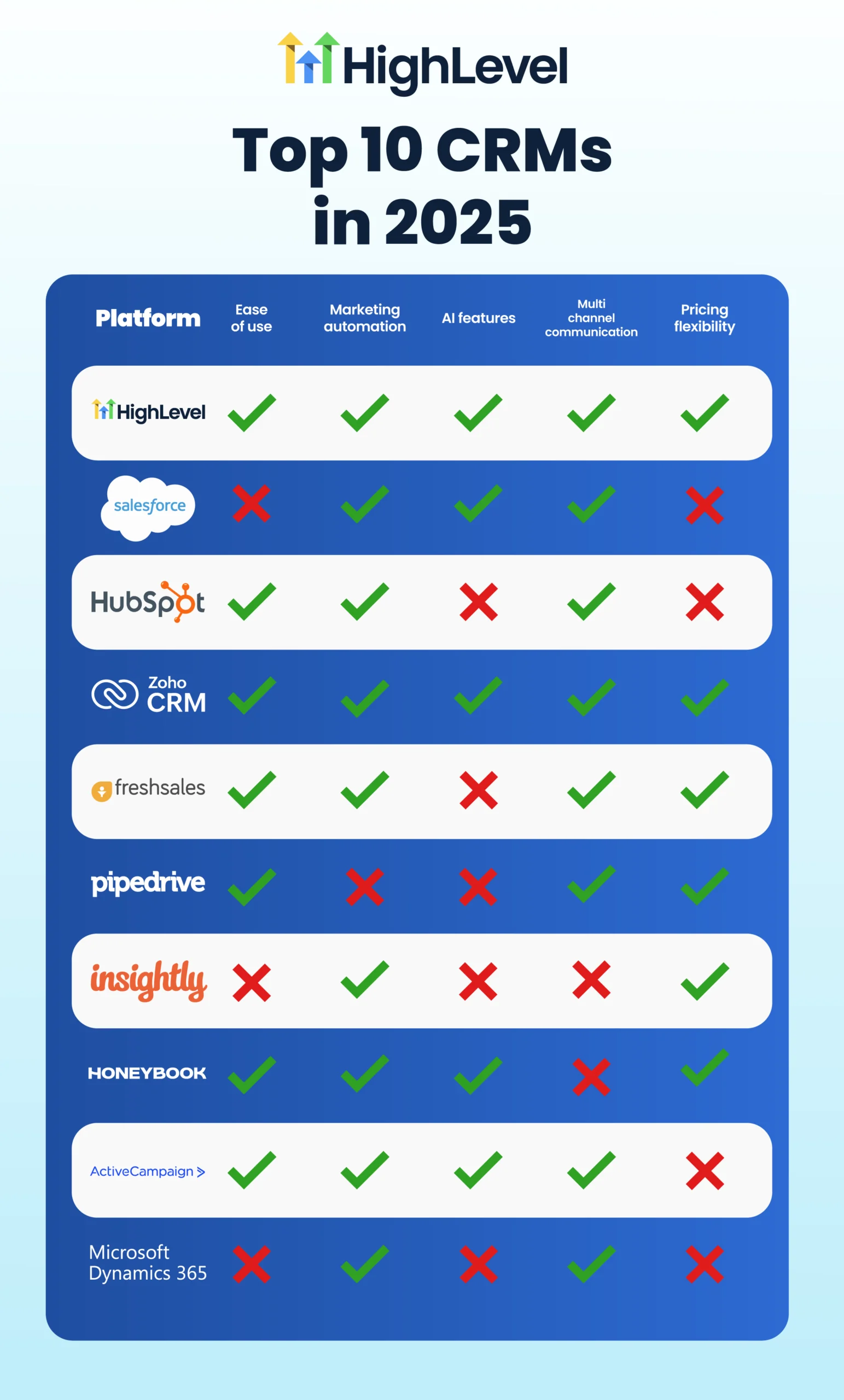
HubSpot’s free CRM supports unlimited users and contacts, ideal for small remote teams. It includes contact management, deal tracking, and task automation. The dashboard is simple to navigate, making it easy to adopt quickly. Email tracking and meeting scheduling come built-in. HubSpot integrates well with other tools, helping sales professionals stay organized without extra expense.
Zoho Crm Features
Zoho CRM offers a robust free plan for up to three users. It provides lead and contact management, workflow automation, and basic analytics. Customizable modules allow sales reps to tailor the system to their process. Zoho’s mobile app helps remote workers update information on the go. Multi-channel communication supports email, phone calls, and social media messaging.
Freshsales Overview
Freshsales free plan supports unlimited users with core CRM features. It includes lead scoring, contact management, and deal tracking. The user interface is clean and easy to use. Built-in phone and email tools help remote sales teams stay connected. Freshsales also offers AI-based insights to prioritize leads and improve sales outcomes.
Affordable Paid Crm Tools
Affordable paid CRM tools offer remote sales professionals valuable features without heavy costs. These tools help manage contacts, track deals, and automate sales tasks. They provide more advanced capabilities than free versions, fitting tight budgets.
Choosing the right paid CRM means balancing price and functionality. Many options offer scalable plans suitable for small teams or solo salespeople. Here are some popular affordable paid CRMs that deliver solid value.
Pipedrive For Pipeline Management
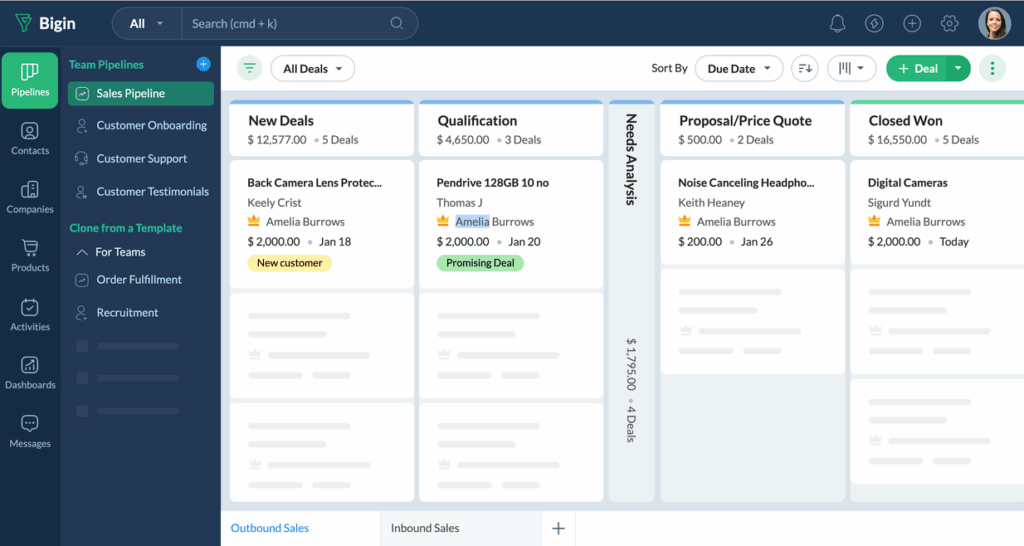
Pipedrive is known for its clear and simple pipeline views. It lets sales teams track deals through each stage easily. The visual layout helps prioritize tasks and focus on closing sales.
This tool offers automation features that save time on repetitive work. It integrates with many other apps used daily. Pipedrive’s pricing remains affordable for most remote sales professionals.
Bitrix24 Comprehensive Features
Bitrix24 combines CRM with communication and project management tools. It supports email marketing, task management, and customer support. This makes it a great all-in-one platform.
Bitrix24 offers a free tier, but its paid plans unlock more storage and advanced options. It suits teams that want a robust system without paying for multiple tools separately.
Nimble’s Social Crm Focus
Nimble stands out by linking CRM with social media profiles. It helps salespeople learn more about contacts and engage effectively. This approach builds stronger relationships.
The tool automatically updates contact details and tracks interactions. Nimble keeps all customer information in one place, easy to access. Its pricing is competitive for small businesses and solo users.
Key Features To Look For
Choosing the right CRM tool means focusing on features that support your remote sales work. Essential features help keep your sales organized and improve productivity. The right tools make managing customers and deals easier.
Lead And Contact Management
Good CRM software stores all your leads and contacts in one place. It helps track communication history and follow-ups. You can organize contacts by categories or status. This feature ensures no lead gets forgotten or lost.
Sales Pipeline Visualization
Visual sales pipelines show where each deal stands. You see all stages from prospect to closing. This helps prioritize tasks and focus on high-value opportunities. Clear pipelines also improve team coordination and forecasting.
Customizable Dashboards
Dashboards display important data in one view. Customizable dashboards let you choose which metrics appear. You can track sales goals, activities, and performance easily. This saves time and keeps you focused on what matters most.
Reporting And Analytics
Reports analyze sales data to reveal trends and results. Analytics help identify strengths and weaknesses in your sales process. Good CRM tools offer simple report creation and export options. These insights support better decision-making and growth.
Credit: www.onepagecrm.com
Choosing Based On Business Needs
Choosing a CRM tool based on your business needs ensures better efficiency and smoother sales processes. Remote sales professionals face unique challenges. Their CRM must fit their specific workflows and team size. Not all CRM tools suit every business. Focus on key factors that impact daily use and long-term value.
Scalability And Growth
Start with a CRM that fits your current size. Your business will grow over time. Pick a tool that can handle more users and data. Avoid switching systems often. A scalable CRM saves time and money. It supports new sales processes and features as needed. This flexibility helps remote teams stay productive.
User-friendliness And Adoption
Choose a CRM that your team can use easily. Complex tools slow down adoption and lower productivity. Simple interfaces encourage quick learning and daily use. Look for clear dashboards and easy navigation. Training time should be short. A user-friendly CRM keeps remote sales reps focused on selling, not learning software.
Integration With Other Tools
Remote sales rely on many apps. Your CRM should work well with them. Check if it connects with email, calendars, and communication tools. Integration avoids manual data entry and saves time. It keeps information consistent across platforms. A connected system supports smooth workflows and better customer management.
Comparing Cheap Vs. Expensive Crms
Choosing between cheap and expensive CRM tools matters for remote sales professionals. Each type offers different benefits and challenges. Understanding these differences helps make a smart choice that fits your budget and needs.
Feature Differences
Cheap CRMs cover basic tasks like contact and lead management. They often lack advanced automation and analytics. Expensive CRMs include more features like AI insights, detailed reports, and integrations. These help streamline complex sales processes and improve efficiency.
Some affordable CRMs offer scalability, but high-end tools provide deeper customization. Expensive options often support large teams and multi-channel communication. Cheap tools may limit user seats or storage, affecting growth.
Cost-effectiveness
Cheap CRMs lower initial expenses and reduce risk. They suit startups or small teams with simple needs. Expensive CRMs require bigger budgets but can save time with powerful tools.
Consider total cost of ownership, including upgrades and training. Some pricey CRMs charge extra for add-ons or support. Budget-friendly options often bundle core features for one price.
Long-term Value
Cheap CRMs may need switching as your business grows. This adds migration costs and learning curves. Expensive CRMs often evolve with your needs, offering continuous updates and support.
Investing in a reliable CRM pays off by improving sales efficiency and customer retention. Choose a CRM that fits current needs and scales over time to maximize value.
Boosting Remote Sales Efficiency
Remote sales professionals face unique challenges. Staying efficient and organized is key. Affordable CRM tools help manage these challenges well. They improve how teams communicate, track progress, and handle daily tasks. This leads to better sales results and less stress.
Streamlining Communication
Clear communication is vital for remote sales teams. CRM tools centralize messages, calls, and emails. This keeps all conversations in one place. Team members can quickly access client information. It reduces confusion and missed details. Everyone stays on the same page, no matter where they work.
Tracking Sales Activities
Sales tracking helps monitor progress and plan next steps. CRM software records calls, meetings, and deals automatically. Managers can see which leads need attention. Sales reps know what tasks to prioritize daily. This visibility supports faster decision-making and better client follow-up.
Automating Routine Tasks
Repeating tasks waste valuable time. CRM tools automate data entry, reminders, and follow-ups. This frees sales reps to focus on building relationships. Automation reduces errors and keeps workflows smooth. Teams work smarter, not harder, improving overall productivity.
Credit: juleb.com
Frequently Asked Questions
What Is The Cheapest And Best Crm?
The cheapest and best CRM depends on your needs. HubSpot Free CRM suits basic use and scalability. Zoho CRM offers customization at low cost. Freshsales provides rich features with free and paid plans. Choose based on features, user count, and integration needs.
What Is The Simplest Crm Tool To Use?
HubSpot Free CRM stands out as the simplest tool, offering easy setup and essential features for small businesses. Pipedrive is also user-friendly with strong pipeline management. Both suit beginners needing straightforward, scalable CRM solutions.
Which Crm Is Best For Sales?
HubSpot CRM, Zoho CRM, and Freshsales rank among the best for sales due to ease of use, customization, and scalability. Choose based on your team’s size, needed features, and integration requirements for optimal sales management and growth.
What’s The Best Free Crm For Beginners?
HubSpot Free CRM stands out as the best free CRM for beginners. It offers easy contact management, sales tracking, and scalable features. Zoho CRM and Freshsales also provide strong free plans with customization and sales tools, ideal for small businesses starting with CRM software.
Conclusion
Affordable CRM tools help remote sales teams stay organized and effective. Choosing the right CRM depends on your business needs and budget. Free options like HubSpot and Zoho offer solid basics to get started. Paid tools such as Pipedrive and Bitrix24 provide advanced features without high costs.
Remember to check for ease of use and integration with your current apps. Investing time in selecting the best CRM will improve your sales process and customer relationships. Simple, budget-friendly CRM solutions make managing remote sales easier and more efficient.