If you’re running a remote startup, you know how crucial clear communication is to your success. But high costs shouldn’t stand in the way of staying connected with your team and clients.
That’s why finding affordable video conferencing tools that fit your budget and boost productivity is a game-changer. You’ll discover easy-to-use, budget-friendly options designed to keep your remote startup thriving without breaking the bank. Ready to make your meetings smoother and your collaboration stronger?
Let’s dive in!
Credit: www.devopsschool.com
Top Affordable Tools
Finding affordable video conferencing tools is vital for remote startups. These tools keep teams connected without breaking budgets. The right platform must balance cost, features, and ease of use. Here are some top affordable video conferencing options that fit small business needs.
Zoom Features And Pricing
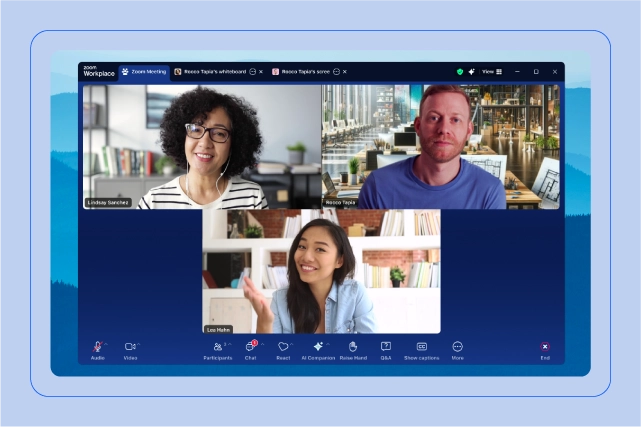
Zoom offers clear video and audio quality for meetings. It supports up to 100 participants in the free plan. Paid plans start at $14.99 per month, adding longer meeting times and more participants. Features include screen sharing, breakout rooms, and recording. Zoom works on all devices and has a user-friendly interface.
Google Meet Benefits
Google Meet integrates smoothly with Google Workspace apps. It allows up to 100 participants for free with a 60-minute limit. Paid plans add extra meeting time and security options. The platform is browser-based, requiring no software download. It offers live captions and screen sharing, perfect for startups using Google tools.
Microsoft Teams Overview
Microsoft Teams combines chat, video calls, and file sharing in one app. The free version supports up to 100 participants with 60-minute meetings. Paid plans start at $4 per user monthly, adding more features and storage. Teams integrates well with Microsoft 365 apps. It is ideal for startups using Microsoft services.
Webex Capabilities
Webex by Cisco provides secure video conferencing for teams. The free plan supports up to 100 participants with a 50-minute limit. Paid plans start at $14.95 per month. It includes screen sharing, meeting recording, and virtual backgrounds. Webex works on multiple platforms and focuses on security and reliability.
Zoho Meeting Highlights
Zoho Meeting offers simple, affordable online meetings and webinars. The free plan supports up to 3 participants with a 30-minute limit. Paid plans start at $8 per month with more participants and features. It includes screen sharing, recording, and integration with Zoho apps. Zoho Meeting suits startups needing basic, budget-friendly tools.
Free Plans And Limitations
Free plans attract many remote startups seeking cost-effective video conferencing tools. These plans offer basic features without any charge. They help new businesses connect teams and clients easily.
Free plans come with some limits. Understanding these limits helps startups choose the best tool. Below are key restrictions found in many free video conferencing plans.
Duration Limits
Most free plans restrict meeting length. Common limits range from 30 minutes to 1 hour per session. This can interrupt long discussions or training sessions. Some platforms reset timers after meetings end, allowing back-to-back calls.
Participant Caps
Free plans often limit the number of attendees. Caps usually range between 25 and 100 participants. Small teams fit well, but larger meetings need paid plans. Exceeding the cap can prevent joining or cause technical issues.
Feature Restrictions
Basic plans lack advanced features. Screen sharing, recording, and virtual backgrounds may be unavailable. Some tools disable admin controls and integrations with other apps. These limits impact productivity and meeting quality.
Choosing Based On Startup Needs
Choosing the right video conferencing tool depends on your startup’s unique needs. Not all tools fit every team perfectly. Consider key factors that match your daily work and growth plans. This helps avoid paying for features you won’t use. Focus on what truly supports your team’s collaboration and productivity. Below are important points to guide your choice.
Team Size Considerations
Start with the number of people who will join meetings. Small teams need fewer features and lower participant limits. Larger teams require tools that support many users at once. Some platforms charge more for bigger groups. Check if the tool allows easy scalability as your team grows. Choose a tool that matches your current size and future plans.
Integration With Existing Tools
Your startup likely uses apps for chat, project management, or calendars. The video tool should connect smoothly with these apps. Integration saves time and keeps workflows simple. For example, syncing with calendar apps helps schedule meetings faster. Look for tools that work well with software you already use daily. This reduces switching between platforms and improves efficiency.
Security Features
Protecting your startup’s data is vital. Video conferencing tools must offer strong security measures. Look for end-to-end encryption and meeting password options. Features like waiting rooms and user authentication add extra layers of safety. Avoid tools with poor security that risk leaks or hacking. Choose software that keeps your conversations and files safe.
Ease Of Use
The tool should be simple for everyone to use. Complex setups or confusing interfaces slow down meetings. Look for clear controls and quick access to key features. Mobile and desktop versions should work smoothly. Easy tools reduce frustration and boost team participation. Test the platform with your team before committing to it.
Credit: www.zoom.com
Specialized Tools For Startups
Startups require video conferencing tools designed to fit their unique needs. Specialized tools help small teams collaborate without wasting resources. These solutions offer essential features without complex setups or high costs.
Choosing the right tool supports smooth communication and growth. Affordable options designed for startups bring flexibility and focus to remote work. This section highlights tools that match startup demands.
Lightweight Options Like Jitsi
Jitsi is a simple, open-source video conferencing tool. It requires no account creation or downloads. Startups can host meetings quickly with minimal setup.
Jitsi works well on low bandwidth and older devices. It supports screen sharing, chat, and encryption. This tool suits teams needing fast, easy communication.
Webinar-focused Platforms
Webinar platforms help startups reach larger audiences effectively. These tools offer features like polls, Q&A, and attendee management. They allow startups to present ideas and products professionally.
Many webinar tools offer free or low-cost plans. This makes it easier for startups to host events without high expenses. Engaging presentations build brand awareness and customer trust.
Tools For Virtual Events
Virtual event platforms enable startups to create interactive online experiences. Features include breakout rooms, networking lounges, and exhibitor booths. These tools support conferences, workshops, and product launches.
Virtual event tools help startups connect with partners and clients worldwide. They offer scalability and customization to fit different event sizes. Startups gain visibility and engagement through these platforms.
Pricing Comparison
Comparing pricing helps remote startups pick the right video conferencing tool. Budget control is vital for small teams. Understanding costs avoids surprises and wasted resources. Startups need clear pricing insights to plan growth. Below is a breakdown of costs, value, and scalability.
Monthly Subscription Costs
Video conferencing tools offer various monthly plans. Google Meet provides a free version with basic features. Paid plans start around $6 per user monthly. Zoom’s free tier limits meeting length and participants. Paid Zoom plans range from $14.99 to $19.99 monthly per host. Microsoft Teams includes free access but charges for advanced options. Their paid plans start at $5 per user monthly. Webex offers a free plan with limited features. Paid plans begin near $13.50 per user monthly.
Value For Money
Affordable tools must balance cost with features. Google Meet integrates well with Google Workspace at a low price. Zoom offers robust features like breakout rooms and recordings. Microsoft Teams combines chat, files, and meetings in one app. Webex focuses on security and HD video quality. Choosing a tool depends on which features matter most. Consider how many meetings and participants your startup needs.
Scaling With Growth
Startups grow fast and need flexible plans. Most tools increase costs as users rise. Google Meet and Microsoft Teams scale easily within Google and Microsoft ecosystems. Zoom allows adding more hosts and participants smoothly. Webex supports large meetings but costs more for bigger groups. Pick a tool that fits your current size and future expansion. Avoid switching platforms often to save time and money.
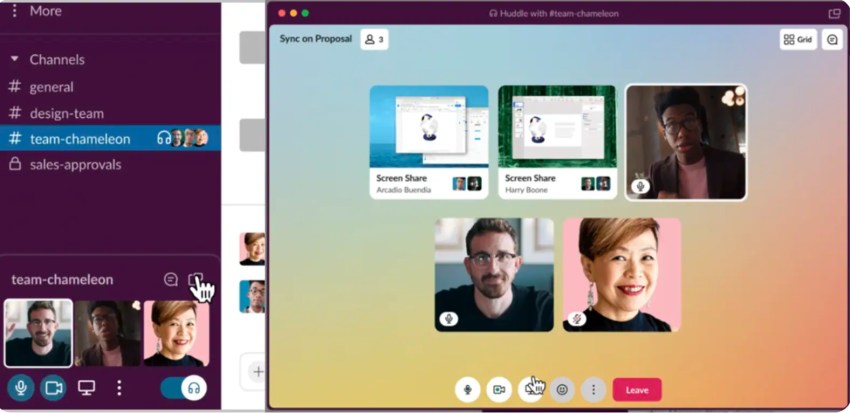
Credit: www.nextiva.com
User Experience Insights
Understanding user experience is key when choosing video conferencing tools. Remote startups need platforms that feel smooth and reliable. Every interaction matters, from joining a call to managing meetings. A positive experience keeps teams connected and productive. Below are important insights on user experience features.
Video And Audio Quality
Clear video helps participants read facial expressions and body language. Sharp audio stops users from asking others to repeat themselves. Good tools adjust quality based on internet speed. This prevents calls from freezing or dropping sound. Startups benefit from consistent quality to avoid communication gaps.
Meeting Controls
Easy-to-use controls improve meeting flow. Features like mute, screen sharing, and chat should be simple to find. Hosts must manage participants without hassle. Controls that respond quickly reduce frustration. Startups need intuitive tools to keep meetings organized and on track.
Mobile Vs Desktop Performance
Many team members join calls from phones or tablets. Mobile apps should offer almost the same features as desktop versions. Performance must stay stable even on slower connections. Desktop platforms often handle larger meetings better. A good tool provides smooth experiences on both devices for flexible work.
Tips For Maximizing Video Conferencing
Maximizing video conferencing helps remote startups stay connected and productive. Simple steps improve call quality and team engagement. Clear audio, smooth video, and secure meetings build trust and efficiency.
Optimizing Internet Connection
Use a wired connection for stable internet. Wi-Fi can drop signals and cause lag. Close other apps that use bandwidth during calls. Test your speed before important meetings. Restart your router if connection slows down. A strong internet prevents freezing and delays.
Setting Up Effective Meetings
Plan meetings with clear goals and agendas. Share the agenda before the call to save time. Choose a quiet, well-lit space for video calls. Encourage participants to mute microphones when not speaking. Use screen sharing to explain ideas visually. Keep meetings short and focused to maintain attention.
Security Best Practices
Use password protection for all video calls. Avoid sharing meeting links on public platforms. Enable waiting rooms to control who joins. Update your video conferencing software regularly. Limit screen sharing to hosts or trusted participants. Protecting your meetings keeps your startup’s data safe.
Frequently Asked Questions
Which Type Of Video Conferencing Is Best For Remote Workers?
Zoom offers feature-rich, reliable video conferencing ideal for remote workers. Google Meet suits users needing simplicity and seamless Google Workspace integration. Microsoft Teams combines chat and video well. Choose based on team size, features, and budget for the best remote collaboration experience.
What Is The Cheapest Online Meeting Platform?
Google Meet offers the cheapest online meetings with a free plan and affordable paid options starting at $6 per user monthly.
Does Google Have Free Video Conferencing?
Yes, Google offers free video conferencing through Google Meet. It allows meetings with up to 100 participants for 60 minutes. Users need a Google account to host or join meetings. Google Meet integrates smoothly with Google Workspace for added features.
What Is The Best Video Call Software For Beginners?
Zoom is best for beginners due to its user-friendly interface and reliable performance. Google Meet suits those using Google Workspace. Microsoft Teams combines chat and video well. Jitsi offers a lightweight, free option.
Conclusion
Choosing the right video conferencing tool saves money and boosts teamwork. Affordable options like Zoom, Google Meet, and Microsoft Teams offer great features. These platforms support smooth communication for remote startups. Easy setup and clear video improve daily meetings. Small budgets do not mean low quality.
Test a few to find what fits your team best. Stay connected and productive without overspending. Good video tools keep your startup growing strong.