SSDs are generally more reliable than HDDs for most everyday and mobile use.
If you care about data safety, speed, and less downtime, you’ve likely asked yourself: are ssd more reliable than hdd? I’ve deployed and supported thousands of drives in laptops, desktops, NAS boxes, and servers. In this guide, I’ll explain how reliability really works, what the data shows, and how to choose the right drive with confidence.
What reliability really means in storage
Reliability is not one number. It is a mix of how a drive fails, when it fails, and how it handles errors. To judge are ssd more reliable than hdd, we need the same yardstick.
Key ideas to know:
- Annualized failure rate. This is the chance a drive dies in a year.
- Uncorrectable read errors. This is when a block of data cannot be read.
- Endurance. SSDs have a write budget called TBW or DWPD.
- SMART health. These counters warn you before real trouble.
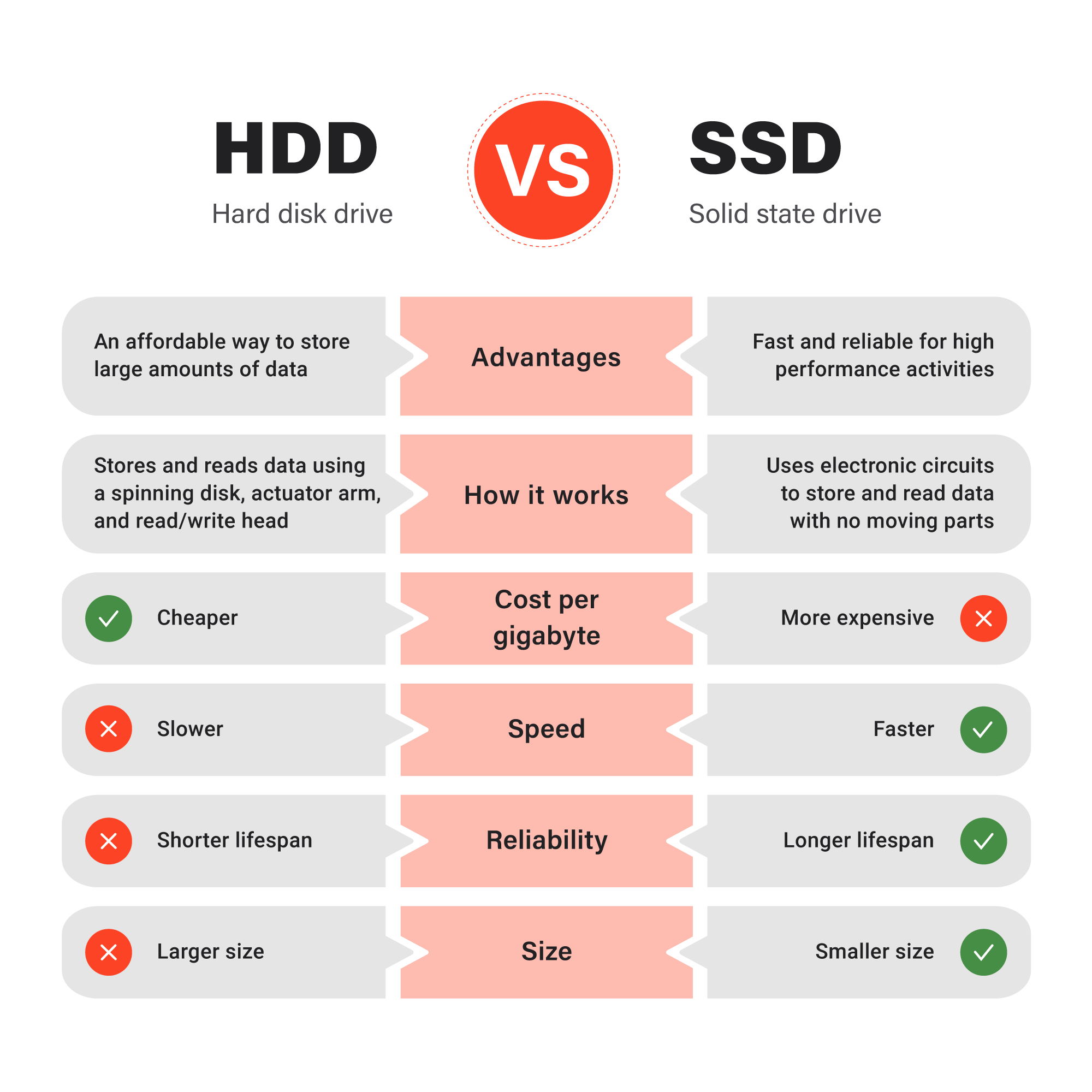
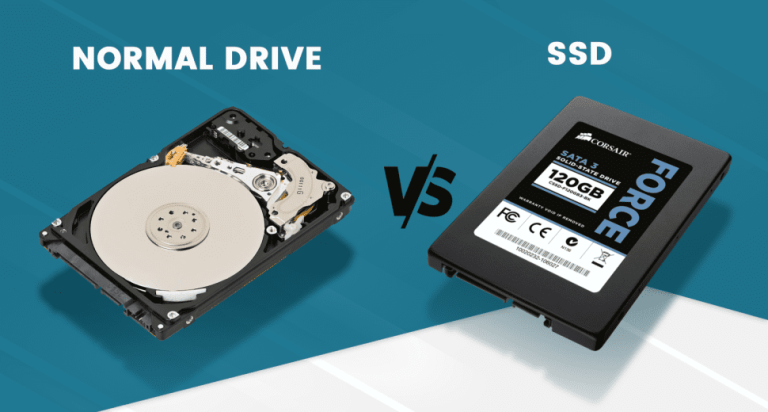
HDDs use spinning disks and heads. They fail from mechanical wear, heat, and shocks. SSDs have no moving parts. They fail from worn-out flash cells, power issues, and controller faults. Different risks, different signs.
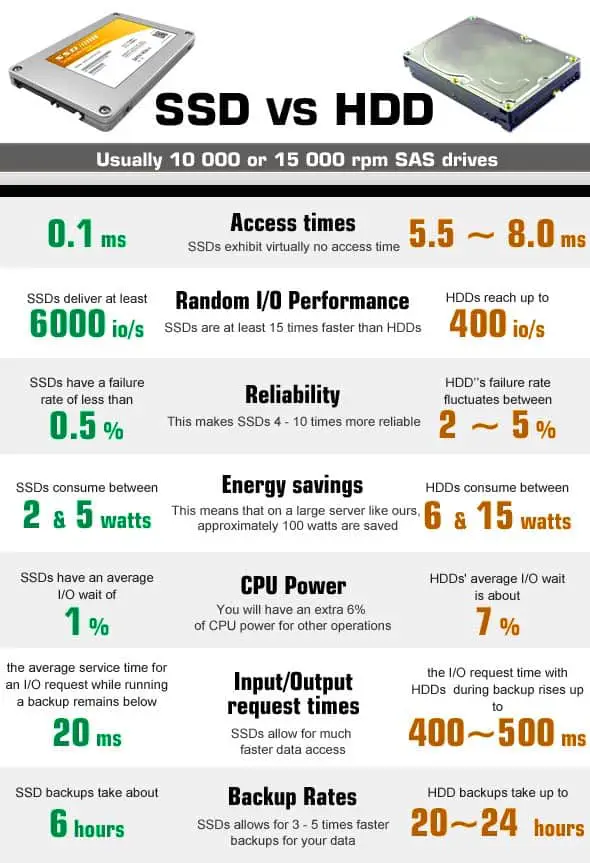
Are ssd more reliable than hdd under normal home and office use? Most field data says yes. But the story changes with heavy writes, heat, and long storage without power. We will break that down next.
What large-scale data shows
Fleet studies from cloud providers and repair labs help a lot. They track many drives across years. The patterns are clear.
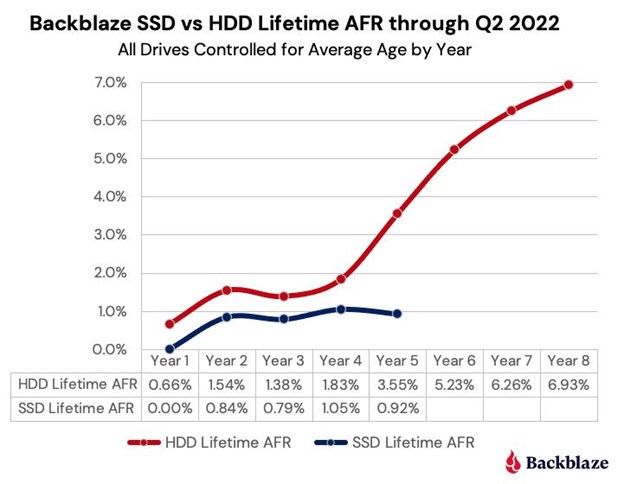
- Early life. SSDs show fewer early deaths than HDDs in the first years.
- Mid life. From years two to five, SSD failure rates stay low if writes are not extreme.
- Later life. HDD failure rates rise with age and vibration. SSD rates rise when they hit their write limits.
- Boot drives. SSD boot drives in data centers fail less than HDD boot drives of the same age.
Are ssd more reliable than hdd long term? For normal workloads and temps, yes for at least the first five years. Past that, the answer depends on writes, heat, and model quality.
How SSDs and HDDs fail in the real world
Understanding failure modes helps you plan.
SSDs:
- Wear-out. Every flash cell has a write limit. Good controllers spread writes to delay wear.
- Power loss. Without power-loss protection, sudden outages can corrupt in-flight data.
- Data retention. When left unplugged for months in heat, worn drives can lose bits.
HDDs:
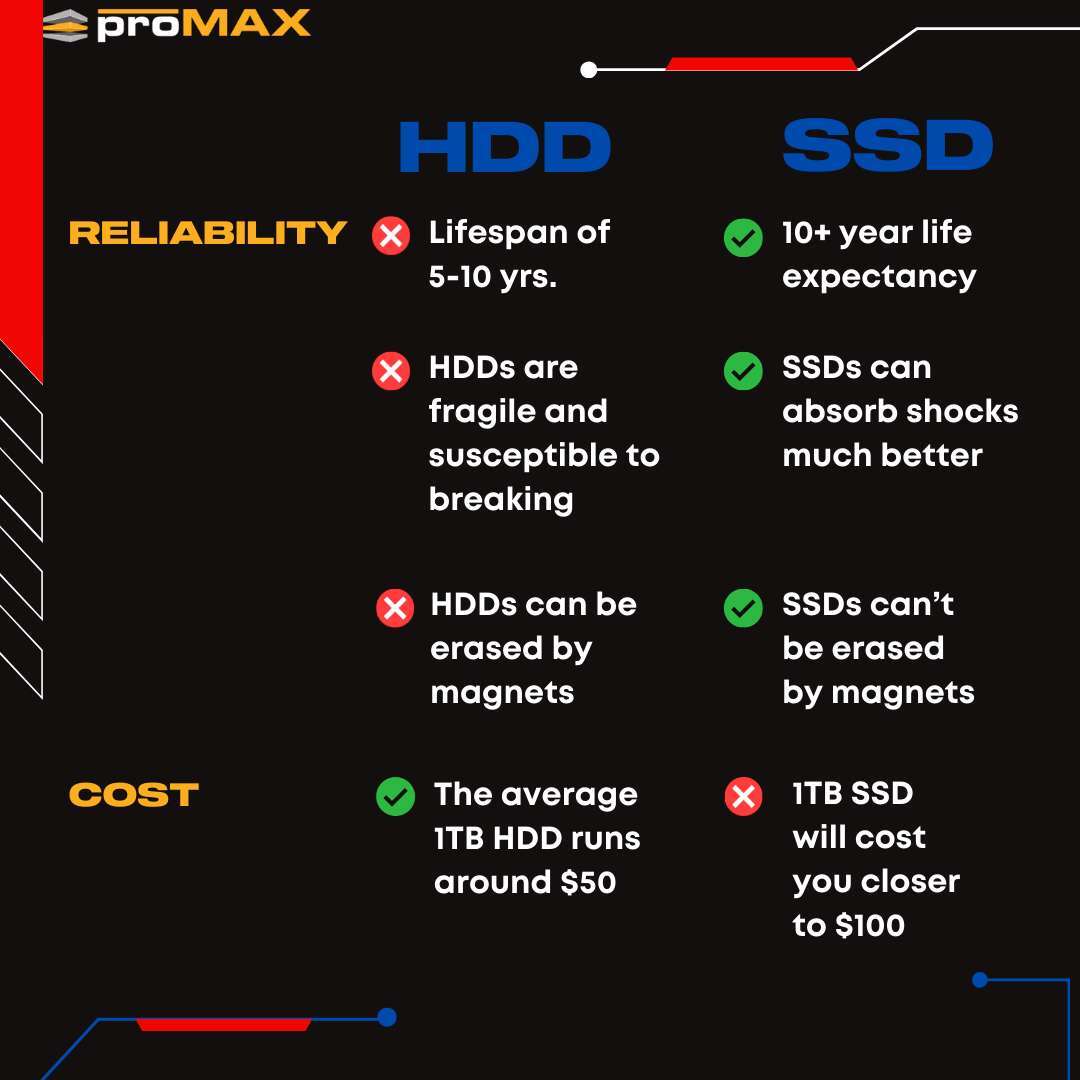
- Mechanical parts. Motors, bearings, and heads wear down. Shock can cause instant failure.
- Vibration. Many drives in one box can shake each other and raise errors.
- Rebuild stress. During RAID rebuilds, uncorrectable errors are more likely.
Are ssd more reliable than hdd for travel, field work, and laptops? Yes, because they shrug off bumps. Are ssd more reliable than hdd for cold shelves with no power for a year? Often HDDs hold data longer when left unplugged, if stored well.
When SSDs win and when HDDs still shine
Let’s match the tool to the job.
SSDs win when:
- You move the device often or work on the go.
- You value fast boot, load, and copy speeds.
- You write a normal amount of data each day.
HDDs still shine when:
- You need many terabytes on a tight budget.
- You store archives for years with few writes.
- You want simple, long, unplugged storage in a cool place.
So, are ssd more reliable than hdd for day-to-day systems? Yes. Are ssd more reliable than hdd for huge, cold archives on a budget? Often no.
Practical tips to extend drive life
You can boost reliability with simple habits.
For SSDs:
- Leave 10–20% free space to help wear leveling.
- Keep firmware current and enable TRIM.
- Avoid heavy writes on QLC models; pick TLC for mixed use.
For HDDs:
- Mount drives to limit vibration.
- Keep temps stable and airflow steady.
- Use gentle power cycles; avoid frequent spin-ups.
For both:
- Monitor SMART health monthly.
- Test backups. A backup not tested is not a backup.
- Use a UPS to cut sudden power loss.
Are ssd more reliable than hdd if you follow best practices? Yes, and even more so with these steps.
Cost, endurance, and total value
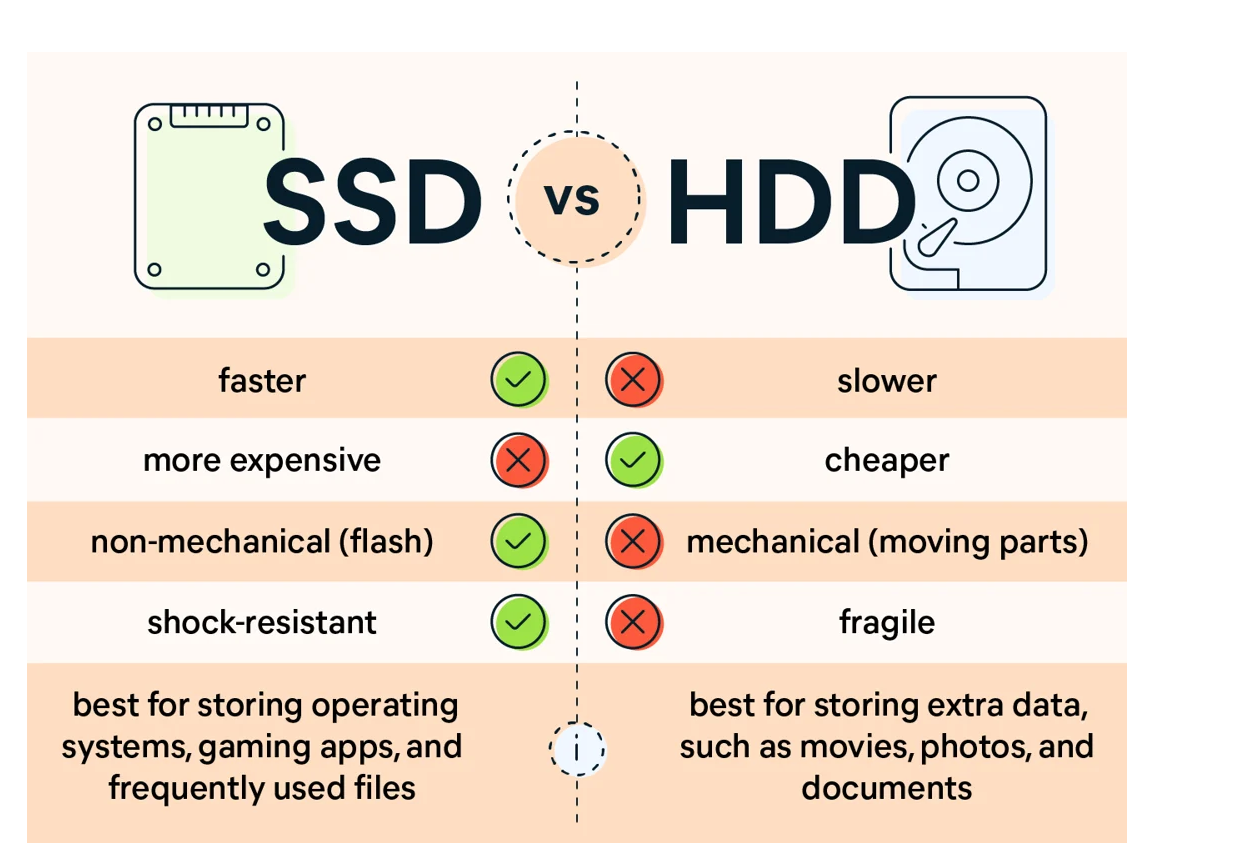
Price per terabyte still favors HDD. Endurance per dollar can favor SSD for boot and app drives. Your write pattern matters.
- SSD endurance. Check TBW or DWPD. A 1 TB SSD may have 300–1200 TBW. Heavy creators should aim higher.
- HDD endurance. No formal write cap, but bearings and heads wear with time and heat.
- Warranty. Many SSDs ship with 3–5 years, tied to TBW. Many HDDs ship with 2–5 years, tied to hours.
Are ssd more reliable than hdd at the same price? For a boot or work drive, often yes. For mass storage per dollar, HDDs still make sense.

Data protection that beats device failures
No single drive is a plan. A plan is a plan.
- Follow 3-2-1 backups. Three copies, two media, one offsite.
- Use checksums and scrubs. Filesystems like ZFS or tools that verify data can catch silent errors.
- Watch SMART. Set alerts for reallocated sectors, media wear, or high temps.
- Test restores. Do a small restore every month to be sure it works.
This is how you make are ssd more reliable than hdd less urgent. Your data is safe even if a drive dies.
What to look for when buying
Specs vary a lot. Choose with your workload in mind.
For SSDs:
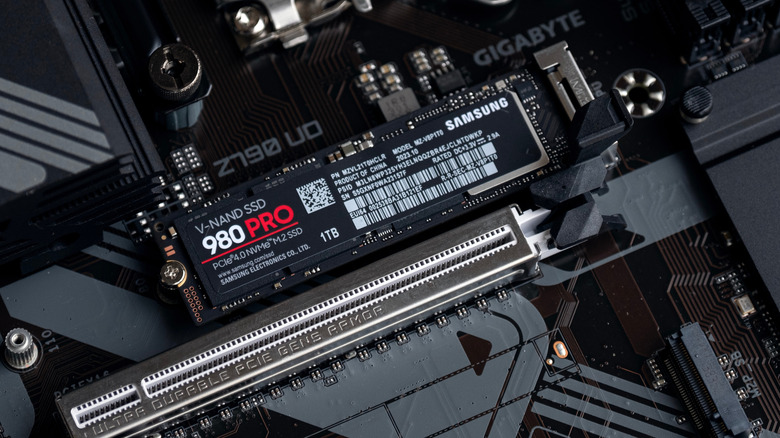
- NAND type. TLC is a safe pick for mixed use. QLC is fine for light writes and big media libraries.
- Controller and DRAM. DRAM helps steady speed under load. HMB is fine for light use.
- Power-loss protection. Needed for servers and important work.
For HDDs:
- Workload rating. NAS or enterprise models handle 24/7 use better.
- Vibration tolerance. NAS drives add sensors for multi-bay boxes.
- RPM and cache. Faster models help small random tasks.
If your core question is are ssd more reliable than hdd, pick SSD for your OS and apps. Add HDD for bulk media and backups.
Real-world lessons from the field
From my own fleets, a few patterns repeat.
- Laptop SSDs rarely fail in the first 5 years unless they run hot or get filled to 99%.
- Desktop HDDs fail more after moves, heat waves, or bad cables.
- NAS arrays with mixed models last longer. Avoid filling cases to the max with no airflow.
- Video editors chew through QLC SSDs. TLC or small enterprise SSDs pay for themselves.
Are ssd more reliable than hdd in mixed offices? Yes, by a clear margin, when paired with good backups and cooling.
Frequently Asked Questions of are ssd more reliable than hdd
Are SSDs safer for laptops than HDDs?
Yes. SSDs have no moving parts, so drops and bumps are less risky. You also get better battery life and speed.
Do SSDs lose data if left unplugged for months?
A worn SSD can lose charge over long, hot storage. For long unplugged storage, keep it cool or use an HDD and verify backups.
Are enterprise HDDs more reliable than consumer SSDs?
It depends on use. Enterprise HDDs handle 24/7 workloads well, but a good TLC SSD is still better for boot, apps, and mobile use.
How do I know my SSD is wearing out?
Watch SMART metrics like percentage used, media wear, and reallocated blocks. Many tools will warn you long before failure.
Should I defrag an SSD?
No. Defrag adds needless writes. Use TRIM and leave free space to keep speeds steady.
Are ssd more reliable than hdd for gaming PCs?
Yes for the system and games. Load times drop and failure rates are lower in normal use.
Are ssd more reliable than hdd for NAS?
For heavy writes and 24/7 use, pick NAS-rated HDDs or enterprise SSDs. Consumer SSDs can work, but check endurance and cooling.
Are ssd more reliable than hdd for cold archives?
Often HDDs are better for cold shelves, if stored cool and tested. Always keep two copies.
Are ssd more reliable than hdd over five years?
For normal writes and temps, yes in many fleets. Past that, check endurance, temps, and SMART stats.
Are ssd more reliable than hdd during power cuts?
SSDs with power-loss protection are very good. Without it, a UPS helps both SSDs and HDDs a lot.
Conclusion
If you want fewer surprises, faster boots, and lower field failures, choose SSD for daily work. HDDs still rule for low-cost bulk storage and long archives. The best setup is simple: SSD for OS and apps, HDD or cloud for backups, and steady cooling.
Make your next step now. Audit your drives, set SMART alerts, and test a backup restore this week. If this helped, subscribe for more practical guides, or drop a comment with your setup and questions.

Jamie Lee is a seasoned tech analyst and writer at MyTechGrid.com, known for making the rapidly evolving world of technology accessible to all. Jamie’s work focuses on emerging technologies, product deep-dives, and industry trends—translating complex concepts into engaging, easy-to-understand content. When not researching the latest breakthroughs, Jamie enjoys exploring new tools, testing gadgets, and helping readers navigate the digital world with confidence.