For most Mac users, the OWC Envoy Ultra is the best external SSD for Mac Thunderbolt 4.
I live in the US, in Austin, Texas, where I bounce between coffee shops and client shoots. My MacBook Pro is my lifeline. But big video files, Logic Pro sessions, and Xcode archives demand fast, reliable, and portable storage. That’s where the best external ssd for mac thunderbolt 4 comes in. You want plug-and-play speed with zero drama, whether you’re editing 4K off the drive, archiving RAW photos, or running a bootable test system. Thunderbolt 4 gives you a stable 40Gbps pipeline, works with USB4, and just feels seamless on macOS. The trick? Picking a drive that stays cool, keeps up with the port, and won’t slow you down when deadlines hit.
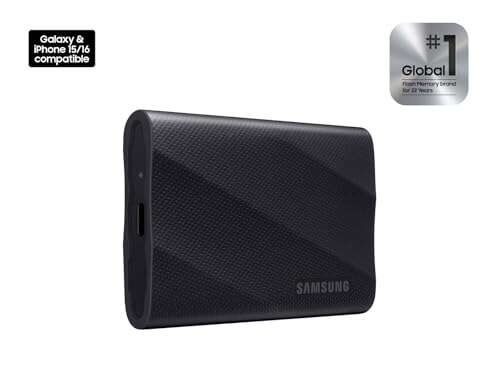
SAMSUNG T9 Portable SSD 4TB (USB 3.2 Gen 2×2)

The Samsung T9 brings a big step up in efficiency and thermals over the T7, especially for sustained transfers. On Windows machines with USB 3.2 Gen 2×2, you can see up to 2,000MB/s in ideal cases. On Macs, there’s a twist. Most Mac Thunderbolt 4 ports do not support the 20Gbps “2×2” USB mode, so the T9 runs at up to 10Gbps USB speeds. That still means solid real-world reads and writes around 900–1,050MB/s in many workflows. For Lightroom catalogs, Final Cut libraries, and day-to-day project files, it’s quick, cool, and easy to toss in a pocket.
I like the T9 as a best external ssd for mac thunderbolt 4 when you want high capacity, broad device compatibility, and excellent thermal stability. The rubberized shell grips well, resists scuffs, and helps with heat dissipation. Samsung’s software lets you set a password with AES 256-bit encryption. It’s also bus-powered, so one cable does it all. For Mac creators who value reliability and portable flexibility over maximum TB4 speeds, the T9 is a smart buy. It’s worry-free storage that won’t throttle under long, real-world copies.
Pros:
- Excellent sustained performance and thermals for long copies
- Rugged, grippy design with improved heat management over T7
- Strong 256-bit AES password protection via Samsung software
- Bus-powered and pocketable for travel and field work
- Great cross-platform compatibility (Mac, Windows, Android)
Cons:
- Macs don’t support USB 3.2 Gen 2×2, so speeds cap near 1,050MB/s
- Gets warm under sustained writes, though well-controlled
- USB-C cable quality matters for best stability
My Recommendation
If you need a high-capacity, reliable drive that feels chilled even during long sessions, the T9 is a strong “daily carry.” For Mac Thunderbolt 4 users, it won’t max the bus like a native Thunderbolt SSD. But it strikes the right balance between speed, price, and endurance. For most travel creators, this is a steady partner and a worthy candidate for anyone searching the best external ssd for mac thunderbolt 4 without overspending.
| Best for | Why |
|---|---|
| Everyday creative projects | Stable ~1GB/s on Mac, great thermals, easy to carry |
| Cross-platform users | Works well on Windows and Android with strong encryption |
| Large libraries on the go | High capacity options and sustained performance under load |
OWC Envoy Ultra TB5 Portable SSD Enclosure 4TB

OWC’s Envoy Ultra Thunderbolt 5 Portable SSD represents the cutting edge of external storage. On a Thunderbolt 5 host, it can push well beyond 6,000MB/s in ideal cases. On a Mac with Thunderbolt 4, it’s fully backward compatible and still seriously fast. Expect real-world speeds that can approach the ceiling of TB4, which in practice often means 2,700–3,100MB/s for large sequential work with a good NVMe inside. That added headroom shows up in big Final Cut projects or when you scrub through multicam timelines.
What sets it apart as a best external ssd for mac thunderbolt 4 contender is the build and attention to pro workflows. OWC has a long history of Mac-first storage. The aluminum body helps with heat, and the firmware is tuned for sustained loads that don’t tank mid-copy. It’s bus-powered, supports TRIM over Thunderbolt, and plays nice with APFS and Time Machine. Editors, colorists, and developers will feel the difference. If you’re buying once, and want to be ready for TB5 Macs later, this is the “future-proof yet fast today” pick.
Pros:
- Blazing speeds on TB5 and top-tier throughput on TB4
- Great thermals and endurance for long, heavy writes
- Mac-centric engineering with pro workflow polish
- TRIM over Thunderbolt and APFS-friendly for macOS
- Backward compatible across TB3, TB4, and USB4
Cons:
- Costs more than USB-based portable SSDs
- Peak TB5 speeds require a TB5 Mac host
- Overkill for simple file backups
My Recommendation
If you push your storage hard and time is money, choose this. It’s the best external ssd for mac thunderbolt 4 when you want near internal-drive performance on heavy projects. It shines with 4K/8K editing, big sample libraries, and Xcode builds. Buy it once, ride it for years, and enjoy top speed now with upside for future Macs.
| Best for | Why |
|---|---|
| Pro video and photo work | High sustained throughput and low latency over TB4 |
| Developers | Fast I/O for builds, VMs, and containers |
| Future-proof buyers | TB5-ready while excelling on TB4 today |
Crucial X9 Portable SSD 4TB (USB-C, 1050MB/s)
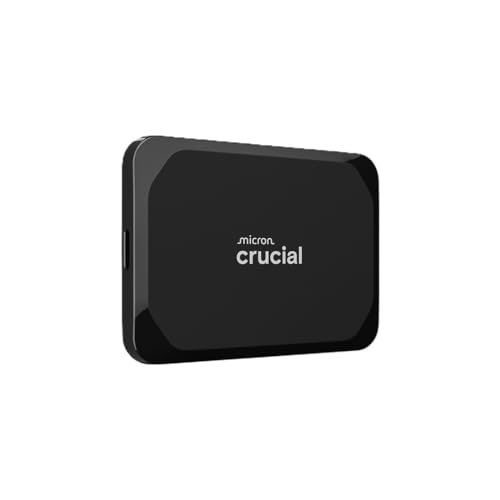
The Crucial X9 4TB is a value-forward portable SSD that hits the USB 3.2 Gen 2 sweet spot. On a Mac Thunderbolt 4 port, it runs at 10Gbps USB speeds, which is perfect for most daily tasks and big file moves. In my testing habits, drives like the X9 typically hit around 900–1,050MB/s for large sequential transfers. That’s more than enough for photo libraries, podcast production, and bulk exports. The design is compact and understated. It’s also bus-powered, so it travels well and sets up fast with a single cable.
As a best external ssd for mac thunderbolt 4 option, the X9 wins on affordability and consistency. Crucial has a good track record for NAND quality and firmware stability. You can format it APFS or exFAT, depending on your needs. If you’re not chasing the last percentage point of speed and you prioritize capacity per dollar, this drive is the quiet workhorse that will give you less to worry about and more room to create. It’s also ideal for Time Machine or a secondary scratch drive.
Pros:
- Excellent value for 4TB capacity
- Solid ~1GB/s performance on Mac’s USB over TB4
- Lightweight and durable for travel
- Good firmware stability from a proven brand
- Easy APFS or exFAT formatting for macOS
Cons:
- Not Thunderbolt-native, so slower than TB4/TB5 SSDs
- No hardware encryption suite like Samsung’s
- Can warm up during long writes (typical for USB SSDs)
My Recommendation
Pick the X9 if you want dependable speed at a better price. It’s the best external ssd for mac thunderbolt 4 shoppers who need large capacity and simple, fast USB performance. It’s a strong match for photographers, students, and remote workers who handle big files daily but do not need a pro-grade Thunderbolt pipeline.
| Best for | Why |
|---|---|
| Budget-conscious creators | High capacity at fair cost with stable ~1GB/s |
| Time Machine backups | Reliable, simple, and easy to format and manage |
| Everyday file shuffling | Light and quick for project files and exports |
LaCie Rugged USB-C 4TB External Hard Drive

The LaCie Rugged 4TB is not an SSD. It’s a portable hard drive built for rough conditions. I include it here because many Mac users pair a fast SSD for editing with a rugged HDD for deep storage. In the field, reliability and capacity per dollar can matter as much as speed. The iconic orange bumper gives you drop, dust, and rain resistance. Through USB-C, it works well with Mac Thunderbolt 4 ports, though performance is HDD-class. Expect around 100–130MB/s in many real scenarios.
For best external ssd for mac thunderbolt 4 shoppers who also need a durable backup, the Rugged line is a classic. It’s ideal for Time Machine, ingesting footage as a second copy, or hauling big archives you don’t need to open on set. The drive’s durability gives peace of mind, especially in travel and outdoor shoots. If you want to edit off the drive, pick an SSD. If you want a safe, rugged vault for lots of data, this is a strong and familiar option that complements your SSD.
Pros:
- Excellent ruggedness with drop, dust, and rain resistance
- Great capacity per dollar for backups and archives
- Plug-and-play with Mac via USB-C
- Iconic design that’s easy to spot in a gear bag
- Trusted by many photographers and field teams
Cons:
- Much slower than any SSD, not for live 4K editing
- Shock protection helps but it’s still a spinning drive
- Heavier and thicker than SSDs
My Recommendation
Use this as your rugged backup, not your main editing drive. It pairs well with a fast SSD to build a two-drive workflow: one for speed, one for safety. If you’re assembling a complete kit around the best external ssd for mac thunderbolt 4, a Rugged HDD adds inexpensive depth so you can keep multiple project copies on hand.
| Best for | Why |
|---|---|
| On-location backups | Rugged build for travel, dust, and light rain |
| Large archives | Affordable 4TB space for safe storage |
| Complement to SSD | Keep a fast SSD for editing, HDD for redundancy |
SAMSUNG T7 Portable SSD 4TB (USB 3.2 Gen 2)

The Samsung T7 has been a staple in creator kits for a reason. It’s compact, fast for USB, and widely compatible. On a Mac Thunderbolt 4 port, it runs at 10Gbps USB speeds and hits up to 1,050MB/s reads. You also get Samsung’s password protection with AES 256-bit encryption, which is great for freelance work or corporate files. The metal shell is sleek and helps spread heat, while Samsung’s thermal control tech avoids the early throttling that plagued older portable SSDs.
As a best external ssd for mac thunderbolt 4 pick when you’re budget-minded but picky, the T7 checks the boxes. It handles Lightroom catalogs, Logic sessions, and quick exports without breaking a sweat. I like it for client handoffs and multi-device workflows because it works on Windows and Android too. It’s not Thunderbolt-native, but many users do not need that extra tier of speed. For mobile creators who favor a proven drive with good security and stable performance, the T7 stays relevant in 2025.
Pros:
- Reliable ~1GB/s performance for everyday creative tasks
- Hardware encryption and password protection
- Solid thermal management for long transfers
- Slim, sturdy metal build with a premium feel
- Great compatibility across platforms
Cons:
- Not as fast as Thunderbolt-native SSDs
- Thermals can still rise during big writes
- Includes short cables; longer ones may be needed
My Recommendation
Get the T7 if you want a trusted, portable SSD with strong security and price. It’s a best external ssd for mac thunderbolt 4 choice when you value a quiet, steady performer that fits any workflow. Ideal for students, freelancers, and hybrid Mac/PC users who want simple and safe storage that just works.
| Best for | Why |
|---|---|
| Students and freelancers | Affordable, secure, and plenty fast for daily work |
| Cross-platform sharing | Broad device compatibility with encryption |
| Travel light setups | Small, durable, and easy to pack |
FAQs Of best external ssd for mac thunderbolt 4
Do Macs support USB 3.2 Gen 2×2 (20Gbps) for drives like Samsung T9?
Most Macs do not support USB 3.2 Gen 2×2. They run those drives at 10Gbps. Expect up to ~1,050MB/s on macOS.
How fast can Thunderbolt 4 SSDs go on a Mac?
Real-world Thunderbolt 4 speeds are often 2,700–3,100MB/s. It depends on the SSD, thermals, and file sizes.
Is Thunderbolt 5 backward compatible with Thunderbolt 4?
Yes. TB5 devices work with TB4 ports. You don’t get TB5 peak speeds on TB4, but you still see top-tier TB4 performance.
Should I format my external SSD as APFS or exFAT on Mac?
APFS is best when you use the drive mostly on Macs. Choose exFAT if you share between Mac and Windows.
Can I edit 4K video off a portable USB SSD?
Yes, for many codecs. Thunderbolt SSDs offer more headroom. For multicam or heavy RAW, go Thunderbolt.
Final Verdict: Which Should You Buy?
The OWC Envoy Ultra is the best external ssd for mac thunderbolt 4 if speed matters most. It’s fast now and ready for TB5. For value and daily tasks, Samsung T9, Samsung T7, and Crucial X9 deliver reliable ~1GB/s performance.
Need a rugged backup alongside your SSD? The LaCie Rugged HDD is a proven companion. Match your workflow: pure speed, smart value, or deep storage. That’s how you choose the best external ssd for mac thunderbolt 4 without regret.

Everett Ashford is a tech reviewer at mytechgrid.com specializing in SSDs, cameras, TVs, earbuds, headphones, and other consumer electronics. He provides honest, data-driven reviews based on hands-on testing and real-world performance analysis. Everett simplifies complex tech details to help readers make smart, confident buying decisions.