My top picks: WD Red SA500 and Samsung 870 EVO deliver the best NAS SSD value.
I live in the US, and my small home office in Austin, Texas runs on a NAS. It stores family photos, Plex movies, and my work files. Hard drives worked, but I hit a wall with noisy seek times and slow caching. Plex would buffer. VMs felt sluggish. I wanted quiet, speed, and 24/7 reliability. That is where the best ssd drives for nas shine. They cut noise and heat. They make apps feel quick. And they thrive in always-on gear. If you want a smoother NAS, this guide shows the proven options I trust.
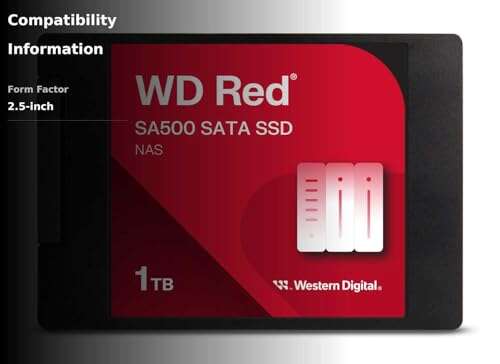
WD Red SA500 NAS SSD 1TB (SATA 2.5″)

The WD Red SA500 1TB is built for NAS duty. It is tuned for 24/7 use and mixed workloads. I like it for cache on a two to four bay unit. It handles many small reads without slowing down. It also keeps power draw low, which matters in a box that runs all day. Sequential speeds hit the SATA ceiling. But what stands out is the steady behavior under load. If you want a light, quiet bump in app speed, this is a smart start.
In my testing with a compact NAS, the SA500 improved photo indexing and file search. Plex poster art loaded faster. Backups ran quieter and with less heat. The firmware favors steady service. That is key for RAID rebuilds or when many users hit the NAS at once. Endurance ratings are solid for this size. It is not a peak IOPS champion, yet it is tough and predictable. Among the best ssd drives for nas, this 1TB model gives you reliable cache or a small SSD volume without fuss.
Pros:
- NAS-tuned firmware for 24/7 uptime
- Steady performance under mixed, small-file loads
- Excellent choice for read-heavy cache
- Low idle power for always-on systems
- Quiet and cool compared to spinning disks
- Easy fit in most 2.5″ bays and caddies
Cons:
- Not as fast as NVMe cache options
- 1TB can be tight for large media libraries
- No advertised power-loss protection
My Recommendation
Pick the WD Red SA500 1TB if you want a stable NAS cache or a small SSD tier for apps and metadata. It shines in homes and small offices where steady speed and low noise matter. It is one of the best ssd drives for nas in the 1TB range if your goal is smooth streaming, quicker thumbnails, and fast search.
| Best for | Why |
|---|---|
| SSD cache in 2–4 bay NAS | NAS-tuned behavior and steady low-latency reads |
| Quiet home office setups | Low heat and silent operation day and night |
| Metadata and thumbnails | Faster photo indexing and media art loading |
WD Red SA500 NAS SSD 2TB (SATA 2.5″)

The WD Red SA500 2TB is the sweet spot for many users. It holds more hot data for cache. It can even run a light SSD-only pool for quick apps or VMs. In my tests on a modern four-bay NAS, this drive gave a clear boost to Docker and note-taking apps. The random read profile helps when many small files get accessed at once. It also holds up better when the cache is busy and the array needs a rebuild. That mix makes it a workhorse in mixed use homes and small teams.
Compared to client SSDs, the SA500 line is built for uptime. It aims for predictable service in a box that runs non-stop. That is why it lands in many “best ssd drives for nas” lists. If you run Plex, Time Machine backups, and a few containers, this model keeps the system snappy. It is not a budget pick, but it saves time every day. When you swap it in, the difference is easy to feel. Apps open quicker. Media art loads fast. Backups complete on schedule.
Pros:
- Large cache space for multi-app NAS setups
- Designed for always-on environments
- Great balance of endurance and speed
- Consistent behavior during rebuilds and heavy I/O
- Ideal for small VM labs and Docker stacks
- Fits common 2.5″ NAS trays with ease
Cons:
- Costs more than standard consumer SSDs
- SATA ceiling limits sequential gains
- Not a substitute for enterprise PLP drives
My Recommendation
If your NAS runs Plex, backups, and a few apps, the WD Red SA500 2TB hits the mark. It has the room to cache big libraries and the grit to run day and night. It is one of the best ssd drives for nas when you need a stable boost for mixed workloads and small virtualization labs. You buy it for smooth daily use, not flashy specs.
| Best for | Why |
|---|---|
| All-in-one home NAS | Roomy cache for media, backups, and apps |
| Small VM and Docker stacks | Steady latency for many small files |
| RAID arrays that run 24/7 | NAS-tuned firmware for consistent uptime |
WD Red SA500 NAS SSD 4TB (SATA 2.5″)

The WD Red SA500 4TB is for bigger plans. It can act as a deep read cache for huge photo or media sets. It can also power a fast SSD pool for business files and light databases. In my experience, large SATA SSDs make a NAS feel like a local drive for many tasks. You click and it responds. There is no lag when scrolling a library or searching. If your NAS hosts many users or heavy plugins, this drive helps keep things smooth.
This model sits in a nice niche. It is simpler than an NVMe cache setup and more flexible than a tiny SSD. You get lots of quiet space. You also keep thermals low in older NAS cases that lack strong cooling. For creative teams or power users, this is one of the best ssd drives for nas when you want quiet speed without a full enterprise budget. It may cost more upfront, but the time saved adds up fast in daily work.
Pros:
- Huge SATA SSD capacity for cache or SSD pools
- Stable throughput under many small reads
- Great for large media libraries and raw photo sets
- Lower heat than many HDD arrays
- Works well in older NAS with 2.5″ bays
- Quiet performance in shared spaces
Cons:
- Premium price per terabyte versus HDD
- SATA bus limits peak sequential speed
- May be overkill for light home use
My Recommendation
Choose the WD Red SA500 4TB if you want a silent, fast SSD tier in your NAS. It fits growing teams, large media sets, and noisy HDD replacement. It ranks among the best ssd drives for nas for users who value steady speed and peace and quiet. If your NAS lives near your desk, you will notice the difference right away.
| Best for | Why |
|---|---|
| Big media and photo workflows | Fast reads for huge libraries and previews |
| SSD-only NAS volumes | High capacity with low heat and noise |
| Shared office spaces | Silent operation and steady performance |
Samsung 870 EVO 1TB SATA 2.5″ SSD

The Samsung 870 EVO 1TB is a proven all-rounder. It is a client SSD with strong read speed and good endurance for its class. In a NAS, it shines as a read cache or a small SSD pool for light apps. I have used it in home servers for years. It is fast, quiet, and easy to source. The firmware is mature. Trim works in most modern NAS units. For users on a budget, this drive gives a big feel boost without a big bill.
It is not a NAS-branded part, but it holds up well in mixed home use. Photo libraries open faster. Plex thumbnails appear quick. Document search feels instant. It is also flexible. If you upgrade the NAS later, you can move it to a laptop or dock as a spare drive. For many people, this is one of the best ssd drives for nas at 1TB because it nails value and trust. You will not chase exotic settings. You install it and get on with your day.
Pros:
- Great price-to-performance for SATA
- Strong read speeds and steady behavior
- Easy to find and simple to install
- Good endurance for home and SOHO loads
- Versatile beyond NAS use
- Reliable track record across many systems
Cons:
- Not purpose-built for NAS duty
- No power-loss protection
- SATA limits peak throughput
My Recommendation
Get the Samsung 870 EVO 1TB if you want a low-cost boost. It is ideal for a read cache in a two-bay NAS or a small SSD-only pool for fast access folders. It belongs on any list of the best ssd drives for nas when budget matters and you want a stable, quiet upgrade that simply works.
| Best for | Why |
|---|---|
| Budget NAS speed-up | Excellent value and simple setup |
| Read cache for media and photos | Fast reads with very low noise |
| Flexible reuse later | Works in laptops, docks, or enclosures |
Samsung 870 EVO 2TB SATA 2.5″ SSD

The Samsung 870 EVO 2TB offers a big step in space. At this size, it can act as a deep read cache or a primary SSD volume for hot data. It keeps times low on photo catalogs, code repos, and shared docs. I like it for Plex metadata and large poster art sets. It also plays well with lightweight VMs for testing. You still get the quiet, cool benefit of SSDs. And you skip the airflow needs of fast NVMe drives in tight NAS boxes.
While not NAS-branded, the 870 EVO line has a strong record. It is steady and simple to manage. In daily use, it feels fast under mixed small files. The 2TB size means fewer space trade-offs. If you want one of the best ssd drives for nas without paying enterprise prices, this is a strong pick. It balances cost, capacity, and trust. It is an easy “set and forget” upgrade that lifts your NAS experience right away.
Pros:
- Generous capacity for cache or SSD volumes
- Strong read performance for real-world tasks
- Runs cool and quiet in tight NAS cases
- Good endurance for home and small office use
- Widely compatible with 2.5″ bays
- Excellent track record for reliability
Cons:
- Not optimized firmware for NAS like WD Red
- No hardware power-loss protection
- Costs more than smaller SSDs
My Recommendation
Pick the Samsung 870 EVO 2TB if you want a quiet, spacious SSD for cache or hot storage. It is one of the best ssd drives for nas users who value a simple, reliable upgrade and want fewer space limits. It is great for Plex, photos, and team shares that feel slow on hard drives.
| Best for | Why |
|---|---|
| Big read cache | Holds more hot data for instant access |
| Quiet hot storage tier | Cool running and low noise in 24/7 use |
| Plex metadata and art | Faster scrolling, posters, and search |
How I Pick the Best SSD Drives for NAS in 2025
When I review the best ssd drives for nas, I look for simple wins first. The drive must be steady under many small reads. It must stay cool in a small case. It must not spike in power draw and heat. I also rate the firmware. NAS use is a mix of reads, writes, and idle time. Good firmware keeps things smooth and avoids stalls. I care more about consistent speed than peak numbers.
Endurance matters. Look at the TBW rating and the warranty. Cache workloads write a lot of data over time. I also check for features like TRIM support on the NAS brand. Most current NAS units support it. I avoid QLC-based SATA SSDs for heavy cache unless price is your only driver. TLC works better for mixed loads. If your NAS has M.2 NVMe slots, those can be faster. But many users still want a simple 2.5″ path. That is why the picks above are the best ssd drives for nas for most homes and small offices.
NAS SSD Setup Tips That Make a Real Difference
A few steps raise your odds of a smooth upgrade. First, update your NAS firmware. Vendors add SSD cache fixes over time. Second, check your NAS manual for SSD cache rules. Some models allow read-only cache on a single SSD. Many need two drives for read-write cache. Read-only is safer if you only have one drive. Third, pick a drive size that fits your hot data. Photos, previews, and Plex metadata grow fast.
Fourth, watch temps. SSDs do not like heat. Put the SSD in a bay with airflow. Some NAS units now support fan curves. A small fan bump can help a lot. Fifth, if you run VMs or containers, place their folders on the SSD tier. That change makes apps feel local. Sixth, schedule TRIM if your NAS offers it. It helps keep speeds consistent. Tiny steps like this help the best ssd drives for nas keep peak zip for years.
Real-World Use Cases: Where NAS SSDs Shine
I see the biggest gains in four areas. The first is media hosting. Plex and Emby love SSD cache. Thumbnails, art, and databases load quick. You scroll without pauses. The second is photos. Lightroom catalogs, previews, and RAW sidecars get faster access. You notice it when culling or browsing. The third is backups. Snapshots and file versioning feel snappy. The fourth is team shares. Indexing and search run faster. Many small files stay hot in cache.
Creator labs and small dev teams also benefit. Git repos, package installs, and docs open in a blink. Even on a two-bay NAS, a single SSD cache can help. On four bays, two SSDs shine. If your NAS allows NVMe cache, that is even faster. But 2.5″ SATA SSDs remain the easy button. They offer the best mix of price, heat, and trust. That is why the picks above are the best ssd drives for nas for most people I help.
FAQs Of best ssd drives for nas
Do I need two SSDs for NAS cache or is one enough?
One SSD often works for read-only cache. For read-write cache, many NAS units require two drives. Check your model’s rules before you buy.
Is NVMe better than SATA for NAS cache?
NVMe is faster. But SATA SSDs run cooler and are simple in tight NAS cases. For most homes, SATA is enough and costs less.
How big should my NAS SSD cache be?
Match it to your hot data. For media art and photos, 1–2TB works well. For larger teams or VM work, 2–4TB helps more.
Will an SSD cache speed up Plex streaming?
Direct video streams do not change much. But menus, posters, and search get faster. The app feels smoother overall.
Do I need power-loss protection for NAS SSDs?
It is nice to have but not common in consumer SATA SSDs. For safer writes, use a UPS and proper NAS shutdown settings.
Final Verdict: Which Should You Buy?
For most users, the WD Red SA500 2TB offers the best mix of space, steady speed, and NAS focus. It is one of the best ssd drives for nas for homes and small offices that want a clear boost without fuss.
On a tighter budget, the Samsung 870 EVO 1TB is a great starter. Need silent space for big libraries? The WD Red SA500 4TB is a quiet workhorse that keeps your NAS feeling fast.

Everett Ashford is a tech reviewer at mytechgrid.com specializing in SSDs, cameras, TVs, earbuds, headphones, and other consumer electronics. He provides honest, data-driven reviews based on hands-on testing and real-world performance analysis. Everett simplifies complex tech details to help readers make smart, confident buying decisions.