Yes, you can install two SSDs in one PC for faster speed and more storage.
That said, there are smart ways to do it. In this guide, I will show you how two SSDs fit into today’s PCs, the best setup for speed and safety, and common pitfalls to avoid. If you have asked can i have 2 ssd in my pc, I will answer that fully with clear steps, real build tips, and trusted best practices.
How two SSDs fit into a modern PC
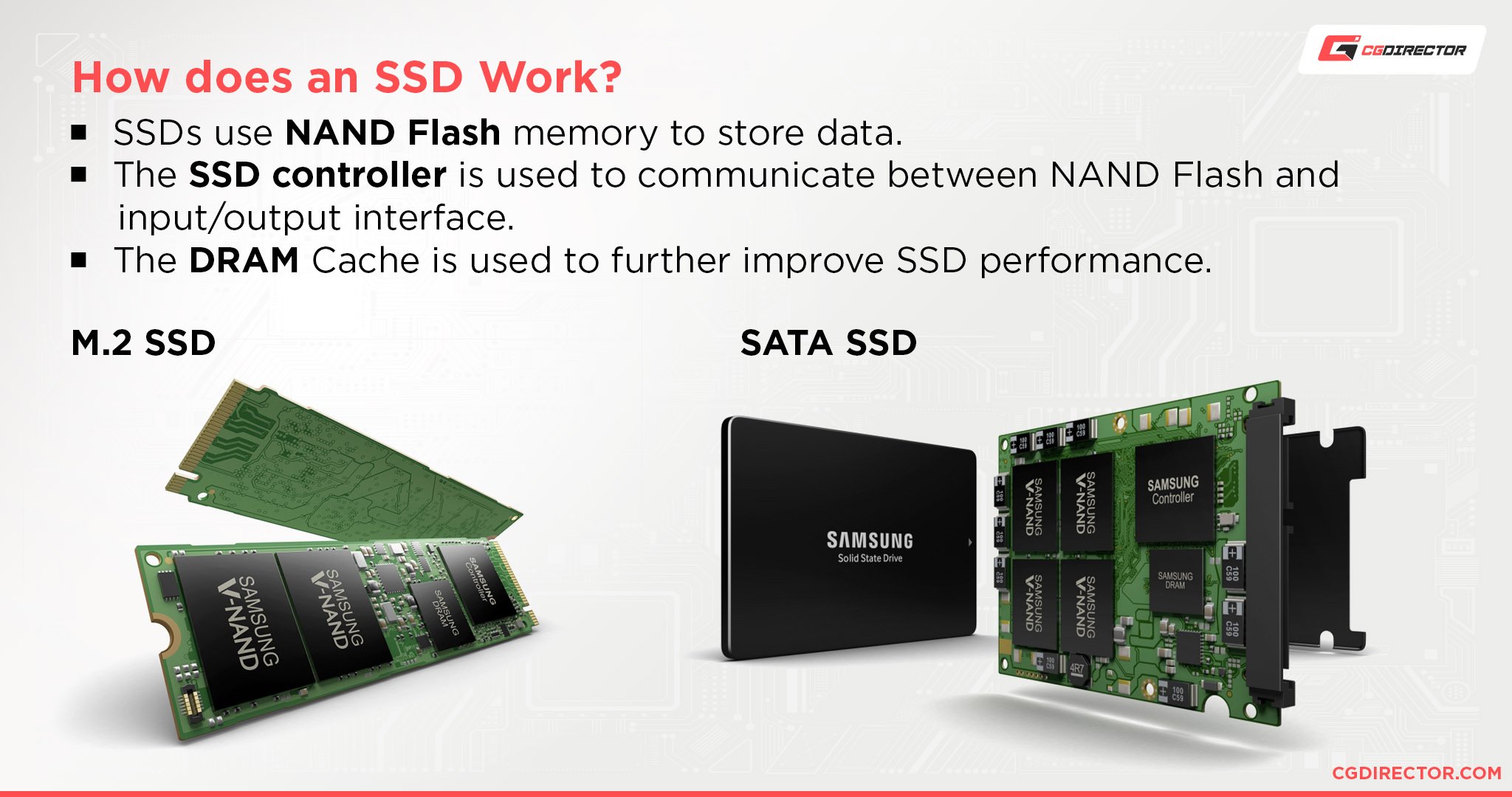
There are two common types of SSDs today. SATA SSDs use a cable and cap out near 550 MB per second. NVMe SSDs use PCIe lanes through an M.2 slot and can be many times faster. Many boards support both types at the same time.
Two SSDs can sit side by side with no issue. Your board may have one or more M.2 slots and several SATA ports. If you are asking can i have 2 ssd in my pc on one mid range board, the answer is often yes.
Note that some M.2 slots share lanes with SATA ports. A SATA M.2 drive can disable a certain SATA port. Check your board manual. If you wonder can i have 2 ssd in my pc with both NVMe, look for two M.2 slots that both support NVMe mode.

Key benefits of running dual SSDs
Two SSDs give you more speed options and better flow in daily work.
- Faster boot and app load. Keep Windows on the fastest NVMe drive.
- Cleaner storage plan. Put games or large files on the second SSD.
- Safer workflow. Keep active projects away from the OS disk.
- Easier upgrades. Add a second SSD instead of replacing the first.
- Simple backup habits. Clone the OS drive or keep a local archive on the second SSD.
Gamers, creators, and devs ask can i have 2 ssd in my pc for a reason. It helps reduce load times, stutter, and clutter.
What to check before you buy the second SSD
Do a quick check list before you hit buy.
- Motherboard support. Count M.2 slots and SATA ports. Read the lane sharing notes.
- PCIe lanes. On some systems, using a second M.2 slot can reduce GPU lanes. Rare, but check.
- Form factor. NVMe uses M.2. SATA 2.5 inch needs a bay and a SATA cable.
- Power and cooling. SATA SSDs need power leads. NVMe runs hot. A small heatsink helps.
- Laptop limits. Some laptops take only one M.2 drive. Others have two. Space is tight.
- OS and file system. Windows 10 or 11 works great. macOS on PCs is a special case.
If you think can i have 2 ssd in my pc without BIOS tweaks, you often can. Still, a quick BIOS review never hurts.
src="https://b2c-contenthub.com/wp-content/uploads/2024/07/pcw08_NVME-SSD_RGBeci.jpg?quality=50&strip=all&w=1200"
alt="Picking the right mix: NVMe vs SATA, size, and endurance”
style=”max-width: 100%; height: auto; border: 2px solid black; border-radius: 10px; display: block; margin: 0 auto;”
loading=”lazy”
/>
Picking the right mix: NVMe vs SATA, size, and endurance
Match the drive to the job.
- Best speed. Use a PCIe 4.0 or 5.0 NVMe for the OS and heavy apps.
- Best value. A SATA SSD is cheap and great for games and media.
- Capacity. Aim for 1 TB or more per drive if budget allows.
- Endurance. Look at TBW or Drive Writes Per Day if you edit video or code a lot.
- DRAM cache. Drives with DRAM hold up better under long writes. HMB is fine for light use.
- Heatsink. Many boards ship with M.2 shields. Use them for Gen4 and Gen5 drives.
Many readers ask can i have 2 ssd in my pc with one old SATA and one new NVMe. Yes. That mix works well and saves cash.
:max_bytes(150000):strip_icc()/6-0094128015f74a7c84f1011743f4d556.jpg)
Step by step: install and set up a second SSD
Here is the simple process I use in my builds.
- Power down and unplug the PC.
- For NVMe. Find the M.2 slot. Remove the cover if present. Insert the drive at an angle. Press down and secure with the screw. Add the heatsink.
- For SATA. Mount the 2.5 inch SSD in a bay. Connect one SATA data cable to the board. Connect one SATA power lead from the PSU.
- Boot into BIOS. Check that both drives show up. Update BIOS if a drive does not appear.
- Boot into Windows. Open Disk Management. Initialize the new SSD as GPT. Create a new volume. Format NTFS. Assign a drive letter.
- Move or install apps. You can move your Steam or Epic library to the new drive. You can also clone your OS if you plan to swap roles.
- Set boot order. If you cloned the OS, pick the right boot drive in BIOS.
I often get the question can i have 2 ssd in my pc and choose which to boot. Yes. Set the boot order or press the boot menu key when you start.

Smart ways to use two SSDs day to day
A clean plan saves time and stress.
- OS and apps on the fastest NVMe.
- Games and large files on the second SSD.
- Use the second SSD as a scratch disk for Adobe Premiere or Photoshop.
- Point temp folders and caches to the non OS drive to reduce OS drive wear.
- Keep a weekly clone or snapshot on the second SSD if it has space.
If you wonder can i have 2 ssd in my pc to boost game load times, yes. Keep the hot titles on NVMe and the rest on SATA.

Common issues with two SSDs and how to fix them
These are the problems I see most in client builds.
- Drive not detected. Reseat the drive. Update BIOS. For NVMe, check the slot mode is not set to SATA only.
- M.2 disables SATA port. Move your SATA cable to a different port that still works with your M.2 slot.
- Slow speed. Install the vendor NVMe driver if available. Use a PCIe 4.0 slot for a Gen4 drive. Check that the drive is not near its full capacity.
- High temps. Add a heatsink or improve airflow. Heavy writes can heat a Gen4 drive fast.
- Clone fails. Use a trusted tool. Check for hidden vendor recovery partitions that block the clone.
If your question is can i have 2 ssd in my pc and avoid conflicts, yes. Just read your manual and map your ports.

RAID or no RAID with two SSDs
RAID can help in some cases, but it is not a backup.
- RAID 0. Stripes data for speed. One drive fails and you lose all data. Use only for temp media or scratch work with a backup plan.
- RAID 1. Mirrors data for drive fault tolerance. Cuts usable space in half. Good for uptime, not a backup.
- Windows Storage Spaces. Easy to set up pools with two SSDs. Flexible and simple.
- Creator tip. Keep OS on a single NVMe and use the second SSD for projects. Back up to the cloud or an external drive.
I get asked can i have 2 ssd in my pc and use RAID for safety. RAID helps uptime, but a true backup is still a must.

Cost, value, and upgrade paths
Prices for SSDs are friendly now. Many solid 1 TB NVMe drives are low cost. A 2 TB SATA SSD can be a bargain for big libraries.
- Start with one fast NVMe for the OS. Add a second SSD when you need space.
- Keep your old SSD in a USB enclosure when you upgrade. Use it as a fast portable drive.
- Mix brands if the deal is good. It will not hurt performance in normal use.
If you ask can i have 2 ssd in my pc without spending a lot, yes. You can add a budget SATA drive later and get great results.
Real build examples and lessons learned
Here are setups that worked well for me.
- Gaming PC. 1 TB Gen4 NVMe for Windows and key games. 2 TB SATA SSD for the rest. Smooth loads and easy updates.
- Creator rig. 2 TB Gen4 NVMe for OS and apps. 2 TB Gen4 NVMe for projects and scratch. Weekly clone to an external drive.
- Compact build. One single sided NVMe under the GPU with a thin heatsink. Second SATA SSD tucked behind the tray. Quiet and cool.
Clients often start with can i have 2 ssd in my pc for video edits. The dual NVMe plan plus an external backup is the sweet spot.
Frequently Asked Questions of can i have 2 ssd in my pc
Can I mix NVMe and SATA SSDs in one PC?
Yes. Most boards support both at the same time. You will just see two drives in Windows and can use them as you like.
Can I have 2 SSD in my PC and an HDD too?
Yes. You can use SSDs and HDDs together. Just be aware of SATA port limits and power leads.
Do I need more power for a second SSD?
Usually no. SSDs draw very little power. Most modern PSUs handle two or more SSDs with ease.
Will two SSDs make my games faster?
They can. Put your most played games on the fastest NVMe for the best load times.
Is it better to buy one big SSD or two smaller ones?
It depends. One big drive is simple. Two drives give you better file layout and upgrade paths.
Can I install Windows on one SSD and Linux on the other?
Yes. Dual boot across two SSDs works well. Set the boot order in BIOS or use a boot menu.
Conclusion
Two SSDs add speed, order, and peace of mind. Plan the roles for each drive, confirm your board supports the layout, and keep a solid backup habit. The result is a snappy, tidy system that grows with you.
If you are still wondering can i have 2 ssd in my pc, you now know the how and the why. Take the next step. Map your slots, pick the right drives, and set up a clean storage plan today. Want more guides like this? Subscribe, share your build in the comments, or ask your next question.

Jamie Lee is a seasoned tech analyst and writer at MyTechGrid.com, known for making the rapidly evolving world of technology accessible to all. Jamie’s work focuses on emerging technologies, product deep-dives, and industry trends—translating complex concepts into engaging, easy-to-understand content. When not researching the latest breakthroughs, Jamie enjoys exploring new tools, testing gadgets, and helping readers navigate the digital world with confidence.