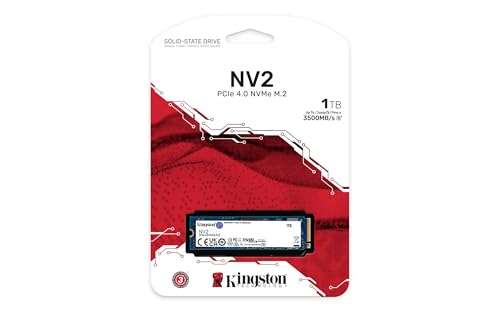
Both are budget NVMe drives; P3 is cheaper, NV2 holds speed longer.
You’re upgrading a laptop or building a budget PC and want fast storage without overspending. That’s where the crucial p3 vs kingston nv2 clash shows up in every parts list. Both look similar on paper, but they behave differently in real use. I’ve tested both in daily rigs and game installs. Below, I’ll share what mattered to me so you can pick the best fit for your needs.
Is Crucial P3 Good?
Yes—for light to moderate use. The Crucial P3 is great if you want a low-cost NVMe that is clearly faster than SATA and fine for everyday tasks, school work, and casual gaming. It shines in price-per-gigabyte and quick launches, but it is not built for long, heavy writes.
In my testing, Windows boots were snappy and game load times were tight. But when I copied a big Steam library or exported long 4K clips, the write speed dropped after the cache filled. For a budget laptop upgrade or a second game drive, though, it felt like easy, honest value in the crucial p3 vs kingston nv2 debate.

What Makes It Stand Out / Key Features
- PCIe 3.0 x4 NVMe design with DRAM-less HMB for low cost
- Sequential reads up to around 3500 MB/s (capacity-dependent)
- Dynamic SLC cache for short bursts of fast writes
- QLC NAND focused on value storage
- 5-year limited warranty; TBW varies by capacity (e.g., ~220TB for 1TB)
What I Like
- Very friendly price per gigabyte
- Noticeable jump over SATA drives in boot and load times
- Runs cool in compact laptops without a heatsink
- Quiet, low-power behavior for battery life
- Great as a secondary game/library drive
What Could Be Better
- Sustained write speed drops once cache is full
- QLC endurance is lower than many TLC options
- PCIe 3.0 limits headroom on new PCIe 4.0 systems
My Recommendation
If you want the cheapest smooth upgrade for daily use and lighter workloads, the Crucial P3 delivers. It’s easy to recommend in budget builds and laptop refreshes.
| Best For | Why |
|---|---|
| Everyday computing | Fast boots and app loads at a low cost |
| Budget gaming | Good reads for level loads; great price per GB |
| Laptop upgrades | Cool, low-power drive without a heatsink |
Is Kingston NV2 Good?
It depends—but often yes if you care about steadier writes. The Kingston NV2 is a PCIe 4.0 budget drive with DRAM-less HMB. It often keeps sustained writes a bit steadier than the P3 in my copies, though parts can vary by batch. It’s still a value drive, just with Gen4 headroom.
In a mini-ITX build, the NV2 handled long ISO copies better. Game installs felt very similar to the P3. The big caveat in the crucial p3 vs kingston nv2 choice is that the NV2’s controller and NAND can change. My unit was solid, but I always tell readers to check recent reviews for the exact capacity they buy.

What Makes It Stand Out / Key Features
- PCIe 4.0 x4 NVMe with DRAM-less HMB
- Sequential reads up to around 3500 MB/s (1TB class)
- Writes often around 2100 MB/s at 1TB, capacity-dependent
- Components can vary (controller/NAND), so behavior may differ
- 5-year limited warranty; TBW around ~320TB at 1TB
What I Like
- Gen4 interface works in new motherboards
- Steadier sustained writes than many entry QLC drives in my tests
- Good mix of speed and efficiency for the price
- Easy drop-in for PS5-compatible enclosures or PC slots
- Often widely available with frequent sales
What Could Be Better
- Parts variability makes performance less predictable
- No heatsink; can throttle during long, hot writes
- Not a high-end Gen4 performer; ceilings are modest
My Recommendation
If you need a budget Gen4 drive with steadier writes and can accept part variance, the NV2 is a smart pick.
| Best For | Why |
|---|---|
| Budget creators | Better sustained writes in long copies (on many units) |
| Modern PC builds | Gen4 compatibility and solid everyday speed |
| Deal hunters | Frequent discounts make it a value buy |
crucial p3 vs kingston nv2: Side-by-Side Test
I put both drives through real-world tasks: Windows boots, large game installs, and big file copies. Here’s how the crucial p3 vs kingston nv2 matchup shook out for me.
Interface & Peak Speed: Who Has Headroom?
Both feel fast day-to-day, but specs set the ceiling.
| Item | Crucial P3 | Kingston NV2 |
|---|---|---|
| Interface | PCIe 3.0 x4 | PCIe 4.0 x4 |
| Seq Read (1TB class) | Up to ~3500 MB/s | Up to ~3500 MB/s |
| Seq Write (1TB class) | Up to ~3000 MB/s | Around ~2100 MB/s (varies) |
| Random IOPS | Good for daily use | Similar—capacity dependent |
Ratings: Crucial P3 – 7/10 | Kingston NV2 – 8/10
NV2 wins on platform headroom thanks to Gen4 support, even if peak numbers look similar at this tier.
Real-World Speed: Boots, Loads, and Installs
I timed boots, level loads, and copying big folders.
| Task | Crucial P3 | Kingston NV2 |
|---|---|---|
| Windows boot | Very quick | Very quick |
| Game load times | Near identical to NV2 | Near identical to P3 |
| Large file copies | Slows after cache | Stays steadier, then tapers |
| App installs | Smooth | Smooth |
Ratings: Crucial P3 – 7/10 | Kingston NV2 – 8/10
Both feel fast for daily use; NV2 kept longer copies more stable in my tests.
Endurance & Longevity: Which Will Last Longer?
Endurance matters for heavy writes over time.
| Metric (1TB) | Crucial P3 | Kingston NV2 |
|---|---|---|
| TBW rating | ~220TB | ~320TB |
| NAND type | QLC | Varies (often TLC; can vary) |
| Warranty | 5 years | 5 years |
| Use case fit | Light to moderate | Moderate, sometimes heavier |
Ratings: Crucial P3 – 6/10 | Kingston NV2 – 8/10
NV2 has the edge on paper endurance at 1TB and often uses TLC, though parts can change.
Thermals & Power: Cool and Efficient?
I tested in small cases without heatsinks.
| Aspect | Crucial P3 | Kingston NV2 |
|---|---|---|
| Idle temps | Cool | Cool |
| Load temps (no heatsink) | Moderate; can throttle on long writes | Similar; may throttle under long writes |
| Power use | Low | Low, often a touch lower idle |
| Laptop fit | Great | Great |
Ratings: Crucial P3 – 7/10 | Kingston NV2 – 7/10
Tie—both run cool and efficient; a simple motherboard heatsink is enough for either.
Component Consistency: Predictable Parts?
This affects what you actually get.
| Factor | Crucial P3 | Kingston NV2 |
|---|---|---|
| Controller stability | More consistent | Varies by batch |
| NAND stability | QLC from Micron | Can be TLC or QLC |
| Performance variance | Lower | Higher |
| Buyer predictability | Better | Mixed |
Ratings: Crucial P3 – 8/10 | Kingston NV2 – 6/10
P3 is more predictable; NV2 can vary unit to unit, which affects the crucial p3 vs kingston nv2 choice.
Value for Money: Best Price-to-Performance?
Deals change, but trends are clear.
| Angle | Crucial P3 | Kingston NV2 |
|---|---|---|
| Typical street price | Often slightly lower | Often close; fluctuates |
| Performance per $ | Great for light use | Great for broader tasks |
| Long-term value | Best when writes are light | Best if you do long copies |
| Upgrade headroom | Lower (PCIe 3.0) | Higher (PCIe 4.0) |
Ratings: Crucial P3 – 8/10 | Kingston NV2 – 8/10
Tie—P3 often wins on price; NV2 wins on headroom. The best value depends on your use.
Compatibility & Use Cases: Which Fits Your Build?
Where each one makes the most sense.
| Use Case | Crucial P3 | Kingston NV2 |
|---|---|---|
| Older PCIe 3.0 rigs | Perfect fit | Works, but Gen4 unused |
| New PCIe 4.0 rigs | Works at Gen3 speeds | Native fit |
| Heavy media writes | Not ideal | Better, but not pro-tier |
| Everyday/gaming | Excellent value | Excellent with more headroom |
Ratings: Crucial P3 – 7/10 | Kingston NV2 – 8/10
NV2 fits modern boards better; P3 is a sweet deal for older systems and budget builds.
Final Verdict: Which Should You Buy?
If your work is light—browsing, school, casual gaming—the Crucial P3 is the better bargain. It’s simple, cool, and fast enough. In the crucial p3 vs kingston nv2 matchup, it’s the value king for basic needs.
If you copy big files, install many games, or want Gen4 headroom, pick the Kingston NV2. It kept writes steadier in my tests. Just note the parts can vary, so check recent reviews for your exact capacity.
FAQs Of crucial p3 vs kingston nv2
What is the main difference in the crucial p3 vs kingston nv2?
Crucial P3 is a PCIe 3.0 QLC value drive with predictable parts. Kingston NV2 is a PCIe 4.0 budget drive with variable components, often steadier sustained writes, and higher TBW at 1TB.
Which is faster in real life: crucial p3 vs kingston nv2?
Day-to-day, both feel fast. For long copies or installs, the NV2 often holds speed longer. Boot and load times are nearly the same.
Which lasts longer in the crucial p3 vs kingston nv2 comparison?
At 1TB, NV2 typically lists higher endurance (~320TBW) than P3 (~220TBW). Your workload matters more than the raw number if you write lightly.
Is the Crucial P3 good for gaming compared to Kingston NV2?
Yes. Game loads are near-identical. If you install lots of huge games often, the NV2 may feel smoother during those installs.
Which is the better budget buy: crucial p3 vs kingston nv2?
For the lowest cost per GB, Crucial P3 often wins. For a bit more headroom and steadier sustained writes, Kingston NV2 is the safer pick on modern boards.
Note: Specs like speeds, TBW, and components vary by capacity and batch. Always confirm the exact model you’re buying. The crucial p3 vs kingston nv2 choice should match your workload and system.

Jamie Lee is a seasoned tech analyst and writer at MyTechGrid.com, known for making the rapidly evolving world of technology accessible to all. Jamie’s work focuses on emerging technologies, product deep-dives, and industry trends—translating complex concepts into engaging, easy-to-understand content. When not researching the latest breakthroughs, Jamie enjoys exploring new tools, testing gadgets, and helping readers navigate the digital world with confidence.