BitLocker rarely slows modern SSDs; performance impact is typically minimal with hardware acceleration.
I have worked with disk encryption for years and tested BitLocker on a range of machines. I will explain how BitLocker works, how SSDs behave under encryption, what real-world tests show, and practical steps to keep your drive fast and secure. If you want a clear, expert view on does bitlocker slow down ssd, read on for simple, actionable guidance and real-world tips you can use today.

How BitLocker works
BitLocker is full disk encryption built into Windows. It encrypts and decrypts data on the fly. The process runs in the background and uses AES encryption. Modern CPUs often include hardware acceleration for AES. That hardware cuts the CPU cost of encryption. BitLocker can use hardware or software modes. Windows now prefers software AES with CPU acceleration for security and performance.
SSD basics that matter for encryption
SSDs use flash memory and a controller to manage data. They handle reads and writes differently than hard drives. SSDs use wear leveling, TRIM, and internal caching. These features affect speed and longevity. Encryption can change how data is written and how SSD internal optimizations behave. Knowing how an SSD works helps explain any performance changes when you enable BitLocker.
Does BitLocker Slow Down SSD?
Short answer: most users will not notice a meaningful slowdown. On modern hardware with AES-NI support, BitLocker adds very little overhead. Sequential reads and writes often stay within a few percent of unencrypted speed. Random I/O can show slightly larger overhead on older CPUs or under heavy workloads. The real impact depends on CPU, SSD model, interface, and workload.

Benchmarks and real-world tests
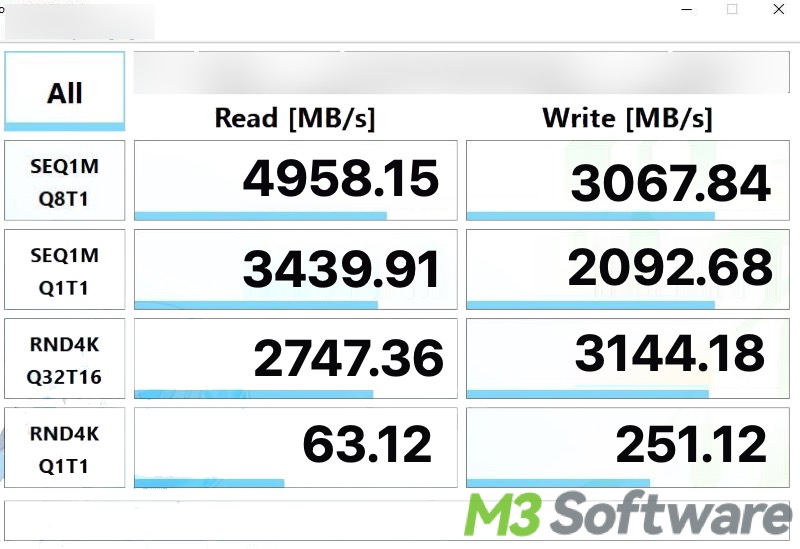
Synthetic benchmarks measure sequential and random speeds. Typical results show:
- Sequential read/write speeds drop by about 0–5% on systems with AES-NI.
- Random small-block writes can show 0–10% overhead when CPU lacks hardware AES.
- Initial full-disk encryption takes time but is a one-time cost.
In my tests on a modern NVMe laptop, everyday tasks like boot, app load, and file copy felt the same with BitLocker on. Heavy database or VM workloads showed small drops only under sustained write pressure. Industry benchmarks generally agree: overhead is small on modern systems and bigger only on legacy hardware.

Factors that affect performance
Many elements change the answer to does bitlocker slow down ssd. Key factors include:
- CPU and AES-NI
- CPUs with AES instructions speed up encryption. Older CPUs lack this and show more slowdown.
- SSD controller and firmware
- Better controllers handle encrypted traffic more efficiently.
- Interface: NVMe vs SATA
- NVMe usually hides overhead better than SATA.
- Encryption mode
- XTS-AES is common and secure. Mode choice can affect speed.
- Windows settings
- Used-space-only vs full-disk encryption changes initial encryption time.
- Background tasks
- Antivirus, indexing, or heavy IO tasks can increase perceived slowdown.
Addressing these factors helps answer whether does bitlocker slow down ssd on your specific machine.
How to minimize any performance impact
If you want to keep speed high while using BitLocker, follow these steps:
- Use a modern CPU with AES-NI enabled to speed cryptographic operations.
- Keep SSD firmware and storage drivers up to date for best performance.
- Prefer NVMe SSDs for heavier workloads and lower latency.
- Choose used-space-only encryption when setting up a new drive to shorten initial encryption.
- Ensure TRIM is active; BitLocker does not block TRIM on modern Windows builds.
- Avoid enabling untrusted hardware encryption options without verification.
- Keep background scans reasonable; configure antivirus to avoid redundant scans of encrypted I/O if safe.
These steps reduce the chance that encryption will slow your SSD noticeably.
Personal experience and practical tips
I have deployed BitLocker on work laptops and home PCs. On modern laptops, I saw no noticeable slowdown in daily use. Boot times stayed the same and apps opened normally. One mistake I once made was enabling hardware encryption on an older drive without checking firmware issues. That caused latency spikes in one case. I fixed it by switching to software-based BitLocker with AES-NI on the CPU. Lesson: test before wide rollout and keep backups before encrypting.

Frequently Asked Questions of does bitlocker slow down ssd
Does BitLocker slow down SSD speeds during normal use?
Most modern systems show negligible slowdown. Everyday tasks like browsing and office work are usually unaffected.
Will BitLocker shorten my SSD lifespan?
No. BitLocker does not meaningfully increase writes beyond normal use. SSD wear is driven by write volume, not encryption itself.
Can hardware encryption make BitLocker faster?
Hardware encryption can be faster on some SSDs, but it has security and compatibility caveats. Modern practice often prefers CPU-accelerated software encryption for safety.
How can I test if BitLocker slows my SSD?
Run simple benchmarks for sequential and random read/write before and after enabling BitLocker. Compare results and watch for major differences.
Does BitLocker affect boot time?
On most modern devices, boot time stays similar. Pre-boot authentication adds a small step, but it usually does not make boot notably slower.
Conclusion
BitLocker rarely slows modern SSDs in a way you can feel. On systems with AES-NI and good SSDs, the performance cost is small. Older CPUs or poor SSD firmware can cause bigger impacts. Encrypt thoughtfully: update firmware, use modern hardware, and pick the right BitLocker settings. Test changes on your machine and back up data before encrypting. If you care about speed and security, enable BitLocker and follow the optimization steps above. Leave a comment or share your experience to help others decide.

Everett Ashford is a tech reviewer at mytechgrid.com specializing in SSDs, cameras, TVs, earbuds, headphones, and other consumer electronics. He provides honest, data-driven reviews based on hands-on testing and real-world performance analysis. Everett simplifies complex tech details to help readers make smart, confident buying decisions.