Choose the R8 for full-frame cinematic look, the R7 for reach, stabilization, and run-and-gun.
I have shot weddings, short films, and nature runs. I also teach video workshops and test gear. I will walk you through how to choose Canon R7 or R8 for video with clear facts and real-world tips. You will learn where each camera shines, what trade-offs matter, and how to match the camera to your shoots and budget. Read on to pick the right tool for your videos.

Why this choice matters for video
Choosing the right camera shapes your look and workflow. How to choose Canon R7 or R8 for video depends on your subject, lens needs, and postwork. One camera gives a shallow, cinematic feel. The other gives extra reach, better stabilization, and more pro controls. I will show you the practical trade-offs so you pick with confidence.
Key differences at a glance
- Sensor and look
- R8 uses a full-frame sensor for shallower depth of field and wider field of view.
- R7 uses an APS-C sensor for a 1.6x crop. That gives more reach with the same lens.
- Stabilization
- R7 has in-body image stabilization. It helps handheld video.
- R8 favors lighter weight and relies on lens stabilization.
- Form factor and ports
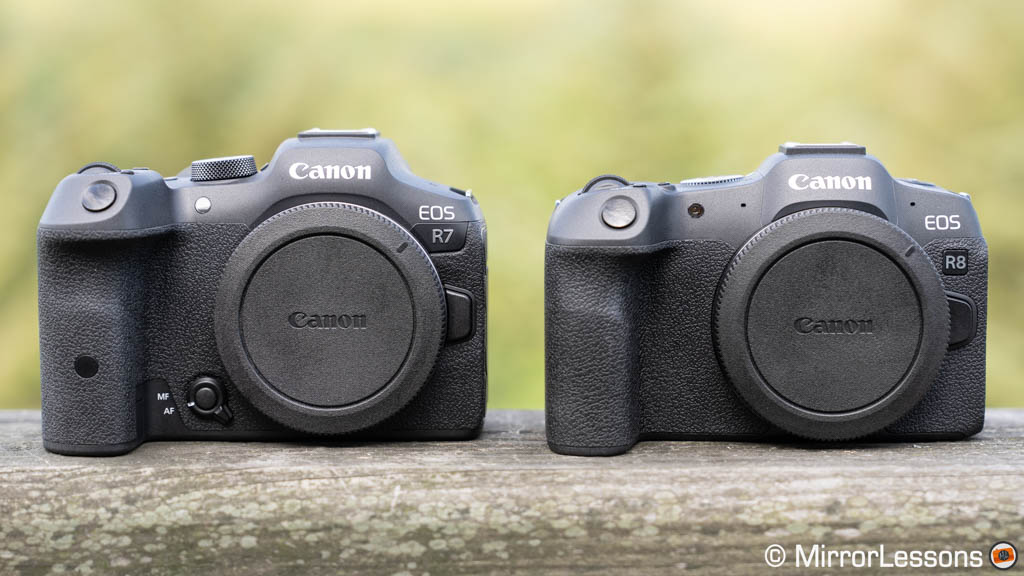
- R8 is smaller and lighter. It is easier on gimbals.
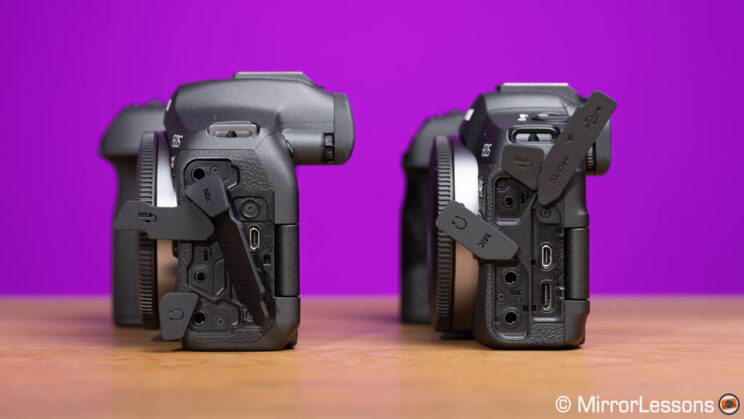
- R7 is slightly larger and has more physical controls and dual card slots.
- Workflow and battery
- R8 is compact but can run warmer on long 4K sessions.
- R7 typically handles long handheld runs better.
- Use-case shorthand
- Choose R8 for cinematic, low-light, and studio work.
- Choose R7 for run-and-gun, wildlife, and sports where reach and IBIS matter.

Sensor, crop, and low-light performance
The sensor defines your image. How to choose Canon R7 or R8 for video starts with sensor needs. R8’s full-frame sensor gives a wider view and a shallow depth of field at the same aperture. This helps separate your subject from the background. R7’s APS-C sensor adds a 1.6x crop. That crop gives more telephoto reach with the same lens. It is great for wildlife and interviews from a distance.
Low-light is tied to sensor size and pixels. Full-frame sensors tend to handle high ISO cleaner. I found the R8 gives smoother skin tones in dim rooms. The R7 still performs well at moderate ISO and often wins on detail thanks to its higher pixel density. If your films run a lot of nighttime or club scenes, the R8 often needs less noise cleanup in post.
Autofocus, IBIS, and stabilization
Autofocus is a big deal for video. Both cameras use Canon’s reliable AF for smooth subject tracking. Face and eye detect work very well on both bodies in normal light. The R7 has in-body image stabilization. This saves you when you handhold, walk, or shoot with non-stabilized lenses. The R8 lacks in-body stabilization and leans on stabilized RF lenses or gimbals for steady footage.
From my tests, the R7’s IBIS plus a stabilized lens gave very steady slow walking shots. The R8 required a gimbal or lens IS to match that same steadiness. If you often shoot handheld or run-and-gun without a stabilizer, remember that when thinking about how to choose Canon R7 or R8 for video.

Video features, frame rates, codecs, and heat management
Frame rates and codecs decide your final workflow. Both cameras offer high-quality 4K recording and useful frame rates for slow motion. The R8’s full-frame sensor tends to give a creamier look at 4K. The R7’s crop can give tighter framing at the same focal length. Both cameras provide internal codecs that work for fast turnaround. They also support higher bit-depth outputs when paired with the right accessories.
Heat and battery matter in long sessions. The smaller, lighter body of the R8 can run warmer during extended 4K recording. The R7’s design helps longer handheld recording without as much thermal cutout. If you plan to record long interviews, events, or continuous takes, factor that in when you decide how to choose Canon R7 or R8 for video.
Ergonomics, ports, and practical controls
How a camera feels changes how you shoot. R8 is light and easy to carry for travel and gimbal work. R7 is built with more buttons and a sturdier grip. That helps when you must change settings fast on a shoot. Dual card slots on the R7 give peace of mind when you must back up footage in-camera. The R8’s compact body is great for vlogging rigs and small studios.
I value direct dials on the camera during live shoots. The R7’s extra controls cut time. The R8 is simpler and forces you to rely more on menus. Decide if quick tactile control or light weight is more important for your work.

Lens ecosystem and reach
Lenses define image quality and style. Both cameras use Canon’s RF mount. The R7 also plays well with RF-S lenses designed for APS-C. RF-S lenses are often lighter and cheaper. Using full-frame RF glass on the R7 gives a tighter field thanks to the crop. That is a big plus for wildlife and sports where reach matters.
If you want shallow depth of field and full-frame lenses, the R8 is the natural match. If you want extended telephoto reach out of the same lens bag, the R7 wins. Think through your existing lens lineup when you decide how to choose Canon R7 or R8 for video.
Which to choose for your workflow
Use this quick workflow guide to decide how to choose Canon R7 or R8 for video:
- You shoot short films, interviews, and need cinematic depth of field
- Pick the R8 for full-frame look and cleaner low-light performance.
- You shoot weddings, run-and-gun events, or wildlife and need reach
- Pick the R7 for IBIS, crop reach, and dual card slots.
- You rely on a gimbal and travel light
- Pick the R8 for its compact size and lighter weight.
- You need long hand-held takes and fast AF with extra battery life
- Pick the R7 for endurance and in-body stabilization.
- You already own RF full-frame glass and prefer a shallow look
- Lean toward the R8 for native full-frame rendering.
I often choose the R7 for fast-paced shoots and the R8 for controlled, cinematic work. Your needs will guide you in the same way.

Practical tips and mistakes to avoid
- Test your lenses before a real shoot
- Lens choice changes the final look more than the body.
- Don’t ignore stabilization
- If you pick R8, plan for gimbals or lens IS for handheld shots.
- Watch battery life and heat
- Bring extra batteries and cooling time for long 4K sessions.
- Back up on set
- Use dual slots or a reliable backup workflow after every shoot.
- Match camera to story
- Pick the tool that supports the story, not the other way around.
These tips come from shoots where I had to switch gear on the fly. They saved good takes more than once.
Frequently Asked Questions of How to choose Canon R7 or R8 for video
Which camera gives a more cinematic look for video?
The R8 gives a more cinematic look thanks to its full-frame sensor and shallower depth of field. Use fast lenses and controlled lighting to maximize that effect.
Is the R7 better for wildlife and sports video?
Yes. The R7’s APS-C crop adds reach and its IBIS helps stabilize long lenses. It is a great choice for action and distant subjects.
Can I use RF full-frame lenses on the R7?
Yes. RF full-frame lenses work on the R7 and give a tighter field of view due to the 1.6x crop. This can be a cost-effective way to get more reach.
Do both cameras handle autofocus well for video?
Both cameras have strong autofocus with eye and subject detection. The R7 and R8 perform reliably in most light, though low light can challenge any AF system.
Which camera is better for vlogging and travel?
The R8 is lighter and easier to carry, making it ideal for travel and vlogging rigs. If you need more stabilization for handheld vlogging, plan for a gimbal or stabilized lens.
Conclusion
Choosing between these two is about fit, not which is “best.” The R8 favors a full-frame cinematic look and low-light ease. The R7 favors reach, stabilization, and long handheld work. Think about your subjects, lenses, and how you like to move on set. Try both bodies if you can, then pick the one that makes your work faster and your films better. Share your shooting style or questions below, subscribe for more gear guides, or leave a comment about your pick.

Jamie Lee is a seasoned tech analyst and writer at MyTechGrid.com, known for making the rapidly evolving world of technology accessible to all. Jamie’s work focuses on emerging technologies, product deep-dives, and industry trends—translating complex concepts into engaging, easy-to-understand content. When not researching the latest breakthroughs, Jamie enjoys exploring new tools, testing gadgets, and helping readers navigate the digital world with confidence.