Raise device volume, use better ear tips, tweak EQ, or add a small amplifier safely.
I have spent years testing audio gear and fixing quiet earbuds for friends and clients. This guide explains exactly how to make earbuds louder with clear steps, safe practices, and real-life tips. Read on to learn practical fixes, when to upgrade hardware, and how to avoid hearing damage while you boost volume.
Why earbuds sound quiet and what to check first
Many things can make earbuds low in volume. Your phone or player may limit output. Earbud fit or dirty tips can leak sound. Bluetooth codecs and signal strength can cut volume. Driver damage, faulty cables, or wrong equalizer settings also reduce loudness.
Check these quick items first:
- Make sure the device volume and app volume are high.
- Inspect ear tips for wax or dirt and clean them.
- Try a different device and cable to rule out a phone or jack issue.
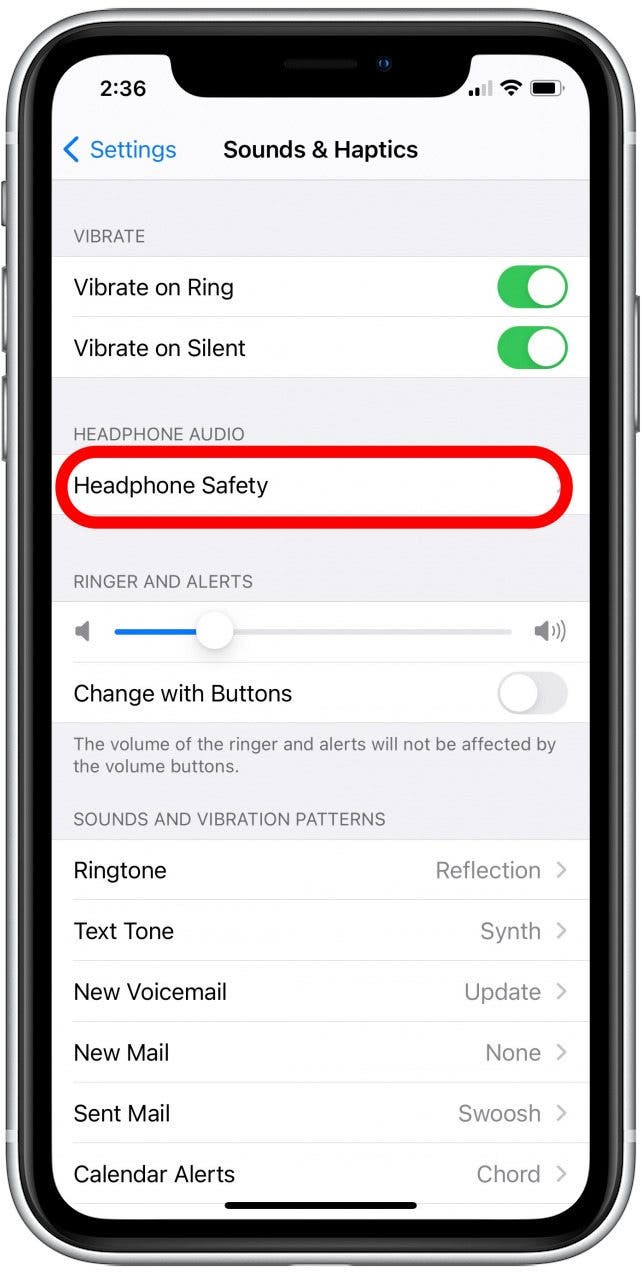
- Turn off any “volume limit” or “safe listening” features on your device.
Understanding the root cause helps you target the right fix and avoid wasteful purchases. If you know why your earbuds are quiet, you can follow the steps below to make earbuds louder with confidence.

Simple software fixes to make earbuds louder
Start with software. This is often the safest and fastest path to louder sound.
Steps to try:
- Increase master volume and app volume on your phone or computer.
- Disable any built-in volume limit or safe listening mode in settings.
- Use the device equalizer to boost mid and high frequencies gently.
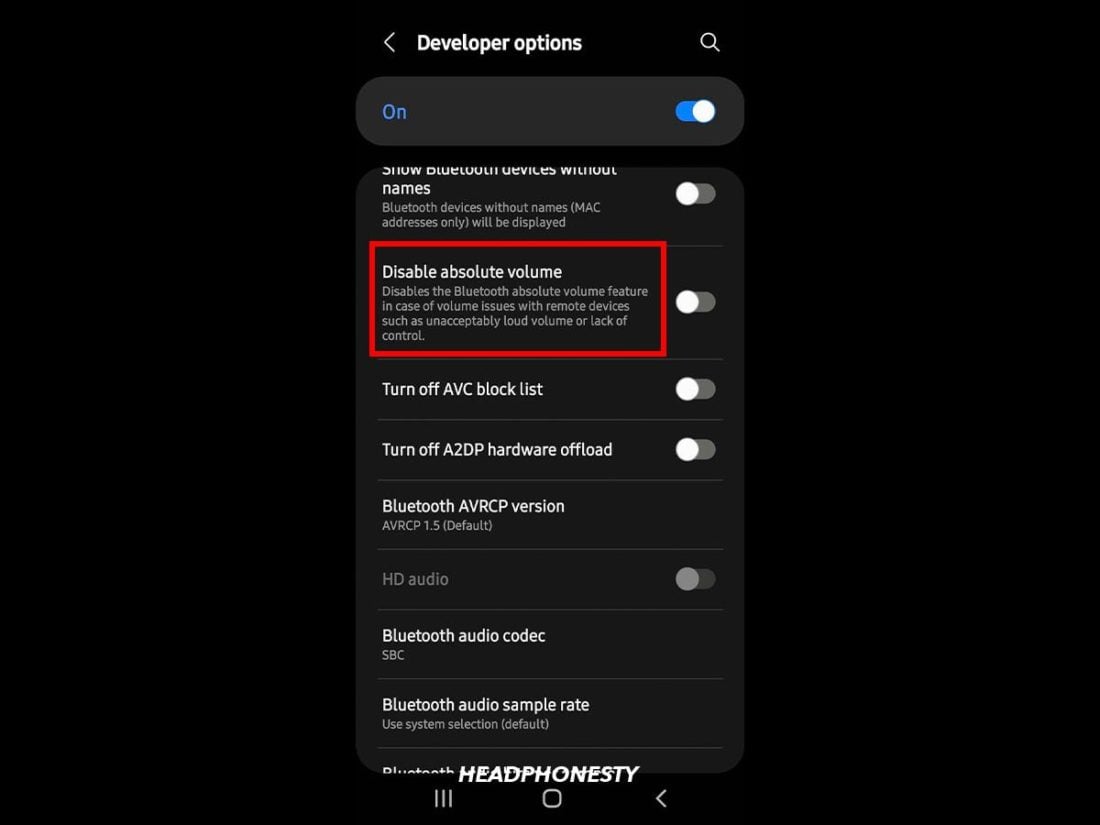
- Enable Absolute Volume or similar settings on Android to improve Bluetooth output.
- Update firmware for earbuds and your phone to fix volume bugs.
Caveats and tips:
- Avoid extreme EQ boosts; they can create distortion and damage drivers.
- Some apps have their own volume control. Check each streaming app.
- If you use Bluetooth, try wired mode if your earbuds support it. Wired connections often provide more volume headroom.
These software steps often make earbuds louder without buying anything. They also reveal if the problem is hardware.
Hardware tweaks and accessories to increase loudness
When software is not enough, small hardware changes can help.
Useful hardware options:
- Replace silicone tips with foam tips to improve seal and bass response.
- Clean and inspect drivers for earwax or debris that blocks sound.
- Use a portable headphone amplifier or DAC to boost signal cleanly.
- Try a higher-sensitivity earbud model if you need more passive loudness.
- Replace worn cables or use a different connector to fix resistance or poor contact.
How to choose an amp or DAC:
- Pick a compact amp rated for low-impedance earbuds.
- Match impedance and sensitivity to avoid overpowering drivers.
- Battery-powered amps are good for phones and travel use.
Small upgrades often give a big perceived volume boost. Foam tips and a mild amp are two of the most effective changes to make earbuds louder.
Advanced fixes and repairs for serious issues
If your earbuds still sound quiet, deeper issues may exist. Diagnose and repair carefully.
Advanced steps:
- Test drivers by swapping left and right if possible, to find damage.
- Check the jack and connector for corrosion or loose pins and clean them.
- Replace broken internal wires or connectors if you can solder or have a tech do it.
- Consider professional driver replacement for high-end earbuds.
When to replace instead of repair:
- Cost of repair nears the price of new earbuds.
- Multiple drivers are damaged.
- Repair would degrade sound quality or reliability.
Advanced fixes require care. If you are not confident soldering or opening tiny housings, use a trusted repair shop.

Safety, hearing health, and legal considerations
Making earbuds louder comes with risks. Protect your hearing and follow allowed limits.
Safety points:
- Keep average listening below 85 dB to reduce long-term hearing loss risk.
- Use volume limiters for children or sensitive ears.
- Avoid prolonged listening at max volume to prevent tinnitus.
- Be aware some regions require warnings for high-volume devices.
Legal and warranty notes:
- Modifying earbuds or using unapproved amps can void warranties.
- Some apps and devices have mandated volume caps that you should not try to bypass recklessly.
Respect your ears while you make earbuds louder. A little caution preserves hearing and keeps your gear functional.

Personal experience: what I tried and what worked
I once worked on a pair of earbuds that seemed fine but were very quiet on one phone and louder on another. I learned a few things:
- The phone had a hidden “smart volume” limiter that cut Bluetooth output. Turning it off fixed volume completely.
- Foam tips transformed the seal and boosted perceived volume and bass.
- A pocket amp gave clear extra headroom without distortion. But cheap amps added noise.
Mistakes I made:
- I once cranked EQ to extreme settings and clipped the drivers. That taught me to boost in small steps.
- I bought an overly powerful amp and heard distortion. Proper impedance match is key.
These lessons help you choose safe and effective ways to make earbuds louder.
Troubleshooting checklist: step-by-step
Follow this order to diagnose and fix volume issues fast.
- Check device and app volume controls. Raise both to maximum.
- Test earbuds on another device to isolate the problem.
- Clean ear tips and try different tips for a better seal.
- Disable safe listening or volume limit features in settings.
- Update firmware for both device and earbuds.
- Use EQ for modest boosts and avoid pushing extremes.
- Try a wired connection if available.
- Consider a portable amp or DAC if volume is still low.
- Seek professional repair if drivers or wiring are suspected damaged.
This checklist covers most situations where you want to know how to make earbuds louder.

Frequently Asked Questions of how to make earbuds louder
How can I make earbuds louder on an iPhone?
Increase the iPhone volume and app volume, disable any volume limit in Settings > Sounds & Haptics, and use a wired connection or a compatible external DAC for extra headroom.
How do I make earbuds louder on Android?
Turn on Absolute Volume in developer options if available, raise both media and app volume, and check for device-specific volume limit settings in Sound or Safety menus.
Will ear tips really make a difference?
Yes. Foam or well-fitting silicone tips create a better seal. A good seal improves bass and perceived loudness without increasing driver power.
Can EQ or a volume booster damage earbuds?
Excessive EQ boosting can cause clipping and distortion, which may damage tiny drivers over time. Make small equalizer adjustments and listen for distortion.
Is using a portable amp safe for earbuds?
A proper amp matched to your earbuds is safe and effective. Avoid very high gain settings and pick an amp designed for low-impedance earbuds to prevent damage.
Why do my earbuds sound quieter on Bluetooth than wired?
Bluetooth codecs and wireless compression can lower perceived volume. Wired connections usually deliver stronger, cleaner signals and more volume headroom.
Conclusion
You can make earbuds louder through quick software fixes, better ear tips, cleaning, or small hardware like a portable amp. Start with checks and safe steps, and only move to repairs or upgrades when needed. Protect your hearing while you tweak volume, and test changes methodically to find what works best.
Take action now: follow the troubleshooting checklist, try foam tips, and test an amp if needed. If this guide helped, leave a comment with your earbud model or subscribe for more audio tips.

Everett Ashford is a tech reviewer at mytechgrid.com specializing in SSDs, cameras, TVs, earbuds, headphones, and other consumer electronics. He provides honest, data-driven reviews based on hands-on testing and real-world performance analysis. Everett simplifies complex tech details to help readers make smart, confident buying decisions.