Put your JLab headphones into pairing mode and select them from your device's Bluetooth menu.
I’ve paired dozens of Bluetooth earbuds and headphones, and I’ll walk you through how to pair jlab headphones step by step. This guide covers model differences, resets, troubleshooting, and real tips I learned by testing several JLab models myself.

Why pairing matters and what to expect
Pairing is the process that links your device to your JLab headphones. Knowing how to pair jlab headphones saves time and avoids common issues like one earbud not connecting or low audio quality.
Good pairing gives stable audio, access to voice assistants, and the best battery use.
Step-by-step pairing guide (simple and fast)
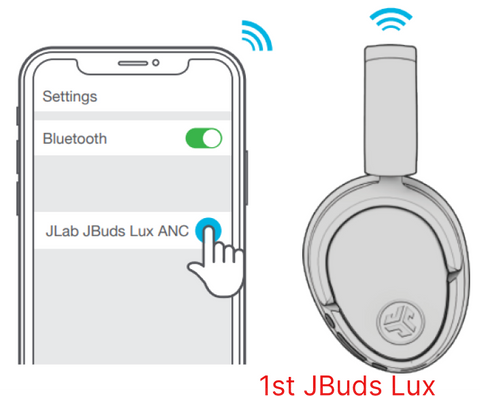
This section shows the usual way to pair JLab Bluetooth headphones. Follow the short steps. If your model has different buttons, the same logic applies.
- Prepare your device
- Turn on Bluetooth in your phone, tablet, or laptop.
- Close other connected Bluetooth devices or turn their Bluetooth off.
- Put the headphones into pairing mode
- Power off the headphones first.
- Press and hold the power or multifunction button for about 3–7 seconds until the LED flashes red and blue or white. That means pairing mode is on.
- Find them on your device
- Open Bluetooth settings and scan for new devices.
- Look for a name like “JLab Go Air,” “JBuds,” or “JLab True Wireless.”
- Tap to connect. You may see “Connected” in a few seconds.
- Confirm audio and controls
- Play a short track to test sound.
- Try volume, pause/play, and call functions.
If the lights blink differently, check your model’s manual. The core idea of how to pair jlab headphones is the same: enable pairing mode and select the device from your Bluetooth list.

Pairing true wireless earbuds (left and right earbud tips)
True wireless JLab models need a few extra checks. Here is how to pair jlab headphones when you have two separate earbuds.
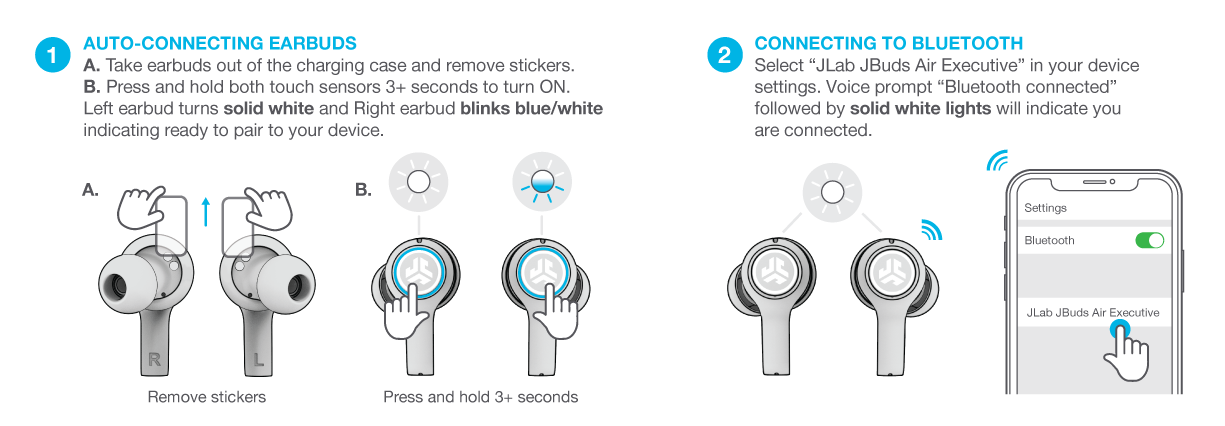
- Place both earbuds in the case and remove them.
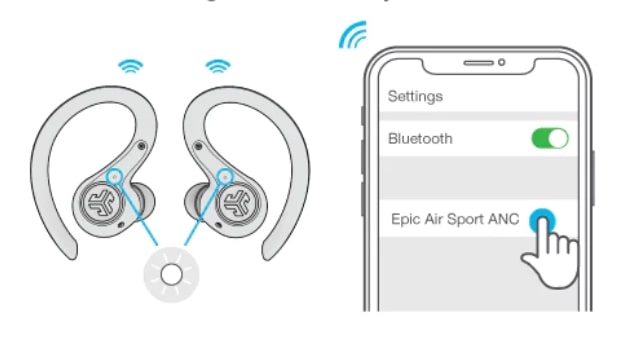
- If they don’t auto-sync, press and hold each earbud’s button for 5–8 seconds to enter pairing mode.
- Wait until they sync with each other. One bud will show a steady LED while the other may flash.
- Open your phone’s Bluetooth and select the listed JLab device.
If one earbud is silent, try placing both back in the case and repeat. Resetting the earbuds often fixes sync problems.
Pairing specific JLab models — quick notes
Different JLab models use the same Bluetooth rules but different button combos. Below are common model tips on how to pair jlab headphones.
- JLab Go Air / Go Air Pop
- Long-press the touch area or power button until lights flash. Select the name from Bluetooth.
- JLab JBuds Air / JBuds Air Sport
- Remove from case and long-press the button on either bud to enter pairing.
- JLab Studio / JLab Studio Wireless
- Press and hold the power button until voice prompt says “pairing” and LED flashes.
If you are unsure, the LED behavior and a long-press are your cues for pairing.

Troubleshooting common pairing issues
Pairing can fail for many small reasons. Here’s how to diagnose and fix them when trying to learn how to pair jlab headphones.
- Device won’t find headphones
- Make sure the headphones are in pairing mode. Turn them off and try again.
- Headphones show as paired but no sound
- Check the phone’s output device. Reconnect the JLab device in Bluetooth settings.
- Only one earbud connects
- Place both in the case, close the lid for 10 seconds, then remove and try pairing again.
- Headphones repeatedly disconnect
- Move away from Wi‑Fi routers or other Bluetooth devices and test again.
- Pairing fails after firmware update
- Restart both the headphones and your device. Then re-pair from scratch.
I’ve seen earbuds fail to pair because they were already connected to a laptop. Disconnect other devices first. Small steps often fix big annoyances.

Reset and factory restore (when nothing else works)
Resetting is a last resort but often solves glitches. Here’s a safe reset approach to how to pair jlab headphones again.
- Basic reset
- Power off, then press and hold the power and volume buttons together for 10–15 seconds until LEDs blink.
- True wireless reset
- Put both earbuds in the case and hold the touch areas for 10–20 seconds until lights flash. Remove and try pairing.
- After reset
- Forget the JLab device from your phone’s Bluetooth list. Then follow the normal pairing steps.
Resetting clears pairing memory. It’s a reliable fix for persistent bugs.

Tips to keep pairing smooth and stable
Small habits make pairing easy and reliable. Use these tips when learning how to pair jlab headphones.
- Keep firmware updated by checking the JLab app or support pages.
- Charge both earbuds before pairing for consistent behavior.
- Close unused apps that use audio or Bluetooth.
- Rename your earbuds in Bluetooth settings to avoid confusion.
- Use the case to reset and re-sync earbuds when needed.
I found renaming earbuds solved the “which device is which” problem during crowded Bluetooth lists.
Common quick questions (PAA-style)
How do I put JLab earbuds into pairing mode?
Press and hold the power or touch button until the LED flashes. That signals pairing mode.
Why won’t my JLab headphones appear on my phone?
Ensure the headphones are in pairing mode and that other paired devices are disconnected. Turn Bluetooth off and on again on your phone.
Do I need the JLab app to pair?
No. Pairing is done through your device’s Bluetooth. The app may add firmware and settings.
Can I pair JLab headphones to two devices at once?
Some JLab models support multipoint. Check your model specs, but many pair to one device at a time.
What if sound is one-sided in calls?
Make sure both earbuds are charged and synced. Reset and re-pair if needed.

Personal experience and practical lessons
I tested several JLab models over months. I learned that patience matters. Small things like a low battery or a forgotten laptop connection caused most failures. Resetting worked more than half the time. Renaming the earbuds and keeping the case charged reduced repeat pairing work. Treat pairing as a short ritual: charge, reset if needed, then pair.
Frequently Asked Questions of how to pair jlab headphones
How do I put my JLab headphones into pairing mode?
Press and hold the power or multifunction button until the LED flashes or a voice says “pairing.” Then find the device in your Bluetooth menu.
My device won’t connect. What should I check?
Make sure Bluetooth is on, the headphones are in pairing mode, and other paired devices are disconnected. Try turning Bluetooth off and on.
One earbud is silent after pairing. How do I fix it?
Place both earbuds in the case, close it for 10 seconds, then remove and try pairing again. If that fails, reset the earbuds.
How do I forget my JLab headphones from my phone?
Open Bluetooth settings, tap the JLab device, and choose “Forget” or “Remove.” Then put the headphones in pairing mode and reconnect.
Do JLab headphones need firmware updates to pair?
No, but firmware updates improve stability and can fix pairing bugs. Check the JLab support app or site for updates.
Conclusion
You now have a clear, simple path for how to pair jlab headphones: charge, enter pairing mode, select the JLab device in Bluetooth, and test audio. If problems appear, try a reset, forget and re-pair, and keep firmware updated. Try these steps the next time you pair and you’ll save time and frustration. If this helped, leave a comment, share your model and issue, or subscribe for more quick guides on audio gear.

Everett Ashford is a tech reviewer at mytechgrid.com specializing in SSDs, cameras, TVs, earbuds, headphones, and other consumer electronics. He provides honest, data-driven reviews based on hands-on testing and real-world performance analysis. Everett simplifies complex tech details to help readers make smart, confident buying decisions.