Press and hold the power button on your Bose headphones until the indicator light turns off.
I’ve used many Bose models for work and travel, and I’ll walk you through clear, reliable steps on how to turn off Bose headphones. This guide covers universal steps, model-specific instructions, app and auto-off options, troubleshooting when they won’t power down, and practical tips from real-world use. Read on to confidently manage power and preserve battery life on your Bose headphones.

Quick, universal steps to turn off Bose headphones
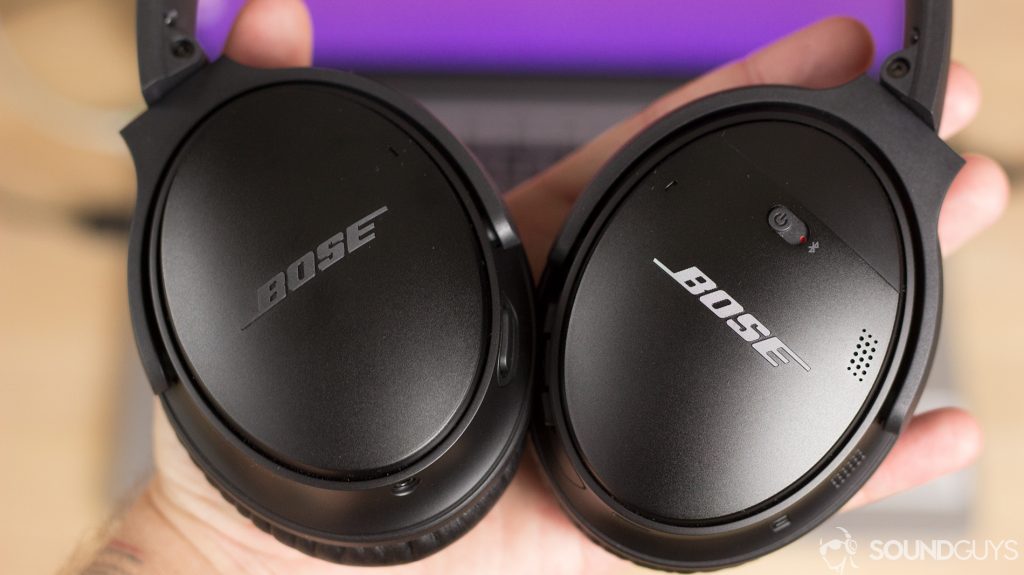
Most Bose headphones share a simple power routine. Use these steps if you want a fast solution on how to turn off bose headphones.
- Locate the power button or switch on your headphones.
- Press and hold the power button for about 2 to 5 seconds.
- Watch the LED or listen for the voice prompt that confirms shutdown.
- If there’s a physical switch, slide it to the off position until the LEDs go dark.
If a short press activates pairing or a feature, the long press usually powers down. If nothing happens, try holding the button longer — up to 15 seconds — to force a shutdown. These steps work for most Bose models and are the first thing I try when teaching people how to turn off bose headphones.

Model-specific instructions
Different Bose models have small differences. Below are concise, model-focused steps on how to turn off bose headphones.
Bose QuietComfort 35 and QuietComfort 35 II
Press and hold the power switch for 2 to 3 seconds. Release when you hear the “power off” voice prompt or when the indicator light goes out.
Bose QuietComfort 45
Press and hold the power/Bluetooth button until the status light extinguishes or you hear the shutdown prompt. This usually takes about 2–3 seconds.
Bose Noise Cancelling Headphones 700
Press and hold the power/Bluetooth button on the right earcup until the LEDs go out. A voice prompt will often confirm power off.
Bose QuietComfort Earbuds and Sport Earbuds
Press and hold the multifunction button on either earbud for several seconds until the earbud powers down. Place them in the case to ensure power off and charging.
Bose SoundLink around-ear models
Slide the physical power switch to the off position or press and hold the power button until the voice or light confirms shutdown.
If you are unsure for your model, check the printed labeling around the buttons. These model tips helped me avoid confusion when switching between different Bose pairs.

Using the Bose Connect app and auto-off features
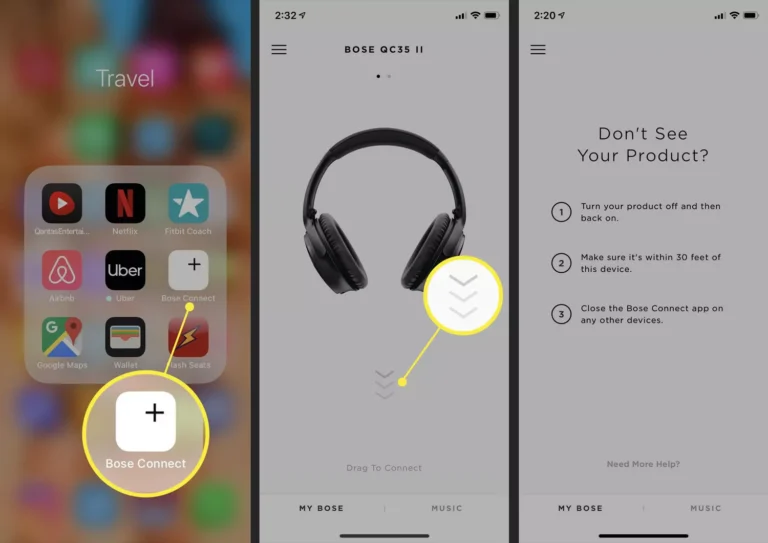
The Bose Connect app and some models include auto-off timers and settings. Use these to avoid manual shutdowns and save battery.
- Open the Bose app to check device settings and battery status.
- Look for an auto-off timer you can adjust (for supported models). Set it for shorter idle time to conserve power.
- Use the app to safely disconnect and then power down if the app provides a shutdown option.
Note that not all Bose models support power-off through the app. For many users, the app is handy for diagnosing power issues and confirming firmware updates that improve shutdown behavior. I rely on the app to check battery health and change auto-off preferences when traveling.

Troubleshooting: If your Bose headphones won't turn off
If your headphones stay on, use these troubleshooting steps to resolve power issues and learn how to turn off bose headphones when they seem stuck.
- Force shutdown by holding the power button for 10–15 seconds. Many models will power down after an extended press.
- Let the battery drain fully, then recharge. A fully drained battery can reset odd states.
- Perform a factory reset if the firmware is frozen. Reset steps vary by model, so follow the manual for your specific Bose headphones.
- Update firmware via the Bose app or desktop updater. Firmware bugs can prevent proper power-off behavior.
- If none of the above work, contact Bose support or schedule a repair; a hardware fault might prevent power-off.
From experience, an extended hold or firmware update fixes most stuck-power cases. If you try these steps, document what you did before contacting support.
Battery-saving tips and best practices
Turning your headphones off properly extends battery life. Here are simple habits that help you manage power and avoid repeated questions about how to turn off bose headphones.
- Turn off headphones whenever you’re not using them.
- Use the auto-off feature when available to power down after idle time.
- Store earbuds in their case to ensure they power off and recharge.
- Keep firmware up to date for better power management.
- Avoid leaving them in hot cars, which can harm battery life.
These small steps add up. I cut my headphone charge cycles in half by using auto-off and storing earbuds properly.
My experience: real-world tips and mistakes to avoid
I’ve carried multiple Bose pairs in a backpack and learned practical lessons on how to turn off bose headphones that save time and frustration.
- Mistake: assuming a quick tap powers off. Lesson: always press and hold when in doubt.
- Mistake: leaving earbuds loose in a bag. Lesson: use the case; it powers them down and protects them.
- Tip: teach family members the long-press method to avoid accidental pairing or leaving devices on.
- Tip: keep the charging cable handy for troubleshooting a stubborn unit.
These experiences made me more systematic. I now set auto-off to the shortest comfortable time and always check the app when power behavior seems odd.
Frequently Asked Questions of how to turn off bose headphones
How long should I hold the power button to turn off Bose headphones?
Hold the power button for 2 to 5 seconds for most Bose models. If they don’t respond, try holding it for up to 15 seconds to force a shutdown.
Can I turn off Bose headphones from the Bose Connect app?
Some Bose models let you adjust auto-off and show battery status in the app, but not all let you power off directly. Use the app to check settings and firmware instead.
What do I do if my Bose headphones are frozen and won’t turn off?
Try a long press on the power button, drain and recharge the battery, and perform a factory reset if needed. If the issue persists, contact Bose support for repair options.
Do Bose headphones turn off automatically?
Yes, many Bose models include auto-off after a period of inactivity. You can usually change or enable this in the app or settings for supported models.
Will a factory reset turn off my Bose headphones?
A factory reset may power them down as part of the process, but its primary role is to clear settings and restore defaults. Follow model-specific reset steps carefully.
Conclusion
Turning off Bose headphones is usually quick: press and hold the power button, or use a switch or the charging case depending on the model. Use the Bose app and auto-off features to save battery and avoid manual shutdowns. If they won’t turn off, a long press, firmware update, or reset often fixes the issue — and contact support if hardware is at fault. Try these steps now, set an auto-off timer, and keep your headphones charged and ready. Leave a comment or subscribe for more practical tips and troubleshooting guides.

Everett Ashford is a tech reviewer at mytechgrid.com specializing in SSDs, cameras, TVs, earbuds, headphones, and other consumer electronics. He provides honest, data-driven reviews based on hands-on testing and real-world performance analysis. Everett simplifies complex tech details to help readers make smart, confident buying decisions.