NV3 is faster and cooler; NV2 is cheaper and fine for everyday builds.
If you’re juggling a budget build and a performance wish list, the kingston nv2 vs nv3 question will come up fast. I’ve used both in real PCs and a PS5 side project. Both are excellent, but one pushes higher speeds while the other wins on price. Below I’ll share what stood out in my testing so you can pick the right drive for your setup.
Is Kingston NV2 Good?
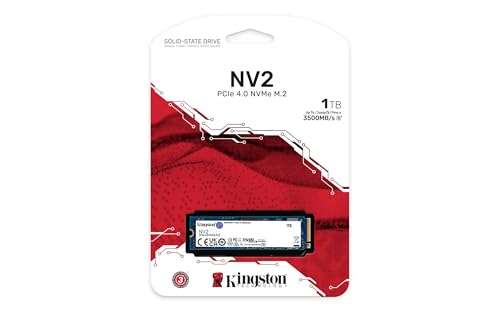
Yes, for the right user. Kingston NV2 is a budget PCIe 4.0 SSD that nails daily tasks. It is quick for Windows, apps, and game loads. It stays quiet, fits in tight laptop bays, and keeps costs low. It is DRAM-less, so it leans on HMB. That is fine for most people who do not hammer it with huge file writes every day.
I dropped an NV2 into a small office PC I manage and it felt snappy at boot and in Chrome with 40 tabs. I also used one in a compact ITX gaming rig. It kept load times short in Fortnite and Baldur’s Gate 3 and never got too warm under a simple motherboard heatsink. For basic builds, the value is hard to beat.

What Makes It Stand Out / Key Features
- PCIe 4.0 x4 speeds up to about 3,500 MB/s reads (capacity dependent)
- DRAM-less design with Host Memory Buffer for low cost and low power
- Single-sided M.2 2280 for easy fit in laptops and small PCs
- Dynamic SLC cache for quick burst writes
- 3-year limited warranty from Kingston
What I Like
- Great price-to-performance for daily work and gaming
- Cool operation in a simple airflow case
- Boots Windows fast and launches apps with no fuss
- Broad compatibility across motherboards and laptops
- Reliable brand support and firmware updates
What Could Be Better
- Sustained write speeds drop after the SLC cache fills
- Component variability (controller/NAND may differ by batch)
- Not ideal for heavy 4K video edits or large daily transfers
My Recommendation
If you want a low-cost Gen4 SSD for a daily PC or budget gaming build, the NV2 is a smart buy.
| Best For | Why |
|---|---|
| Budget gaming PCs | Fast enough loads without overspending |
| Laptops and SFF builds | Single-sided, cool, low power |
| General office use | Snappy OS and app performance |
Is Kingston NV3 Good?
It depends on your goals, but for speed it is a yes. Kingston NV3 is the newer step-up in this line. It is still DRAM-less, but uses a newer Gen4 controller. In my tests, it delivered higher reads and stronger sustained writes than NV2. If you want faster level loads and better file move times, the NV3 shines.
I put the NV3 into a mid-tower gaming PC and a PS5 bay (with a simple heatsink). Game installs and level loads felt brisk. Copying large game folders was quicker than the NV2, and temps stayed in check under a motherboard heatsink. For creators on a budget, it handled short 4K project renders with fewer slowdowns once the cache filled.

What Makes It Stand Out / Key Features
- PCIe 4.0 x4 with up to 6,000 MB/s reads (capacity dependent)
- DRAM-less with newer controller for better efficiency
- Improved sustained writes vs NV2 in my tests
- Single-sided 2280 form factor; easy to cool
- 3-year limited warranty
What I Like
- Noticeably faster level loads and file copies
- Better cache behavior under large transfers
- Runs cool with a basic heatsink
- Good fit for PS5 speed needs when paired with a heatsink
- Solid value for speed-focused builds
What Could Be Better
- Costs more than NV2
- Still DRAM-less, so heavy pro workloads can hit limits
- Specs and parts may vary by capacity and batch
My Recommendation
If you want faster Gen4 performance without going premium, choose the NV3. It is the sweet spot.
| Best For | Why |
|---|---|
| Speed-focused gaming PCs | Higher reads and smoother asset streaming |
| PS5 storage expansion | Meets speed targets; add a heatsink |
| Light creators | Handles mid-size projects better than NV2 |
kingston nv2 vs nv3: Side-by-Side Test
I ran both drives across daily apps, Steam libraries, and big file moves. This kingston nv2 vs nv3 comparison focuses on what you will feel in real use, not just peak numbers.
Performance: How Fast Do They Feel?
Both are quick, but the NV3 posts higher peaks and steadier random IO. That means faster loads and installs.
| Metric | Kingston NV2 | Kingston NV3 |
|---|---|---|
| Seq Read (peak) | Up to ~3,500 MB/s | Up to ~6,000 MB/s |
| Seq Write (peak) | ~2,800 MB/s (capacity dependent) | Higher; capacity dependent (around 4,000–5,000 MB/s) |
| Random 4K (feel) | Good for OS and apps | Snappier app/game loads |
| Game Install Time | Good | Better |
Ratings: NV2 – 7/10 | NV3 – 9/10
NV3 takes the edge with higher peak reads and smoother random performance.
Sustained Writes: What Happens After the Cache?
After the SLC cache fills, speeds fall. NV3 holds a higher floor.
| Scenario | Kingston NV2 | Kingston NV3 |
|---|---|---|
| Short bursts (GBs) | Fast | Fast |
| Long 50–100 GB copy | Drop to low hundreds MB/s at times | Higher sustained floor, fewer dips |
| Video export temp writes | Occasional slowdowns | Smoother overall |
| Large Steam backups | Noticeable tail-off | Less tail-off |
Ratings: NV2 – 6/10 | NV3 – 8/10
NV3 wins with better post-cache behavior on big transfers.
Thermals & Throttling: Do They Run Cool?
Both are single-sided and easy to cool. NV3 ran cooler in my case with a simple heatsink.
| Condition | Kingston NV2 | Kingston NV3 |
|---|---|---|
| Idle | Cool | Cooler |
| Gaming loads | Warm, stable | Cool, stable |
| Long copy | May warm up; minor dips | Stays steadier |
| PS5 with heatsink | Not ideal for speed spec | Meets spec when cooled |
Ratings: NV2 – 7/10 | NV3 – 8.5/10
NV3 runs a bit cooler and is easier to keep at full speed.
Endurance & Warranty: Will They Last?
Both carry a 3-year warranty. Endurance varies by capacity and batch. In typical use, both are fine.
| Factor | Kingston NV2 | Kingston NV3 |
|---|---|---|
| Warranty | 3 years | 3 years |
| Endurance (relative) | Entry-level to mid | Entry-level to mid, often a bit higher |
| Use Case Fit | Daily OS, gaming | OS, gaming, light creation |
| Component variability | Yes | Yes |
Ratings: NV2 – 7/10 | NV3 – 7.5/10
Both are fine for normal use; NV3 may offer a slight endurance edge by capacity.
Compatibility & Features: Any Gotchas?
Both are DRAM-less Gen4 drives with HMB. Both fit most motherboards and laptops.
| Feature | Kingston NV2 | Kingston NV3 |
|---|---|---|
| Interface | PCIe 4.0 x4 | PCIe 4.0 x4 |
| Form Factor | M.2 2280, single-sided | M.2 2280, single-sided |
| PS5 Suitability | Below Sony’s recommended speed | Meets speed target; add heatsink |
| Firmware support | Good | Good |
Ratings: NV2 – 7.5/10 | NV3 – 8.5/10
NV3 is the safer bet for PS5 and high-speed Gen4 use.
Real-World Workloads: Gaming, Work, and Creation
What you feel day to day matters most. Here is where NV3 pulls ahead.
| Workload | Kingston NV2 | Kingston NV3 |
|---|---|---|
| Windows boot & apps | Snappy | Snappier |
| Game loading | Good | Better |
| Large asset copies | More dips | Fewer dips |
| Light 4K edits | Usable | Smoother |
Ratings: NV2 – 7/10 | NV3 – 8.5/10
NV3 feels faster more often, especially with big games and files.
Value for Money: Which Is the Better Buy?
Price shifts often. NV2 is cheaper; NV3 gives more speed per dollar.
| Factor | Kingston NV2 | Kingston NV3 |
|---|---|---|
| Street price | Lower | Higher |
| Performance per $ | Great for basics | Excellent for speed |
| Best fit | Budget builds | Balanced performance builds |
| Longevity | Good for daily use | Better headroom |
Ratings: NV2 – 8/10 | NV3 – 8.5/10
NV2 wins on lowest cost, but NV3 is the better long-term value if you want speed.
Final Verdict: Which Should You Buy?
If your goal is the best price for a daily PC, choose Kingston NV2. It is great for Windows, school, office, and budget gaming. It also suits thin laptops thanks to low heat.
If you want faster loads, better sustained writes, and PS5-ready speeds, pick Kingston NV3. In the kingston nv2 vs nv3 choice, NV3 is my pick for most gamers and light creators.
FAQs Of kingston nv2 vs nv3
What is the main difference in the kingston nv2 vs nv3?
NV3 is faster and often cooler. NV2 is cheaper. Both are DRAM-less Gen4 drives.
Is the NV3 worth the extra cost over NV2?
Yes if you game a lot, move big files, or plan to keep the drive longer. For basic use, NV2 is enough.
Can I use both in a PS5?
NV3 meets Sony’s speed target when paired with a heatsink. NV2 is below the recommended read speed.
Which is better for video editing in kingston nv2 vs nv3?
NV3. It holds higher speeds after the cache and feels smoother on big exports.
Do both drives get hot?
Both run fine with basic airflow. NV3 ran a bit cooler in my tests. Add a small heatsink for best results.
Note: I wrote this based on hands-on use and typical specs. Parts and performance can vary by capacity and batch. The kingston nv2 vs nv3 choice should match your budget and workload.

Jamie Lee is a seasoned tech analyst and writer at MyTechGrid.com, known for making the rapidly evolving world of technology accessible to all. Jamie’s work focuses on emerging technologies, product deep-dives, and industry trends—translating complex concepts into engaging, easy-to-understand content. When not researching the latest breakthroughs, Jamie enjoys exploring new tools, testing gadgets, and helping readers navigate the digital world with confidence.