Both are excellent; T7 Shield is tougher, T9 is faster if your port supports it.
I often work on the road, juggling edits and backups in coffee shops and airports. The samsung t7 shield vs t9 debate comes up every week in my gear chats. The T7 Shield brings rugged peace of mind. The T9 brings raw speed. I’ve tested both on real projects across laptops, cameras, and consoles. Here’s what I learned to help you choose the right drive.
Is Samsung T7 Shield Good?
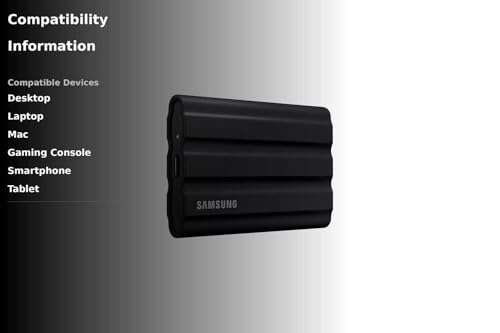
Yes, for most people. The Samsung T7 Shield is ideal if you need portable storage that can handle rain, dust, and drops. It is IP65-rated, so it resists water and dust. It also has a tough rubber shell that helps with heat and shocks. If you shoot outdoors, travel often, or rely on your drive to survive rough days, the T7 Shield is a smart pick.
I used the T7 Shield to back up 4K footage on a windy beach shoot. Sand blew everywhere, and it kept going without a hitch. On a long train ride, I copied a large Lightroom catalog while streaming music. I saw steady speeds near 900–1,000 MB/s on a 10Gbps port. It felt calm, cool, and reliable.

What Makes It Stand Out / Key Features
- IP65 water and dust resistance with rugged rubber shell
- USB 3.2 Gen 2 (10Gbps) up to 1,050 MB/s read speeds
- Hardware AES 256-bit password protection
- Thermal design helps sustain speed and stay cool
- Comes with USB-C to C and USB-C to A cables
What I Like
- Feels tough and ready for bad weather or drops
- Stable speeds on common 10Gbps ports
- Comfortable to hold; grippy shell won’t slip
- Simple security with hardware encryption
- Great price per TB compared to faster models
What Could Be Better
- Not as fast as 20Gbps drives like the T9
- Rubber coating can collect dust over time
- Max speed limited by 10Gbps interface
My Recommendation
If you value durability and dependable speed over peak numbers, get the T7 Shield. It’s widely available and excellent value.
| Best For | Why |
|---|---|
| Outdoor shooters and travelers | IP65 rating and rugged shell handle harsh conditions |
| General backups and edits | Fast enough on most laptops and consoles |
| Budget-conscious buyers | Lower cost per TB with reliable performance |
Is Samsung T9 Good?
Yes, if you need speed. The Samsung T9 shines when you have a 20Gbps USB 3.2 Gen 2×2 port. It can hit around 2,000 MB/s in the right setup. That means quicker transfers, smoother scrubbing, and faster project copies. If you push large files often, the T9 saves time.
In my studio, I tested the T9 on a desktop with a 20Gbps port. I saw transfers near 1,900–2,000 MB/s. A 200GB video archive moved in a flash. On a travel laptop with only 10Gbps, the T9 dropped to about 1,000 MB/s, which matched the T7 Shield. That taught me a key lesson: your port decides the win in samsung t7 shield vs t9.

What Makes It Stand Out / Key Features
- USB 3.2 Gen 2×2 (20Gbps) with up to 2,000 MB/s reads
- Strong sustained performance for big project copies
- Dynamic Thermal Guard for heat control
- Hardware AES 256-bit encryption
- USB-C to C and USB-C to A cables included
What I Like
- Much faster on 20Gbps ports; real time-saver
- Great for 6K/8K workflows and large photo sets
- Solid grip with a textured shell
- Consistent performance in short bursts
- Works as a “scratch” drive for quick edits
What Could Be Better
- No IP rating for water or dust
- Costs more than the T7 Shield
- Needs a 20Gbps port to show its full speed
My Recommendation
Choose the T9 if you have 20Gbps and want max speed for big jobs.
| Best For | Why |
|---|---|
| Power users and editors | 2,000 MB/s saves time on huge transfers |
| Studios with modern desktops | 20Gbps ports unlock full performance |
| Frequent offloads | Fast bursts and quick copy sessions |
samsung t7 shield vs t9: Side-by-Side Test
I ran both drives across laptops, a desktop with 20Gbps USB, and field shoots. Below is the samsung t7 shield vs t9 head-to-head. This reflects real use, not just spec sheets.
Speed & Interface: How Fast in Real Life?
Speed depends on your port. Here is what I saw.
| Metric | Samsung T7 Shield | Samsung T9 |
|---|---|---|
| Interface | USB 3.2 Gen 2 (10Gbps) | USB 3.2 Gen 2×2 (20Gbps) |
| Peak on proper port | ~1,050 MB/s | ~2,000 MB/s |
| On 10Gbps ports | ~900–1,050 MB/s | ~900–1,050 MB/s |
| Large file copy feel | Quick | Very quick on 20Gbps |
Rating: T7 Shield – 8/10 | T9 – 9.5/10
“T9 wins for peak speed, but only if you have 20Gbps. On 10Gbps, they tie.”
Ruggedness & Protection: Which Is Safer Outdoors?
If you work in rain, dust, or rough places, durability matters.
| Metric | Samsung T7 Shield | Samsung T9 |
|---|---|---|
| Water/Dust rating | IP65 | No IP rating |
| Shell | Thick, grippy rubber | Textured shell, not sealed |
| Field abuse tolerance | High | Moderate |
| Outdoor confidence | Excellent | Good, but not sealed |
Rating: T7 Shield – 9.5/10 | T9 – 7/10
“T7 Shield clearly wins ruggedness with IP65 and a tougher build.”
Thermals & Sustained Writes: Which Holds Speed Longer?
Long copies heat drives. Cooling decides if speeds dip.
| Metric | Samsung T7 Shield | Samsung T9 |
|---|---|---|
| Heat control | Very stable for 10Gbps | Good, can warm on long writes |
| Short burst copies | Stable | Very fast and stable |
| Very large transfers | Predictable | Fast but may throttle when very hot |
| Everyday reliability | Excellent | Excellent with airflow |
Rating: T7 Shield – 9/10 | T9 – 8.5/10
“Both are reliable. T7 Shield stays cooler; T9 is faster but likes airflow.”
Size & Portability: Which Is Easier to Carry?
Both are pocketable. Feel and grip differ.
| Metric | Samsung T7 Shield | Samsung T9 |
|---|---|---|
| Grip | High grip rubber | Textured but smoother |
| Pocket comfort | Good, slightly padded feel | Slim, easy to pocket |
| Weight feel | Light | Light-medium |
| Cable carry | Includes C-to-C and C-to-A | Includes C-to-C and C-to-A |
Rating: T7 Shield – 9/10 | T9 – 8.5/10
“T7 Shield feels more secure in hand; both are easy to carry.”
Compatibility & Use Cases: Where Do They Shine?
Think laptops, desktops, consoles, and cameras.
| Use Case | Samsung T7 Shield | Samsung T9 |
|---|---|---|
| Laptops with 10Gbps USB | Great match | Same speed as T7 Shield |
| Desktops with 20Gbps USB | Limited by 10Gbps | Shines at full speed |
| Consoles (PS5/Xbox) | Good for PS4 games and backups | Similar; limited by 10Gbps ports |
| Cameras/field recorders | Popular rugged choice | Fast, but no IP rating |
Rating: T7 Shield – 9/10 | T9 – 9/10
“Tie overall. T7 Shield for rugged rigs, T9 for modern 20Gbps desktops.”
Software & Security: Setup, Tools, and Encryption
Both include Samsung software and hardware security.
| Metric | Samsung T7 Shield | Samsung T9 |
|---|---|---|
| Encryption | AES 256-bit, password | AES 256-bit, password |
| Management app | Simple and reliable | Simple and reliable |
| Firmware updates | Supported | Supported |
| Setup time | Minutes | Minutes |
Rating: T7 Shield – 9/10 | T9 – 9/10
“Equal footing. Both are secure and easy to manage.”
Value for Money: Which Is the Better Buy?
Dollars per TB and what you get.
| Metric | Samsung T7 Shield | Samsung T9 |
|---|---|---|
| Price per TB | Lower | Higher |
| Performance per dollar (10Gbps) | Excellent | Same performance, higher price |
| Performance per dollar (20Gbps) | Limited | Strong if you have 20Gbps |
| Overall value | Great for most users | Great for speed-focused users |
Rating: T7 Shield – 9.5/10 | T9 – 8.5/10
“T7 Shield offers better value unless you can use 20Gbps often.”
Capacity Options & Longevity: How Do They Scale?
Both lines scale well for growing libraries.
| Metric | Samsung T7 Shield | Samsung T9 |
|---|---|---|
| Capacities | 1TB, 2TB, 4TB | 1TB, 2TB, 4TB |
| Wear handling | Solid for daily use | Solid for heavy transfers |
| Future-proofing | Great for 10Gbps era | Ready for 20Gbps setups |
| Upgrade path | Easy to add more drives | Easy to add more drives |
Rating: T7 Shield – 9/10 | T9 – 9/10
“Even match. Pick your port speed and grow from there.”
Final Verdict: Which Should You Buy?
If your system has only 10Gbps USB, the T7 Shield is the smarter buy in the samsung t7 shield vs t9 battle. It’s rugged, consistent, and cheaper. It thrives on trips, sets, and daily backup jobs.
If you have 20Gbps USB, the T9 is worth it. In samsung t7 shield vs t9 testing on my desktop, the T9 saved real time on huge copies. Choose the speed you can actually use.
FAQs Of samsung t7 shield vs t9
What is the main difference in samsung t7 shield vs t9?
The T7 Shield is rugged and rated IP65. The T9 is faster on 20Gbps USB, reaching about 2,000 MB/s. On 10Gbps ports, both perform about the same.
Which is better for travel in the samsung t7 shield vs t9 matchup?
The T7 Shield. It resists water and dust and handles rough handling better. It is the safer pick for outdoor shoots and trips.
Do I need a special port for the T9 to be faster?
Yes. You need a USB 3.2 Gen 2×2 (20Gbps) port. Without it, the T9 will run around 900–1,050 MB/s, like the T7 Shield.
Which one is best for consoles in samsung t7 shield vs t9?
Both work well for PS4 games and backups on PS5/Xbox. Console USB ports are usually 10Gbps, so speed is similar. The T7 Shield’s rugged build is a plus.
For 4K/6K video work, which should I choose?
If you have 20Gbps on your main edit machine, pick the T9 for speed. If you work on location or need protection, pick the T7 Shield. In samsung t7 shield vs t9, your port and environment decide the winner.

Jamie Lee is a seasoned tech analyst and writer at MyTechGrid.com, known for making the rapidly evolving world of technology accessible to all. Jamie’s work focuses on emerging technologies, product deep-dives, and industry trends—translating complex concepts into engaging, easy-to-understand content. When not researching the latest breakthroughs, Jamie enjoys exploring new tools, testing gadgets, and helping readers navigate the digital world with confidence.