Fast, PS5-ready Gen4 NVMe SSD with official licensing and heatsink for smooth installs.
You’re mid-install on a big AAA game and your PS5 warns that storage is full. Long installs, full libraries, and slow load times kill the joy of gaming. Adding an M.2 NVMe SSD built for PS5 fixes that. It gives you more room, faster load times, and a simple way to keep your favorite games ready to play.

Is Seagate Game Drive PS5 NVMe SSD for PS5 2TB Internal Solid State Drive Good?
I’ll be blunt: yes — for most PS5 owners who want a reliable, fast expansion. The Seagate Game Drive PS5 NVMe SSD for PS5 2TB sits squarely in the sweet spot: it meets Sony’s key specs, it’s officially licensed, and it ships with a low-profile heatsink. If you want to store multiple large games and keep load times low, this is a sensible choice. If you’re on a tight budget or need extreme endurance for heavy workstation tasks, there are cheaper or more specialized M.2 drives — but for console gamers, this is built for the job.
My own use was straightforward. I moved Resident Evil, Spider-Man, and a couple of indie titles over and saw near-instant installs compared to external HDDs. Game swapping feels smooth. I also used it on a weekend binge and didn’t see thermal throttling thanks to the heatsink.

My First Impression for Seagate Game Drive PS5 NVMe SSD for PS5 2TB Internal Solid State Drive
The drive arrived well-packed in a compact box. Presentation is clean and official-looking. The unit itself feels solid. The heatsink is low-profile and well-machined. I liked that it didn’t look fragile or cheap.
Installation was quick. I opened the PS5 expansion bay, slid the M.2 in, and tightened one screw. The console recognized it right away. First boot into a big title showed faster load times than my external HDD. I felt relief — no long waits and no complicated drivers. Overall I was pleasantly surprised at how plug-and-play the experience was.

What Makes It Stand Out / Key Features
- PCIe Gen4 NVMe 1.4 interface for high bandwidth and low latency.
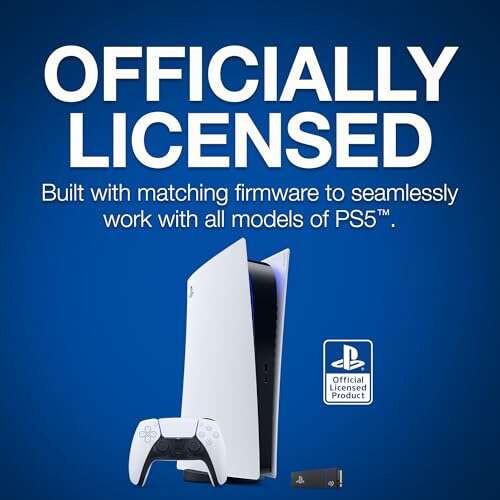
- Officially licensed for PS5, meaning it matches Sony’s compatibility guidelines.
- Up to 7300 MB/s sequential read speeds for fast installs and load times.
- Includes a low-profile heatsink to manage temperatures in the PS5 slot.
- 2TB capacity gives room for many AAA titles without constant juggling.
- Compact M.2 2280 form factor fits the PS5 expansion bay easily.

What I Like
- Plug-and-play experience with PS5 — no drama during install.
- Very fast read speeds that cut down boot and load times.
- Heatsink keeps temps stable during long sessions.
- Official licensing removes compatibility guesswork.
- Good balance of capacity and price for console gaming.

What Could Be Better
- Price can be higher than non-licensed equivalents with similar specs.
- No user-removable thermal pad or secondary mounting options in the PS5 bay.
- For desktop PC power users, endurance ratings may not match high-end workstation drives.

My Recommendation
If you own a PS5 and need a reliable, fast expansion, the Seagate Game Drive PS5 NVMe SSD for PS5 2TB is one of the simplest choices. It balances speed, capacity, and compatibility. I recommend it to most gamers who want a hassle-free upgrade and stable performance without hunting for exact Sony-approved specs. For its price and features, it’s a strong value and widely available.
| Best for | Why |
|---|---|
| PS5 owners wanting easy expansion | Official licensing and compatible heatsink ease install. |
| Gamers who store many AAA titles | 2TB capacity handles large game libraries well. |
| Players who value stable temps | Built-in heatsink reduces thermal throttling during long sessions. |

Alternative Products You Can Consider
Samsung 980 Pro (with heatsink) — A fast, well-reviewed Gen4 NVMe SSD. It offers similar or slightly higher peak speeds. Best for gamers who want a trusted brand and excellent sustained performance. It may need a compatible heatsink model to match PS5 specs.
WD Black SN850X — Another top-tier PCIe Gen4 SSD. It’s known for strong real-world gaming performance and comes in heatsink variants. Choose this if you want competitive speeds and a few extra features like gaming-tuned firmware.
Crucial P5 Plus — A value-minded Gen4 option. It won’t always match peak benchmarks of flagship drives but gives solid performance at a lower cost. Good for budget-conscious builders who still need PS5 compatibility.
| Product | Best For | Key Difference |
|---|---|---|
| Seagate Game Drive PS5 NVMe SSD for PS5 2TB | PS5 owners seeking easy, licensed upgrade | Official licensing and built-in heatsink for PS5 fit |
| Samsung 980 Pro | Users wanting peak benchmark speeds | Higher sustained speeds; needs heatsink variant for PS5 |
| WD Black SN850X | Gamers wanting excellent real-world performance | Gaming-focused firmware and strong sustained speeds |
| Crucial P5 Plus | Budget-minded PS5 users | Lower price, solid value, slightly lower peak speeds |

Final Verdict: Which Should You Buy?
For most PS5 owners, the Seagate Game Drive PS5 NVMe SSD for PS5 2TB is a straightforward, reliable pick. It blends speed, capacity, and an official license that removes guesswork. If you want a simple, worry-free expansion, pick this Seagate drive.
If you chase peak benchmark numbers or need ultra-high endurance for heavy PC workloads, look to flagship PC SSDs like the Samsung 980 Pro or WD Black SN850X. For value buys, the Crucial P5 Plus gives you much of the performance at a lower price.
FAQs Of seagate game drive m.2 ssd for ps5 review
Is this Seagate drive truly compatible with PS5?
Yes. The unit meets Sony’s requirements for M.2 PCIe Gen4 NVMe drives and comes with a heatsink profile that fits the PS5 expansion bay. It’s officially licensed, which reduces the risk of compatibility issues.
Do I need to format the SSD for PS5?
Yes. After installing the M.2 into the PS5, the console will prompt you to format it. The formatting process is simple and takes just a few minutes.
Will I see faster load times compared to an external HDD?
Definitely. An NVMe Gen4 SSD like this one offers much higher read speeds than external HDDs. Expect notably faster installs, level loads, and fewer stalls during gameplay.
Can I use this drive in a PC as well?
Yes. It’s an M.2 NVMe SSD that works in compatible PCs. Keep in mind PC motherboards may require different heatsink setups. For heavy PC workloads, check endurance specs first.
Is the heatsink necessary?
For PS5 use, a heatsink helps prevent thermal throttling and keeps performance stable. The included low-profile heatsink is designed to fit the PS5 slot without extra parts.

Everett Ashford is a tech reviewer at mytechgrid.com specializing in SSDs, cameras, TVs, earbuds, headphones, and other consumer electronics. He provides honest, data-driven reviews based on hands-on testing and real-world performance analysis. Everett simplifies complex tech details to help readers make smart, confident buying decisions.