When your team works remotely, keeping your conversations private isn’t just a preference—it’s a must. You need apps that protect your confidential discussions from prying eyes and hackers.
But with so many options out there, how do you find the one that truly keeps your information safe without slowing down your workflow? You’ll discover the most secure apps designed specifically for confidential talks in remote workplaces. By the end, you’ll know exactly which tools fit your needs and how they guard your privacy, so you can focus on what matters without worry.
Ready to make your remote communication safer and smarter? Let’s dive in.
Top Encrypted Messaging Apps
Encrypted messaging apps protect conversations from unauthorized access. They use strong encryption to keep messages private. Remote workers rely on these apps to share sensitive information safely. Choosing the right app improves security and trust in digital communication.
Here are some top encrypted messaging apps that help maintain confidentiality in remote workplaces.
Signal Features And Benefits
Signal provides end-to-end encryption for all messages and calls. It stores data only on your device, not on servers. The app is open-source, allowing experts to review its security. Signal supports group chats, voice, and video calls with strong privacy. It also offers disappearing messages to enhance confidentiality.
Whatsapp Privacy Measures
WhatsApp uses end-to-end encryption by default for all chats. It encrypts messages, calls, photos, and videos. The app allows users to verify security codes to prevent eavesdropping. WhatsApp also supports two-step verification for extra account protection. Despite being popular, it shares metadata with its parent company, which some users consider.
Telegram’s Security Options
Telegram offers cloud-based messaging with optional end-to-end encryption. Secret Chats provide encrypted conversations that self-destruct after a set time. The app supports large group chats and file sharing. Telegram encrypts data between your device and servers using MTProto protocol. Users can enable two-factor authentication for better security.
Session And Briar For Anonymity
Session routes messages through a decentralized network to hide user IP addresses. It requires no phone number or email for registration, enhancing anonymity. Briar uses peer-to-peer connections via Bluetooth or Wi-Fi, avoiding the internet entirely. Both apps are ideal for users needing strong privacy without revealing identity. They focus on secure, anonymous communication in sensitive environments.

Credit: tfetimes.com
Secure Video Conferencing Tools
Secure video conferencing tools are essential for confidential discussions in remote workplaces. They protect sensitive information from unauthorized access. Choosing the right tool ensures privacy and trust among team members.
These tools use encryption and other security features to keep conversations safe. They also help comply with data protection regulations. Understanding the security highlights of popular platforms can guide businesses in selecting the best option.
Google Meet Security Highlights
Google Meet uses strong encryption for video and audio streams. Meetings are secured by default with protections against unauthorized entry. It integrates with Google Workspace’s security controls to manage access easily.
Two-step verification adds an extra layer of account protection. Hosts can control screen sharing and mute participants to maintain meeting order. Data is stored securely and Google meets strict privacy standards.
Zoom Encryption And Privacy
Zoom offers end-to-end encryption for all meetings on supported plans. It allows hosts to require passwords and waiting rooms for entry. Meeting controls help prevent disruptions and unauthorized attendance.
Data privacy options let users restrict recording and file sharing. Zoom complies with global privacy laws and regularly updates security features. Transparency reports inform users about data requests and disclosures.
Microsoft Teams For Confidential Meetings
Microsoft Teams uses encryption in transit and at rest to protect data. It supports multi-factor authentication to secure user access. Teams integrates with Microsoft 365’s compliance tools for data governance.
Meeting organizers can control participant permissions and recording settings. Advanced threat protection helps detect and block suspicious activity. Teams also provides audit logs for tracking meeting security events.
Encrypted Collaboration Platforms
Encrypted collaboration platforms protect messages and files during remote teamwork. They use strong encryption to stop hackers from reading sensitive information. Teams can chat, share documents, and hold meetings without risking privacy. These platforms are essential for confidential discussions in remote workplaces.
Choosing the right encrypted platform helps keep your data safe. It also boosts trust among team members. Many options offer different features and levels of security. Below are some popular choices known for their encryption and collaboration tools.
Rocket.chat Advantages
Rocket.Chat is an open-source platform that offers end-to-end encryption. It allows teams to control their own servers, enhancing data privacy. Users can customize the platform to fit specific security needs. Rocket.Chat supports voice, video, and text chats securely. Its transparency helps companies verify security measures easily. This platform suits teams needing full control over their communication.
Wire For Secure Teamwork
Wire provides strong encryption for all messages and calls. It complies with strict European privacy laws. Wire supports group chats, file sharing, and conference calls with full encryption. The app uses minimal data storage on servers, reducing risk. Users appreciate its simple design and high security. Wire is ideal for teams focused on privacy without complex setups.
Slack’s Security Features
Slack offers encryption for data in transit and at rest. It uses secure protocols to protect information shared on its platform. Slack integrates with many security tools to enhance protection. Teams can enable two-factor authentication for added safety. Slack also provides compliance certifications for regulated industries. It combines ease of use with solid security for everyday team communication.
Security Practices For Remote Work
Remote work demands strong security practices to protect confidential discussions. Sensitive information travels across various networks and devices. Keeping this data safe is vital for businesses and employees alike. Implementing effective security measures reduces risks of breaches and data leaks. Here are key practices to enhance security in remote workplaces.
End-to-end Encryption Importance
End-to-end encryption ensures messages stay private between sender and receiver. No third party can access the content during transmission. This method protects conversations from hackers and unauthorized viewers. Choosing apps with strong encryption safeguards sensitive workplace discussions. It builds trust and confidence in remote communication tools.
Multi-factor Authentication
Multi-factor authentication (MFA) adds an extra security layer beyond passwords. Users must verify identity using multiple methods, such as codes or biometrics. MFA prevents unauthorized access even if passwords are stolen. Enabling MFA on communication apps and work platforms reduces the chance of intrusions. It is a simple yet effective way to protect accounts.
Using Vpns And Secure Passwords
Virtual Private Networks (VPNs) create secure connections to the internet. VPNs hide IP addresses and encrypt data, protecting remote workers on public or home networks. Using strong, unique passwords for apps and devices stops easy hacking attempts. Password managers help create and store complex passwords safely. Combining VPN use with secure passwords greatly improves online safety.
Regular Software Updates
Updating software regularly fixes security vulnerabilities and bugs. Outdated apps or operating systems expose devices to cyber threats. Automatic updates ensure the latest security patches are applied quickly. Remote workers must keep communication tools and devices up to date. Staying current reduces risks and maintains smooth, secure operations.
Choosing The Right App
Choosing the right app for confidential discussions in remote workplaces is crucial. The app must protect sensitive information while being easy to use. It should work smoothly on different devices. Finding the balance between security and functionality is key. This helps teams communicate without risking data leaks.
Ease Of Use Considerations
An app that is simple to navigate saves time and reduces frustration. Users need to send messages or start calls quickly. Complex settings can discourage employees from using secure tools. A clean interface and clear instructions improve adoption. Training time should be minimal to keep teams productive.
Cross-platform Compatibility
Teams often use different devices like phones, tablets, and computers. The app must work well on all these platforms. It should support major operating systems like Windows, macOS, Android, and iOS. This ensures everyone can join discussions without technical issues. Cross-platform support also allows flexible work from any location.
Balancing Security And Functionality
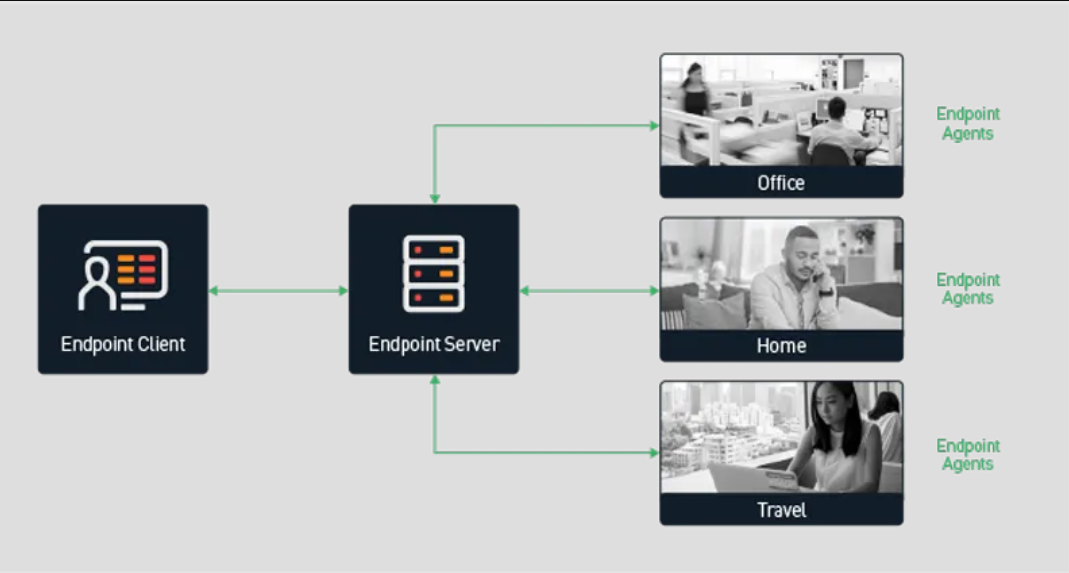
Strong encryption keeps conversations private from outsiders. The app should offer end-to-end encryption for maximum safety. Yet, it must not limit key features like file sharing and video calls. A secure app that lacks functionality can slow down teamwork. Look for apps that combine high security with useful tools.
Credit: cellebrite.com
Specialized Apps For Confidential Use
Specialized apps for confidential use play a crucial role in remote workplaces. They protect sensitive conversations and files from unauthorized access. These tools use strong encryption and privacy features to keep your data safe. Choosing the right app depends on the type of communication and level of security needed.
Apps For Couples And Private Chats
Some apps focus on personal, private conversations. They offer end-to-end encryption to ensure only the participants read the messages. These apps often include features like disappearing messages and encrypted voice calls. Examples include Signal and Wickr, trusted for their strong privacy controls. Such apps protect intimate or sensitive discussions from being intercepted or stored on servers.
Untraceable Messaging Solutions
Untraceable messaging apps hide user identities and message metadata. They do not store logs or user information, making tracking impossible. Apps like Session and Briar use decentralized networks for anonymous communication. This technology prevents data leaks and government surveillance. These solutions suit users needing extra anonymity for work or personal reasons.
Secure Document Signing Tools
Document signing apps protect the integrity of confidential agreements. They use encryption to secure signatures and documents during transmission and storage. Platforms such as DocuSign and Adobe Sign offer tamper-proof seals and audit trails. These tools ensure that only authorized parties can access and sign important documents remotely.
Credit: jitsi.guide
Frequently Asked Questions
What Is The Safest Encrypted Communication App?
Signal is the safest encrypted communication app. It offers free, strong end-to-end encryption and stores messages locally on your device.
What Is The Most Secretive Messaging App?
Signal is the most secretive messaging app, offering strong end-to-end encryption and local message storage for complete privacy.
What Is The Best App For Secrecy?
Signal Private Messenger ranks as the best app for secrecy. It offers strong end-to-end encryption and stores messages locally. The app is free, user-friendly, and widely trusted for private communication.
What Is The Most Secure Meeting Platform?
Google Meet and Microsoft Teams offer strong security with end-to-end encryption and seamless integration for secure virtual meetings.
Conclusion
Choosing secure apps protects sensitive talks in remote work. Encrypted tools keep your messages private and safe. Easy-to-use platforms help teams communicate without worry. Protecting data builds trust among coworkers and clients. Regularly updating apps strengthens your security measures. Prioritize privacy to maintain confidentiality at work.
Secure communication supports smooth and honest collaboration. Keep your remote workplace discussions safe every day.