If you’re providing education remotely, keeping your communications safe isn’t just important—it’s essential. You want to protect your students’ privacy and ensure that sensitive information doesn’t fall into the wrong hands.
But with so many messaging platforms out there, how do you choose one that truly secures your conversations without complicating your workflow? This article will guide you through the best secure messaging platforms designed specifically for remote education providers like you.
By the end, you’ll know exactly which tools can keep your communication private, simple, and reliable—helping you focus on what matters most: teaching. Keep reading to discover your perfect match for secure remote education messaging.
Credit: quickblox.com
Top Secure Messaging Platforms
Secure messaging platforms play a vital role for remote education providers. They protect sensitive information shared between teachers, students, and staff. Choosing the right platform ensures privacy and compliance with data protection rules.
Below are some top secure messaging platforms. Each offers unique features suited for education environments.
Signal Features
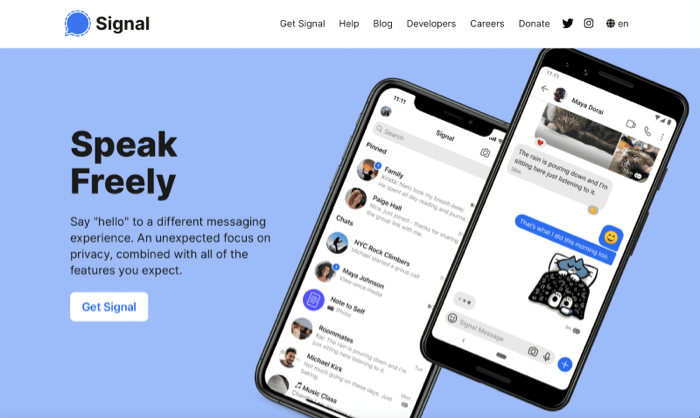
Signal uses strong end-to-end encryption to keep messages safe. It is open-source, which means anyone can check its security. The app supports disappearing messages to reduce data storage. Signal is free and does not collect user data for profit. It works on both mobile and desktop devices. These features make Signal a trusted choice for private communication.
Briar Advantages
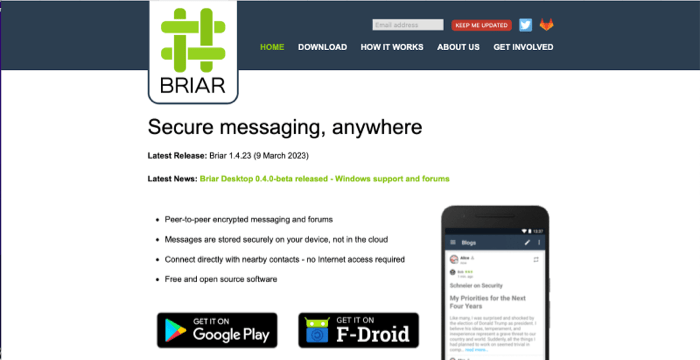
Briar focuses on extreme privacy with a decentralized system. It connects users directly via Bluetooth, Wi-Fi, or the Tor network. This approach removes the need for central servers. Briar disables screenshots and screen recording for extra security. It is designed mainly for Android and supports text-only chats. Briar suits educators needing strong privacy without internet reliance.
Threema Benefits
Threema offers anonymous accounts, so no phone number or email is needed. It follows Swiss privacy laws, known for strict data protection. The platform uses open-source components to ensure security. Threema encrypts messages end-to-end and limits metadata collection. It is a paid app, which helps fund its privacy features. Threema is ideal for institutions valuing anonymity and legal protection.
Wire Highlights
Wire is an open-source platform with end-to-end encryption. It does not store metadata, increasing user privacy. Users can register with an email address instead of a phone number. Wire works across devices, including desktop and mobile. It supports group chats, file sharing, and voice calls securely. Wire fits well in education settings needing versatile communication tools.
Essential Security Features
Choosing the right secure messaging platform is vital for remote education providers. Protecting sensitive information and communication must be a top priority. Essential security features help ensure privacy and trust between teachers, students, and staff.
These features reduce the risks of data breaches and unauthorized access. They also help comply with legal requirements and protect user identities. Understanding key security aspects makes it easier to select a reliable platform.
Open-source Code
Open-source code allows experts to review the platform’s security. This transparency helps find and fix vulnerabilities quickly. It builds trust because anyone can check how the app handles data. Closed-source platforms hide their code, which can hide risks.
Decentralization
Decentralization means no single server controls all messages. Instead, data is spread across many servers or shared directly between users. This limits the chance of a large-scale data breach. It also makes it harder for hackers to access conversations.
Minimal Metadata Collection
Minimal metadata collection means the platform stores little information about users. Metadata includes details like who sent messages and when. Collecting less metadata reduces tracking and profiling risks. It keeps user behavior and patterns private.
Privacy Laws And Jurisdiction
Privacy laws vary by country and affect data protection. Platforms based in strong privacy jurisdictions offer better user safeguards. Knowing where a company is located helps understand your data’s legal protection. Some countries have strict rules that limit data sharing with authorities.
Anonymous Registration
Anonymous registration lets users join without giving personal details. It protects identities and reduces the risk of data leaks. This feature is especially important for students who want privacy. It also prevents unwanted tracking or profiling by third parties.
Benefits For Remote Education
Secure messaging platforms offer many benefits for remote education. They help create a safe space for learning. Both students and teachers can communicate without fear of data breaches or leaks. These platforms build trust between educators and learners. They support a smooth and protected educational experience in online settings.
Protecting Student Privacy
Secure messaging keeps student information safe. Personal data stays private and cannot be accessed by outsiders. This protection helps prevent identity theft and misuse of information. Students feel more comfortable sharing ideas and questions. Their digital safety is a top priority in remote education.
Ensuring Teacher-student Confidentiality
Confidential chats between teachers and students stay secure. Sensitive topics like grades or personal challenges remain private. This confidentiality strengthens the teacher-student relationship. It encourages honest communication and better support. Secure messaging platforms guard these private conversations from leaks.
Compliance With Education Regulations
Secure messaging platforms meet legal education standards. They follow rules about data protection and privacy. Schools avoid penalties by using compliant tools. These platforms help institutions protect student rights. Compliance ensures that remote education is both safe and lawful.
Comparing Platform Usability
Comparing usability among secure messaging platforms helps remote education providers select the best tool. Usability impacts how easily teachers and students communicate and collaborate. A platform that is simple to use reduces barriers and supports smoother interactions. This section examines key usability factors to guide your choice.
Ease Of Use
Clear design and simple navigation matter most. Platforms with clean layouts allow users to send messages quickly. Minimal setup steps encourage adoption by educators and students. Tools that avoid clutter make learning communication less stressful. Easy-to-understand features help users focus on teaching, not technical issues.
Cross-platform Support
Teachers and students use different devices daily. Platforms that work on phones, tablets, and computers fit diverse needs better. Support for major operating systems like iOS, Android, and Windows ensures wide access. Cross-platform apps let users switch devices without losing conversations. Reliable syncing keeps messages updated everywhere.
Integration With Educational Tools
Connecting messaging with educational apps streamlines workflows. Platforms that link with learning management systems save time. Features like calendar syncing and file sharing boost productivity. Integration with video conferencing tools enhances live lessons. Seamless connections between tools create a more cohesive learning experience.
Deployment And Management
Deploying and managing secure messaging platforms is essential for remote education providers. These platforms ensure safe communication among teachers, students, and staff. Proper deployment prevents security risks and improves user experience. Effective management keeps the system reliable and up to date.
Setup And Configuration
Start by selecting a platform that fits your education needs. Install the software or app on all devices used by your team. Configure security settings like encryption and message retention. Customize notification preferences to avoid distractions. Test the system to confirm all features work properly.
User Access Controls
Assign user roles based on their responsibilities. Limit access to sensitive information to authorized users only. Use strong password policies to protect accounts. Enable two-factor authentication for added security. Monitor user activity to detect unusual behavior early.
Maintenance And Updates
Regularly update the platform to fix security vulnerabilities. Schedule maintenance during low-usage hours to reduce disruption. Backup data frequently to prevent loss. Review system logs to identify and resolve issues. Keep users informed about updates and changes.
Credit: apps.apple.com
Challenges And Considerations
Choosing secure messaging platforms for remote education providers involves several challenges. These challenges affect how well the platform protects users and how easy it is to use daily. Providers must consider security, user experience, technical help, and costs. Each factor plays a key role in selecting the right messaging tool.
Balancing Security And Usability
Security features can make a platform hard to use. Strong encryption may slow down message delivery or complicate login steps. Students and teachers may find complex setups frustrating. Providers must find tools that protect data without confusing users. Easy-to-use platforms encourage more consistent and safe communication.
Handling Technical Support
Remote education providers need reliable technical support. Issues with messaging platforms can disrupt classes and communications. Support should be quick and helpful. Many schools lack in-house IT teams, so external support is vital. Choosing a platform with good customer service reduces downtime and frustration.
Cost Implications
Secure messaging platforms vary in price. Some charge monthly fees, while others have one-time costs. Free options may lack advanced security or support. Providers must balance budget limits with needed features. Investing in a secure platform saves money by preventing data breaches and maintaining trust.
Credit: quickblox.com
Frequently Asked Questions
What Is The Most Secure Messaging Platform?
Signal is widely regarded as the most secure messaging platform due to its strong end-to-end encryption and open-source code. It protects user privacy without collecting data. Other secure options include Briar, Threema, and Wire, which offer decentralization, anonymous registration, and minimal metadata collection.
Which Platform Is Widely Used For Professional Instant Messaging?
Slack is widely used for professional instant messaging due to its user-friendly interface and robust collaboration features.
What Apps Do Teachers Use To Communicate?
Teachers use apps like Google Classroom, Remind, ClassDojo, Seesaw, and Microsoft Teams to communicate effectively with students and parents.
What Is The Most Secretive Messaging App?
Signal is the most secretive messaging app, offering strong end-to-end encryption, open-source code, and no data profit motives. Briar and Threema also provide high privacy with decentralized and anonymous features. These apps prioritize user privacy and minimize metadata collection.
Conclusion
Choosing a secure messaging platform helps protect students and teachers online. Strong encryption keeps messages private and safe from outsiders. Easy-to-use apps make remote learning smoother and more reliable. Providers should pick platforms with minimal data collection and clear privacy rules.
Safe communication builds trust and supports effective education. Prioritizing security ensures a better learning experience for everyone involved.