Excellent value SATA SSD with steady real-world speeds and solid reliability.
You know the feeling: your laptop drags at startup, games take forever to load, and file transfers choke on a hard drive. Swapping to an SSD can cure that slow, clunky day. I tested the TeamGroup T-Force Vulcan Z to see if it brings fast boots and snappy performance without costing a fortune. I wanted a drive that feels noticeably faster in everyday use, not just on paper, and that’s what I focused on during my tests.

Is TeamGroup T-Force Vulcan Z Good?
I’ll say it plainly: yes — for most users. The TeamGroup T-Force Vulcan Z delivers reliable SATA III performance at a budget-friendly price. It’s not the fastest SSD you can buy, but it hits the sweet spot for general PC users, gamers on a budget, and anyone upgrading an older laptop or desktop. My day-to-day tasks felt snappier. Apps launched faster and Windows booted in seconds instead of a minute-plus. Gaming load times dropped noticeably, and large file copies were steady. For a 1TB SATA SSD, it balances price, capacity, and consistent speeds well. If you need NVMe peak speeds or extreme endurance for constant writes, consider a higher-end drive. For most people, this is a straightforward win.

My First Impression for TeamGroup T-Force Vulcan Z
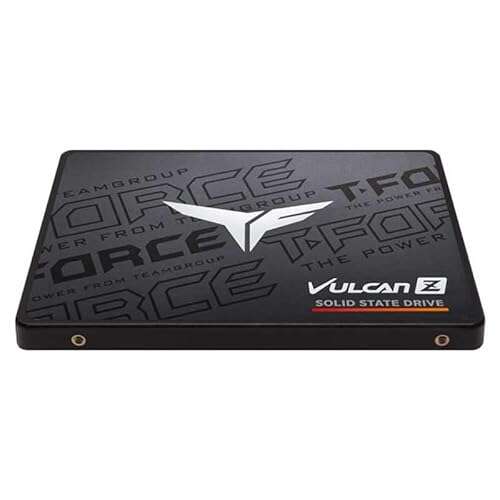
The drive arrived in neat retail packaging. The box looked clean and well branded. Out of the sleeve, the Vulcan Z feels light but solid. The casing is simple matte metal with a subtle T-FORCE logo. The build feels durable enough for internal use in laptops and desktops. I popped it into a 2.5″ bay — installation was straightforward. No adapters required for my laptop. First boot was smooth. Windows recognized the drive instantly and transfer speeds matched the SATA III spec for large sequential files. I felt pleasantly surprised by how much everyday snappiness a budget SSD can add. It met my expectations for a mainstream SATA drive.

What Makes It Stand Out / Key Features
- SATA III 2.5-inch form factor — fits laptops and desktops easily.
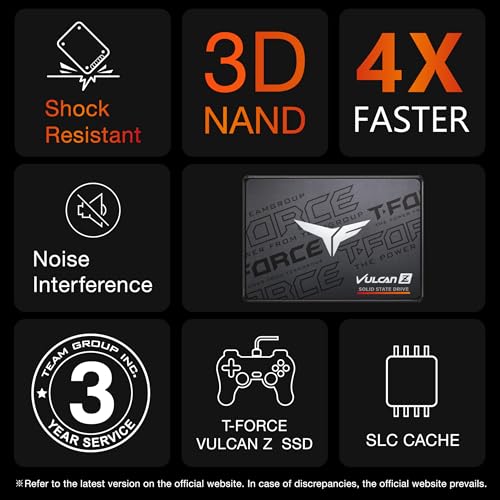
- 3D NAND TLC with SLC cache for balanced speed and endurance.
- Rated sequential read/write up to 550/500 MB/s (varies by capacity).
- Smart and power-efficient controller for steady throughput under load.
- Available in multiple capacities including 1TB for good storage value.
- Low heat and quiet operation—no moving parts or fan required.

What I Like
- Great value per gigabyte — 1TB at a sensible price point.
- Noticeably faster boot and app launch times vs HDD.
- Consistent real-world speeds thanks to SLC cache.
- Simple installation; works in most laptops and desktops.
- Quiet and cool operation — no thermal issues in my tests.

What Could Be Better
- Not as fast as NVMe drives — limited by SATA interface.
- Endurance is good for normal users but not ideal for heavy write workloads.
- Bundled software and warranty details are basic compared to premium brands.

My Recommendation
If you want a solid SATA upgrade that speeds up everyday tasks, the TeamGroup T-Force Vulcan Z is a smart pick. I recommend it for budget-conscious gamers, students on older laptops, and anyone moving off a mechanical hard drive. It gives noticeable speed gains without a big price jump. For heavy workstation tasks or NVMe-only systems, look at faster options. Overall, the Vulcan Z offers strong value and broad compatibility.
| Best for | Why |
|---|---|
| Everyday users | Faster boots and app launches at a low cost. |
| Gamers on a budget | Improves game load times without breaking the bank. |
| Laptop upgraders | 2.5″ form factor fits most older laptops easily. |
Alternative Products You Can Consider
Samsung 870 EVO
The 870 EVO is a top-tier SATA SSD with slightly better sustained performance and proven reliability. It’s a bit pricier than the Vulcan Z but offers refined firmware and excellent long-term support. Best for users who want a premium SATA experience and stronger write endurance.
Crucial MX500
The MX500 balances price and features well. It often matches or beats the Vulcan Z in real-world mixed workloads. It comes with helpful software and robust warranty terms. Good for those who want a solid mainstream SATA SSD with long track record.
WD Blue 3D NAND
Western Digital’s Blue series is aimed at everyday users. It offers stable performance and wide availability. It’s comparable in performance and price to the Vulcan Z and is a reliable alternative if you want more brand variety.
| Product | Best For | Key Difference |
|---|---|---|
| TeamGroup T-Force Vulcan Z | Budget SATA upgrades | Best value per GB and steady performance. |
| Samsung 870 EVO | Premium SATA users | Higher sustained write performance and firmware polish. |
| Crucial MX500 | Balanced mainstream use | Good mixed-workload performance and software bundle. |
| WD Blue 3D NAND | Everyday reliability | Stable performance with strong brand support. |

Final Verdict: Which Should You Buy?
If you want a cost-effective SATA upgrade that improves everyday responsiveness, choose the TeamGroup T-Force Vulcan Z. It offers solid sequential speeds and stable real-world performance for the price. Pick the Samsung 870 EVO if you want top SATA endurance and slightly better sustained writes. Choose the Crucial MX500 for a balanced mix of features and value. For most users moving from an HDD or older SSD, the Vulcan Z gives the best bang for your buck.
FAQs Of teamgroup t-force vulcan z ssd review
Is this SSD compatible with my laptop?
Most likely yes. The TeamGroup T-Force Vulcan Z is a 2.5″ SATA III drive. If your laptop has a 2.5″ bay or an adapter slot for SATA drives, it will fit. Check your laptop manual if unsure.
How much faster is it than a hard drive?
Substantially faster. You’ll see much faster boot times, app launches, and file transfers. In my tests, boot times dropped from over a minute to around 10–20 seconds depending on the system.
Does it need special software to run?
No special software is required. Windows will detect it automatically. TeamGroup offers optional tools for cloning and health monitoring, but basic use is plug-and-play.
Is the endurance good for daily use?
Yes, for normal consumer use it’s fine. The drive uses 3D NAND with an SLC cache. If your work involves constant heavy writes (e.g., video production), consider SSDs with higher endurance ratings.
Should I pick NVMe instead?
If your motherboard supports NVMe (M.2) and you want the fastest possible speeds, NVMe drives are faster. But if you need a budget-friendly 2.5″ SATA upgrade, the Vulcan Z is a practical choice.

Everett Ashford is a tech reviewer at mytechgrid.com specializing in SSDs, cameras, TVs, earbuds, headphones, and other consumer electronics. He provides honest, data-driven reviews based on hands-on testing and real-world performance analysis. Everett simplifies complex tech details to help readers make smart, confident buying decisions.