Are you struggling to keep your remote team aligned and motivated? Tracking goals across different locations and time zones can feel like a constant challenge.
But what if you had the right tools to make this easier? Imagine having a clear, simple way to see progress, celebrate wins, and stay on track—no matter where your team members are. You’ll discover the best tools designed specifically for distributed remote teams.
These tools will help you streamline your goal tracking, boost productivity, and ensure everyone is moving forward together. Keep reading to find out how you can transform your remote team’s success with the right solutions.

Credit: thedigitalprojectmanager.com
Goal Tracking Basics
Tracking goals is essential for distributed remote teams. Clear goal tracking helps keep everyone aligned. It shows progress and highlights areas that need attention.
Good goal tracking tools provide real-time updates. They improve communication and boost team motivation. Teams can set, monitor, and adjust goals easily.
Why Track Goals Remotely
Remote teams work from different locations. This creates gaps in communication and visibility. Tracking goals remotely fills these gaps effectively.
It helps managers see what each member is doing. Team members understand their responsibilities better. Remote goal tracking keeps everyone focused on shared objectives.
Tracking also encourages accountability. It builds trust among team members. Progress becomes visible, helping to celebrate small wins.
Challenges In Distributed Teams
Distributed teams face unique challenges in goal tracking. Time zone differences make real-time updates difficult. Communication delays can cause misunderstandings.
Lack of physical presence can reduce team cohesion. It is harder to gauge motivation and engagement remotely. Technology issues sometimes disrupt access to tracking tools.
Teams may struggle with inconsistent tool use. Without a clear system, goals can get lost or forgotten. Overcoming these challenges requires simple, reliable tools.
Project Management Platforms
Project management platforms help remote teams track goals and stay organized. These tools provide clear workflows and task visibility. They keep everyone aligned despite distance. Choosing the right platform boosts productivity and simplifies collaboration.
Trello For Visual Workflows
Trello uses boards, lists, and cards to show work visually. It helps teams see project progress at a glance. Moving cards across lists shows task status clearly. Trello suits teams needing simple, visual task management.
Asana For Task Management
Asana focuses on assigning tasks and setting deadlines. It helps teams track who does what and when. Teams can create projects, subtasks, and milestones. Asana keeps task details and communication in one place.
Clickup As All-in-one Solution
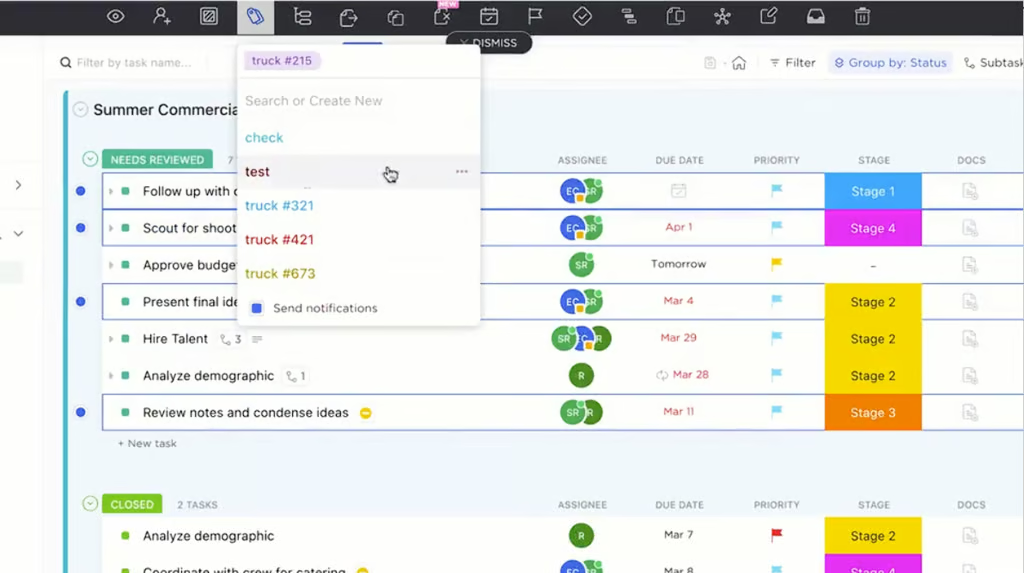
ClickUp combines task management, docs, goals, and chat. It adapts to many workflows and team sizes. ClickUp offers lists, boards, and timelines for work views. Teams use it to centralize all project work and updates.
Linear For Software Development
Linear is designed for software teams to manage issues and sprints. It offers fast issue tracking with clean, minimal design. Developers can link code and track bugs easily. Linear helps teams ship software efficiently and stay focused.
Goal Setting Frameworks
Setting clear goals is vital for distributed remote teams. Goal setting frameworks offer structure and clarity. They help teams focus on priorities and measure progress. Using these frameworks improves communication and accountability across distances.
Remote teams face unique challenges. Different time zones and lack of face-to-face interaction can cause misalignment. Goal setting frameworks bring everyone onto the same page. They create a shared understanding of objectives and expected results.
Using Okrs In Remote Teams
OKRs stand for Objectives and Key Results. This method breaks down big goals into clear objectives. Each objective has measurable key results. Teams check progress regularly and adjust efforts accordingly.
OKRs promote transparency. Everyone sees what others are working on. This visibility increases motivation and collaboration. Remote teams benefit from frequent OKR reviews. They keep goals relevant and achievable despite changing conditions.
Integrating Smart Goals
SMART goals are Specific, Measurable, Achievable, Relevant, and Time-bound. This framework guides teams to set practical and clear goals. It prevents vague or unrealistic objectives that cause confusion.
SMART goals work well in remote settings. Each team member understands exactly what to do and by when. This clarity reduces misunderstandings. It also helps track progress with concrete criteria. Teams can celebrate small wins and stay focused.
Collaboration And Communication Tools
Strong collaboration and clear communication build success in distributed remote teams. The right tools help teams share ideas, track progress, and solve problems quickly. These tools keep everyone connected despite distance and time zones. They also support goal tracking by making teamwork smooth and transparent.
Slack For Instant Messaging
Slack offers fast, easy messaging for remote teams. It organizes chats by channels for projects or topics. Team members can share files, links, and updates instantly. Slack reduces email overload and keeps conversations focused. It also supports voice and video calls for quick meetings.
Notion For Shared Documentation
Notion is a flexible workspace for teams to create and share documents. It combines notes, tasks, and databases in one place. Team members can collaborate on plans, reports, and goals together. Notion helps keep information organized and easy to find. Everyone stays updated with real-time changes.
Calendly And World Time Buddy For Scheduling
Calendly simplifies scheduling meetings across different time zones. Team members pick available times without back-and-forth emails. World Time Buddy shows multiple time zones side by side. It helps teams find overlapping work hours for calls and deadlines. These tools reduce confusion and save time in planning.
Time Zone And Productivity Management
Managing time zones and productivity is crucial for distributed remote teams. Teams spread across different regions face unique challenges. Aligning work hours and tracking progress requires smart tools and clear strategies.
Proper time zone management helps avoid missed meetings and delays. Productivity tracking ensures team members stay focused and meet deadlines. Combining both improves overall team performance and communication.
Handling Global Time Differences
Global time differences create coordination challenges. Scheduling meetings can be confusing without the right tools. Tools like World Time Buddy and Every Time Zone simplify this process. They provide clear visual maps of team members’ time zones.
Setting core hours where most are available boosts collaboration. Rotating meeting times shares inconvenience fairly among team members. Clear communication about deadlines considering time zones prevents misunderstandings.
Tools For Productivity Tracking
Tracking productivity remotely requires reliable software. Tools like Asana, Trello, and ClickUp offer task management and progress tracking. They allow assigning tasks, setting deadlines, and monitoring completion easily.
Time tracking tools such as Toggl and RescueTime help monitor work hours. These tools provide insights into how time is spent daily. Managers can identify bottlenecks and support team members better.
Combining task and time tracking tools creates a full picture of team productivity. Regular updates and check-ins keep everyone aligned and motivated. Transparency in progress encourages accountability across the team.
Credit: www.sorryonmute.com
Performance Monitoring Tools
Performance monitoring tools help managers track remote team progress clearly. These tools collect data on work habits, task completion, and productivity. They provide insights to improve workflows and reach goals efficiently. Using the right tools can boost accountability and support team development.
Managers gain real-time updates without constant check-ins. This reduces misunderstandings and keeps everyone aligned. Performance monitoring tools also highlight strong performers and areas needing help. Choosing tools that respect privacy and build trust is crucial for success.
Kickidler For Employee Monitoring
Kickidler is a popular tool for tracking employee activities remotely. It records screen activity, app usage, and time spent on tasks. Managers can view detailed reports and live sessions to understand work patterns. The tool helps detect distractions and improve focus.
Kickidler also offers productivity analysis and attendance tracking. Its features support fair evaluations and effective coaching. The software works quietly in the background, minimizing disruptions. It fits well with teams needing clear visibility over remote work.
Balancing Oversight And Trust
Monitoring tools must not feel like spying. Trust is key for healthy remote teams. Managers should explain why monitoring exists and how data will be used. Open conversations help reduce anxiety and resistance.
Set clear rules and limits on data access. Avoid micromanaging or overchecking employees. Focus on outcomes, not just activity logs. Encourage feedback and adapt policies as needed.
Trust and oversight together create a positive work culture. Employees feel supported, not controlled. This balance drives better performance and team loyalty.
Choosing The Right Tools
Choosing the right tools for tracking goals in distributed remote teams is crucial. The tools must fit the team’s work style and project demands. The right choice improves communication and goal visibility. It keeps everyone on the same page and drives progress efficiently.
Teams vary in size, skills, and tasks. A tool that works well for one team may not suit another. Focus on tools that simplify tracking without adding complexity. A clear, easy-to-use platform helps remote members stay engaged and productive.
Matching Tools To Team Needs
Start by assessing your team’s specific needs. Consider task types, team size, and project complexity. Some teams need simple task lists, while others require detailed project timelines. Choose tools with features that align with these needs.
Look for tools that support remote work well. Features like real-time updates, notifications, and mobile access are important. The tool should allow easy collaboration across different time zones. Check if it integrates with tools your team already uses.
Avoiding Tool Overload
Using too many tools can cause confusion and reduce productivity. Limit the number of platforms your team must use. Pick tools that cover multiple functions like task tracking, communication, and file sharing.
Train your team on how to use the tools properly. Clear guidelines prevent misuse and ensure everyone benefits. Regularly review tool effectiveness and remove those that do not add value. Keep the focus on simplicity and usability.

Credit: thedigitalprojectmanager.com
Best Practices For Remote Goal Tracking
Tracking goals in distributed remote teams demands clear methods to ensure success. Best practices help teams stay aligned despite distance. These habits create focus, clarity, and motivation across time zones. Implementing structured goal tracking builds stronger remote work culture.
Setting Clear Expectations
Define goals with simple, specific language. Avoid vague instructions to reduce confusion. Share deadlines and deliverables early. Make sure every team member knows their role. Clear expectations guide daily tasks and long-term objectives. This clarity improves productivity and reduces misunderstandings.
Maintaining Transparency
Keep all team members informed about progress and changes. Use shared tools where updates are visible to everyone. Transparency builds trust and encourages collaboration. Regular check-ins help spot issues before they grow. Open communication ensures remote workers feel included and valued.
Encouraging Accountability
Assign ownership for each task and goal. Encourage team members to report progress regularly. Celebrate completed milestones to boost morale. Accountability drives commitment and responsibility. It helps remote teams stay on track and meet their targets consistently.
Frequently Asked Questions
What Are The Best Tools For Tracking Remote Team Goals?
Top tools include Asana, Trello, ClickUp, and Notion. They offer task boards, deadlines, and progress tracking. These tools enhance collaboration and keep distributed teams aligned effectively.
How Do Goal Tracking Tools Improve Remote Team Productivity?
They provide clear visibility of tasks and deadlines. This ensures accountability and timely completion. Teams stay coordinated despite distance, boosting overall productivity.
Can Project Management Tools Handle Distributed Teams’ Time Zones?
Yes, tools like World Time Buddy and Calendly simplify scheduling across time zones. They help remote teams plan meetings without confusion or delays, improving collaboration.
Are Visual Task Management Tools Useful For Remote Teams?
Absolutely. Tools like Trello use boards and cards to visualize workflows. This makes tracking progress simple and intuitive for distributed teams.
Conclusion
Choosing the right tools helps remote teams stay organized and focused. Simple, clear tracking keeps everyone on the same page. Regular updates and easy collaboration improve goal achievement. Remember, tools support your team but don’t replace good communication. Use these solutions to keep progress visible and motivation high.
Consistent tracking leads to better results and stronger teamwork.