You can get M.2 SSD screws from motherboard spares, local shops, or online kits.
If you just need one tiny screw, I’ve got you. I’ve built and serviced hundreds of PCs and laptops. I’ll show you exactly where to get screw for m 2 ssd, how to pick the right size, and how to install it without stress. Stick with me, and you’ll never lose time hunting for that elusive fastener again.
What screw does an M.2 SSD use?
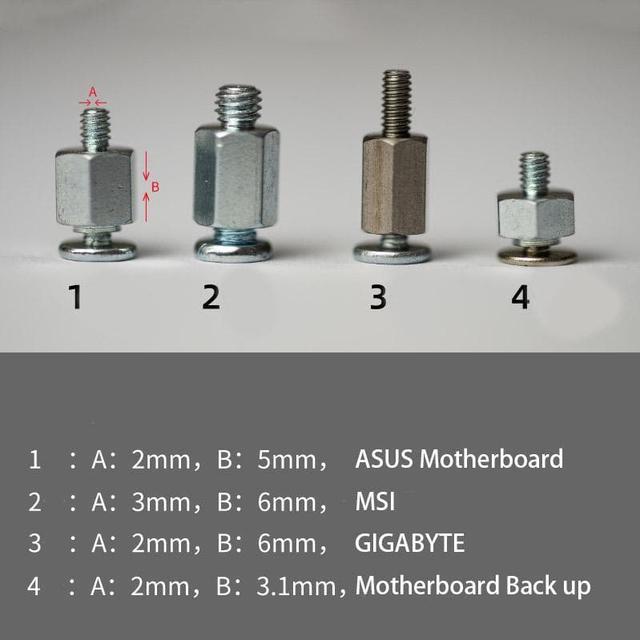
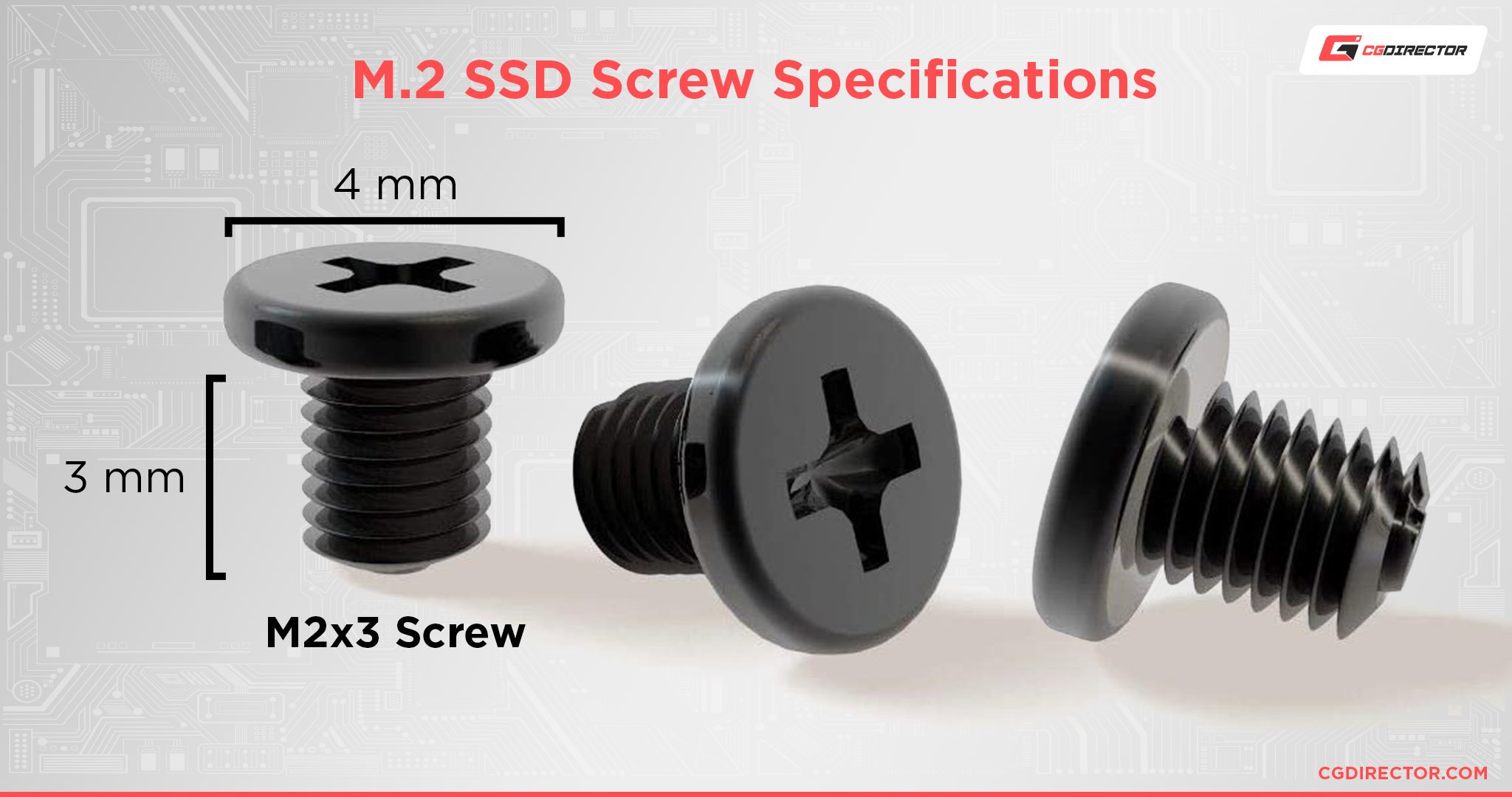
Most desktop boards use an M2 x 3 mm screw. The thread is metric M2 with a 0.4 mm pitch. The head is a small Phillips. A PH0 or PH00 driver fits best.
Many laptops use M2 x 2 mm. Some ultra-thin models use low profile heads. The standoff height also varies. Check the hole depth so you do not bottom out.
You also need a standoff at the 2280, 2260, or 2242 slot. The standoff sets the height and keeps the SSD flat. Never use wood or self-tapping screws. They can crack the board.
Where to buy M.2 screws right now
If you are asking where to get screw for m 2 ssd, start with what you already own. Many parts ship with extras, and they hide in plain sight.
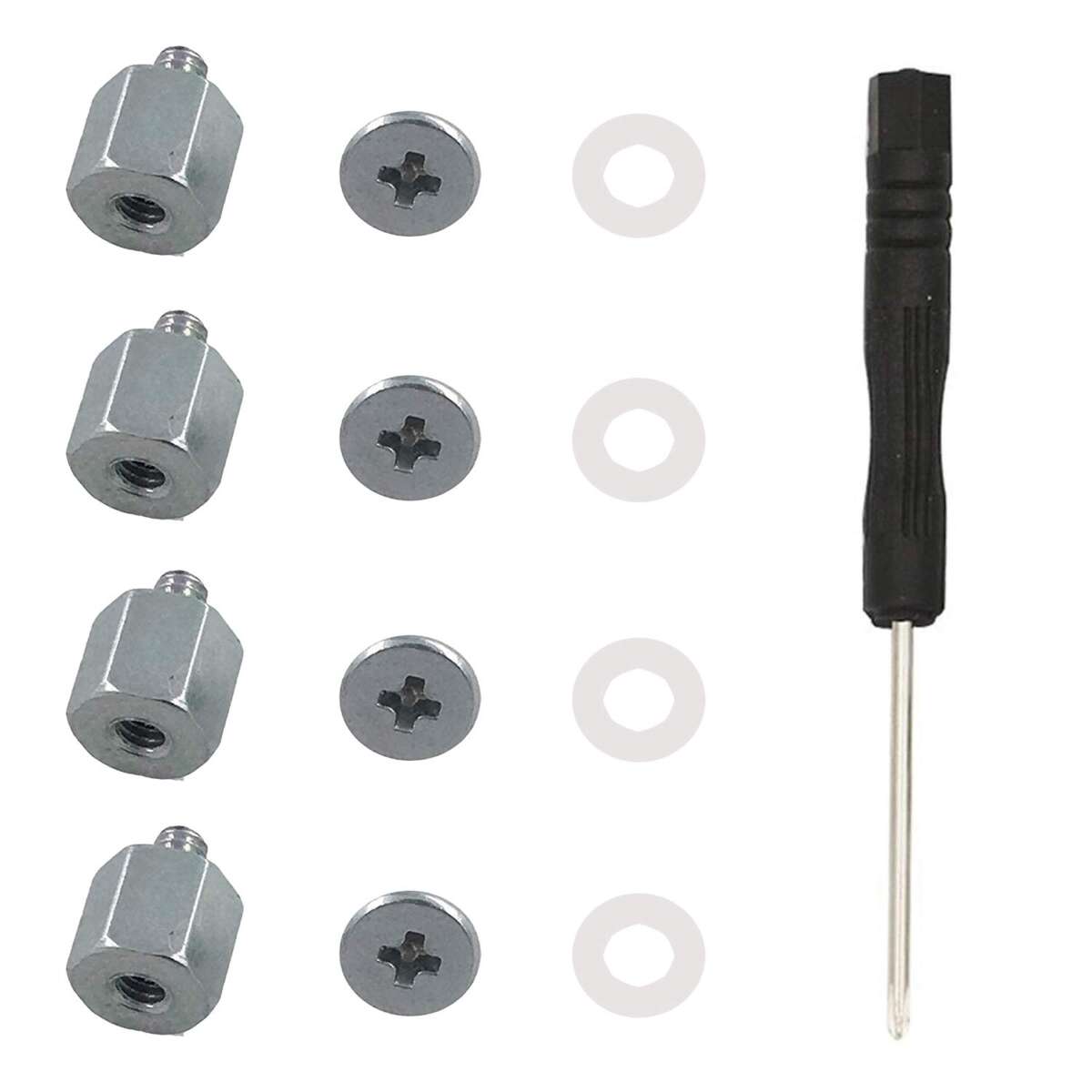
- Motherboard box spares. Look for a tiny zip bag labeled M.2 or NVMe. Many boards include two or more screws and a standoff.
- PC case accessory bag. Some cases include an M.2 screw mixed with case screws. Check the small silver ones.
- Local computer store or repair counter. Ask for M2 x 3 mm M.2 SSD screws. They often give or sell one for a dollar.
- Big box electronics stores. Best for a quick fix. Ask staff to check the service desk or builder aisle.
- Online retailers. Search “M.2 SSD screw kit” or “M2 x 3 mm screw standoff.” You can get a kit in one to two days.
- Marketplaces. eBay and AliExpress have bulk packs. Good value if you build often.
- Hardware stores. Ask for metric M2 machine screws, 3 mm or 2 mm length. Bring your board or standoff to test the thread.
- Laptop OEM support. Order by model. Many brands list “M.2 screw” as a spare part or include it in an SSD upgrade kit.
A local shop is often the fastest answer to where to get screw for m 2 ssd. Online kits are the easiest long-term fix if you build often. Laptop owners often wonder where to get screw for m 2 ssd after a repair. Your PC case bag is also a simple answer to where to get screw for m 2 ssd.

How to confirm the right screw and standoff
- Check your board manual. It lists the screw spec and the slot length (2230 to 2280).
- Measure the old screw or hole. M2 thread is about 2 mm wide. The pitch is 0.4 mm.
- Choose length. Desktop boards use 3 mm. Many laptops use 2 mm.
- Confirm standoff height. It should line up with the SSD notch. Use the correct hole for 2280 or 2260.
- Test by hand. The screw should turn in smoothly with no force. If it binds, stop. Wrong thread.
Where to get screw for m 2 ssd is easy once you know M2 x 3 mm or M2 x 2 mm. That one detail saves time and returns.

Quick install guide
- Power off. Unplug the PC. Hold the power button for 5 seconds to drain.
- Find the M.2 slot. Note the key notch and 2280/2260 holes.
- Insert the SSD at a 20–30 degree angle. Slide it in until it stops.
- Press the SSD down to the standoff. Align the hole.
- Place the M2 screw. Turn by hand first. Then a quarter turn with a PH0.
- Do not over tighten. Snug is enough. The SSD should not wiggle.
- Boot and check. Enter BIOS and confirm the drive shows up.

Common mistakes and how to avoid them
- Using the wrong screw length. A 4–5 mm screw can hit traces. Use 3 mm for desktops, 2 mm for many laptops.
- No standoff. The SSD will bend. Always use the right standoff height.
- Over tightening. This can crack the PCB or strip threads. Stop when it is snug.
- Wrong thread type. M2 is not the same as self-tapping. If it resists, do not force it.
- Static shock. Touch the case frame first or use a strap.
If you still need help finding where to get screw for m 2 ssd, bring the board, SSD, and standoff to a shop. They can match it in minutes.

Budget and bulk buying tips
If you build often, buy a small kit. A good kit has M2 x 2 mm and M2 x 3 mm screws, standoffs, and washers. It costs little and saves time.
- Look for kits with clear labels by length.
- Get a PH0/PH00 driver with a magnetic tip.
- Keep two spare standoffs in your case.
- Store tiny screws in a pill case or label bag.
Online kits are the best value for where to get screw for m 2 ssd in bulk. A single kit can solve many builds for years.
Personal notes from the bench
I have lost more M.2 screws than I care to admit. The first fix is to check the motherboard box. Nine times out of ten, the spare is there. When that fails, I head to the local builder shop. They always know where to get screw for m 2 ssd and will match it on the spot.
I once had a thin laptop that needed a low profile M2 x 2 mm screw. Generic 3 mm would not fit. OEM support mailed the right part in two days. Since then, I keep a small kit at my desk. It ends the hunt before it starts.
Frequently Asked Questions of where to get screw for m 2 ssd
Where to get screw for m 2 ssd if my motherboard did not include one?
Check the motherboard box again and the case accessory bag. If none, visit a local PC store or order an M.2 screw kit online.
What size screw do I need for an M.2 SSD?
Most desktop boards use M2 x 3 mm with a 0.4 mm pitch. Many laptops use M2 x 2 mm with a low profile head.
Where to get screw for m 2 ssd for a laptop?
Start with the laptop maker’s parts store. You can also match it at a local shop using the old standoff or a sample screw.
Where to get screw for m 2 ssd near me?
Try Micro Center, a local computer repair shop, or the service desk at big electronics stores. Bring your board or SSD to match the thread.
Where to get screw for m 2 ssd in bulk?
Buy an M.2 screw and standoff kit online. Look for mixed packs with M2 x 2 mm and M2 x 3 mm plus standoffs.
What if the standoff is missing too?
You need both the standoff and the screw. Buy a kit that includes standoffs, or ask your motherboard maker for the exact part.
Can I use a random small screw I have?
No. Do not force a non-M2 screw. If it binds, stop and get the correct M2 x 3 mm or M2 x 2 mm screw.
Conclusion
You now know the exact sizes, where to get screw for m 2 ssd, and how to install it the right way. Check your motherboard box first, then your case, then a local shop or a simple online kit. Pick M2 x 3 mm for most desktops, and M2 x 2 mm for many laptops.
Take five minutes today to grab a small kit so you never stop a build for a tiny part. Have a question or a tricky laptop model? Drop a comment, share your setup, and I’ll help you match the right screw fast.

Jamie Lee is a seasoned tech analyst and writer at MyTechGrid.com, known for making the rapidly evolving world of technology accessible to all. Jamie’s work focuses on emerging technologies, product deep-dives, and industry trends—translating complex concepts into engaging, easy-to-understand content. When not researching the latest breakthroughs, Jamie enjoys exploring new tools, testing gadgets, and helping readers navigate the digital world with confidence.