UGREEN M.2 NVMe SSD Enclosure: fast, compact, and a great value for most users.
You’ve got a spare NVMe SSD or need fast portable storage for backups, video editing, or cloning drives. The right enclosure makes that NVMe drive useful outside a PC. I’ve tested many enclosures, and a solid USB 3.2 Gen 2 option can save you time and frustration. If you want fast file transfers, cross-platform compatibility, and a compact tool you can trust, this enclosure aims to solve those exact problems.

Is UGREEN M.2 NVMe SSD Enclosure Good?
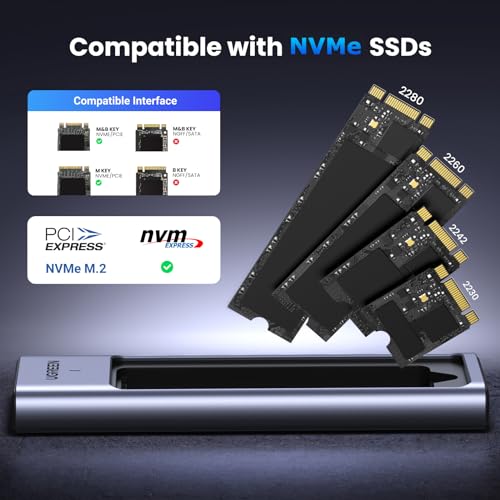
The short answer is yes — for most users who want a fast, reliable external NVMe solution. The UGREEN M.2 NVMe SSD Enclosure works with single-sided M.2 NVMe drives (2280) and taps USB 3.2 Gen 2 speeds for real-world transfers that are much faster than SATA-based enclosures. I used it to move large video projects and to clone an internal drive for a laptop upgrade. In both cases the enclosure delivered steady throughput and stayed stable under long copies. It’s not a full-blown thunderbolt device, so if you need sustained top-tier performance for professional 4K editing with heavy writes, consider a TB3 option. For the rest of us — gamers, power users, and backup-minded folks — the UGREEN M.2 NVMe SSD Enclosure is a dependable, easy-to-use pick that balances speed, build, and price.
My First Impression for UGREEN M.2 NVMe SSD Enclosure
The enclosure arrived in tidy retail packaging with a small accessory tray. Inside was a compact aluminum case, a short USB-C cable, a tiny screwdriver, and a thermal pad. The build feels solid and light. Sliding the top off was easy and the thermal pad lines up nicely with the drive. Installing an NVMe 2280 was quick — it uses a single screw to secure the drive. First plug-in to a MacBook and Windows laptop was plug-and-play with no drivers needed. My first transfers hit near the expected limits for USB 3.2 Gen 2. I felt pleased — it met my expectations for everyday speed and fit. Small caveat: if you expect massive sustained writes, the thin body can warm up; but for typical use it stays well within acceptable temps.
What Makes It Stand Out / Key Features
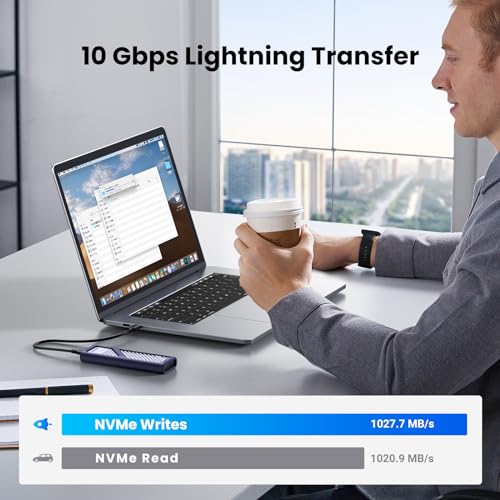
- USB 3.2 Gen 2 (10Gbps) interface for fast transfers
- Supports NVMe M.2 2280 drives (single-sided)
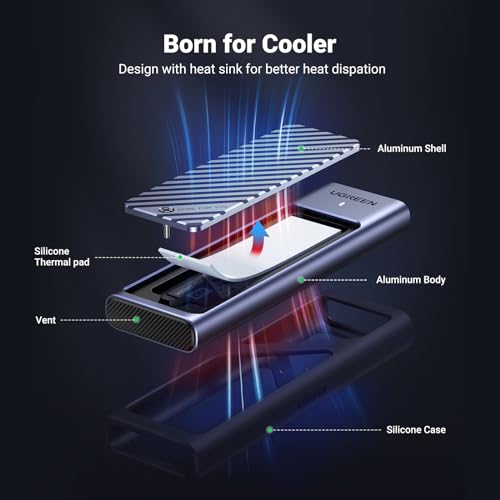
- Aluminum shell with thermal pad for heat dissipation
- Plug-and-play on Windows, macOS, and Linux — no drivers
- Compact design and included USB-C cable for portability
- Tool-included installation (small screwdriver provided)
What I Like
- Fast transfers close to USB 3.2 Gen 2 potential in real tasks
- Easy, tool-included setup — I had a drive installed in minutes
- Cross-platform support: works on Windows, macOS, and Linux
- Solid build and aluminum aid with heat spread
- Great price-to-performance ratio compared to similar enclosures

What Could Be Better
- No active cooling — can run warm under heavy sustained writes
- Supports mainly single-sided M.2 drives (double-sided may not fit)
- No rugged or waterproof rating for rough travel use

My Recommendation
If you need fast, portable NVMe storage without paying for Thunderbolt, the UGREEN M.2 NVMe SSD Enclosure is a smart, budget-friendly choice. I recommend it for users who want quick backups, fast media transfers, or to repurpose spare NVMe drives as external storage. It’s especially good for students, content creators on the go, and small-business users who value speed and simplicity.
| Best for | Why |
|---|---|
| Fast portable backups | USB 3.2 Gen 2 speeds give quick file copies |
| Repurposing spare NVMe drives | Easy install and plug-and-play across systems |
| Budget-conscious creators | Strong value vs pricier TB3 enclosures |

Alternative Products You Can Consider
-
Sabrent USB 3.2 Tool-Free NVMe Enclosure — Best for people who want tool-free install and similar USB 3.2 Gen 2 speeds. It compares closely on performance and is slightly more user-friendly for frequent swaps.
-
ORICO USB-C NVMe Enclosure — A solid midrange option with a metal body and good thermal design. It’s a good pick if you want a slightly different aesthetic and comparable performance.
-
StarTech USB-C NVMe Enclosure — Best for users who want strong build quality and business-focused support. It often costs more but has reliable compatibility across enterprise systems.
| Product | Best For | Key Difference |
|---|---|---|
| UGREEN M.2 NVMe SSD Enclosure | Everyday fast portable storage | Strong value; USB 3.2 Gen 2 at affordable price |
| Sabrent USB 3.2 Tool-Free | Quick drive swaps | Tool-free design for frequent changes |
| ORICO USB-C NVMe Enclosure | Balanced thermal design | Different thermal approach and finish |
Final Verdict: Which Should You Buy?
If you want affordable, fast, and reliable external NVMe storage, pick the UGREEN M.2 NVMe SSD Enclosure. It balances price and performance and works well for backups, file transfers, and repurposing NVMe drives. Choose a Sabrent tool-free model if you swap drives often. Pick a Thunderbolt 3/4 enclosure only if you need sustained maximum throughput for pro video work. Overall, the UGREEN option is the best middle ground for most users who want speed without a big price tag.
FAQs Of ugreen m.2 nvme ssd enclosure review
Does this enclosure work with both Windows and Mac?
Yes. The enclosure is plug-and-play on Windows, macOS, and Linux. No extra drivers are usually required.
What M.2 sizes and types does it support?
It supports M.2 NVMe (PCIe) 2280 drives. It’s mainly for single-sided modules. Double-sided drives may not fit cleanly.
Will it get too hot during heavy use?
It can warm up under long, heavy writes. The aluminum body and thermal pad help, but it lacks active cooling. For sustained professional workloads, consider a cooled or TB3 enclosure.
Can I use it to boot an OS?
Yes. You can boot from an NVMe in the enclosure if your system supports USB boot from NVMe devices. Check your BIOS/UEFI boot options.
Is it worth buying over a SATA-based USB enclosure?
Yes, if you need much faster speeds. NVMe over USB 3.2 Gen 2 is substantially faster than SATA-based external drives for large file transfers.

Everett Ashford is a tech reviewer at mytechgrid.com specializing in SSDs, cameras, TVs, earbuds, headphones, and other consumer electronics. He provides honest, data-driven reviews based on hands-on testing and real-world performance analysis. Everett simplifies complex tech details to help readers make smart, confident buying decisions.