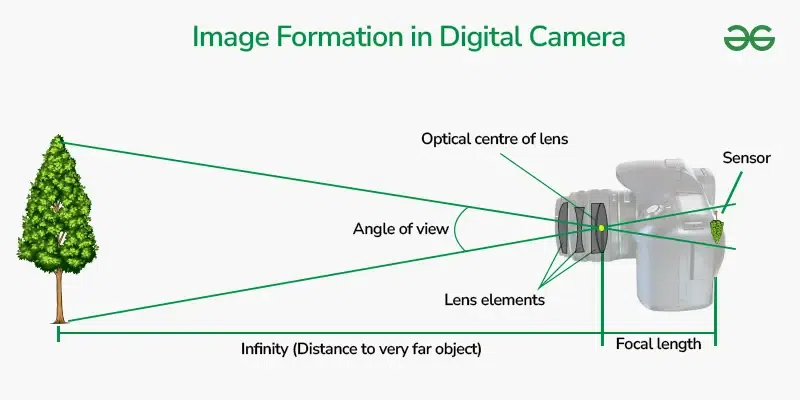
Digital cameras capture images by turning light into electrical signals, then processing those signals into digital files.
Understanding how do digital cameras capture images makes photography much easier. A digital camera is a small, precise system that guides light through a lens, measures it with a sensor, and builds a picture from millions of tiny data points. This guide explains each stage in clear terms, from pressing the shutter to saving a JPEG or RAW file.
The Basic Process: From Light to Image
The simplest answer to how do digital cameras capture images is that they convert light into data. The camera does not record a scene in one instant as a complete picture. Instead, it measures the light reaching its image sensor at thousands or millions of individual points.
Here is the process in order:
- Light reflects from a subject and enters the camera.
- The lens focuses that light onto the image sensor.
- The sensor converts light into electrical signals.
- The camera measures and interprets those signals.
- The image processor turns the data into a photograph.
- The camera saves the result to a memory card or internal storage.
This process happens very quickly. In many cameras, the full capture takes only a fraction of a second. However, the final look depends on lens quality, exposure settings, sensor design, focus accuracy, and image processing.
Think of the sensor as a digital canvas. Instead of paint, it receives light. Instead of a human artist, the camera’s processor organizes the light into color, brightness, contrast, and detail.

How Light Enters the Camera
Light is the starting point in understanding how do digital cameras capture images. A subject has color and brightness because it reflects, absorbs, or emits light. The camera collects some of that light and uses it to form an image.
The lens contains several glass elements. These elements bend light rays so they meet at the correct place on the sensor. If the light does not meet accurately, the photograph looks soft or blurry.
The camera controls the amount of incoming light in three main ways:
• Aperture controls the size of the lens opening.
• Shutter speed controls how long the sensor receives light.
• ISO controls how strongly the camera amplifies the recorded signal.
These three controls form the exposure triangle. For example, a wide aperture lets in more light but creates a shallower depth of field. A fast shutter speed freezes motion but allows less light to reach the sensor. A higher ISO helps in dark scenes but can add image noise.
What the Aperture Does
The aperture is an adjustable opening inside the lens. It is measured in f-stops, such as f/1.8, f/4, or f/11.
A small f-number means a wide opening. A large f-number means a narrow opening. This can feel backward at first, but it becomes easy with practice.
A wide aperture can:
• Brighten the image.
• Blur the background.
• Help in low light.
A narrow aperture can:
• Darken the image.
• Keep more of the scene in focus.
• Improve depth in landscape photos.
What the Shutter Does
The shutter controls the length of the exposure. A shutter speed of 1/1000 second can freeze a bird in flight. A speed of one second can show motion blur from moving water or passing car lights.
Many modern cameras also use electronic shutters. These shutters read the sensor electronically instead of moving a physical curtain. Electronic shutters can be silent, but some may create distortion when photographing fast movement.

How the Image Sensor Records Light
The image sensor is the part that answers much of how do digital cameras capture images. It sits behind the shutter and lens mount. Its job is to receive light and convert it into electrical information.
Most digital cameras use either a CMOS or CCD sensor. CMOS sensors are now common because they use less power, support fast readout, and can include advanced circuitry on the sensor itself. CCD sensors were once popular for their clean image output, but they are less common in modern consumer cameras.
A sensor contains millions of photosites. Each photosite is a light-sensitive area that records the amount of light it receives. Photosites are often described as pixels after the image is processed, although the terms are not always technically identical.
A 24-megapixel camera has about 24 million image points. More megapixels can provide more detail and allow larger prints, but megapixels alone do not determine image quality. Lens sharpness, sensor size, lighting, focus, and processing also matter.
How Photosites Measure Light
Photosites use a material that reacts to photons. When light strikes the photosite, it releases electrical charge. Brighter areas create a stronger signal. Darker areas create a weaker signal.
At this stage, most photosites mainly measure light intensity, not full color. The camera needs another method to record red, green, and blue information.
That method is usually a color filter array. The most common pattern is the Bayer filter. It places red, green, and blue filters over different photosites, with extra green filters because human vision is highly sensitive to green detail.
The camera then estimates missing color information by comparing nearby photosites. This process is called demosaicing.
Dynamic Range
Dynamic range is the span between the darkest and brightest detail a sensor can record. A camera with wide dynamic range may preserve texture in both a bright sky and a shaded building.
If highlights receive too much light, they become clipped and turn pure white. If shadows receive too little light, they may become solid black. Once detail is clipped, editing software usually cannot fully restore it.
This is why photographers often protect bright highlights, especially in scenes with strong sunlight. RAW files may preserve more recoverable information than JPEG files, but they cannot recover detail that the sensor never recorded.

How a Camera Creates Color
Color is another important part of how do digital cameras capture images. A typical sensor does not record a complete red, green, and blue value at every photosite. It gathers filtered light and uses software to estimate a full-color image.
The three main color channels are:
• Red, which helps represent warm tones.
• Green, which contributes strongly to brightness and fine detail.
• Blue, which represents cool tones and helps create accurate color mixtures.
The camera combines these channels to reproduce millions of visible colors. This method is based on the additive color model used by displays and digital imaging systems.
White Balance
Light sources have different color temperatures. Daylight may look neutral, while a household bulb can look orange. Shade can make a scene look blue.
White balance adjusts the image so neutral objects appear neutral. Cameras can use automatic white balance, preset modes, or a custom reading from a white or gray reference.
Automatic white balance works well in many situations. However, it can make a series of photos look inconsistent when the lighting does not change. For important work, a fixed white balance or a gray card can provide more stable results.
Color Profiles
A color profile describes how colors should be interpreted. Common profiles include sRGB and Adobe RGB. Many online platforms and consumer screens work best with sRGB.
Some cameras also offer picture styles or creative profiles. These settings may change contrast, saturation, sharpness, and color tone. They affect the preview and JPEG output, but RAW files usually retain more original sensor data.

What Happens When You Press the Shutter
When you press the shutter button, the camera begins a carefully timed sequence. Learning this sequence helps explain how do digital cameras capture images in real-world use.
First, the camera may confirm focus and exposure. In autofocus mode, it studies contrast, phase information, or both to estimate where the subject is. It then adjusts the lens until the selected subject appears sharp.
Next, the camera opens the shutter or begins an electronic readout. The sensor collects light for the chosen exposure time. During this period, movement from the subject or camera can create blur.
After the exposure ends, the camera reads the sensor. An analog-to-digital converter changes the sensor’s electrical signals into numerical values. The camera’s processor then applies corrections and builds the image file.
This entire operation may include:
• Autofocus confirmation.
• Exposure measurement.
• Shutter activation.
• Sensor readout.