Introduction
For a U.S. business, an agentic AI system is best built as a controlled software system—not as a chatbot with a longer prompt. Start with one narrow job, define the actions the agent may take, connect only the tools it needs, add limits and human approval, then test the full workflow with real task examples.
This guide explains how to build an agentic AI system from scratch using common software patterns. It covers system design, model selection, tool use, memory, security, testing, monitoring, and deployment. The examples use Python-style code and apply to internal tools, customer service, research, operations, and other U.S.-based applications.

What Is an Agentic AI System?
An agentic AI system uses a language model to interpret a goal, choose actions, use tools, inspect results, and continue until it reaches a defined stopping point.
A normal AI application often follows this pattern:
User request → Model <a href="https://en.wikipedia.org/wiki/Claude_(AI)" target="_blank" rel="dofollow" style="color: #6b21a8; text-decoration: underline; font-weight: 600;">response</a>
An agentic system follows a longer loop:
User request
    ↓
Understand the task
    ↓
Plan the next action
    ↓
Call a tool
    ↓
Check the result
    ↓
Repeat or finish
The model does not control the whole application. Your code does. The application decides which tools exist, what inputs are valid, when the agent must stop, and when a person must approve an action.
A useful definition is:
An agent is a software system that uses a model to select actions within a controlled environment to complete a goal.
This definition separates agents from several related systems:
| System type | Main behavior | Example |
|---|---|---|
| Chatbot | Produces a reply | Answers a product question |
| Retrieval system | Finds relevant information | Searches a company knowledge base |
| Workflow | Runs fixed steps | Sends an invoice after approval |
| Agent | Chooses among allowed actions | Investigates a billing issue and proposes a fix |
| Multi-agent system | Uses several specialized agents | Research, review, and approval agents |
An agent is useful when the path to the answer changes from case to case. If every request follows the same steps, a normal workflow is often safer, cheaper, and easier to test.
The core parts of an agent
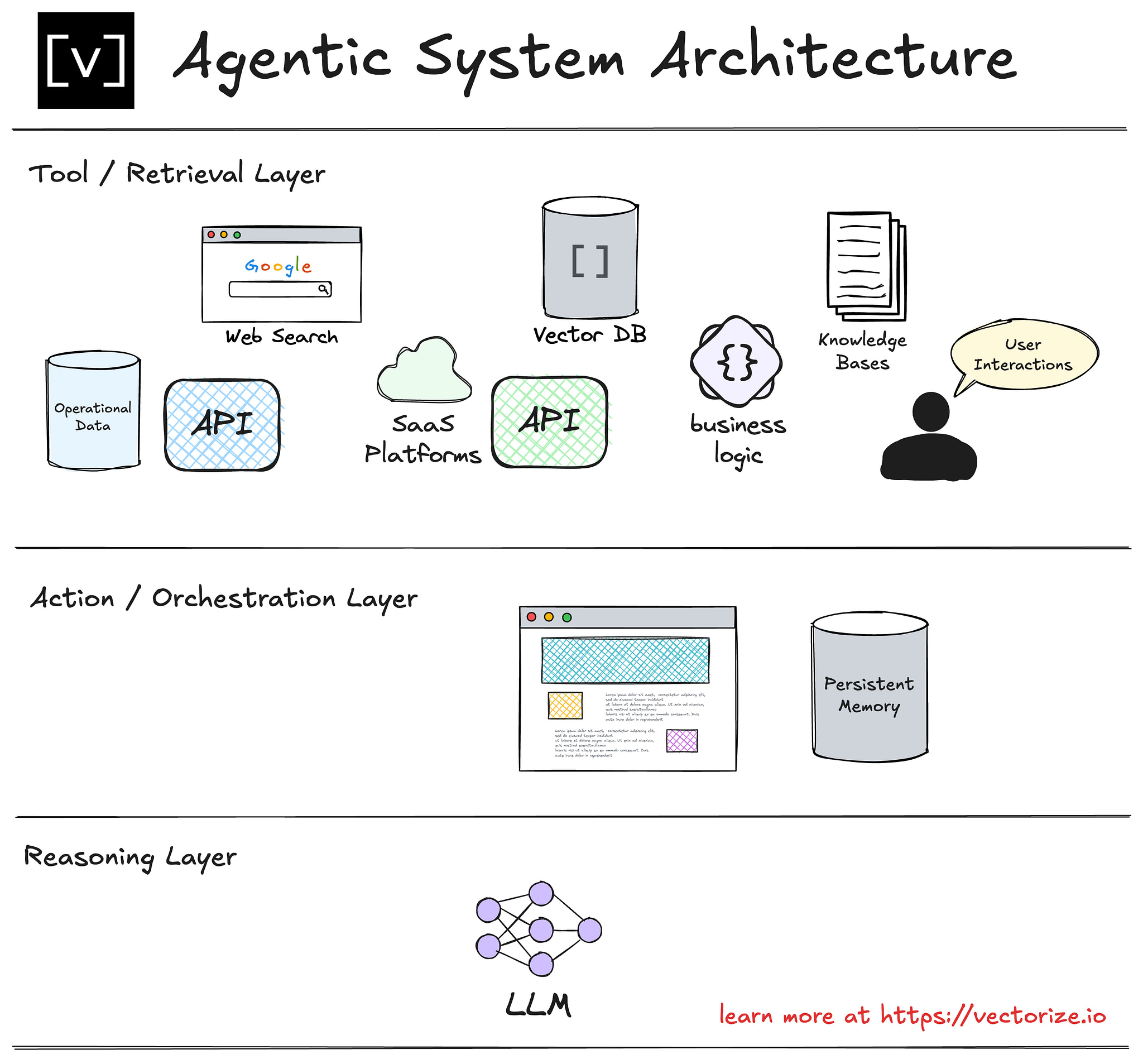
Most agentic AI systems contain six parts:
- Model — Interprets language and selects an action.
- Instructions — Define the role, rules, limits, and output format.
- Tools — Let the agent read data or perform actions.
- State — Stores the current task, results, and decisions.
- Control loop — Runs the model and tools until the task ends.
- Evaluation layer — Checks whether the system worked correctly.
Research such as the ReAct paper describes a related pattern in which a model combines reasoning with actions. In production, do not expose private internal reasoning. Store concise plans, tool calls, results, and decisions instead.

Define the Task Before You Choose a Model
The first step is to define one task with a clear start, finish, and success measure.
Weak task:
Help customers with support.
Better task:
Review a customer’s recent support history, identify the likely cause of a delayed order, draft a response, and request human approval before issuing a refund.
The second task has a clear boundary. It also shows where the agent needs tools and where a person must remain involved.
Write a task contract
Create a short contract with these fields:
Task:
User:
Allowed data:
Allowed tools:
Forbidden actions:
Required approval:
Success condition:
Failure condition:
Maximum steps:
Maximum cost:
For example:
Task:
Draft a response to a delayed shipment request.

Allowed data:
Order status, shipment events, customer message, refund policy.

Allowed tools:
get_order()
get_shipping_events()
search_policy()

Forbidden actions:
Changing an order, issuing a refund, exposing internal notes.

Required approval:
A support employee must approve the final message.

Success condition:
The draft correctly explains the delay and cites the applicable policy.

Failure condition:
The order cannot be found, data conflicts, or the policy is unclear.

Maximum steps:
8 tool calls.
This contract prevents a common mistake: asking a model to “handle” a broad business process without defining what handling means.
Decide whether you need an agent
Use a fixed workflow when:
- The steps rarely change.
- The input fields are predictable.
- The result must be exactly repeatable.
- A rules engine can make the decision.
- A mistake would have a high cost.
Use an agent when:
- The user’s language is varied.
- The system must select from several valid tools.
- The path changes based on the data.
- The task needs interpretation before action.
- A human can review important decisions.
A hybrid design is often the strongest choice. Use normal code for permissions, calculations, database writes, and business rules. Use the model for classification, extraction, search planning, and language generation.

Design the Agent Architecture
A practical architecture separates model decisions from software controls.
User or application
        ↓
API and authentication
        ↓
Task manager
        ↓
Agent controller
   ┌────┼─────────────┐
   ↓    ↓             ↓
Model Tools        State store
        ↓             ↓
External systems  Logs and traces
        ↓
Approval service
        ↓
Final result
The model should not be your security layer
The model can suggest an action. It should not be trusted to enforce access control.
Your application must check:
- Who is making the request.
- Which records that user may access.
- Which tools the user may call.
- Which fields the model may see.
- Whether the action needs approval.
- Whether the request is within rate and cost limits.
For example, a tool named get_customer_record() should still verify the customer ID against the authenticated user’s permissions. A system prompt saying “only access authorized records” is not enough.
Use typed tool contracts
Each tool should have a small, strict interface. A tool description should explain:
- What the tool does.
- When to use it.
- Required inputs.
- Input formats.
- Possible errors.
- Whether it changes data.
- Whether it requires approval.
Example:
from pydantic import BaseModel, Field

class OrderLookup(BaseModel):
    order_id: str = Field(
        description="The order ID supplied by the user or found in an authorized record"
    )

def get_order(order_id: str, user_id: str) -> dict:
    verify_user_can_view_order(user_id, order_id)
    return order_database.fetch(order_id)
The user_id should come from the authenticated session, not from the model. The model may supply the order ID, but your application supplies identity and permission context.
Separate read tools from write tools
Read tools retrieve information. Write tools change something.
Examples of read tools:
- Search documents.
- Retrieve an order.
- Read a calendar.
- Check account status.
- Get product availability.
Examples of write tools:
- Send an email.
- Update a record.
- Create a ticket.
- Issue a refund.
- Place an order.
Treat write tools as high risk. Add one or more of these controls:
- Human approval.
- A second validation step.
- A transaction preview.
- An idempotency key.
- A maximum amount.
- A rollback path.
- A restricted service account.
An agent that can send messages or move money needs more than a well-written prompt.

Build the Smallest Working Agent
Build a narrow vertical slice before adding memory, multiple agents, or complex planning.
The first version should do four things:
- Accept a task.
- Let the model select from a small set of tools.
- Execute valid tool calls.
- Return a clear result or a safe failure.
A provider-neutral control loop
The exact API differs by model provider, but the control pattern looks like this:
MAX_STEPS = 8

def run_agent(user_id: str, user_request: str):
    messages = [
        {
            "role": "system",
            "content": (
                "You are a support assistant. "
                "Use tools only for the stated task. "
                "Never change records or send messages without approval."
            ),
        },
        {"role": "user", "content": user_request},
    ]

    for step in range(MAX_STEPS):
        response = model_call(
            messages=messages,
            tools=SAFE_READ_TOOLS,
            temperature=0
        )

        if response.has_final_text():
            return {
                "status": "complete",
                "answer": response.text,
                "steps": step + 1,
            }

        if not response.has_tool_calls():
            return {
                "status": "failed",
                "reason": "The model returned neither a final answer nor a tool call.",
            }

        for call in response.tool_calls:
            validate_tool_name(call.name)
            arguments = validate_arguments(call.name, call.arguments)

            result = execute_tool(
                name=call.name,
                arguments=arguments,
                user_id=user_id
            )

            messages.append(response.as_message())
            messages.append({
                "role": "tool",
                "tool_name": call.name,
                "content": redact_sensitive_data(result),
            })

    return {
        "status": "stopped",
        "reason": "Maximum step limit reached.",
    }
This example includes several important controls:
- A maximum number of steps.
- An allowlist of tools.
- Schema validation.
- Application-level identity.
- Redaction before results return to the model.
- A safe result when the loop cannot finish.
Use a model SDK or agent framework if it reduces boilerplate. However, understand the underlying loop. Framework abstractions can hide retries, tool calls, state, and costs.
Add structured final output
If another program consumes the result, do not rely on free-form text. Require a schema:
class SupportDraft(BaseModel):
    summary: str
    proposed_reply: str
    policy_basis: str
    confidence: str
    needs_human_review: bool
Structured output reduces parsing errors. It does not guarantee that the content is correct, so validate the values as well.
Add failure paths early
An agent needs explicit answers to these questions:
- What happens when a tool times out?
- What happens when a tool returns empty data?
- What happens when two tools disagree?
- What happens when the model calls an unknown tool?
- What happens when the task exceeds its step limit?
- What happens when the model asks for private data?
- What happens when the user changes the goal halfway through?
A safe default is to stop, explain the problem, preserve the trace, and send the case to a person or a normal support queue.

Add Memory Only When It Solves a Real Problem
Memory is not one feature. It is several types of stored information with different risks.
| Memory type | Purpose | Example |
|---|---|---|
| Working state | Track the current task | Tool results from this session |
| Conversation history | Preserve recent context | Earlier user messages |
| User profile | Store stable preferences | Preferred language |
| Knowledge base | Retrieve external facts | Company policy documents |
| Task history | Learn from past cases | Prior ticket outcomes |
Start with working state. Add long-term memory only when you can explain why the agent needs it and how users can inspect or correct it.
Use retrieval for changing knowledge
A model’s built-in knowledge may be outdated or incomplete. Retrieval-augmented generation, often called RAG, lets the system search approved documents before answering.
A basic RAG flow is:
Question
  ↓
Create search query
  ↓
Retrieve approved passages
  ↓
Check access rights
  ↓
Give passages to the model
  ↓
Generate a grounded answer
A retrieval system should preserve:
- Document title.
- Source URL or record ID.
- Version or effective date.
- Access rules.
- Retrieved passage.
- Search score or ranking data.
Tell the model to treat retrieved text as data, not instructions. A document can contain malicious text that tries to control the agent.
Control context size
Sending every prior message and document to the model raises cost and can reduce accuracy. Use:
- Recent-message limits.
- Summaries for older context.
- Retrieval filters.
- Document chunk limits.
- Duplicate removal.
- Relevance thresholds.
- Separate confidential and non-confidential stores.
Do not store sensitive information in memory merely because it may be useful later. Define retention and deletion rules before launch.

Secure the Agent Against Common Attacks
Agentic systems create a larger attack surface because they can read data and take actions.
The OWASP Top 10 for Large Language Model Applications identifies risks such as prompt injection, insecure output handling, sensitive information disclosure, and excessive agency. These risks apply to both custom systems and framework-based agents.
Defend against prompt injection
Prompt injection happens when untrusted text tries to change the agent’s rules.
The text may come from:
- A user message.
- An email.
- A web page.
- A support ticket.
- A retrieved document.
- A tool response.
- A calendar event.
Useful defenses include:
- Keep system rules outside retrieved content.
- Mark external text as untrusted data.
- Do not let documents define permissions.
- Require confirmation for sensitive actions.
- Use separate tools for reading and writing.
- Validate every tool argument.
- Limit the agent’s authority.
- Test malicious and misleading inputs.
No prompt can fully solve prompt injection. The strongest defense is to limit what the agent can do even when it is manipulated.
Protect private information
Use data minimization:
- Send only the fields needed for the task.
- Mask account numbers and identity numbers.
- Avoid putting secrets in prompts.
- Do not log full passwords, tokens, or payment data.
- Encrypt stored traces.
- Set retention periods.
- Restrict staff access to logs.
For U.S. organizations, the legal duties depend on the industry, state, data type, and business model. A system that handles health, financial, employment, education, or children’s data may need specialized review. Consult qualified privacy and legal professionals before deployment.
Apply least privilege
Create separate credentials for separate tools. A support agent should not use a database account that can delete records. A research agent should not have permission to send email.
A good design asks:
If this agent is fully compromised, what is the maximum damage it can cause?
Reduce that maximum through narrow permissions, transaction limits, approval gates, and monitoring.

Evaluate the Agent Before Production
A successful demo does not prove that an agent is reliable. Agents can follow the happy path while failing on unclear requests, missing data, or hostile input.
Create an evaluation set with examples from several groups:
- Normal tasks.
- Ambiguous tasks.
- Incomplete tasks.
- Out-of-scope tasks.
- Permission violations.
- Prompt injection attempts.
- Tool failures.
- Conflicting records.
- Long conversations.
- Repeated requests.
For each example, record the expected behavior. The expected result may be a refusal or a request for clarification, not a completed answer.
Measure more than answer quality
Track at least these metrics:
| Metric | What it tells you |
|---|---|
| Task success rate | Whether the requested job was completed |
| Tool selection accuracy | Whether the agent chose the right tool |
| Argument accuracy | Whether tool inputs were correct |
| Grounding rate | Whether answers used approved evidence |
| Unsafe action rate | How often the agent attempted forbidden work |
| Human escalation rate | How often people had to intervene |
| Step count | How long tasks took |
| Cost per task | Financial efficiency |
| Latency | User experience |
| Reproducibility | Whether results change unexpectedly |
The metric that matters most depends on the task. For a refund agent, unsafe action rate may matter more than speed. For internal research, grounded answers and citation quality may matter more than exact wording.
Test with real traces
Store structured traces, not just final answers:
task_id
user_id_hash
model_version
prompt_version
tool_name
validated_arguments
tool_result_status
step_number
latency_ms
estimated_cost
final_status
human_feedback
Redact sensitive content before storing traces. Logs should help you find failures without creating a new privacy problem.
Use human review where risk justifies it
Human approval is suitable for:
- Financial transfers.
- Refunds above a set limit.
- Legal or medical communications.
- Account closure.
- Employment decisions.
- Public posts.
- Destructive database actions.
- Messages sent to large groups.
Approval screens should show the proposed action, the data used, the reason, and the exact change. A vague “Approve AI action” button does not give a reviewer enough context.

Deploy and Operate the System Carefully
Treat an agent as a production service, not a script.
Before launch, prepare:
- Authentication and authorization.
- Rate limits.
- Timeouts.
- Retry rules.
- Budget limits.
- Tool health checks.
- Error reporting.
- Version control for prompts and tools.
- A rollback plan.
- A human escalation path.
- Data retention rules.
Use idempotency for write actions
An idempotent action produces the same final result when safely repeated. This matters because network failures can occur after an action succeeds but before the agent receives the response.
For example:
def create_ticket(request, idempotency_key):
    existing = ticket_store.find_by_key(idempotency_key)

    if existing:
        return existing

    ticket = ticket_system.create(request)
    ticket_store.save_key(idempotency_key, ticket.id)
    return ticket
Without idempotency, a retry could create duplicate tickets, send duplicate emails, or charge a customer twice.
Set budgets and stop conditions
Use limits for:
- Maximum loop steps.
- Maximum tool calls.
- Maximum tokens.
- Maximum elapsed time.
- Maximum dollar value.
- Maximum records returned.
- Maximum retries.
A budget is both a cost control and a safety control. If the agent cannot complete a task within the limit, it should stop rather than continue blindly.
Version the whole system
Record the versions of:
- Model.
- System instructions.
- Tool schemas.
- Retrieval index.
- Business rules.
- Evaluation set.
- Application code.
A model change can alter tool selection or refusal behavior. A document update can alter retrieved evidence. Without version records, it is hard to explain why performance changed.

Common Mistakes to Avoid
Starting with a multi-agent design
Multiple agents add coordination, state, permissions, and debugging problems. Start with one agent and one narrow task. Split it only when a clear boundary improves quality or safety.
Giving the agent too many tools
A large tool list makes selection harder and increases the chance of an unsafe call. Give the agent the smallest useful tool set.
Using prompts instead of controls
“Never issue a refund without approval” is useful instruction. It is not an approval system. Enforce the rule in application code.
Letting the model perform calculations
Use normal code for totals, dates, thresholds, tax calculations, and eligibility rules. Ask the model to explain the result, not to become the accounting system.
Treating retrieval as proof
Retrieved text can be stale, incomplete, or malicious. Check access, source dates, and conflicts. Require the agent to say when evidence is missing.
Skipping negative tests
A system that passes five friendly examples may still fail when a user supplies an order ID belonging to someone else. Test misuse before launch.
Making autonomy the goal
More autonomy is not always better. The right goal is dependable task completion within clear limits. Sometimes the best agent is one that asks a person for help early.

A Practical Build Plan
Use this sequence for a first production-grade prototype:
- Choose one narrow task.
- Write the task contract.
- Define success and failure cases.
- Create two or three read-only tools.
- Build a bounded control loop.
- Validate tool names and arguments.
- Add authentication and access checks.
- Add structured final output.
- Create a test set with normal and hostile cases.
- Log steps, tools, errors, cost, and latency.
- Add human approval for risky actions.
- Deploy with time, cost, and permission limits.
- Review failures and update the system in small changes.
A simple first milestone is not “the agent can do everything.” It is:
The agent completes one defined task, refuses unsafe requests, produces a useful trace, and fails in a controlled way.
Signs that the system is ready for a pilot
A pilot may be reasonable when:
- The task boundary is clear.
- Tool permissions are narrow.
- Failures have a known escalation path.
- Evaluation examples cover common edge cases.
- Human reviewers can see proposed actions.
- Logs avoid unnecessary sensitive data.
- Costs and latency fit the business need.
- The team can disable the agent quickly.
Do not expand the scope until you understand the failure patterns in the first task.

Official References and Technical Foundations
The following resources provide useful primary or standards-based guidance:
- NIST AI Risk Management Framework — risk management concepts for AI systems.
- [NIST Generative AI Profile](https://www.nist.gov/itl/ai-risk-management-framework/ generative-ai-profile) — risks and controls related to generative AI. Remove the space in the URL if your editor inserts one.
- OWASP Top 10 for LLM Applications — common application security risks.
- ReAct: Synergizing Reasoning and Acting in Language Models — research on combining language reasoning with external actions.
- Anthropic: Building Effective Agents — practical discussion of workflows, agents, and system complexity.
- Model Context Protocol specification — an open protocol for connecting models to tools and data sources.
These references support design decisions, but they do not replace testing your own model, tools, data, or risk environment.
FAQs About Building Agentic AI Systems
Can I build an agentic AI system without training my own model?
Yes. Most teams begin with an existing language model and focus their work on tool design, access controls, evaluation, data quality, and operations. Fine-tuning may help with a narrow behavior, but it is not required for many agent applications.
Should I use an agent framework?
A framework can help with tool calls, state, tracing, retries, and structured output. Use one when it reduces code without hiding important controls. You should still understand the loop and be able to inspect every tool call.
How much memory should an agent have?
Use the least memory that solves the task. Begin with the current task state. Add long-term memory only when you have clear retention, correction, deletion, and access rules.
What is the difference between an AI agent and an AI workflow?
A workflow follows a mostly fixed sequence. An agent chooses the next action based on the current situation. Many reliable systems combine both: code controls the major stages, while the model handles flexible language and tool selection inside a stage.
How do I reduce hallucinations?
Give the agent access to approved source data, use retrieval when information changes, require structured outputs, validate important claims, and make uncertainty visible. For high-risk work, require human review. No single prompt can remove hallucinations.
What programming language is best?
Python is a common choice because it has strong libraries for APIs, validation, data work, and model integration. TypeScript, Java, Go, and other languages can work well. The language matters less than clear interfaces, testing, security, and operations.
Conclusion
To build an agentic AI system from scratch, begin with a narrow task and a written contract. Add a small set of typed tools, run them through a bounded control loop, enforce permissions in software, and test both normal and hostile cases.
Keep the system simple until its behavior is measurable. Use human approval for high-impact actions, store useful traces, limit cost and steps, and expand only after the first workflow is dependable. The best agentic systems are not the most autonomous ones; they are the ones that complete useful work while keeping people and software controls firmly in charge.

Everett Ashford is a tech reviewer at mytechgrid.com specializing in SSDs, cameras, TVs, earbuds, headphones, and other consumer electronics. He provides honest, data-driven reviews based on hands-on testing and real-world performance analysis. Everett simplifies complex tech details to help readers make smart, confident buying decisions.