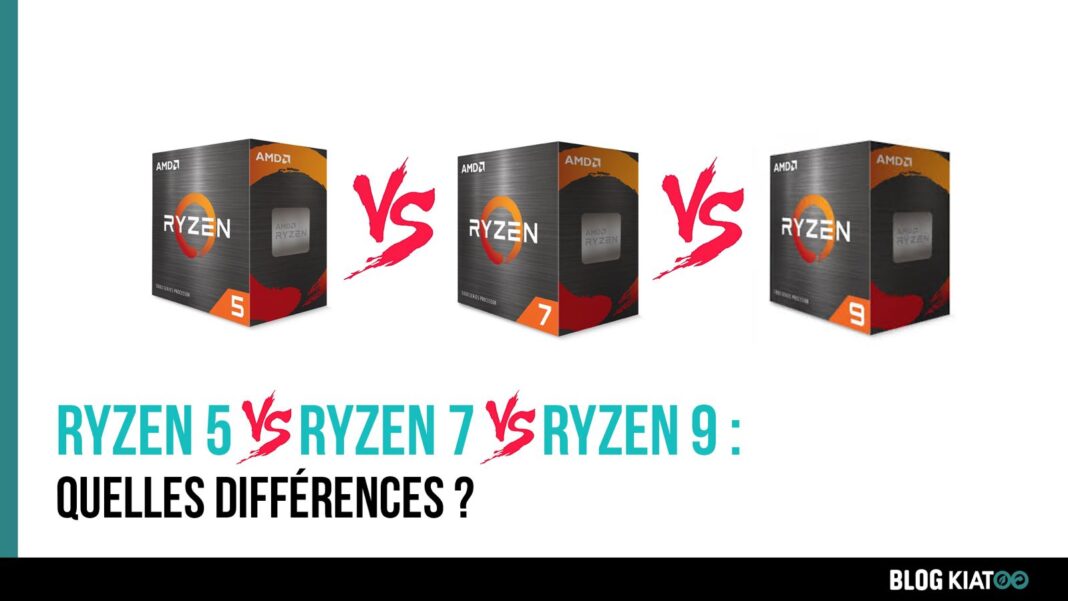
For shoppers in the United States, the main difference between an AMD Ryzen 7 and Ryzen 9 laptop is performance class. Ryzen 9 chips usually offer more cores, higher clock speeds, larger cache, or a higher power limit. That can make them faster for video editing, 3D work, coding, and heavy multitasking.
However, the Ryzen 9 label does not always mean a large speed gain. Laptop makers can pair the chip with different cooling systems, memory, displays, and graphics cards. A well-cooled Ryzen 7 laptop may beat a thin Ryzen 9 model in some tasks.
The best choice depends on the exact processor model, laptop design, cooling, battery, and price—not just the Ryzen 7 or Ryzen 9 name.
Ryzen 7 vs. Ryzen 9: The Short Answer
Ryzen 7 is usually the better value for most people. Ryzen 9 is aimed at users who need extra CPU power and can accept a higher price, more heat, louder fans, and sometimes shorter battery life.
| Feature | AMD Ryzen 7 laptop | AMD Ryzen 9 laptop |
|---|---|---|
| Typical position | Upper-midrange to high-end | High-end and enthusiast |
| CPU cores | Often fewer, but not always | Often more, but not always |
| Multitasking | Strong | Stronger on matching models |
| Gaming | Very good | Often similar with the same GPU |
| Video editing | Good to very good | Better for long, CPU-heavy work |
| Battery life | Often easier to manage | Depends on power mode and design |
| Price | Usually lower | Usually higher |
| Best for | Students, work, gaming, general use | Heavy creators, developers, workstations |
The word “often” matters. AMD uses Ryzen 7 and Ryzen 9 across several generations and laptop power classes. A low-power Ryzen 9 may have fewer cores than a high-power Ryzen 7 from another generation.
What Do Ryzen 7 and Ryzen 9 Mean?
Ryzen 7 and Ryzen 9 are AMD performance tiers. They are similar to trim levels in a vehicle line. The badge gives you a rough position in the range, but it does not describe every important part.
A processor name also includes information about its generation and power class. For example:
- Ryzen 7 7840HS is an 8-core mobile processor from the Ryzen 7000 era.
- Ryzen 9 7940HS is also an 8-core mobile processor from the same broad generation.
- Ryzen 9 7945HX is a much larger 16-core mobile processor designed for high-performance laptops.
The Ryzen 9 7940HS can be faster than the Ryzen 7 7840HS in some workloads. But the gap may be modest because both chips have eight cores and 16 threads. The Ryzen 9 7945HX is a different class of chip because it has twice as many cores.
AMD’s laptop processor families can also include:
- U-series: Designed for thin laptops and lower power use.
- HS-series: A balance of performance and size.
- H-series: Higher performance, often in gaming and creator laptops.
- HX-series: The highest mobile power class, usually in thick performance laptops.
The letters can matter as much as the Ryzen tier. A Ryzen 7 HX processor may outperform a Ryzen 9 U processor in sustained work because it can use far more power.
CPU Cores and Threads: The Biggest Performance Difference
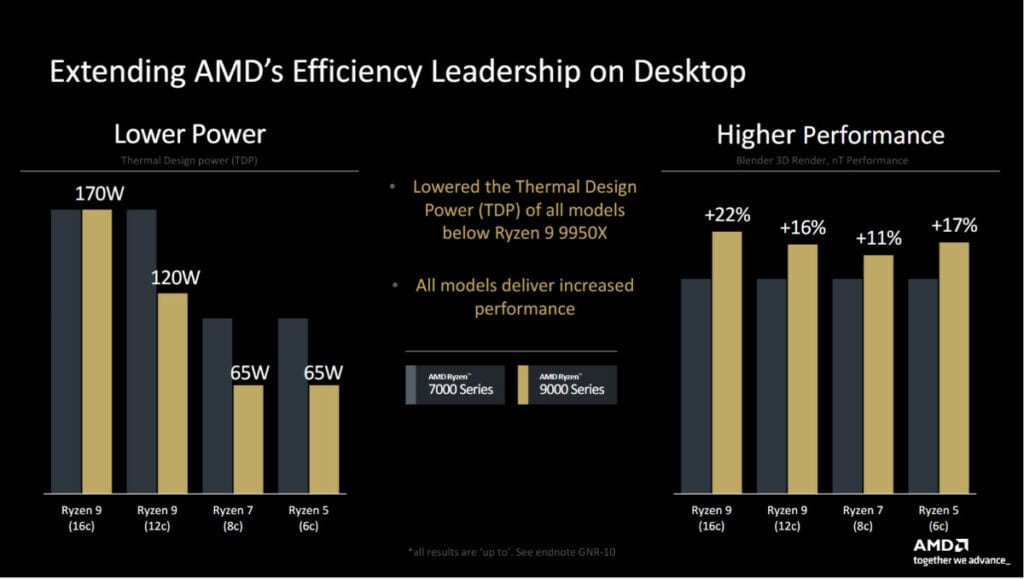
The largest difference between matching Ryzen 7 and Ryzen 9 processors is often the number of CPU cores and threads.
A core is a physical processing unit. A thread is a stream of work that the processor can handle. More cores can help when software divides a task into many parts.
Ryzen 9 laptops are more likely to include:
- More CPU cores.
- More simultaneous threads.
- Higher sustained performance.
- Larger cache on some models.
- Higher boost speeds on some models.
These features help with tasks such as:
- Exporting long 4K video projects.
- Rendering 3D scenes.
- Compiling large software projects.
- Running virtual machines.
- Processing large data sets.
- Compressing files while other apps remain open.
They matter less for simple work. Web browsing, email, office apps, streaming, and school work rarely use all available cores. A Ryzen 7 processor is already more than capable for these tasks.
Why the exact model matters
Do not compare only “Ryzen 7” with “Ryzen 9.” Compare the full chip names.
For example, two processors may both belong to the Ryzen 7 family but use different:
- CPU architectures.
- Core counts.
- Integrated graphics.
- Power limits.
- Cache sizes.
- Manufacturing generations.
A newer Ryzen 7 can also outperform an older Ryzen 9 in efficiency, battery life, or lightly threaded work. The tier number is a useful starting point, not a final performance score.
Gaming Performance: Ryzen 7 Is Often Enough
For gaming laptops sold in the United States, the graphics card usually has a greater effect on frame rates than the difference between Ryzen 7 and Ryzen 9.
A laptop with:
- Ryzen 7
- GeForce RTX 4070
- Good cooling
may deliver higher game performance than a laptop with:
- Ryzen 9
- GeForce RTX 4060
- A lower graphics power limit
The discrete GPU renders most modern 3D scenes. The CPU still matters for game logic, physics, background tasks, and very high frame rates. It can also matter more in strategy games, simulation games, esports titles, and games played at low settings.
Ryzen 9 can be useful if you:
- Use a high-refresh display.
- Play CPU-heavy games.
- Stream while gaming.
- Run game development tools.
- Pair the laptop with a powerful external monitor.
- Keep the laptop for many years and want extra CPU headroom.
For most gaming buyers, it is usually smarter to compare the GPU model and its power rating first. Then check the cooling system, RAM, display, and CPU.
Productivity and Everyday Use
Both Ryzen 7 and Ryzen 9 laptops can handle everyday work with ease. This includes:
- Microsoft 365 apps.
- Web browsing with many tabs.
- Video calls.
- Streaming.
- Photo management.
- Light coding.
- Online classes.
- Basic photo editing.
Ryzen 9 may feel faster when many demanding tasks run at once. For example, you could export a video while compiling code and keeping several browser windows open.
Still, extra CPU power may not improve the parts of a laptop that you notice most. A laptop with a brighter screen, better keyboard, more RAM, or a faster solid-state drive may feel better than a faster processor in daily use.
For general productivity, consider this order:
- Choose a comfortable keyboard and display.
- Get at least enough RAM for your work.
- Check storage capacity and upgrade options.
- Review battery and weight.
- Then compare Ryzen 7 and Ryzen 9 performance.
Video Editing, 3D Work, and Professional Software
Ryzen 9 is more useful for professional workloads that keep the CPU busy for long periods.
A Ryzen 9 laptop may reduce export or render time when the software uses many CPU cores. The real gain depends on the program. Some tools use the GPU for effects and encoding, while others depend more on the CPU.
Ryzen 7 is often sufficient for:
- Short-form video editing.
- 1080p and moderate 4K projects.
- Photo editing.
- Music production with a reasonable track count.
- CAD work that is not heavily CPU-bound.
- Occasional 3D rendering.
Ryzen 9 is more suitable for:
- Frequent 4K or 8K video exports.
- Large 3D scenes.
- Complex simulations.
- Large software builds.
- Professional workloads that run for hours.
- Multiple demanding applications at the same time.
Laptop cooling can erase part of Ryzen 9’s advantage. A thin laptop may lower clock speeds when it becomes hot. A thicker Ryzen 7 laptop with better cooling may sustain a higher speed for longer.

Battery Life, Heat, and Fan Noise
Ryzen 9 laptops do not automatically have poor battery life. Battery life depends on the processor, screen, battery size, operating system settings, firmware, and workload.
However, a higher-performance Ryzen 9 laptop often has:
- A higher power limit.
- A larger cooling system.
- More aggressive fans.
- A discrete graphics card.
- A heavier chassis.
- Greater power use during demanding tasks.
These parts can increase heat and fan noise. They may also make the laptop heavier.
A low-power Ryzen 7 laptop may offer longer unplugged use because it is built for efficiency. But a Ryzen 9 model with a large battery and careful power settings may last longer than a small Ryzen 7 laptop with a bright high-resolution display.
When comparing battery claims, check the test conditions. A manufacturer’s estimate may not match your use. Gaming, video editing, screen brightness, Wi-Fi, background apps, and battery health all affect results.
Integrated Graphics: A Key Difference in Some Models
Some AMD laptop processors include Radeon integrated graphics. These graphics share system memory with the CPU.
Integrated graphics are useful for:
- Office work.
- Video playback.
- Light photo editing.
- Older games.
- Casual games.
- Some creative applications.
A few Ryzen 7 and Ryzen 9 processors have stronger integrated graphics than others. The Ryzen label alone does not tell you the graphics performance.
For gaming or 3D work, check:
- The exact Radeon graphics model.
- The number of graphics cores.
- Memory speed and channel setup.
- Whether the laptop includes a discrete GPU.
- The laptop’s cooling and power settings.
If a laptop has a dedicated NVIDIA or AMD graphics card, that card usually matters more for demanding games and GPU-based creative work.

Price and Value
Ryzen 7 laptops usually offer the better balance of price and performance. They can leave more of your budget for parts that affect daily use, such as:
- More RAM.
- A larger SSD.
- A better display.
- A stronger graphics card.
- A larger battery.
- A longer warranty.
Ryzen 9 can be worth the extra cost when the laptop also includes meaningful upgrades. For example, a Ryzen 9 model may come with a better GPU, stronger cooling, more memory, or a higher-quality display.
The Ryzen 9 label alone is not enough reason to pay more. Compare the complete configuration.
A simple value test
Suppose two US laptops have similar screens and graphics cards:
- Laptop A: Ryzen 7, 32 GB RAM, 1 TB SSD.
- Laptop B: Ryzen 9, 16 GB RAM, 1 TB SSD.
For heavy multitasking, Laptop A may be the better buy because insufficient memory can cause slowdowns. If Laptop B has a much higher core count and you render video every day, its extra CPU power may justify the price.
The right question is not “Which badge is higher?” It is “Which complete laptop removes my biggest performance limit?”
How to Choose Between a Ryzen 7 and Ryzen 9 Laptop
Use this process before buying.
Choose Ryzen 7 if:
- You need a fast school or work laptop.
- You play games with a dedicated graphics card.
- You edit photos or occasional video.
- You value battery life, weight, or price.
- You do not run long CPU-heavy tasks every day.
- You can use the savings for more RAM or a better GPU.
Choose Ryzen 9 if:
- You render or export content often.
- You compile large projects frequently.
- You use virtual machines or demanding engineering tools.
- You need many cores for professional work.
- The laptop has a stronger cooling system.
- The extra cost is reasonable after comparing the full specifications.
Check these specifications in order
- Exact CPU model: Compare the full number and suffix.
- CPU cores and threads: More cores help in parallel workloads.
- Generation and architecture: Newer does not always mean faster in every task, but it matters.
- GPU: This is critical for gaming and many creative tasks.
- Cooling and power: Sustained performance depends on the laptop design.
- RAM: Aim for enough memory for your apps and future use.
- SSD: Check capacity, speed, and whether it can be replaced.
- Display: Review resolution, refresh rate, brightness, and color coverage.
- Battery and weight: Match them to how you use the laptop.
- Independent benchmarks: Use tests for the exact laptop model when possible.
Common Buying Mistakes
Assuming every Ryzen 9 is faster than every Ryzen 7
This is false. Generations, suffixes, core counts, and power limits can change the result.
Ignoring the graphics card
A Ryzen 9 with a weak GPU may be a poor gaming choice. A Ryzen 7 with a stronger GPU can produce higher frame rates.
Comparing desktop and laptop processor names directly
Laptop processors operate within tighter power and cooling limits. A mobile Ryzen 9 is not automatically equal to a desktop Ryzen 9.
Trusting the maximum boost clock alone
Boost clock is not the same as sustained speed. Cooling, firmware, and workload affect long tasks.
Buying too little RAM
A fast CPU cannot compensate for inadequate memory. Check whether the laptop supports upgrades before buying.
Treating benchmark results as universal
Results vary by laptop configuration. RAM layout, cooling, power mode, drivers, and firmware can all affect scores.
Paying for cores you will not use
If your work is mostly writing, browsing, and meetings, a Ryzen 9 may provide little visible benefit. A better screen or longer battery may matter more.
Are Ryzen 7 Laptops Better Than Ryzen 9 for Battery Life?
Not always, but Ryzen 7 laptops are often designed with lower power targets. That can help battery life and reduce heat.
The exact result depends on the laptop. A Ryzen 7 gaming laptop with a discrete GPU may use more power than a Ryzen 9 business laptop running in an efficient mode.
Compare measured battery tests for the exact model. Also check battery capacity in watt-hours, screen brightness, and whether the laptop uses a high-refresh display.
Is Ryzen 9 Worth It for Gaming?
Ryzen 9 is worth considering for gaming when it comes with a strong GPU and effective cooling. It is less compelling when the Ryzen 9 upgrade replaces a more important GPU upgrade.
For most players, a well-matched Ryzen 7 and modern discrete GPU are enough. Ryzen 9 becomes more useful for high-refresh competitive gaming, CPU-heavy games, game streaming, and demanding workloads outside gaming.
Which Is Better for College Students?
A Ryzen 7 laptop is usually the better choice for college students. It offers strong performance for research, writing, programming, video calls, and light creative work without requiring the weight and cost of a high-power Ryzen 9 system.
A student in engineering, computer science, architecture, film, or 3D design may benefit from Ryzen 9. Even then, GPU power, RAM, battery life, and portability should be compared with the processor.
Does Ryzen 9 Have Better Integrated Graphics?
Not automatically. Some Ryzen 7 processors have stronger integrated graphics than some Ryzen 9 models. AMD uses different graphics designs across generations and power classes.
Check the exact processor specifications. If gaming matters, do not rely on the Ryzen tier. Review the Radeon graphics details or choose a laptop with a suitable discrete GPU.
Can You Upgrade Ryzen 7 to Ryzen 9 Later?
In most laptops, no. The processor is usually soldered to the motherboard. You normally cannot replace a Ryzen 7 chip with a Ryzen 9 chip after purchase.
Some laptops allow RAM or SSD upgrades, but this varies by model. Check the manufacturer’s service manual before buying. If you need Ryzen 9-level performance, choose the right processor at the start.
Final Verdict
Ryzen 7 is the smarter choice for most US laptop buyers. It provides strong performance for work, school, gaming, and everyday use while often costing less and fitting into lighter designs.
Ryzen 9 is the better tool for sustained, demanding CPU work. It makes the most sense when you render, compile, simulate, or multitask heavily and the laptop has cooling that can maintain its performance.
The most reliable buying rule is simple: compare the full processor model and the complete laptop configuration, not just the Ryzen 7 or Ryzen 9 badge. For gaming, prioritize the GPU. For portability, examine power and battery design. For professional workloads, focus on cores, cooling, and sustained performance.
Sources for further checking
- AMD Ryzen Mobile Processors
- AMD Product Specifications
- AMD Ryzen Processor Naming and Product Information

Everett Ashford is a tech reviewer at mytechgrid.com specializing in SSDs, cameras, TVs, earbuds, headphones, and other consumer electronics. He provides honest, data-driven reviews based on hands-on testing and real-world performance analysis. Everett simplifies complex tech details to help readers make smart, confident buying decisions.