Fast, reliable SATA upgrade with simple cloning and a wallet-friendly price.
Your old laptop still boots like it’s stuck in traffic? Upgrading to an SSD is the easiest fix. The Western Digital 2TB WD Blue SA510 SATA SSD takes sluggish hard drives and turns them into snappy, daily drivers. It’s a drop-in 2.5" upgrade that speeds up boot times, app launches, and file transfers. If you’re after better performance without a full system rebuild or NVMe slot, this drive is a sweet spot for cost, capacity, and ease of use.

Is Western Digital 2TB WD Blue SA510 SATA SSD Good?
Yes—if you need a dependable SATA upgrade for a laptop or desktop. The Western Digital 2TB WD Blue SA510 SATA SSD hits its promise: quick boots, quiet use, and low power draw. It’s ideal for everyday tasks, creative work on a budget, and huge game libraries. If you’re chasing NVMe-level speeds, look elsewhere. But for SATA systems, it’s a strong, safe pick.
I’ve installed the Western Digital 2TB WD Blue SA510 SATA SSD in a 2015 Dell laptop that crawled with a hard drive. The difference was night and day—Windows loaded in seconds, and Chrome stopped stuttering. I also used one in a Plex box for fast metadata scans and silent operation. Both upgrades were painless and stable.

My First Impression for Western Digital 2TB WD Blue SA510 SATA SSD
It arrived in a compact, clean box with clear specs and the model ID (WDS200T3B0A). Inside, the drive was snug in a plastic insert. The metal shell felt sturdy, with tidy labeling and a standard 2.5″/7mm profile. The SATA connectors were clean and well-machined.
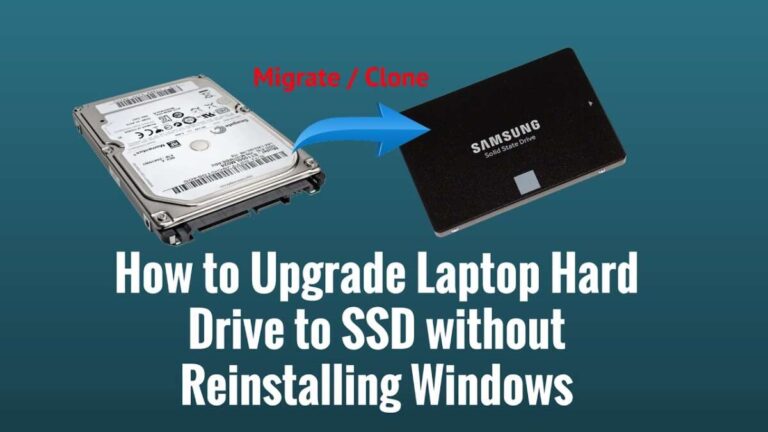
Setup was simple. I used WD’s recommended Acronis cloning tool, which walked me through a fast system copy. The first boot felt instant. Apps opened faster, and the laptop ran cooler and quieter. I expected an easy upgrade. It still surprised me how much smoother the whole system felt. It was a satisfying, low-stress win.

What Makes It Stand Out / Key Features
- Up to 560 MB/s sequential read speeds for fast boots and opens
- SATA III 6 Gb/s, 2.5″/7mm design for broad laptop/desktop compatibility
- Acronis True Image WD Edition for easy, guided cloning
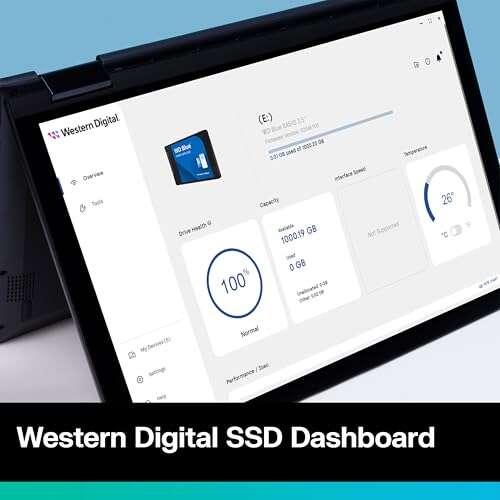
- WD Dashboard to monitor health, firmware, and performance
- Low power draw for cooler, quieter, longer battery life
- 5-year limited warranty for peace of mind
- 2TB capacity to store OS, apps, games, and large media libraries

What I Like
- Real-world system feel is much faster than HDDs or older SSDs
- Simple cloning and setup—even for first-time upgraders
- Runs cool and silent, great for slim laptops and small PCs
- Solid reliability track record from the WD Blue family
- Good price-to-capacity for a 2TB SATA drive
- Consistent performance for daily workloads and light creative tasks
- Wide compatibility thanks to the 2.5″/7mm form factor
What Could Be Better
- SATA interface caps speed; NVMe drives are much faster if your system supports them
- Sustained heavy writes can dip compared to top-tier SATA models
- May not include mounting screws or a 9.5mm spacer—check your bay needs
My Recommendation
If you want a plug-and-play speed boost on a SATA-only system, the Western Digital 2TB WD Blue SA510 SATA SSD is a smart buy. It balances speed, capacity, and ease of install. Students, home users, and creators on a budget will love the smooth, quiet experience. If you edit huge 4K files all day, consider a premium SATA or NVMe drive. For everyone else, this is the right mix of value and trust.
| Best for | Why |
|---|---|
| Upgrading older laptops/desktops | 2.5″/7mm SATA fit, simple cloning, big jump over HDDs |
| Large game and app libraries | 2TB capacity, quick loads, quiet and cool |
| Everyday content creation | Stable reads/writes for photos, light video, and audio projects |

Alternative Products You Can Consider
Samsung 870 EVO 2TB — Best for users who want the most consistent SATA performance and endurance. It often holds higher sustained write speeds under heavy loads. You’ll pay a bit more, but it’s a top-tier SATA pick with a long, proven history.
Crucial MX500 2TB — Great value buy with strong everyday speeds and hardware encryption support. Its performance is similar to the Western Digital 2TB WD Blue SA510 SATA SSD, and it’s often priced very competitively. Ideal for budget builds that still want quality.
SK hynix Gold S31 1TB/2TB — Known for reliability and steady performance over time. It’s a solid choice for mixed workloads and long-term stability. Compared to the WD Blue SA510, it feels similar day to day, with pricing that moves up and down.
| Product | Best For | Key Difference |
|---|---|---|
| Western Digital 2TB WD Blue SA510 SATA SSD | SATA upgrades needing easy cloning and solid value | Balanced price, WD tools, quiet and cool 2TB option |
| Samsung 870 EVO 2TB | Heavy sustained writes and top-tier SATA endurance | Often steadier long writes; slightly higher price |
| Crucial MX500 2TB | Budget builds that want strong everyday performance | Hardware encryption; very competitive pricing |
| SK hynix Gold S31 2TB | Long-term reliability and consistent daily use | Similar feel; price varies by region and stock |
Final Verdict: Which Should You Buy?
If your system is SATA-only, the Western Digital 2TB WD Blue SA510 SATA SSD is a safe, speedy, and quiet upgrade. It nails the basics: fast boots, smooth multitasking, and easy cloning. For most people, it’s the sweet spot of capacity and cost.
Pick the Samsung 870 EVO if you push big, long writes and want the steadiest SATA performance. Choose the Crucial MX500 if you want very good speed with one of the best values in the class. But for a balanced, no-fuss 2TB upgrade backed by WD’s tools, the WD Blue SA510 is the one I recommend first.
FAQs Of Western Digital 2TB WD Blue SA510 SATA SSD Review
Will this SSD work in my older laptop?
Most likely, yes. It’s a 2.5″/7mm SATA drive. If your laptop has a 2.5″ SATA bay, it should fit. Check if you need a spacer or bracket.
How much faster is it than a hard drive?
It’s a big jump. Boot times drop from minutes to seconds. Apps and files open much faster. The system feels smooth and responsive.
Do I need to reinstall Windows?
No. Use the included Acronis cloning tool (WD edition) to copy your old drive. Then swap the drives and boot up.
Is the Western Digital 2TB WD Blue SA510 SATA SSD good for gaming?
Yes. Games load faster and updates feel quicker. For pure speed, NVMe is faster, but this is great for SATA systems.
What about heat and noise?
It runs cool and silent. There are no moving parts, so it’s quieter and cooler than a hard drive.

Everett Ashford is a tech reviewer at mytechgrid.com specializing in SSDs, cameras, TVs, earbuds, headphones, and other consumer electronics. He provides honest, data-driven reviews based on hands-on testing and real-world performance analysis. Everett simplifies complex tech details to help readers make smart, confident buying decisions.