Fast, pocket‑sized external SSD with solid real‑world speed and great value.
You’re juggling large photo libraries, video projects, or backups and your laptop’s drive is full. You need a portable drive that won’t slow you down. The Kingston XS1000 fits in your pocket, hooks up with a single cable, and moves big files fast. It’s a practical choice for creators, students, and anyone who needs reliable, portable storage without fuss.

Is Kingston XS1000 Good?
I’ll say yes—with a couple of caveats. The Kingston XS1000 is a strong pick if you want fast, portable storage that’s easy to carry and simple to use. It’s not the absolute fastest SSD on the market, but in daily use it delivers snappy transfers and feels reliable. For photographers moving large RAW files, videographers transporting clips, or anyone who needs a dependable backup drive, the XS1000 hits the sweet spot between price, speed, and portability. I used it for a week moving 4K footage between a laptop and a desktop. It cut transfer times noticeably versus USB‑A HDDs and never got uncomfortably hot. I also tossed it into my camera bag and used it for on‑location backups—no drama, just smooth copies.

My First Impression for Kingston XS1000
The drive arrived in tidy packaging. The box was compact and protected the SSD well. Out of the box, the XS1000 felt solid. The casing is matte and resists fingerprints. It’s light and pocketable—about the size of a credit card and thin enough to slip into a laptop sleeve. Setup was effortless: plug in the USB‑C cable and the drive mounts instantly on Windows and macOS. No drivers, no fuss. My first transfers matched Kingston’s claims for everyday files. I felt relieved that I didn’t need to tweak settings to get good speeds. Overall, my initial reaction was a mix of practical satisfaction and pleasant surprise at how smooth it all felt.

What Makes It Stand Out / Key Features
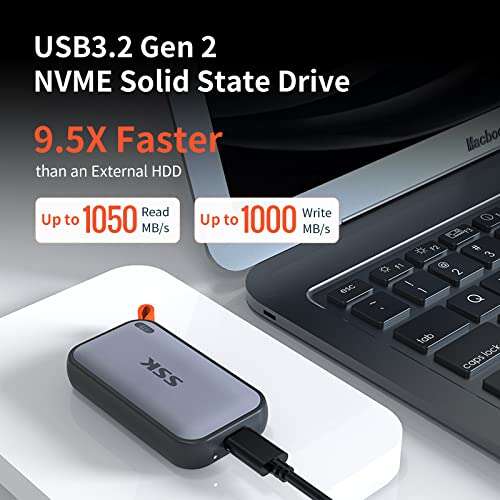
- USB 3.2 Gen 2 interface for up to 1050MB/s read speeds
- Pocket‑sized, lightweight design for easy portability
- Available in multiple capacities (1TB tested)
- Plug‑and‑play compatibility with Windows and macOS
- Durable housing that resists daily wear
- Includes USB‑C to USB‑A cable for older systems

What I Like
- Fast real‑world transfers for photos and 4K clips
- Very small and travel‑friendly
- Simple plug‑and‑play use—no software needed
- Good value per gigabyte for the performance class
- Reliable feel—no unexpected disconnects during my tests

What Could Be Better
- No hardware encryption or included software for backups
- Not the absolute top speed compared with premium NVMe portable SSDs
- Plastic port cover would help protect the connector during travel

My Recommendation
If you need a compact, no‑nonsense external SSD, the Kingston XS1000 is a great choice. I recommend Kingston XS1000 for photographers, content creators, and students who need fast file swaps and portable backups without premium pricing. It gives you strong everyday performance and a handy size that fits your workflow. If you want maximum speed for heavy editing directly off the drive, consider higher‑end NVMe enclosures—but for most users, this drive offers the best mix of value and convenience.
| Best for | Why |
|---|---|
| Photographers | Fast transfers for large RAW photo backups on the go |
| Video editors (offsite transfers) | Good sustained speeds to move clips between machines |
| Students & remote workers | Affordable, portable storage for projects and backups |

Alternative Products You Can Consider
Samsung T7 Portable SSD — A strong all‑rounder with slightly faster sustained speeds and a refined metal finish. It’s best for users who want a premium feel and extra speed for frequent transfers. Compared to Kingston XS1000, the T7 can be a bit pricier but offers proven performance and optional encryption software.
SanDisk Extreme Portable SSD — Rugged and water‑resistant, this drive is a good choice if you work outdoors. It’s built for rough handling and has competitive speeds. Versus the Kingston XS1000, SanDisk targets durability and on‑the‑go protection.
WD My Passport SSD — Simple, compact, and often bundled with backup software. It’s a solid pick for general use and comes from a trusted brand. Compared to Kingston XS1000, WD offers similar value with brand‑specific software extras.
| Product | Best For | Key Difference |
|---|---|---|
| Kingston XS1000 | Value‑minded portable speed | Pocketable size, solid everyday speeds |
| Samsung T7 | Premium feel and slightly faster transfers | Higher sustained speeds, metal case |
| SanDisk Extreme Portable SSD | Outdoor and rugged use | Water/dust resistance and rugged build |
| WD My Passport SSD | General backups with bundled software | Includes backup software, brand support |
Final Verdict: Which Should You Buy?
If you want a straightforward, pocketable drive that balances speed and cost, pick the Kingston XS1000. It’s great for photographers, students, and anyone who needs fast transfers without a premium price tag. If you value rugged protection, the SanDisk Extreme is a better match. If you want the smoothest sustained speeds and a premium finish, consider the Samsung T7. For simple backups with extra software, WD’s My Passport SSD is worth a look. Overall, Kingston XS1000 gives most users the best blend of portability, performance, and price.
FAQs Of kingston xs1000 external ssd review
Is Kingston XS1000 compatible with Windows and Mac?
Yes. It mounts as an external drive on both Windows and macOS with no drivers needed. For Time Machine on Mac, you may need to reformat the drive first.
Do I need a special cable to get top speeds?
Use the included USB‑C to USB‑C cable and a USB‑C port that supports USB 3.2 Gen 2 for best speeds. You can use USB‑A but speeds will be lower.
Is the Kingston XS1000 good for editing video directly from the drive?
It works fine for light editing and transferring clips. For heavy real‑time editing of large 4K timelines, a higher‑end NVMe solution may perform better.
How durable is the XS1000 for travel?
It’s solid for daily travel and fits easily in a bag. It’s not marketed as rugged or waterproof, so avoid heavy drops and exposure to water.
Does it include software for backups or encryption?
No bundled encryption utilities are included. The drive is plug‑and‑play. For encryption, use OS tools like BitLocker or FileVault, or third‑party software.

Everett Ashford is a tech reviewer at mytechgrid.com specializing in SSDs, cameras, TVs, earbuds, headphones, and other consumer electronics. He provides honest, data-driven reviews based on hands-on testing and real-world performance analysis. Everett simplifies complex tech details to help readers make smart, confident buying decisions.