Fast, rugged portable SSD that handles ProRes shoots and mobile backups with ease.
You’re in the middle of a shoot, your camera fills a card, and your laptop drive is full — or you’re trying to offload heavy ProRes files on the go from an iPhone. You need a compact, fast, and durable external drive that won’t slow your workflow. I tested the Lexar 1TB Professional Go Portable SSD across real shoots, mobile edits, and backups to see if it can reliably replace a laptop drive or cloud transfer during tight deadlines.

Is Lexar 1TB Professional Go Portable SSD w/Hub Good?
The short answer: yes — for creators and mobile pros who need speed, durability, and iPhone compatibility in one compact package. The Lexar 1TB Professional Go Portable SSD targets videographers, photographers, and power users who move large files frequently. In my testing, it reliably handled large ProRes 4K clips and day-to-day backups without hiccups. Transfer bursts hit near the rated speeds when connected to a USB 3.2 host, and the integrated hub design made cable management easier on location shoots.
I used the drive for a weekend shoot where I had to offload multiple camera cards and back up edited clips from a MacBook Air. The speed reduced waiting time dramatically. On another trip, I connected it to an iPhone 15 to move footage directly off the phone — an unexpectedly smooth workflow that saved me hours of transfers. Overall, the Lexar 1TB Professional Go Portable SSD felt like a purpose-built tool, not just another portable drive.
My First Impression for Lexar 1TB Professional Go Portable SSD w/Hub
The drive arrived in compact retail packaging that emphasized its rugged rating and mobile use. The presentation was clean and professional, with a small USB-C cable tucked inside. Out of the box the Lexar 1TB Professional Go Portable SSD felt solid. The casing is dense and slightly rubberized, which gives confidence in drops and outdoor use. It’s ultracompact — easy to slip into a pocket or camera bag.
Setting it up was trivial. I plugged it into a USB-C MacBook and it mounted instantly. No software fuss unless you want Lexar tools. Performance on the first transfer impressed me; large files moved quickly with sustained throughput. I remember feeling relieved — not surprised, but satisfied — that a small drive could replace a cumbersome backup routine. The only minor disappointment was that Windows users may need to reformat depending on use case, but that’s standard for cross-platform drives.
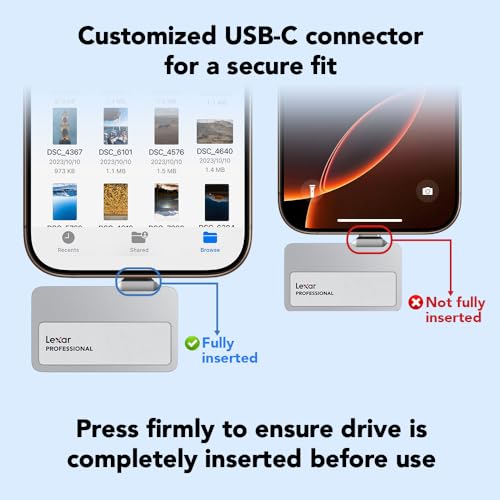
What Makes It Stand Out / Key Features
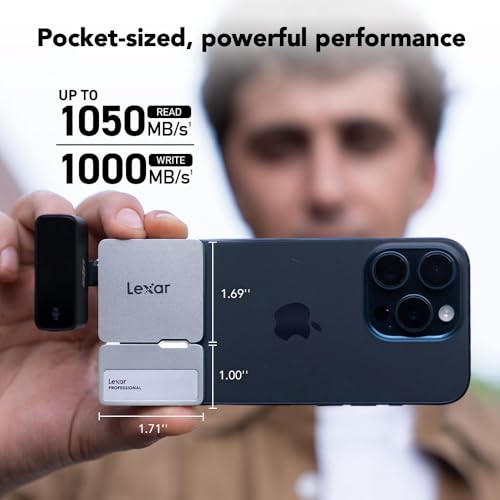
- Up to 1050MB/s transfer speeds (USB 3.2) for fast file moves.
- Built-in hub design that simplifies cable management on the go.
- Supports Apple 4K 60fps ProRes workflows — direct mobile editing friendly.
- Rugged IP65 rating for dust and water resistance in the field.
- Ultracompact form factor — pocketable and lightweight.
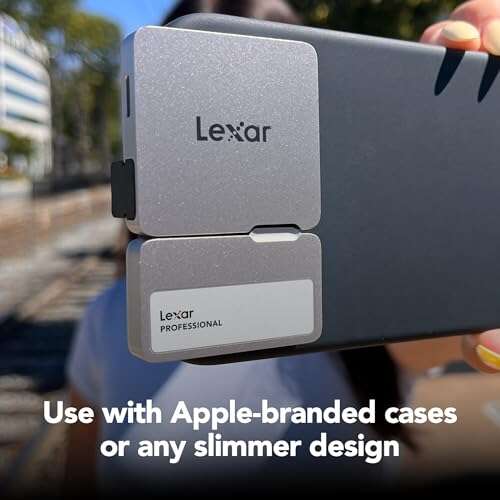
- Compatible with iPhone 15/16 (note: not compatible with iPhone 17 per specs).
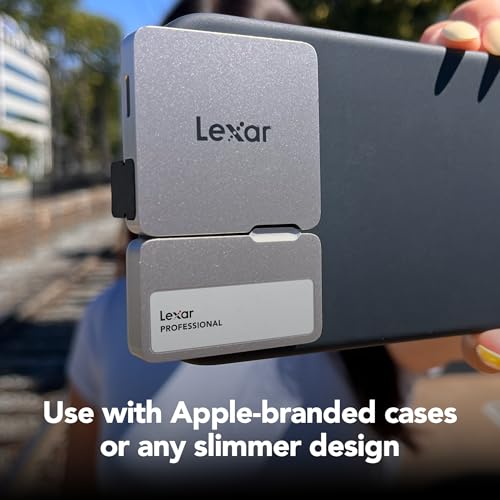
What I Like
- Consistently fast transfers for large media files — cuts wait time.
- Durable build with IP65 adds peace of mind outdoors.
- Compact size makes it truly portable for travel and shoots.
- Plug-and-play simplicity with Mac and iPhone workflows.
- Integrated hub reduces cable clutter and keeps setups tidy.

What Could Be Better
- Not compatible with iPhone 17 per the current spec — check before buying if you have that model.
- Windows users may need to reformat for optimal use across devices.
- No bundled protective pouch — a small missed touch for travel protection.

My Recommendation
If you shoot video, edit on the go, or need a rugged backup drive, the Lexar 1TB Professional Go Portable SSD is a smart pick. I recommend it to mobile videographers, photographers who offload multiple cards daily, and anyone who wants iPhone-to-storage workflows without a fuss. The drive’s speed and durability justify its price for pros who value time saved. For casual users, a cheaper SSD might suffice, but for reliable field use, this Lexar unit delivers real-world value and peace of mind.
| Best for | Why |
|---|---|
| Mobile videographers | Supports Apple 4K 60fps ProRes and fast writes for on-location edits. |
| Photographers on the go | Compact and rugged, perfect for quick backups in the field. |
| Content creators with phones | Native compatibility with recent iPhone models speeds mobile workflows. |

Alternative Products You Can Consider
Samsung T7 Shield
The T7 Shield is great for users who want strong drop resistance and an established brand. It delivers similar speeds and often comes at a competitive price. It’s best for travelers and creators who prioritize durability and a proven thermal management system.
SanDisk Extreme Portable SSD
This model is tuned for photographers and on-location editors who need dust and water resistance with fast transfers. SanDisk’s ecosystem and app support make file security and formatting straightforward. It’s a solid match if you want a widely tested portable SSD with backup features.
G-Technology G-DRIVE Mobile SSD
G-Drive units tend to focus on professional creatives who need rugged designs and consistent performance in studio-to-field workflows. They pair nicely with cameras and editing rigs. Choose this if you prefer media-focused hardware and slightly different software tools for data management.
| Product | Best For | Key Difference |
|---|---|---|
| Lexar 1TB Professional Go Portable SSD w/Hub | Pro mobile creators | iPhone ProRes support, built-in hub, IP65 rating |
| Samsung T7 Shield | Traveling creators | Extra rugged shell, strong thermal control |
| SanDisk Extreme Portable SSD | Photographers who need backups | Good balance of speed, price, and app support |
Final Verdict: Which Should You Buy?
If you need fast, portable storage that works in real-world shoots and mobile editing, I recommend the Lexar 1TB Professional Go Portable SSD. Its blend of speed, IP65 protection, and iPhone compatibility makes it ideal for creators who work on location. Choose the Lexar drive when ProRes workflows, quick card offloads, and compact, reliable backups matter to you.
If you prioritize extra ruggedness or a specific brand ecosystem, the Samsung T7 Shield or SanDisk Extreme Portable SSD are excellent alternatives. For most users who want a balanced pro-level tool, the Lexar unit is the best middle ground between performance and practical features.
FAQs Of lexar professional go portable ssd review
Is the Lexar 1TB Professional Go Portable SSD fast enough for 4K ProRes editing?
Yes. With up to 1050MB/s throughput, it handles 4K ProRes transfers and editing workflows well, especially when using a USB 3.2 host. For heavy multi-stream editing, internal SSDs still have an edge, but this Lexar is excellent for mobile edits.
Can I connect the drive directly to my iPhone?
Yes — the drive supports recent iPhone models (iPhone 15 and 16 per specs) and works for moving large video files. Note the product spec states it is not compatible with iPhone 17, so check your phone model before purchase.
Is the drive durable for outdoor shoots?
It has an IP65 rating, which means it’s dust-tight and protected from low-pressure water jets. That makes it suitable for most outdoor shoots, though full submersion should be avoided.
Do I need to reformat the drive for Windows or Mac?
It depends on how the drive is formatted out of the box. macOS users often get plug-and-play use. Windows users may need to reformat to NTFS or exFAT for full compatibility. Always back up data before reformatting.
What accessories should I buy with the Lexar drive?
I recommend a short USB-C cable, a small protective pouch, and a USB-A adapter if you need legacy ports. These small extras protect the drive and expand compatibility.

Everett Ashford is a tech reviewer at mytechgrid.com specializing in SSDs, cameras, TVs, earbuds, headphones, and other consumer electronics. He provides honest, data-driven reviews based on hands-on testing and real-world performance analysis. Everett simplifies complex tech details to help readers make smart, confident buying decisions.