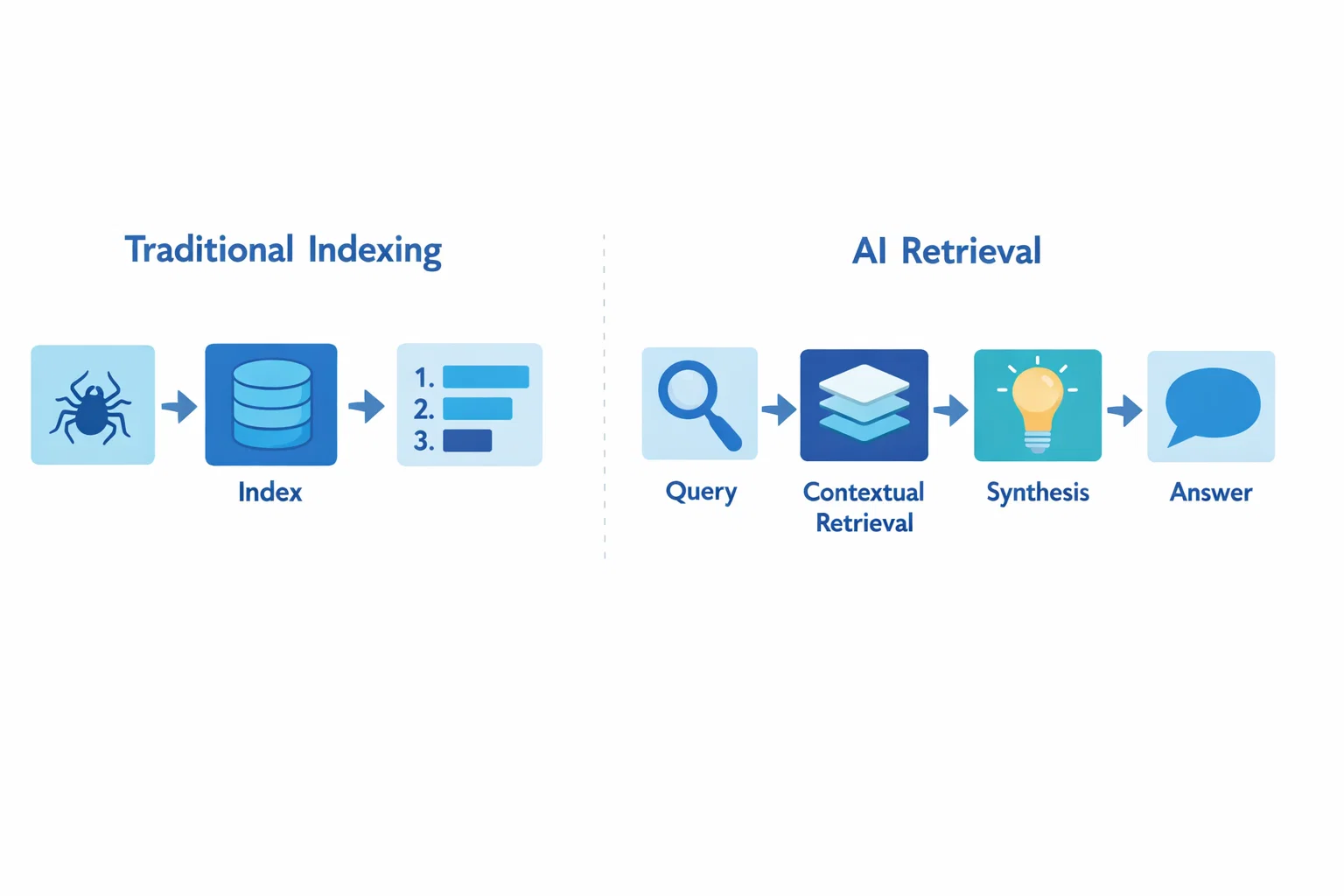
For people in the United States, the main difference is simple: traditional search usually gives you a ranked list of web pages, while AI search often gives you a direct answer built from several sources. Traditional search asks you to open, read, and compare results. AI search tries to do more of that work for you.
The line is not fully clear-cut. Google, Bing, and other search engines already use artificial intelligence to understand words, rank pages, detect spam, and interpret intent. The newer term AI search usually means a search experience that can understand a longer question, combine information, explain it in natural language, and support follow-up questions.
Both tools are useful. The better choice depends on your goal, the risk of being wrong, and how much source checking you need to do.


AI search and traditional search: the key differences
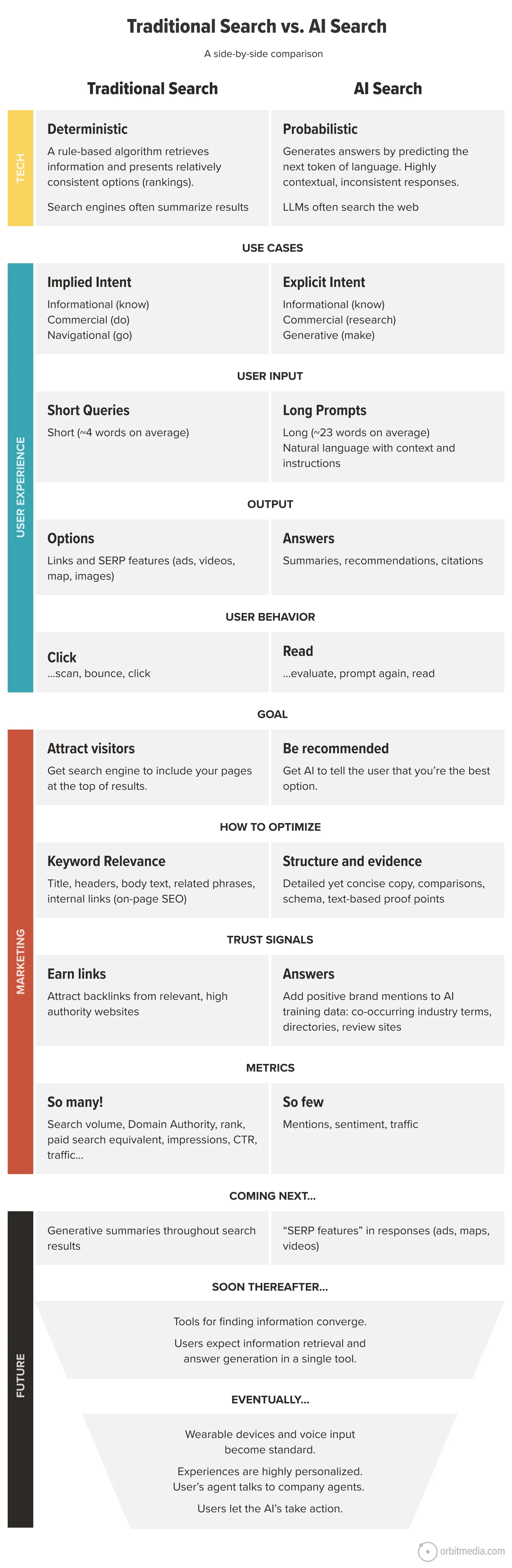
AI search and traditional search differ most in how they understand a query, present information, and handle follow-up questions.
| Feature | Traditional search | AI search |
|---|---|---|
| Main output | Ranked links, snippets, images, maps, or products | A written answer, often with links or citations |
| Query style | Short keywords work well | Full questions and detailed instructions work well |
| User’s role | Opens and compares sources | Reviews, checks, and refines the generated answer |
| Follow-up questions | Usually requires a new search | Often supports a continuing conversation |
| Source visibility | The source page is the main result | Sources may appear beside or below a summary |
| Risk | Can return poor or misleading pages | Can produce a fluent but incorrect answer |
| Best use | Finding a specific page, site, product, or official record | Understanding a topic or combining information |
| Speed to a basic answer | Fast | Often faster for complex questions |
| Research depth | Depends on the pages you open | Depends on the sources used and the system’s summary |
Traditional search is built around retrieval
Traditional search generally matches a query with documents in an index. It then ranks likely results using many signals, such as relevance, page quality, freshness, location, and the meaning of the query.
For example, a search for:
IRS standard deduction 2025
may return the official IRS page near the top. You then open the page, find the correct table, and read the details.
This process gives you direct access to the original page. It also makes you responsible for comparing sources and deciding which information applies.


Traditional search is often best when you need:
- An official government form
- A specific business website
- A product page
- A local service
- A court opinion or public record
- A current news report
- A page you already know exists
AI search is built around synthesis
AI search often uses retrieval first, then generates a response from the information it finds. This process is sometimes called retrieval-augmented generation, or RAG.
A typical AI search system may:
- Interpret the meaning of your question.
- Break a complex question into smaller parts.
- Retrieve information from a search index, database, or connected source.
- Combine the information into a natural-language answer.
- Show links, citations, or suggested follow-up questions.
For example, instead of searching several separate queries about a road trip, you might ask:
Plan a five-day family road trip from Chicago to Nashville in July. Include driving time, child-friendly stops, and a moderate budget.
An AI search tool may organize the answer into a plan. A traditional search engine may give you separate results for routes, hotels, attractions, and prices.
The AI answer saves time, but you still need to verify dates, prices, road conditions, booking rules, and other details.
AI search is not always more accurate
A smooth answer can feel more reliable than a page of links. That feeling can be misleading.
AI systems may:
- Misread a question
- Combine details from unrelated sources
- Use an old page
- Leave out a key exception
- State an uncertain claim with too much confidence
- Create a citation that does not fully support the answer
Google’s documentation on AI features in Search warns that generated responses may contain errors. Microsoft also explains that AI-generated content should be checked against its sources. These warnings matter most for health, legal, financial, safety, and emergency questions.
How AI search works compared with traditional search
The most useful way to understand the difference is to look at the search process from the question to the final answer.
Step 1: The system interprets your query
Traditional search can match words and meaning. Modern search engines do not rely only on exact keyword matches. They can understand related terms and common intent.
AI search usually goes further. It may identify:
- The main task
- Important conditions
- Implied questions
- The desired format
- The context from earlier messages
Compare these two queries:
best laptopsI need a Windows laptop under $900 for college, light video work, and travel. Battery life matters more than gaming speed.
The second query gives an AI system more information to use. It can compare options against your needs instead of giving a broad list.


Step 2: The system retrieves information
Both types of search may retrieve information from an index. The index can contain web pages, product data, maps, news, images, and other records.
AI search may use more than one search step. It could search for the main topic, then search for prices, official specifications, reviews, or current rules.
This process can improve coverage. It can also introduce errors if the system uses weak sources or mixes information from different dates.
Step 3: The system creates the result
Traditional search normally shows the source itself through a title, link, and short description. You inspect the page and draw your own conclusion.
AI search generates a new response from the material it retrieved. The response may include:
- A short answer
- A comparison
- A step-by-step plan
- A table
- A summary of several pages
- Follow-up questions
- Links or citations
The generated text is not the same thing as a source document. It is an interpretation of source material. That distinction is central to safe use.
Step 4: The system handles follow-up questions
Traditional search usually treats each query as a separate event. You can refine a search, but you must often repeat important context.
AI search can keep context across a conversation. You might ask:
- “What are the main causes of high electricity bills?”
- “Which cause is most common in a two-bedroom apartment?”
- “Give me a safe checklist to test each one.”
This makes AI search feel more like a research partner. However, the system may carry a mistaken assumption from an earlier answer. A follow-up question does not automatically correct the original error.

What are the practical benefits and limits of AI search?
AI search is most helpful when the task requires explanation, comparison, or several connected searches. Traditional search is often stronger when you need a precise source or a record that you can inspect directly.
Where AI search is useful
AI search can help with:
- Explaining a difficult topic in plain language
- Comparing several options against stated needs
- Turning a broad goal into a research plan
- Summarizing long documents
- Creating a list of questions for a professional
- Finding connections between related topics
- Refining a search through follow-up questions
- Converting information into a table or checklist
For example, a person learning about home solar power could ask AI search to explain panels, inverters, battery storage, tax credits, and maintenance in one response. The person could then ask for official sources and a list of questions for installers.
Where traditional search is useful
Traditional search often works better when you need:
- The exact wording of a law, regulation, or contract
- A government form
- A company’s current policy
- A live sports score
- A local business listing
- A product’s official manual
- A primary research paper
- A page with a clear date and author
- Several independent viewpoints
A direct source is easier to inspect than a summary. It also lets you see qualifications that an AI answer may shorten or omit.


The largest AI search trade-off: convenience versus control
AI search reduces the work needed to form a basic understanding. Traditional search gives you more control over the evidence you inspect.
That creates a useful rule:
Use AI search to build a map. Use original sources to confirm the road.
If the answer affects your money, health, rights, safety, or privacy, do not stop at the generated summary.
AI search may hide source differences
Suppose three pages discuss a product. One is the manufacturer’s specification page. One is an independent test. One is a retailer description.
An AI summary may combine all three. But they do not carry the same weight:
- The manufacturer is a suitable source for stated specifications.
- An independent test may be more useful for measured performance.
- A retailer may be useful for availability, but not always for impartial evaluation.
The answer should tell you which source supports which claim. If it does not, open the links and check.
AI search can create a false sense of completeness
An answer may sound complete because it has headings and smooth sentences. That does not prove that the search covered all relevant evidence.
This matters when:
- Rules vary by state or city
- Information changes often
- The question has legal exceptions
- A decision depends on personal facts
- The topic includes conflicting research
- The cost of an error is high
For U.S. readers, location can change the answer. Tax rules, insurance requirements, tenant rights, licensing rules, election procedures, and professional regulations may differ by state.
Which search method should you use?
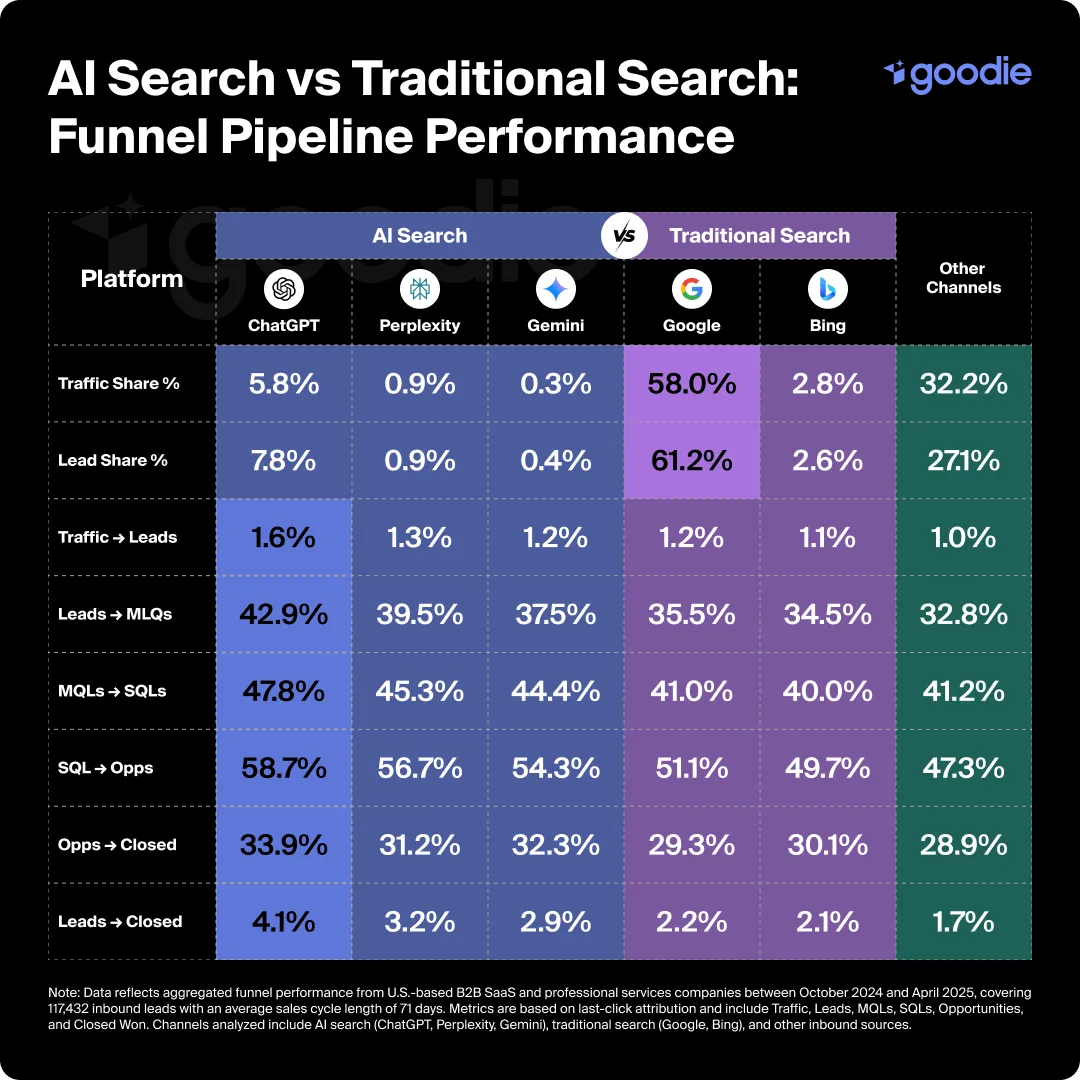
Choose the method based on the type of answer you need, not on the label “AI” or “traditional.”
Use AI search first when you need understanding
Start with AI search if you need to:
- Learn the basic terms
- See how parts of a topic relate
- Compare several approaches
- Turn a vague problem into clear questions
- Summarize a long source
- Draft a research checklist
A useful prompt includes the goal, limits, location, date, and desired format.
For example:


Explain the main differences between a Roth IRA and a traditional IRA for a U.S. beginner. Use current IRS sources, state what may change by tax year, and list questions I should ask a tax professional.
This prompt does not make the answer correct by itself. It does make the task clearer and encourages source checking.
Use traditional search first when you need an exact source
Use traditional search when your next action requires a specific page.
Examples:
site:irs.gov 2025 tax bracketssite:usa.gov replace lost passportsite:cdc.gov current flu guidanceAcme Model 4 user manual PDFNew York tenant notice requirements official
Search operators and exact phrases can help narrow the results. For important questions, prefer official agencies, universities, courts, standards bodies, and original research over copied summaries.
Use both for important decisions
A strong workflow combines the two methods:
- Ask AI search to explain the topic and identify key terms.
- Ask for the claims that need proof.
- Search for the original sources.
- Read the relevant sections yourself.
- Check the date, location, scope, and exceptions.
- Ask AI search to compare the sources without replacing them.
- Make the decision only after checking facts that affect you.
This approach uses AI for speed and traditional search for control.
A quick decision table
| Your goal | Start with | Then do this |
|---|---|---|
| Learn a new topic | AI search | Confirm key facts in reliable sources |
| Find an official form | Traditional search | Use the government or agency website |
| Compare products | Both | Check specifications, independent tests, and current prices |
| Research a medical concern | Traditional search or both | Use trusted medical sources and speak with a clinician |
| Understand a long report | AI search | Compare the summary with the original report |
| Find local services | Traditional search | Check location, hours, licensing, and recent reviews |
| Make a legal or financial decision | Official sources first | Get advice from a qualified professional when needed |
| Explore ideas or plan a project | AI search | Verify claims before spending money or acting |
How to verify an AI search answer
Verification is the step that separates useful AI search from risky guesswork.
Check the source, not only the citation
A citation is helpful, but it is not proof by itself. Open the link and ask:
- Does the page actually support the claim?
- Is the page from an authoritative source?
- Is the information current?
- Does it apply to the United States?
- Does it apply to your state?
- Did the AI answer leave out a condition or exception?
- Is the source describing a rule, an opinion, or a marketing claim?
A link can be real and still fail to support the sentence beside it.
Check dates and versions
Dates matter for:
- Tax rules
- Government programs
- Software features
- Product models
- Prices
- Medical guidance
- Security advice
- Travel requirements
Ask the system to identify the publication date and the date of the underlying information. If it cannot, treat the claim as uncertain.
Check numbers with simple math
AI systems can make mistakes with percentages, units, and totals. Recalculate important figures yourself.
For a hypothetical example, if a service costs $40 per month for 12 months:
[
$40 \times 12 = $480
]
If an answer adds a $100 setup fee, the estimated first-year cost becomes:
[
$480 + $100 = $580
]
This is a basic example, but the same habit helps with loans, energy use, discounts, subscriptions, and project budgets.
Ask for uncertainty
Useful follow-up prompts include:
- “Which part of this answer is most uncertain?”
- “What facts could change the result?”
- “Which claims require an official source?”
- “Show the strongest argument against this answer.”
- “Separate documented facts from estimates.”
- “Give me the source and date for each major claim.”
These prompts do not remove errors. They make weak points easier to find.
Protect personal information
Do not enter sensitive information into a search tool unless you understand how the service handles it and you have a valid reason to do so.
Avoid sharing:
- Social Security numbers
- Bank account details
- Passwords
- Medical records
- Private legal documents
- Confidential work files
- Personal information about another person
You can often replace private details with general facts. For example, use “a U.S. taxpayer with freelance income” instead of entering an actual tax identification number.
Know when to stop searching and get help
AI search cannot replace a qualified professional when the decision depends on your personal situation or carries serious risk.
Consider professional help for:
- A medical diagnosis or urgent symptom
- A legal dispute or filing deadline
- A tax return with complex issues
- Investment or debt decisions
- Electrical, gas, structural, or safety work
- A security incident involving accounts or identity
For emergencies in the United States, contact the appropriate emergency service rather than relying on an AI search response.
Common mistakes when comparing AI search with traditional search
The first mistake is treating them as completely separate technologies. Traditional search already uses AI in many parts of its system. The useful distinction is usually between link-focused search and answer-generating search.
The second mistake is assuming that a generated answer saves the need to read sources. It does not. AI search can reduce the time needed to find and organize information, but it cannot guarantee that the summary is complete or correct.
The third mistake is using one broad prompt for a decision that needs several facts. Add the country, state, date, budget, intended use, and important limits. Missing context can change the answer.
The fourth mistake is asking AI search to choose a product without stating what matters. “What is the best laptop?” has no single answer. Battery life, price, operating system, repair options, weight, software needs, and warranty can all change the result.
The fifth mistake is trusting an answer because it uses confident language. Confidence is a writing style, not evidence.
Frequently asked questions
Is AI search replacing traditional search?
No. AI search is changing how people find and use information, but traditional search remains useful for direct sources, current records, local results, and exact pages. Many search engines now combine both approaches on the same results page.
Is AI search more accurate than Google’s traditional results?
Not in every situation. AI search may give a clearer answer to a complex question, but it can also summarize sources incorrectly or omit important details. Accuracy depends on the topic, the sources, the date, and how well you verify the result.
Does AI search use real websites?
Often, yes. Many AI search systems retrieve information from websites, databases, or connected services. The exact sources and access rules vary by system. Always inspect the links provided and confirm that they support the answer.
Should I use AI search for medical, legal, or financial questions?
You can use it for general education and to prepare questions. Do not treat it as a personal diagnosis, legal opinion, or financial plan. Use trusted primary sources and seek qualified help when the decision affects your health, rights, money, or safety.
Can AI search understand natural-language questions?
Yes, many AI search tools are designed to handle full questions and follow-up prompts. They can still misunderstand unclear wording, missing context, sarcasm, or specialized terms. State your goal and constraints plainly.
Conclusion: use AI search for synthesis and traditional search for proof
AI search differs from traditional search mainly in its output and workflow. Traditional search points you toward pages. AI search tries to explain, combine, and organize information for you.
The best approach is not to choose one forever. Use AI search to explore a topic, compare ideas, and create a research plan. Use traditional search and original sources to confirm important claims. For high-stakes decisions, check dates, location, evidence, and exceptions before you act.
A practical next step is to run the same question through both methods. Compare the AI summary with the original pages. Note what the summary explains well, what it leaves out, and which claims require closer checking.
Sources and further reading
- Google Search Central: AI features and your website
- Google Search: How search works
- Microsoft Support: Copilot and AI-generated answers
- NIST AI Risk Management Framework
- U.S. National Archives: Finding government information
- USA.gov: Official information and services


Everett Ashford is a tech reviewer at mytechgrid.com specializing in SSDs, cameras, TVs, earbuds, headphones, and other consumer electronics. He provides honest, data-driven reviews based on hands-on testing and real-world performance analysis. Everett simplifies complex tech details to help readers make smart, confident buying decisions.