Use a wired DAC or RCA-to-3.5mm adapter to plug headphones into your Vizio TV.
I’ve spent years fixing home A/V setups and helping friends get private sound from TVs. This guide shows how to connect headphones to Vizio TV without Bluetooth. I’ll walk you through every practical method, explain which outputs Vizio models usually offer, and share real-world tips so you can pick the easiest, clearest solution for your setup.

Why you might want to connect headphones to a Vizio TV without Bluetooth
Many people want private listening, better clarity, or lower latency. Bluetooth can add lag, compress audio, or drain batteries. Wired solutions keep audio in sync and keep sound quality high.
Typical reasons:
- Watch late-night shows without waking others.
- Use high-quality wired headphones for music or movies.
- Avoid Bluetooth latency for gaming or lip-sync sensitive content.
Vizio TV audio outputs explained — what to look for
Before you buy anything, check which audio ports your Vizio TV has. Models vary by year. Common outputs:
- Headphone jack (3.5mm) — rare on newer Vizio models but easy when present.
- RCA analog audio out (red and white) — common on older TVs.
- Optical audio out (TOSLINK) — the most common modern option for digital audio.
- HDMI ARC/eARC — used to send audio to soundbars or receivers, not directly to headphones.
- USB — usually for power or media, not headphone audio.
Knowing your TV’s outputs guides your choice for how to connect headphones to Vizio TV without Bluetooth. Check the TV’s back panel or the user manual for exact ports.
Methods to connect headphones to Vizio TV without Bluetooth
Below are the practical methods ranked by ease and audio quality. Each method shows what you need and step-by-step actions.
Method 1 — Use a built-in 3.5mm headphone jack
This is the simplest if your Vizio TV has it.
Steps:
- Locate the 3.5mm headphone port on the TV.
- Plug your headphones into the jack.
- Use the TV remote to adjust volume. If volume control is limited, use headphone inline controls.
Notes:
- Some TVs mute the TV speakers automatically.
- If volume is low, a small inline headphone amp may help.
Method 2 — Use RCA audio out with an RCA-to-3.5mm cable or adapter
Many Vizio TVs have red/white audio outputs.
Steps:
- Buy an RCA-to-3.5mm cable or adapter.
- Connect the red and white plugs to the TV’s RCA audio out.
- Plug the 3.5mm end into your headphones or into a headphone amp.
- Set TV audio output to “Line Out” or “Variable” if available so you can control volume from the TV.
Notes:
- RCA provides line-level output, not headphone-level. You may need a small headphone amplifier to get proper volume and impedance match.
Method 3 — Use optical (TOSLINK) out with a DAC (recommended for best quality)
Optical out is common and delivers digital audio. A DAC (digital-to-analog converter) turns optical into analog headphone output.
What you need:
- Optical (TOSLINK) cable.
- A DAC with optical input and 3.5mm or 6.3mm headphone output.
Steps:
- Plug the optical cable into the TV’s optical (digital audio out) port.
- Connect the other end to the DAC’s optical input.
- Plug your headphones into the DAC’s headphone jack.
- Set the TV audio output to PCM or Stereo (not Bitstream) so the DAC receives compatible audio.
- Adjust volume from the DAC or TV depending on DAC features.
Why this works well:
- Preserves audio quality and supports modern TVs.
- Avoids the need for an external receiver.
- Low latency and great sound for music and movies.
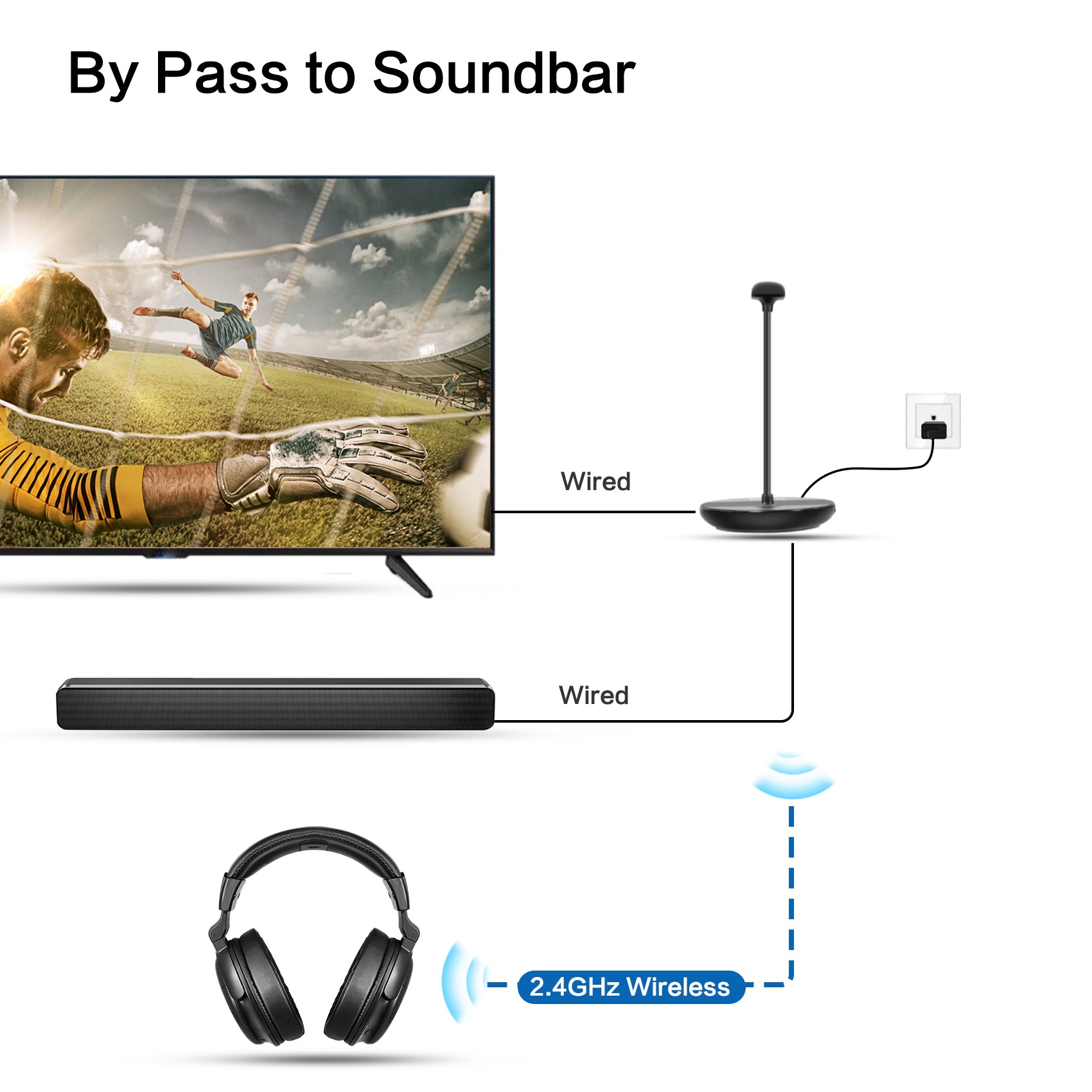
Method 4 — Use a soundbar or AV receiver as a pass-through
If you have a soundbar or receiver with headphone output, use it.
Steps:
- Connect the TV to the soundbar/receiver via HDMI ARC, optical, or RCA.
- Plug headphones into the soundbar/receiver’s headphone jack.
- Adjust volume and audio modes on the soundbar/receiver.
Notes:
- Many soundbars lack a headphone jack. Check specs first.
- This route can provide improved sound control and equalization.
Method 5 — USB headphones or USB DAC (limited)
Some users try USB. Most Vizio TVs do not output headphone audio from USB ports. A USB DAC can work if the TV supports USB audio output, but many TVs do not.
Steps:
- Check if the TV manual lists USB audio output.
- If supported, connect a USB audio device and follow on-screen prompts.
Notes:
- This method is inconsistent across Vizio models. Optical-to-DAC is more reliable.
Troubleshooting common issues when connecting headphones to Vizio TV without Bluetooth
If sound does not appear or volume is low, try these fixes.
Common problems and fixes:
- No sound from headphones — Confirm cables are plugged into the correct output. Set TV audio output to the matching mode (Line Out, Optical).
- Low volume with RCA — Use a headphone amplifier or set TV audio output to Variable.
- TV speakers stay on — Check TV audio settings; some TVs require you to disable internal speakers when using external outputs.
- Audio out is digital only — Use an optical-to-analog DAC if the TV only provides optical output.
- Lip-sync or latency — Use wired DAC or direct analog connections to avoid delay.

Tips for best audio experience and safety
These practical tips save time and improve sound.
Quick tips:
- Buy a DAC with built-in volume control to avoid low signal.
- Choose a DAC with the right headphone jack size (3.5mm or 1/4 inch) or use an adapter.
- Match headphone impedance to the amplifier/DAC for better volume and tone.
- Keep cables short to reduce clutter and signal loss.
- Avoid excessive volume to protect hearing for long listening sessions.
Personal experience: what I learned setting up a Vizio TV
I once helped a friend who had a Vizio with only optical out. We used a compact DAC. The first DAC had no volume knob and gave weak output. After switching to a DAC with a built-in amp and clear volume control, the headphones sounded full and clear. Lesson learned: buy a DAC with volume control or a separate headphone amp. Also, double-check TV audio settings so the TV sends stereo PCM to the DAC.
Quick user questions (PAA-style)
Can I use a simple RCA-to-3.5mm cable for headphones?
Yes. It works, but RCA is line-level and often needs a headphone amp for loudness and proper impedance matching.
Will an optical-to-analog DAC add audio delay?
No, a good DAC adds minimal latency. It’s usually unnoticeable for movies and music.
Does USB always work for headphone audio on Vizio TVs?
No. Many Vizio TVs do not support USB audio output. Check your model’s manual first.
Frequently Asked Questions of how to connect headphones to vizio tv without bluetooth
How do I know if my Vizio TV has a headphone jack?
Look at the TV’s side or back panel for a 3.5mm port labeled "headphones" or check the user manual specifications.
Can I use the TV’s RCA outputs directly for headphones?
You can physically connect, but RCA provides line-level output. For full volume and proper sound, use a headphone amp or DAC.
Is an optical-to-analog DAC the best option?
Yes. A DAC gives the best quality on TVs that only have optical out. It supports clear stereo audio and low latency.
Will using a DAC affect audio formats like Dolby Digital?
Set the TV audio output to PCM stereo on the TV so the DAC receives compatible two-channel audio. Some surround formats may not convert properly to stereo.
Are there cheap DACs that work well with Vizio TVs?
Yes. Many budget DACs perform well for TV use. Prioritize ones with optical input, volume control, and a headphone amp if you use high-impedance headphones.
How can I control headphone volume if the TV has no variable line-out?
Use a DAC or inline headphone amplifier with volume control. That gives manual control independently of the TV.
Conclusion
You can reliably connect headphones to Vizio TV without Bluetooth by using the right physical output and the right adapter. For best results, use an optical-to-analog DAC or RCA-to-3.5mm with a headphone amp when needed. Check your TV’s ports, buy the correct adapter, and set the TV audio output to compatible settings. Try one method, test for volume and sync, and switch to a DAC if you want top audio quality.
Take action now: check your TV’s back panel, choose the method that matches your ports, and enjoy private, high-quality sound. If you found this guide helpful, leave a comment or share your setup to help others.

Everett Ashford is a tech reviewer at mytechgrid.com specializing in SSDs, cameras, TVs, earbuds, headphones, and other consumer electronics. He provides honest, data-driven reviews based on hands-on testing and real-world performance analysis. Everett simplifies complex tech details to help readers make smart, confident buying decisions.