Introduction
For U.S. businesses, public agencies, schools, and research teams, agentic AI means more than a system that answers a prompt. It describes an AI system that can pursue a goal, choose steps, use tools, respond to new information, and stop or ask for help when needed.
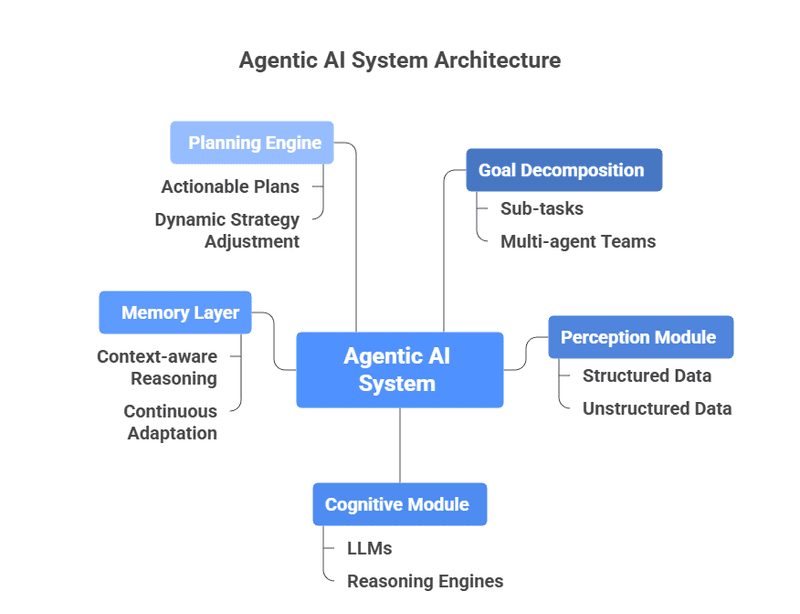
The key behavioral components of agentic AI are goal direction, perception, planning, memory, tool use, action, feedback, adaptation, communication, and safety control. These parts work as a loop rather than as separate features:
Observe → understand → plan → act → check results → adjust or stop
This behavior can help an AI system handle tasks such as preparing a report, checking a data set, scheduling work, or moving information between approved software systems. It also creates new risks because the system may act without a person approving every step.

What Is Agentic AI?
Agentic AI is an AI system that can take a sequence of actions to reach a defined goal. It does not merely produce one response. It decides what to do next based on the task, available information, tools, rules, and results.
A basic chatbot may answer:
“Here are three ways to analyze this sales file.”
An agentic system may:
- Read the sales file.
- Check whether the columns are valid.
- Choose an analysis method.
- Run code or query a database.
- Find unusual results.
- Create a report.
- Ask a person to review the report before sending it.
The term agentic does not mean that an AI system has feelings, personal goals, or human-level judgment. It describes a pattern of behavior and system design.
The National Institute of Standards and Technology (NIST) AI Risk Management Framework treats AI as a technology that must be managed according to its intended use, risks, limits, and impact. That principle matters here: an agent should have only the access and freedom required for its assigned task.
Agentic AI versus generative AI
Generative AI creates content from a request. Agentic AI may use generative AI as one part of a larger system.
| Feature | Generative AI | Agentic AI |
|---|---|---|
| Main behavior | Produces an answer or artifact | Pursues a goal through several steps |
| Typical input | Prompt or question | Goal, task, policy, or event |
| Use of tools | Often optional | Usually central to the workflow |
| Memory | May use conversation context | Often stores task state or long-term data |
| Action | Usually limited to output | May update systems or trigger workflows |
| Human role | Reviews the response | Sets limits, approves risky actions, and monitors results |
These categories can overlap. A large language model may generate text inside an agent, while the surrounding software manages planning, tools, memory, and permissions.
The Key Behavioral Components of Agentic AI
The most important components are the behaviors that let an AI system move from a goal to a controlled result. A system does not need every component at the same level. A simple agent may use a fixed workflow, while a more flexible agent may select tools and revise its plan.
1. Goal-directed behavior
an agent needs a clear goal and a way to judge progress. The goal may be to summarize a document, resolve a support request, or identify duplicate records.
A useful goal has:
- A defined outcome.
- A clear scope.
- A time or resource limit.
- Rules about what the agent may change.
- A success test.
- A stop condition.
For example, “improve customer service” is too broad for safe autonomous action. A better goal is:
“Classify new support tickets, suggest a response, and route billing disputes to a human reviewer.”
The second goal gives the agent a task boundary. It also makes testing easier.
2. Perception and context gathering
Perception is how an agent collects and interprets information from its environment. In software, this may include reading documents, checking a database, receiving an API response, or reviewing a user message.
Perception does not mean human sight alone. It can include:
- Text and images.
- Audio or video.
- Files and databases.
- Application events.
- Sensor data.
- Web pages or approved data feeds.
- Messages from other software agents.
The agent must also decide whether the information is relevant, current, complete, and trustworthy. A tool result is not automatically true. An API may return an error, a file may contain stale data, and a web page may contain misleading content.
A strong design records where important information came from and when the system received it. That record helps a reviewer check the agent’s reasoning later.
3. Reasoning and interpretation
Reasoning allows the system to turn a goal and available facts into a useful next step. The model may compare options, identify constraints, infer missing details, or explain why a task cannot continue.
This behavior has limits. A language model can produce a convincing explanation that is not supported by evidence. For that reason, high-impact systems should connect reasoning to verifiable data, tool results, and explicit rules.
The ReAct research paper describes a method that combines reasoning with actions. The system alternates between thinking about the task and using tools to gather information. In practice, the important lesson is not to treat model reasoning as proof. The system should check key claims against reliable sources or computed results.
4. Planning and task decomposition
Planning breaks a larger goal into smaller actions. The agent may create a plan before acting or build the plan one step at a time.
For example, an invoice-review agent might plan to:
- Find the invoice.
- Confirm the vendor.
- Compare the amount with the purchase order.
- Check required fields.
- Flag exceptions.
- Send approved items for payment review.
Planning helps the system handle work that cannot be completed in one model response. It also makes the task easier to monitor.
There are two common planning styles:
- Fixed planning: People define the steps in advance. This is predictable and easier to test.
- Dynamic planning: The agent chooses the next step as conditions change. This is more flexible but harder to control.
Dynamic planning is not always better. A fixed workflow may be the safer choice for payroll, medical records, tax preparation, or other tasks where each step must follow a known process.
5. Memory and state management
Memory lets an agent retain information during or across tasks. It should be treated as controlled data storage, not as a human-like mind.
Agent memory may include:
- Short-term context: The current conversation and recent tool results.
- Task state: Which steps are complete and which remain.
- Long-term records: Approved facts, preferences, or prior cases.
- External memory: Databases, document stores, or retrieval systems.
Memory improves continuity, but it can also preserve errors. If an agent stores a mistaken fact, it may repeat that mistake later. Personal data also creates privacy and security concerns under the laws and policies that apply to the organization.
A practical memory policy should answer:
- What information may be stored?
- How long should it remain?
- Who can read or change it?
- How can a person correct it?
- When should it be deleted?
- Which facts require fresh verification?
6. Tool use
Tool use allows an agent to interact with systems beyond its language model. Tools may include search, calculators, code runners, databases, calendars, ticketing systems, or enterprise software.
Tool use is often the dividing line between a conversational AI system and an operational agent. The agent can gather current data or perform a task instead of only describing what a person could do.
Each tool should have:
- A clear purpose.
- A narrow input format.
- Permission limits.
- Error handling.
- Logging.
- A defined owner.
- A policy for sensitive data.
An agent that can read a calendar does not necessarily need permission to cancel meetings. An agent that can draft an email may not need permission to send it.
7. Action and autonomy
Action is the agent’s ability to change its environment. That may mean writing a file, opening a ticket, updating a record, sending a message, or calling an external service.
Autonomy should be assigned by risk, not by technical enthusiasm. A useful model has three levels:
| Action level | Example | Suggested control |
|---|---|---|
| Read-only | Search a policy database | Automatic access with logging |
| Reversible change | Draft a ticket or create a private report | Automatic action with review |
| Irreversible or high-impact change | Send funds, delete records, deny a claim | Human approval or strict workflow |
The more serious the consequence, the stronger the approval requirement should be. The NIST AI RMF Playbook emphasizes governance, measurement, and management across the AI life cycle. Those ideas apply directly to agent permissions.
8. Feedback and self-checking
Feedback tells the agent whether an action worked. It may come from a tool response, a validation rule, a user correction, or a later result.
An agent can use feedback to:
- Retry a failed request.
- Correct a formatting error.
- Choose another tool.
- Ask for missing information.
- Escalate the task.
- Stop when the goal is not achievable.
Self-checking should not mean that the AI simply asks itself whether its answer looks good. Better checks compare the result with an external rule, source, calculation, or expected format.
For example, a reporting agent can check whether:
- All required fields are present.
- Totals match the source data.
- Dates fall within the requested range.
- A file opens correctly.
- A human approval is recorded.
9. Adaptation and learning
Adaptation is the ability to change behavior after new information or feedback. It may happen during one task or across many tasks.
Short-term adaptation might mean changing a plan after an API error. Longer-term adaptation might mean updating a routing rule after people correct many classifications.
Adaptation does not always require training the model. It can come from:
- Updated prompts.
- New business rules.
- Revised retrieval data.
- Better tool descriptions.
- Human feedback.
- A changed workflow.
- Model fine-tuning.
Uncontrolled adaptation is risky. A system should not silently change its own objectives or permissions. Organizations should approve changes, test them, and preserve a record of what changed.
10. Communication and collaboration
An agent must communicate with people and, in some systems, with other software agents. Good communication includes the current status, assumptions, uncertainty, requested input, and completed actions.
A useful status message might say:
“I found two matching contracts. The first is current. The second has an expired approval. I prepared a comparison and need a reviewer to select the correct record.”
That message is more useful than “Task complete” because it explains the result and the remaining risk.
Multi-agent systems add another layer. One agent may retrieve information, another may analyze it, and a third may produce a report. Clear message formats, identity checks, permission controls, and shared task records help prevent confusion between agents.
11. Safety, policy, and human oversight
Safety behavior sets the boundaries for everything else. It includes access control, privacy protection, content rules, approval steps, monitoring, and emergency stops.
Important controls include:
- Least-privilege access.
- Input and output validation.
- Human approval for high-impact actions.
- Rate and spending limits.
- Audit logs.
- Prompt-injection defenses.
- Data-loss controls.
- Timeouts and retry limits.
- A kill switch or pause function.
- Clear escalation paths.
The OWASP Top 10 for Large Language Model Applications identifies risks such as prompt injection, insecure output handling, excessive agency, and sensitive information disclosure. These risks are especially relevant when an AI system can call tools or make changes.
Safety is not a single filter at the end. It should operate before an action, during execution, and after the result.
How These Components Work Together
Agentic behavior usually follows a repeated control loop:
- Receive a goal.
- Gather context.
- Choose or create a plan.
- Select an approved tool or action.
- Execute the action.
- Check the result.
- Update the task state.
- Continue, ask for help, or stop.
Consider a hypothetical U.S. property-management company that uses an agent to process maintenance requests.
The agent receives a tenant message, identifies the issue, checks the property record, and asks for a photo if needed. It then searches an approved vendor list, drafts a work order, checks whether the repair exceeds a spending limit, and sends the order only if the rules allow it.
If the request involves a gas smell, flooding, or a possible safety emergency, the agent should not rely on ordinary automation. It should follow the company’s emergency process and alert a qualified human or emergency service as required by local policy.
A simple behavioral model
A practical way to describe an agent is:
[
\text{Next action} = f(\text{goal}, \text{context}, \text{memory}, \text{tools}, \text{rules}, \text{feedback})
]
This is a conceptual model, not a precise performance formula. It shows why an agent can behave differently when any one input changes.
For example:
- A new policy can change the allowed action.
- A tool error can change the plan.
- A memory correction can change the conclusion.
- A human approval can unlock the next step.
- A missing field can cause the agent to ask a question instead of acting.
Signs of healthy agentic behavior
A well-designed agent should:
- State what it is trying to do.
- Use only approved tools.
- Keep actions within scope.
- Show uncertainty when evidence is weak.
- Check important outputs.
- Avoid repeated failed actions.
- Ask for help when rules conflict.
- Stop when the task is complete or unsafe.
- Leave a useful audit trail.

How to Design an Agentic AI System Safely
Start with the task, not the model. A clear workflow often provides more safety and value than a highly autonomous system.
Step 1: Define the goal and success test
Write the task in plain language. Then define what counts as success.
For a document-classification agent, success might mean:
- Every document receives one category.
- The category comes from an approved list.
- Low-confidence cases go to a reviewer.
- The source file remains unchanged.
- Each classification includes a reason and timestamp.
Step 2: List allowed and forbidden actions
Create an action inventory before connecting tools. Mark each action as read-only, reversible, or high impact.
Do not give an agent broad access because it may need one small function. Narrow permissions reduce the harm from mistakes, compromised credentials, and malicious instructions in external data.
Step 3: Choose the smallest useful autonomy level
Use a fixed workflow when the process is stable and regulated. Use dynamic planning when the task has many valid paths and the agent can safely recover from errors.
A useful progression is:
- Answer questions from approved documents.
- Draft a result for review.
- Take reversible actions.
- Take limited actions under rules.
- Handle broader tasks with human escalation.
Move up only after testing the lower level.
Step 4: Add verification points
Verification should match the risk. A low-risk formatting task may need a schema check. A payment-related task may require a human approval, identity verification, and a second system check.
Use independent checks when possible. Asking the same model to review its own unsupported answer is weaker than comparing the answer with a source database or deterministic calculation.
Step 5: Test normal, rare, and hostile cases
Testing should include:
- Missing information.
- Conflicting instructions.
- Tool downtime.
- Bad file formats.
- Duplicate records.
- Unexpected costs.
- Sensitive personal data.
- Prompt injection in a document or web page.
- Attempts to exceed permissions.
- A task that cannot be completed.
Record not only whether the agent succeeds, but also whether it stops safely.
Step 6: Monitor real use
After deployment, track:
- Task completion rate.
- Error rate.
- Tool failures.
- Escalations.
- Human overrides.
- Unauthorized attempts.
- Time and cost per task.
- Harmful or misleading outputs.
- Changes after system updates.
Monitoring should include a way for users to report errors and correct records. A system that cannot learn from an error report may repeat the same failure.

A Practical Framework for Evaluating Agent Behavior
A simple scorecard can help teams compare an agent’s design with the needs of a task.
| Behavioral area | Key question | Evidence to review |
|---|---|---|
| Goal control | Does the agent know what success means? | Task definition and completion tests |
| Context | Does it use current and relevant information? | Source records and retrieval logs |
| Planning | Can it break work into safe steps? | Plans, state records, and failure paths |
| Tool use | Does it call only approved tools? | Tool logs and permission settings |
| Memory | Does it store only needed information? | Retention rules and correction process |
| Feedback | Does it detect failed actions? | Validation results and retry behavior |
| Adaptation | Can it improve without changing its mission? | Change records and regression tests |
| Communication | Does it explain status and uncertainty? | User messages and escalation records |
| Safety | Can people stop or limit it? | Approval rules, alerts, and emergency controls |
The right evaluation standard depends on the use case. A marketing-draft agent and a benefits-eligibility agent should not have the same autonomy or approval process.

Common Mistakes and Limitations
Treating autonomy as intelligence
An agent may complete many steps and still misunderstand the goal. More autonomy can increase the number of ways the system can fail.
Giving broad tool access
A capable model with excessive permissions can turn a small error into a serious incident. Start with read-only tools and add rights only when the task requires them.
Trusting model confidence
Confident language does not prove that the answer is correct. Require source checks, calculations, or human review for important decisions.
Using memory without governance
Stored data may become outdated, expose private information, or preserve an incorrect conclusion. Set retention, access, correction, and deletion rules.
Adding retries without limits
Retries can help with temporary failures, but repeated actions can duplicate orders, send multiple messages, or increase costs. Use limits, idempotency controls, and clear stop rules.
Confusing a workflow with an autonomous agent
A fixed workflow can be the better design. It is easier to predict, test, and audit. Use agentic planning only when flexibility provides a real benefit.
Ignoring prompt injection
External text can contain instructions aimed at the AI rather than the user’s task. Treat retrieved content as data unless the system has verified that it is an authorized instruction source.
Failing to plan for human review
Human oversight should be specific. Define when a person must approve, what information they receive, and what happens if they reject the proposed action.

Key Takeaways
- Agentic AI pursues goals through a sequence of decisions and actions.
- Its main behavioral components are goal direction, perception, reasoning, planning, memory, tool use, action, feedback, adaptation, communication, and safety.
- The agentic loop is usually observe, plan, act, check, and adjust.
- Tool access and permissions often create more practical risk than the model’s text output.
- Human approval is most important for high-impact, irreversible, or uncertain actions.
- A fixed workflow may be safer than dynamic autonomy when the task follows stable rules.
- The best agent designs make goals, limits, sources, uncertainty, and stop conditions visible.
Frequently Asked Questions
Is agentic AI the same as an AI agent?
The terms are related but not identical. An AI agent is a system that performs tasks for a user or organization. Agentic AI describes the behavior and design pattern that allow the system to pursue goals, plan, use tools, and respond to feedback.
What is the most important component of agentic AI?
There is no single component for every use case. Goal control and safety boundaries are the foundation. Without a clear goal, the agent cannot judge progress. Without limits, a successful action may still create unacceptable risk.
Does agentic AI always need memory?
No. A simple agent may complete each task with only the current context. Memory becomes useful when the agent must track a long workflow, reuse approved information, or maintain continuity across sessions. Memory should be limited and governed.
How is agentic AI different from automation?
Traditional automation usually follows rules that people define in advance. Agentic AI can interpret information, choose among possible steps, and adjust its plan. Many safe systems combine both approaches: fixed rules control important boundaries, while the AI handles flexible parts of the task.
Can agentic AI make decisions without a human?
It can make limited decisions when the organization has authorized that behavior. Human approval remains appropriate for actions that are irreversible, legally sensitive, financially significant, safety-related, or difficult to explain. The decision should depend on risk, not simply on whether the technology can act.
What should a company do before deploying an AI agent?
Define the task, success criteria, data sources, tools, permissions, approval points, failure responses, logging requirements, and stop conditions. Then test the agent with normal, unusual, misleading, and hostile inputs before allowing it to act on live systems.
Conclusion
The key behavioral components of agentic AI form a controlled decision loop. The system gathers context, interprets a goal, plans work, uses tools, checks results, learns from feedback, and either continues, escalates, or stops.
The safest path is not to maximize autonomy. It is to match autonomy to the task. Begin with a narrow goal, limited access, clear tests, visible status, and human review for high-impact actions. Then expand only when real evidence shows that the agent can operate within those limits.

Everett Ashford is a tech reviewer at mytechgrid.com specializing in SSDs, cameras, TVs, earbuds, headphones, and other consumer electronics. He provides honest, data-driven reviews based on hands-on testing and real-world performance analysis. Everett simplifies complex tech details to help readers make smart, confident buying decisions.