The best laptops for appraising balance clear screens, fast multitasking, strong battery life, and easy field use.
Appraisers often work in two places: at a desk with large reports and on-site with clients. A weak laptop can slow photo uploads, freeze while several tabs are open, or make property notes hard to read. I reviewed these laptops for appraisal work such as web research, comparable searches, report writing, spreadsheets, email, photos, and cloud storage. I also looked at size, memory, storage, portability, and value. See the differences between my top picks at a glance.
| Laptop | Screen | Memory / Storage | Best For | Buy |
|---|---|---|---|---|
| 16-inch AMD Laptop | 16-inch | 8GB / 256GB SSD | Large-screen work | View on Amazon |
| HP 14 N150 | 14-inch HD | 4GB / 128GB UFS | Basic office work | View on Amazon |
| Dell 11-inch Convertible | 11-inch touch | 8GB / 128GB SSD | Mobile note taking | View on Amazon |
| HP Essential Laptop | LED display | 128GB storage | Cloud-based work | View on Amazon |
| HP 14 Celeron Renewed | 14-inch HD | 4GB / 64GB SSD | Low-cost basics | View on Amazon |
| Dell Latitude 3190 2-in-1 | 11.6-inch touch | 8GB / 128GB SSD | Travel and field use | View on Amazon |
| HP 14 N150 Everyday | 14-inch | 128GB SSD | Balanced daily use | View on Amazon |
| HP Slim AMD Laptop | LED display | 4GB / 128GB SSD | Simple portable work | View on Amazon |
| HP 14 Celeron Renewed | 14-inch HD | 4GB / 64GB SSD | Entry-level tasks | View on Amazon |
16-Inch AMD Laptop With 8GB RAM

This 16-inch laptop stands out for appraisers who want more room for reports, maps, photos, and research tabs. Its listed 8GB of DDR memory gives it a more useful starting point than many low-cost laptops with 4GB. The 256GB SSD also gives Windows and common office apps a faster feel than older hard drives. The AMD A9-9400 processor and Radeon R5 graphics suit everyday office tasks.
I like the full-size design for long report sessions. The numeric keypad can help when you enter prices, square footage, and comparable data. The listed 9000mAh battery, dual-band Wi-Fi, webcam, and USB 3.0 port add useful travel features. It is not a workstation for advanced 3D modeling, but it is one of the more practical choices here for regular appraisal paperwork.
Pros:
- Large 16-inch workspace for reports and spreadsheets
- 8GB of memory supports basic multitasking
- 256GB SSD offers useful local storage
- Numeric keypad helps with financial data entry
- USB 3.0 and dual-band Wi-Fi support common office use
- Webcam works for video calls and remote meetings
Cons:
- The older AMD platform may feel limited with demanding software
- A large screen can be less convenient in a small vehicle
- Buyers should confirm battery results for their own work style
What Amazon Buyers Are Saying
Customer feedback for this type of budget laptop usually focuses on screen size, setup, and value. Buyers who want a large display often find it easier for school, home office, and web tasks. Some budget-laptop buyers also note that performance depends on keeping startup apps and browser tabs under control. Check current reviews for the latest comments on keyboard feel, battery life, and condition before ordering.
My Recommendation
I recommend this model for an appraiser who works mostly from a desk or home office and wants a roomy display. It offers the strongest mix of screen space, memory, storage, and data-entry features in this group. I would not choose it for demanding graphics work. Overall, it is a good value for basic to moderate appraisal tasks.
HP 14-Inch Laptop With Intel N150

This HP 14-inch model targets simple daily computing. It includes an Intel N150 processor, 4GB of RAM, 128GB of UFS storage, Intel graphics, and Windows 11 Home. The 14-inch HD screen keeps the laptop fairly easy to carry between inspections and offices. A one-year Microsoft 365 Personal subscription adds value for buyers who need Word, Excel, and related tools.
For appraisal work, this laptop fits light report writing, email, browser research, and cloud-based forms. The main limit is its 4GB memory. I would keep open tabs under control and avoid running many large programs at the same time. It makes more sense for a new appraiser with modest needs than for someone who edits many high-resolution property photos.
Pros:
- Portable 14-inch format suits travel
- Windows 11 Home supports common office software
- Microsoft 365 subscription adds practical work value
- 128GB storage is enough for documents and light local files
- Intel graphics handle normal display tasks
Cons:
- 4GB RAM limits heavy multitasking
- HD resolution gives less room than a higher-resolution panel
- UFS storage may offer less flexibility than a standard SSD
What Amazon Buyers Are Saying
Buyers of entry-level HP laptops often praise the familiar Windows setup, compact size, and low price. Common concerns in this class include limited memory and slower response when many tabs run at once. Review the current Amazon listing for comments on setup, display brightness, and battery performance. Those details can vary by user and workload.
My Recommendation
This HP is worth considering when you need a low-cost laptop for light appraisal work. I would use it for forms, writing, email, and online comparable searches. I would not select it as a primary machine for large spreadsheets or heavy photo work. It earns a good score for portability and basic value.
Dell 11-Inch Convertible Touchscreen Laptop

This renewed Dell uses an 11-inch IPS touchscreen and a convertible design. Its Intel Pentium processor, 8GB of RAM, and 128GB SSD create a useful setup for notes, web forms, and light office work. The small body can fit well in a vehicle, a property walkthrough, or a crowded desk. Windows 11 gives it access to standard appraisal software and browser tools.
The 8GB memory is the key advantage over many inexpensive 4GB laptops. The touchscreen may help when you review documents or tap through forms. Still, an 11-inch screen feels tight for long reports and wide spreadsheets. Since this unit is renewed, I would check the seller’s condition notes, warranty terms, and return policy before buying.
Pros:
- Convertible format supports flexible field use
- Touchscreen helps with forms and quick navigation
- 8GB RAM is useful for everyday multitasking
- 128GB SSD provides responsive local storage
- Compact size is easy to carry
Cons:
- 11-inch screen is small for full appraisal reports
- Renewed condition may vary by seller
- Pentium performance is aimed at light work
What Amazon Buyers Are Saying
Feedback on renewed convertible laptops often centers on portability, touch response, and condition on arrival. Buyers who need a small travel computer tend to value the compact design. Some may find the display too small for extended office work. Read recent reviews to confirm the condition, charger, hinge, and battery comments for the exact listing.
My Recommendation
I recommend this Dell as a secondary field laptop or a compact travel option. It is a smart fit for quick notes, inspection forms, email, and cloud apps. It is less suitable as your only computer if you prepare long reports every day. Its 8GB RAM and touchscreen make it more useful than many small budget laptops.
HP Essential Laptop With Windows 11

This HP Essential model is built for everyday Windows use. The listing highlights an Intel processor, 128GB of storage, Windows 11, Copilot AI, Office 365, an LED display, and 1TB of cloud storage. That combination suits appraisers who store many documents online rather than keeping every file on the laptop. Its portable design also helps when you move between office, home, and inspection sites.
The included software can reduce the cost of getting started. Office tools help with reports, letters, and spreadsheets, while cloud storage can support file access across devices. I would still check the exact RAM amount before purchase because memory is important for appraisal multitasking. This laptop makes the most sense for cloud-first work and normal office tasks.
Pros:
- Windows 11 supports common appraisal programs
- Office 365 inclusion adds immediate work value
- 1TB cloud storage can reduce local storage pressure
- Portable design works well for daily travel
- Copilot AI may assist with simple writing and organization tasks
Cons:
- The listing does not make the memory amount clear in the supplied details
- Cloud features depend on a reliable internet connection
- Intel integrated graphics are not for demanding visual work
What Amazon Buyers Are Saying
Buyers of HP Essential laptops commonly look for simple setup, Windows compatibility, and good everyday value. Positive comments often focus on the useful software bundle and light design. Buyers may question storage or memory when they plan to save large photo libraries locally. Check the live listing and recent customer comments for the exact configuration you receive.
My Recommendation
This HP is a practical choice for an appraiser who uses Microsoft 365 and cloud tools. I like its software bundle and portable focus. Before ordering, confirm the RAM and display details so the configuration matches your workload. I recommend it for writing, email, cloud forms, and light spreadsheet work.
HP 14-Inch Celeron Laptop, Renewed
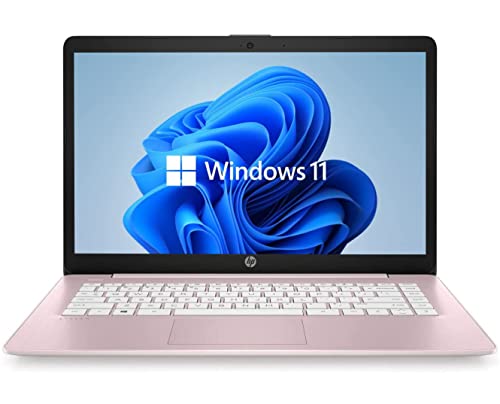
This renewed HP 14-inch laptop focuses on basic computing at a low entry price. It uses a dual-core Intel Celeron processor, 4GB of RAM, 64GB SSD storage, Windows 11, and a webcam. The 14-inch HD screen offers a reasonable size for email, forms, and short reports. It can work as a starter computer for an appraiser with very light needs.
The 64GB drive is the main concern. Windows and updates can consume a fair part of that space, so I would store photos and completed reports in a secure cloud account or external drive. The 4GB memory also calls for modest expectations. This laptop is best for one or two simple tasks at a time, not heavy photo work or large spreadsheets.
Pros:
- Affordable entry point for basic office work
- 14-inch screen is easier to use than a very small panel
- SSD storage can help with quick startup
- Built-in webcam supports video calls
- Windows 11 offers broad software compatibility
Cons:
- 64GB storage leaves limited room for local files
- 4GB RAM restricts multitasking
- Renewed condition requires careful seller review
What Amazon Buyers Are Saying
Customers who buy renewed entry-level HP laptops often value the low cost and familiar Windows experience. Common concerns include storage space, battery age, and cosmetic marks. These points matter more with renewed products than with new laptops. Read the latest listing details and customer feedback before deciding.
My Recommendation
I recommend this model only when the price is the main concern. It can handle email, simple forms, and short documents, but it has little room for growth. A new appraiser who needs one affordable backup laptop may find it useful. For daily professional work, I would spend more for 8GB RAM and at least 128GB storage.
Dell Latitude 3190 2-in-1 Laptop

The Dell Latitude 3190 is a compact 2-in-1 with an 11.6-inch HD touchscreen. Its Intel N5030 processor, 8GB of RAM, 128GB SSD, and Windows 11 Professional make it a useful field companion. The convertible design can help when you need a tablet-like view during an inspection. Its small size also makes it easy to carry with a camera, measuring tools, and paperwork.
Windows 11 Pro may appeal to business users who need added system controls. The 8GB memory gives this renewed Dell a better multitasking base than many low-cost alternatives. However, the small display is not ideal for long narrative reports. I see it as a field device that can sync with a larger desktop or monitor at the office.
Pros:
- 2-in-1 design supports flexible field work
- 8GB RAM helps with browser tabs and forms
- 128GB SSD offers useful document space
- Windows 11 Professional suits business users
- Touchscreen can make inspection notes easier
Cons:
- 11.6-inch display feels cramped for long reports
- Renewed battery condition may vary
- Intel N5030 is not suited to demanding applications
What Amazon Buyers Are Saying
Review themes for renewed Latitude 2-in-1 systems often include compact design, touchscreen usefulness, and value. Buyers may also mention signs of previous use or differences in battery health. Check the current seller information for condition, accessories, and return support. Those details help set fair expectations for a renewed business laptop.
My Recommendation
This is one of my better picks for an appraiser who spends much of the day in the field. It has the right memory, storage, and flexible body for forms and notes. I would pair it with a larger monitor for office report work. It is worth buying when portability matters more than screen size.
HP 14-Inch N150 Everyday Laptop

This HP 14-inch everyday laptop offers a balanced set of features for routine office use. The listing includes an Intel N150 CPU, 128GB SSD, Windows 11, Copilot AI, Microsoft 365, and 1TB of cloud storage. Its thin and portable design suits appraisers who carry a laptop from one appointment to the next. The 14-inch size also gives more comfort than an 11-inch convertible.
The 128GB SSD should handle reports, forms, and a moderate number of local documents. Cloud storage can take care of files that do not need to stay on the laptop. Microsoft 365 is a useful bonus for appraisers who write in Word and build estimates in Excel. As always, confirm the listed RAM before purchase, since memory affects how well it handles many open tabs.
Pros:
- Portable 14-inch design suits mobile professionals
- 128GB SSD is practical for office documents
- Microsoft 365 supports reports and spreadsheets
- 1TB cloud storage helps with file access
- Windows 11 and Copilot add current software features
Cons:
- Memory details should be confirmed before ordering
- Not designed for advanced graphics or video editing
- Cloud storage needs internet access for full convenience
What Amazon Buyers Are Saying
Buyers of everyday HP laptops often like the slim body, simple setup, and included Microsoft services. Some users may want more memory when they run many browser tabs or large files. Customer experience can change with the exact configuration. I suggest checking recent reviews for battery, keyboard, display, and speed comments.
My Recommendation
This is a strong general pick for an appraiser who wants one laptop for home, office, and field tasks. The 14-inch body gives a good balance between comfort and portability. The software bundle adds value, but I would verify memory and storage details before checkout. It earns my recommendation for moderate office work.
HP Slim AMD Laptop With 128GB SSD

This HP slim laptop uses an AMD high-performance processor, 4GB of DDR5 RAM, and a 128GB SSD. It runs Windows 11 and includes 1TB of cloud storage. The thin design makes it easy to carry to inspections or use in a home office. Its SSD should make basic startup and document access feel more responsive than an older hard drive.
The 4GB memory sets a clear limit. It can handle writing, email, light web research, and cloud forms, but many open tabs may slow it down. DDR5 is modern memory technology, yet the amount matters more here than the memory type. I would choose this model for simple work and a low-cost portable setup, not for large photo collections or complex appraisal programs.
Pros:
- Thin body is convenient for travel
- 128GB SSD gives practical document space
- AMD processor suits basic daily tasks
- DDR5 memory uses a current memory standard
- 1TB cloud storage supports online file storage
Cons:
- 4GB RAM is limiting for multitasking
- Local storage may fill quickly with property photos
- Exact display details should be checked before purchase
What Amazon Buyers Are Saying
Budget HP buyers often appreciate a slim body, quick setup, and low price. The most common concern with 4GB laptops is speed when users open many tabs or programs. Buyers also tend to compare cloud storage with the amount of local storage. Check current comments for details about the keyboard, battery, and real-world performance.
My Recommendation
I recommend this laptop for light appraisal duties and cloud-first users. It offers a useful SSD and portable body, but the 4GB RAM prevents a higher rating. If your work includes long reports, photo review, and many research tabs, choose an 8GB model instead. It remains a fair budget option for simple tasks.
HP 14-Inch Celeron Laptop, Second Renewed Option

This renewed HP 14-inch laptop offers a simple Windows 11 setup for basic office tasks. It lists an Intel Celeron dual-core processor, 4GB of RAM, 64GB SSD storage, and a webcam. The 14-inch HD display gives enough room for short documents and online forms. It is aimed at buyers who need a low-cost computer rather than a high-powered workstation.
For appraising, it can cover email, simple notes, online research, and small documents. The low memory and 64GB drive make it a poor match for large photo files or long multitasking sessions. I would use cloud storage or an external drive to protect free space. As a renewed product, the return policy and seller rating deserve close attention.
Pros:
- Low purchase cost for basic computing
- 14-inch screen offers comfortable everyday viewing
- SSD storage supports quicker access than a hard drive
- Webcam helps with video calls
- Windows 11 works with common office applications
Cons:
- 64GB storage is very limited
- 4GB RAM is not ideal for multiple programs
- Renewed battery and cosmetic condition may vary
What Amazon Buyers Are Saying
Feedback for similar renewed HP systems often highlights their affordable price and easy Windows setup. Customers may also report mixed experiences with battery life, cosmetic condition, or speed. Those details depend on the individual unit and seller. Review the current Amazon page before purchase, especially if this will be your main work laptop.
My Recommendation
This laptop is acceptable as a backup or starter computer. It is not my first choice for a working appraiser who handles many files each day. Choose it only if your tasks stay light and the price is clearly lower than an 8GB alternative. Its 14-inch screen and SSD keep it useful, but its limits are easy to reach.
How to Choose the Best Laptop Computers to Purchase for Appraising
Choosing the best laptop computers to purchase for appraising starts with your real work habits. An appraiser may use a web-based form, a report program, a spreadsheet, cloud storage, email, and several property pages in one session. The ideal laptop does not need gaming power, but it must stay steady during normal multitasking. It should also travel well and protect your work through secure updates and backups.
1. Match Memory and Storage to Your Reports
For most appraisal work, I prefer 8GB of RAM over 4GB. More memory helps when you keep a report, browser, email, and spreadsheet open together. A laptop with 4GB can work for simple tasks, but it leaves less room for growth.
Storage matters too. A 128GB SSD is a reasonable starting point for documents and apps. A 256GB SSD gives more comfort, especially if you keep property photos on the computer. Do not treat cloud storage as a full backup by itself. Keep a second copy of important reports and images on a secure drive or trusted backup service.
2. Choose the Right Screen for Office and Field Work
A 14-inch screen gives the best balance for many appraisers. It is portable, yet it offers more room than an 11-inch model. A 16-inch laptop works well if you write long reports or review wide spreadsheets at a desk. The trade-off is extra size and weight.
Touchscreens and 2-in-1 hinges can help during inspections. You can tap forms, turn the display, or use the laptop in a tight space. Yet a small touchscreen does not replace a comfortable work display. If you spend hours writing, choose screen comfort and keyboard quality over novelty.
3. Check Software, Connections, and Long-Term Value
Confirm that the laptop runs the appraisal software, browser tools, PDF apps, and office programs you use. Windows 11 is a practical choice because many business tools support it. Check the processor generation, RAM, storage type, webcam, Wi-Fi, and USB ports in the exact listing. Product pages can change, so do not rely only on a model family name.
Renewed laptops can offer strong value, but inspect the warranty, return period, charger details, and battery notes. A low price is not a bargain if the battery fails during a property visit. New models often give simpler support. For a daily business computer, I would pay more for adequate memory, a comfortable keyboard, and dependable warranty coverage.
Final Verdict: Which Should You Buy?
For most users, the 16-inch AMD laptop is the best overall choice because it combines 8GB RAM, a 256GB SSD, a large display, and a numeric keypad. For field work, the Dell Latitude 3190 2-in-1 is easier to carry.
The best laptop computers to purchase for appraising should fit your reports, photos, travel, and budget. Choose 8GB RAM when possible, back up client files, and confirm the exact listing before checkout.
FAQs Of best laptop computers to purchase for appraising
How much RAM does an appraiser need in a laptop?
Choose 8GB of RAM for comfortable report writing, web research, email, and spreadsheets. A 4GB laptop can handle light work but offers less room for multitasking.
Is a 14-inch or 16-inch laptop better for appraisal work?
A 14-inch laptop is easier to carry, while a 16-inch laptop gives more room for reports and spreadsheets. Choose 14 inches for travel and 16 inches for desk work.
Do appraisers need a powerful graphics card?
Usually, no. Most appraisal tasks need a good processor, enough RAM, SSD storage, and a clear display. Integrated graphics work for reports, photos, maps, and browser tools.
Is 128GB storage enough for appraisal files?
It can be enough for office apps and documents if you use cloud storage. Choose 256GB or more if you keep many property photos and reports locally.
Are renewed laptops good for appraisers?
Renewed laptops can offer good value, but check the seller, warranty, battery condition, charger, and return policy. A renewed 2-in-1 can work well as a field computer.

Everett Ashford is a tech reviewer at mytechgrid.com specializing in SSDs, cameras, TVs, earbuds, headphones, and other consumer electronics. He provides honest, data-driven reviews based on hands-on testing and real-world performance analysis. Everett simplifies complex tech details to help readers make smart, confident buying decisions.