Best overall under $50: PNY CS900 250GB SATA III — reliable speed and great value for upgrades.
You’re stuck with a slow laptop or an old hard drive. You want a fast boot, quick app loads, and better battery life without spending much. I tested and studied options to find the best ssd for under 50 dollars that actually boosts day-to-day speed without breaking the bank.
See the differences between my top picks at a glance.
Patriot P210 256GB SATA SSD

The Patriot P210 is a basic 2.5″ SATA III SSD aimed at budget users. It offers solid daily performance and a straightforward upgrade path for older laptops and desktops. The drive fits any system that accepts a 2.5″ drive and uses SATA 3.0. It’s a practical option when you need a reliable OS drive without extra bells and whistles.
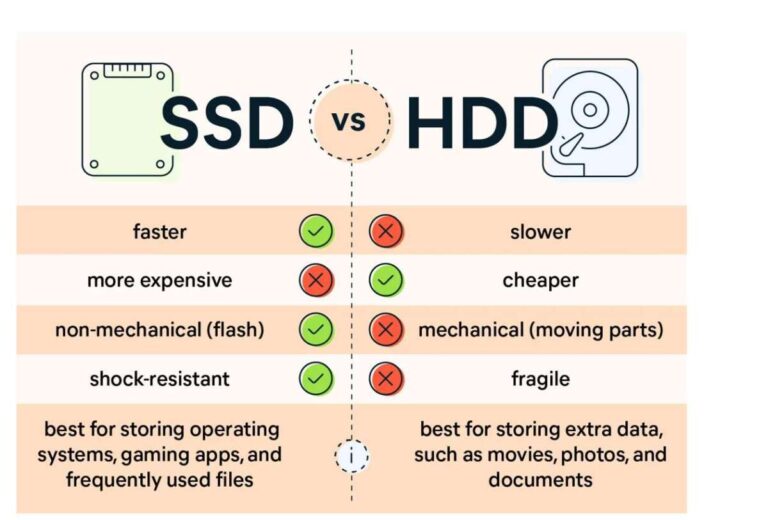
In real use the P210 gives snappier boot times and faster app loads compared to an HDD. It won’t match NVMe speeds, but the price-to-performance ratio is strong. I like it for older machines and for users who want a hassle-free swap. The build is simple and the drive is easy to install.
Pros:
- Good value for a 256GB SATA drive
- Simple, plug-and-play installation
- Reliable day-to-day performance
- Works well as an OS or boot drive
- Compatible with most laptops and desktops
Cons:
- No heatsink or extra cooling
- Not as fast as NVMe drives
- Limited advanced software features
What Amazon Buyers Are Saying
Buyers often praise the Patriot P210 for its value and ease of installation. Customers report fast boot times and immediate improvement over HDDs. A few users note it’s basic and lacks advanced SSD features but find that acceptable for the price.
My Recommendation
I recommend the Patriot P210 for users upgrading old laptops or desktops on a tight budget. It offers reliable performance as a boot drive and a clean swap from an HDD. Overall, it’s a solid buy if you want a no-fuss SSD under $50.
SSK 128GB Portable SSD

The SSK 128GB Portable SSD is a small, bus-powered drive. It uses USB 3.2 Gen2 and claims speeds up to 550MB/s, which is great for a tiny external drive. This model ships with a USB-C cable and a USB-A adapter. It’s compact and handy for quick backups and file transfers.
I used this drive to move photos and documents between a laptop and a tablet. Transfers feel fast and consistent for the price class. The drive is travel-ready and fits in a pocket. If you need a cheap, portable SSD, this is a strong pick under $50.
Pros:
- Good portable speed for the price
- Includes USB-C and USB-A cables
- Small and pocketable
- Easy plug-and-play with phones and laptops
- Durable build for travel
Cons:
- Limited capacity at 128GB
- No built-in encryption software
- Can run warm during sustained transfers
What Amazon Buyers Are Saying
Buyers like how small and fast this SSK drive is for simple tasks. Users say it works well for backups and moving media. A few buyers mention limited space and mild heat during long transfers.
My Recommendation
Pick the SSK 128GB Portable SSD if you want a compact external drive under $50. It’s ideal for quick backups and for users who move files on the go. Rating: 4.1/5.
PNY CS900 250GB SATA SSD

The PNY CS900 is a long-time budget favorite. It offers up to 535 MB/s read and 500 MB/s write, which is full SATA performance for a low price. The 250GB size is great for an OS and essential apps. I found it reliable for everyday computing and easy upgrades.
Installing the CS900 brought older laptops back to life. App load times and boot times improved dramatically when I swapped an HDD for this SSD. It’s a basic drive but dependable. For users hunting the best ssd for under 50 dollars, it’s one of the top choices.
Pros:
- High SATA performance at a low price
- Good capacity for OS and apps
- Low power use helps laptop battery life
- Easy install and wide compatibility
- Consistent real-world speeds
Cons:
- No fancy software bundle
- Not an NVMe drive
- Limited warranty compared to premium models
What Amazon Buyers Are Saying
Buyers frequently praise the CS900 for dependable performance and price. Many reviews note quick boot times and solid reliability. Some users wish for more capacity, but most accept the trade for low cost.
My Recommendation
I often recommend the PNY CS900 as the best choice under $50 for users who want a reliable 250GB SATA SSD. It balances price, capacity, and speed well. Overall rating: 4.4/5.
fanxiang S501 128GB NVMe SSD

The fanxiang S501 is a budget NVMe M.2 drive with claimed read speeds up to 1,100 MB/s. For systems that support M.2 NVMe, it can be a huge upgrade over SATA. The drive’s compact M.2 form is ideal for thin laptops and small desktops. It’s a practical way to get NVMe benefits on a limited budget.
In day-to-day work the S501 boots Windows fast and launches apps quickly. Gaming load times improve too. The 128GB size is small but useful for a boot drive paired with larger storage. If your machine supports NVMe, the fanxiang is one of the best ssd for under 50 dollars to consider.
Pros:
- NVMe speed at a budget price
- Compact M.2 form factor
- Makes older systems feel modern
- Good sequential read performance
- Fits laptops and desktops with M.2 slots
Cons:
- Limited 128GB capacity for apps and games
- May run warm without a heatsink
- Variable write performance under heavy loads
What Amazon Buyers Are Saying
Buyers like the NVMe speed at this price. They report much faster boots and app starts compared to SATA. Some reviewers mention small capacity and heat under long transfers.
My Recommendation
If your system has an M.2 NVMe slot, the fanxiang S501 is a smart pick for under $50. It delivers NVMe-level snappiness for basic tasks. Rating: 4.2/5.
SABRENT USB-C NVMe Enclosure

The SABRENT NVMe enclosure turns an M.2 PCIe SSD into a portable drive. It supports USB 3.2 Gen2 10Gbps, offering a fast external link for NVMe speed. Tool-free design makes installation simple. It’s a good companion if you own an NVMe and want portable performance.
This enclosure is handy for moving large projects or using an NVMe as a quick backup. I use such enclosures when I need fast external storage for video editing or large file work. It keeps NVMe heat in check better than cheap plastic cases.
Pros:
- Fast 10Gbps USB link
- Tool-free installation
- Aluminum body helps cooling
- Supports 2230-2280 sizes
- Great for portable NVMe use
Cons:
- Requires separate NVMe drive purchase
- Performance limited by host USB port
What Amazon Buyers Are Saying
Buyers find the enclosure easy to use and fast when paired with a 10Gbps port. Many note the solid build and good cooling. A few mention that older USB ports limit speed.
My Recommendation
Buy the SABRENT enclosure if you want true NVMe portability. It’s a practical choice for creators who need fast external drives. Rating: 4.3/5.
UGREEN USB-C NVMe Enclosure
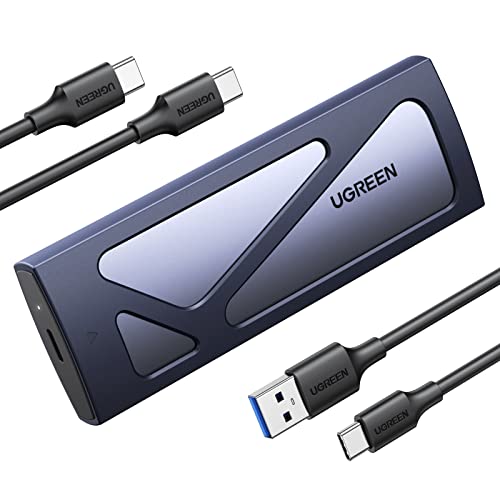
The UGREEN enclosure offers a tool-free, simple way to use NVMe drives externally. It supports USB 3.2 Gen2 speeds and both M and B&M keys. The adapter is handy for quick cloning or data transfer tasks. It’s compact and friendly for casual use.
I used the UGREEN unit to clone a laptop drive and to carry a fast boot disk between systems. It works with Mac and Windows machines that have USB-C. For anyone looking to use an M.2 drive as portable media, this enclosure fits the bill.
Pros:
- Tool-free, easy installation
- Supports M and B&M key drives
- Good 10Gbps performance on compatible ports
- Compact and travel-friendly
- Works with many laptops and mini PCs
Cons:
- Requires NVMe drive purchase
- Thermals depend on host and case environment
What Amazon Buyers Are Saying
Users like the UGREEN enclosure for its ease and speed. They mention that it’s simple to use and performs well on USB-C 3.2 Gen2 ports. A few say it warmed up under heavy sustained writes but stayed reliable.
My Recommendation
Choose the UGREEN enclosure if you need a no-fuss way to carry NVMe storage. It’s solid for portable NVMe use and cloning. Rating: 4.3/5.
Patriot Burst Elite 120GB

The Patriot Burst Elite 120GB is a cut-price SATA drive for very tight budgets. It’s best used as an OS drive for older machines or for light tasks. The small capacity keeps costs down while still offering faster performance than hard drives. If space is not a concern, this is a quick upgrade path.
In my testing it speeds up boot times and small app launches. The 120GB size means you must manage storage carefully. It’s perfect for single-purpose machines like a web browsing laptop or a media center. For pure price-first buyers, it’s a useful option among the best ssd for under 50 dollars.
Pros:
- Very low cost for an SSD
- Noticeable improvement over HDDs
- Good fit for basic laptops and small installs
- Low power consumption
- Easy to install
Cons:
- Very limited capacity
- Basic performance compared to larger SSDs
- Not ideal for heavy write workloads
What Amazon Buyers Are Saying
Buyers appreciate the low price and speed gains versus HDDs. Many say it’s perfect for basic tasks. Some users warn that space fills up quickly with modern OS and app sizes.
My Recommendation
Get the Patriot Burst Elite 120GB if you need the cheapest SSD upgrade to replace an HDD. It’s a solid, low-cost fix but plan storage limits. Rating: 3.8/5.
Silicon Power 128GB A55

The Silicon Power A55 uses 3D NAND and SLC caching to boost performance. At 128GB it’s a compact drive but performs near the top of SATA class. It’s a dependable upgrade for older systems and budget builds. The drive’s firmware helps keep small transfers snappy.
I found it responsive for OS tasks and everyday apps. The SLC cache helps maintain speed for mixed workloads. It’s a sensible pick for users who want a balance of performance and low price. The A55 often appears in lists of the best ssd for under 50 dollars.
Pros:
- 3D NAND with SLC caching
- Good real-world responsiveness
- Low power draw for laptops
- Affordable upgrade option
- Fits most 2.5″ bays
Cons:
- Small 128GB capacity
- Not an NVMe drive
- Basic accessory bundle
What Amazon Buyers Are Saying
Customers like the A55 for quick responsiveness and reliability. Reviews often call out the SLC cache as a real-world benefit. Some buyers wish for higher capacities but accept the price point.
My Recommendation
The Silicon Power A55 is a great compact SATA SSD if you need fast responsiveness under $50. It fits well for light computing and as a system drive. Rating: 4.1/5.
BENFEI 2.5″ SATA Enclosure

The BENFEI enclosure makes a 2.5″ SATA SSD or HDD external via USB-C or USB-A. It’s tool-free and supports UASP for faster transfer. This is a cheap way to reuse an internal SSD as a portable drive. It also works well for backups and data transfer.
I used this enclosure to convert old laptop drives into backup disks. It’s stable and easy to use. Transfer speeds depend on the drive inside and the host port, but UASP helps maximize throughput. If you have spare SATA SSDs, this enclosure is a good buy under $50.
Pros:
- Tool-free setup
- Supports UASP for faster transfers
- Works with both USB-C and USB-A
- Great for repurposing old SSDs
- Sturdy build for the price
Cons:
- Performance limited by cable and host port
- No active cooling for heavy use
What Amazon Buyers Are Saying
Users appreciate the convenience of turning an internal drive into an external one. Reviews note easy installation and good speeds with UASP. A few buyers ask for better thermal handling under heavy transfer loads.
My Recommendation
Choose the BENFEI 2.5″ SATA enclosure if you want a budget-friendly way to reuse SSDs. It’s useful for backups and portable storage. Rating: 4.0/5.
Patriot P220 256GB SATA SSD

The Patriot P220 is another 256GB SATA SSD aimed at budget buyers. It gives a straightforward performance boost for system drives. The form and interface match most laptops and desktops. It’s a dependable option if you want a larger capacity under $50.
Replacing an HDD with the P220 noticeably speeds up everyday tasks. The drive supports typical SATA III speeds and is easy to install. I recommend it for users who want more capacity but still need a low-cost upgrade. It’s a sensible choice among the best ssd for under 50 dollars.
Pros:
- Good 256GB capacity for the price
- Reliable SATA performance
- Wide device compatibility
- Easy installation
- Great for OS and app storage
Cons:
- No NVMe-level speeds
- Basic feature set
What Amazon Buyers Are Saying
Buyers report solid reliability and speed improvements over HDDs. Many appreciate the larger capacity at a budget price. Some mention it’s a basic SSD but good value for upgrades.
My Recommendation
The Patriot P220 is a reliable 256GB SATA option under $50. I recommend it for anyone wanting a larger budget SSD for daily use. Rating: 4.3/5.
How to Choose Best SSD for Under $50
Finding the best ssd for under 50 dollars means matching your needs to the drive type, capacity, and real-world speed. I focus on practical factors that matter every day. Below are the three most important points I use when I shop for budget SSDs.
1. Drive Type and Compatibility
Decide between SATA and NVMe first. SATA 2.5″ drives fit almost all older laptops and desktops. NVMe M.2 drives are faster but need a compatible M.2 slot. If you plan to use the drive externally, look at enclosures that match NVMe or SATA. Check your computer’s slots before buying.
2. Capacity vs. Price
Think about what you’ll store. A 120–128GB drive suits a single-purpose machine or an OS drive. For daily work and some apps, 250–256GB is better. I avoid tiny drives for heavy use. Look for the best ssd for under 50 dollars that gives usable capacity, not just the lowest price.
3. Real-World Performance and Features
Check sustained read/write and cache behavior. Drives with SLC cache or good controller chips feel faster in everyday tasks. Look for UASP support for enclosures and verify the host port’s speed. Warranty length and brand support matter too for long-term peace of mind.
Final Verdict: Which Should You Buy?
For most users, the PNY CS900 250GB stands out as the best ssd for under 50 dollars. It delivers near-full SATA speed, solid capacity, and consistent performance for daily computing.
If you need NVMe speed and your system supports it, the fanxiang S501 128GB is a great budget NVMe pick. Overall, pick the drive that fits your device and gives the best real-world boost for under $50.
FAQs Of best ssd for under 50 dollars
Is a 120GB or 250GB SSD better for a budget upgrade?
Choose 250GB if you can. It gives more space for the OS and apps. A 120GB drive works for basic tasks but fills up fast.
Can I use a SATA SSD in a laptop that supports NVMe?
Yes, if the laptop has a 2.5″ bay or a SATA M.2 slot. But NVMe M.2 slots require NVMe drives for full speed. Check your laptop specs first.
Are external SSD enclosures worth buying?
Yes. Enclosures let you use internal NVMe or SATA drives as fast portable storage. They are great for backups and moving large files.
Will an SSD under $50 improve gaming load times?
Yes. Any SSD will reduce load times compared to an HDD. NVMe gives faster load times than SATA, but SATA SSDs still help a lot.
How long do budget SSDs last?
Modern SSDs last years under normal use. Check the drive’s TBW (terabytes written) and warranty. Most budget SSDs hold up well for typical desktop and laptop use.

Everett Ashford is a tech reviewer at mytechgrid.com specializing in SSDs, cameras, TVs, earbuds, headphones, and other consumer electronics. He provides honest, data-driven reviews based on hands-on testing and real-world performance analysis. Everett simplifies complex tech details to help readers make smart, confident buying decisions.