Watch Bravo without cable by using streaming services like Hulu + Live TV, YouTube TV, Peacock, Philo, Sling, or by buying episodes.
I’ve spent years cutting the cord and testing every streaming route to watch Bravo without cable tv. I know which services carry Bravo live, which ones offer on-demand Bravo shows, and the gotchas to watch for. Read on for a clear, practical guide that walks you through options, costs, setup steps, personal tips, and troubleshooting so you can stream Bravo with confidence.

Overview: ways to watch Bravo without cable tv
If you want to watch Bravo without cable tv, you have two main paths. You can stream Bravo live through a live-TV streaming service or watch Bravo on-demand through Peacock or by buying episodes. Each path fits different budgets and viewing habits.
Live-TV streaming services give you the live Bravo channel and usually cloud DVR. On-demand options let you watch full seasons and older episodes without a live channel. I’ll explain pros, cons, and when to choose each option so you can pick the right plan quickly.
Streaming services that include Bravo live
Here are the most reliable streaming services where you can watch Bravo without cable tv and what each one brings.
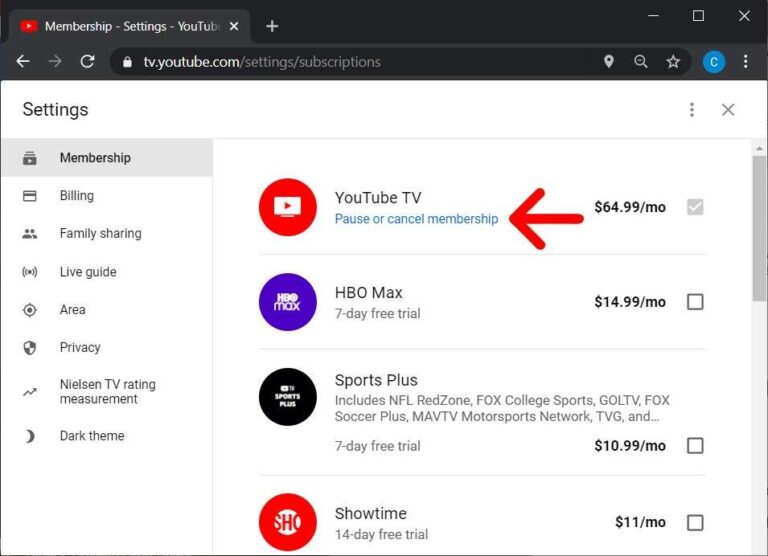
- YouTube TV
- Includes Bravo live and offers unlimited cloud DVR and three simultaneous streams.
- Good for families who want many sports and entertainment channels.
- Hulu + Live TV
- Carries Bravo live and includes Hulu on-demand plus ESPN and local channels.
- Great if you already use Hulu’s catalog and want a single bill.
- Sling TV (Blue or Blue + Orange)
- Offers Bravo in its Blue package at a lower monthly price than some competitors.
- Budget-friendly but has fewer simultaneous streams and less robust DVR unless you add extras.
- FuboTV
- Carries Bravo and targets sports fans; it includes a sizable channel lineup and cloud DVR.
- Good when you want Bravo plus heavy sports coverage.
- Philo
- Includes Bravo at a lower price by focusing on entertainment and lifestyle channels.
- No local channels or sports, but it’s a cost-efficient Bravo option.
- DirecTV Stream
- Has Bravo in most of its plans with local channels and a solid cloud DVR.
- Feels like traditional cable in a streaming wrapper.
If you only want on-demand Bravo shows, Peacock often has full episodes and seasons. You can also buy individual episodes or seasons on services like Amazon Prime Video or iTunes if you prefer ownership.
How to watch Bravo without cable tv using Peacock or on-demand purchases
Peacock and digital purchases are good if you don’t need live Bravo.
- Peacock (on-demand)
- Offers many Bravo shows on-demand because Bravo is part of the same media family.
- Use Peacock to binge older seasons and catch many new episodes after they air.
- Buy episodes or seasons
- Buy shows on Amazon Prime Video, iTunes, or Google Play to keep access without a subscription.
- Good for classic seasons you want to archive or if you watch a single series.
Peacock may not stream live Bravo in all cases. If you need live Bravo for premieres or real-time events, choose a live-TV streaming service. If you mainly want catch-up and older seasons, Peacock or purchases can be cheaper.
How to choose the best option to watch Bravo without cable tv
Use these quick checks to pick the best service for your needs.
- Budget
- If price is primary, Philo or Sling Blue are usually cheapest to watch Bravo without cable tv.
- Live vs on-demand
- Want live Bravo? Pick YouTube TV, Hulu + Live TV, Sling, FuboTV, or DirecTV Stream.
- Want on-demand only? Choose Peacock or buy episodes.
- DVR and simultaneous streams
- Need long DVR storage or many streams? YouTube TV and Hulu + Live TV excel here.
- Channel bundle
- Want Bravo plus sports or locals? Consider YouTube TV, Hulu + Live TV, or DirecTV Stream.
- Device support
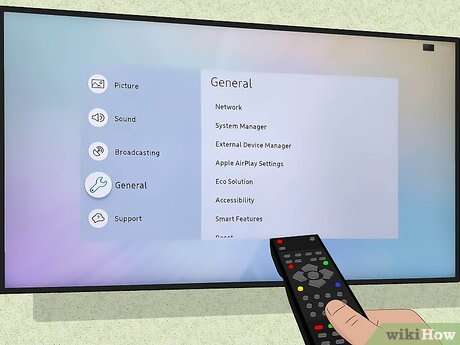
- Confirm apps work on your TV, Roku, Apple TV, Fire TV, or game console.
My rule of thumb from cutting the cord is to list must-have channels, then compare price and DVR limits. Trial periods can help you test a service to watch Bravo without cable tv before committing.

Step-by-step: set up to watch Bravo without cable tv
Follow these simple steps to get streaming.
- Choose a service based on the checklist above.
- Sign up on the service’s website and pick a plan that includes Bravo.
- Download the app on your smart TV, streaming stick, phone, or tablet.
- Log in and search for Bravo or a specific Bravo show.
- If you need live TV, tune to Bravo live. If on-demand, search the show title.
- Set recordings or save shows to your watchlist for easy access.
If you buy episodes, use the store app on your device or buy through a browser and the content will appear in your app library.
Tips, tricks, and troubleshooting for streaming Bravo without cable tv
These practical tips helped me avoid common problems while watching Bravo without cable tv.
- Free trials
- Use free trials to test service streaming quality and device compatibility.
- Use cloud DVR
- Record live Bravo premieres if your schedule conflicts with air time.
- Optimize Wi-Fi
- For smooth streaming, aim for at least 5 Mbps per stream; 25 Mbps for multiple HD streams.
- Sign-in rights
- Some apps require a TV provider sign-in for full access. Use your streaming service credentials instead.
- Regional restrictions and VPNs
- Bravo live may be restricted by region; avoid unreliable VPN promises and pick a service available in your area.
- Account sharing and streams
- Check a service’s simultaneous stream limit before sharing with family or friends.
Common mistakes I made early on were choosing the cheapest plan without checking DVR limits and assuming device apps were identical. Always test the app on your TV before canceling cable.

Frequently Asked Questions of how to watch bravo without cable tv
What streaming services let me watch Bravo without cable tv?
YouTube TV, Hulu + Live TV, Sling TV, FuboTV, Philo, and DirecTV Stream all commonly include Bravo live. Peacock and digital stores offer on-demand Bravo episodes.
Can I watch Bravo live without a cable subscription?
Yes. You can watch Bravo live without cable by subscribing to a live-TV streaming service that carries Bravo, like YouTube TV or Hulu + Live TV.
Does Peacock have all Bravo shows for streaming?
Peacock carries many Bravo shows on-demand, but not every live episode or exclusive content may be available immediately on Peacock.
Is there a cheap way to watch Bravo without cable tv?
Philo and Sling Blue are generally the most budget-friendly options to watch Bravo without cable tv, though each has trade-offs like fewer channels or limited DVR.
Can I watch Bravo on my smart TV or streaming stick?
Yes. Download the streaming service app (YouTube TV, Hulu, Sling, Peacock, etc.) to your smart TV, Roku, Fire TV, or Apple TV and sign in to watch Bravo.
Will I need a VPN to watch Bravo without cable tv while traveling?
A VPN may help with some geo-restrictions, but many streaming services block VPNs. Check the service’s terms and test before traveling.
Conclusion
You can easily watch Bravo without cable tv by choosing the right streaming service for your needs. Whether you want live Bravo, on-demand seasons, or to buy episodes, options like YouTube TV, Hulu + Live TV, Sling TV, Philo, and Peacock make Bravo accessible and affordable. Start by listing your must-haves, try free trials, and test apps on your devices to find the best fit. Take action today: sign up for a trial, stream a Bravo episode, and see which setup fits your routine best. Leave a comment with your favorite Bravo show or question, and share this guide if it helped you cut the cord and keep watching Bravo.

Everett Ashford is a tech reviewer at mytechgrid.com specializing in SSDs, cameras, TVs, earbuds, headphones, and other consumer electronics. He provides honest, data-driven reviews based on hands-on testing and real-world performance analysis. Everett simplifies complex tech details to help readers make smart, confident buying decisions.