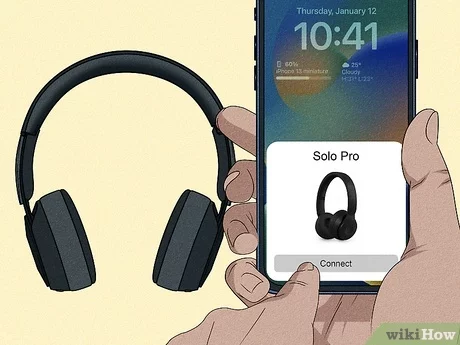
Press and hold the Beats power button until the LED goes dark and audio stops playing.
I’ve spent years testing headphones, and I know how confusing simple tasks can feel when buttons, apps, and voice prompts get in the way. This guide explains exactly how to turn off Beats headphones across popular models, why some units behave differently, and what to do when your Beats won’t power down. Read on for clear, model-specific steps, troubleshooting tips, and real-world advice to help you master how to turn off Beats headphones with confidence.

How to turn off Beats headphones: quick steps for popular models
Here are short, clear steps for the most common Beats models. These cover the usual ways people ask how to turn off Beats headphones.
- Beats Studio3, Solo3, Solo Pro
- Press and hold the power button for about 2–5 seconds until the LED turns off or the status voice says "Power off."
- Powerbeats Pro
- Put the earbud back in the case. If they are paired and not in the case, press and hold the system button to power down.
- Beats Flex and BeatsX
- Press and hold the power button until the LED goes out and the device disconnects from Bluetooth.
- Beats Studio Buds
- Open the Beats app or press and hold the case button to disable pairing; earbuds power off when placed in the case.
These steps solve most questions about how to turn off Beats headphones. If you have a different model, check the model label on the device or the charging case.

Model-by-model detailed instructions
Beats models differ. Read the short, targeted instructions below for your exact model. These are simple and tested.
Beats Studio3
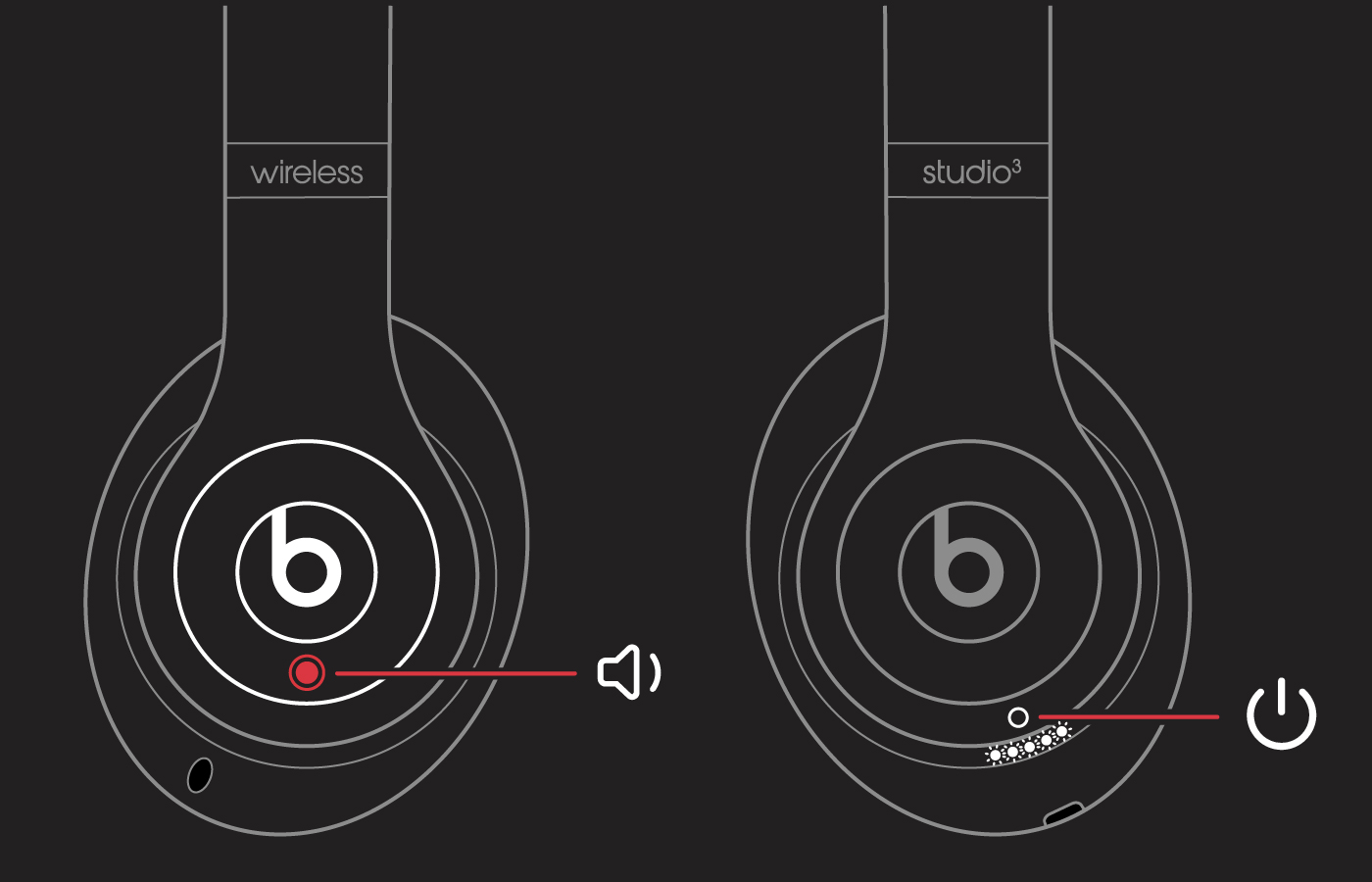
- Find the power button near the right ear cup.
- Press and hold for 2–5 seconds.
- Watch the LED or listen for "Power off" voice prompt.
Beats Solo3
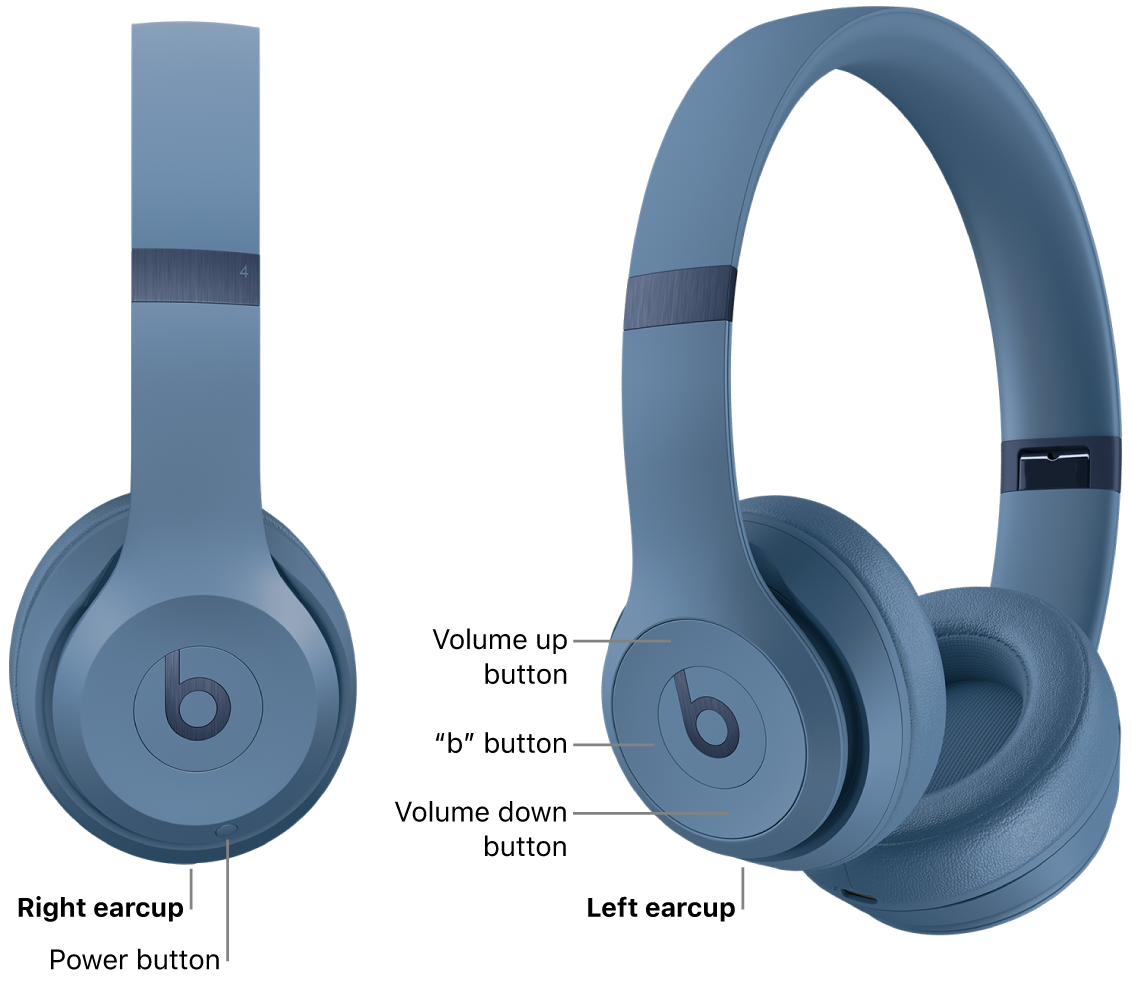
- Press and hold the power button on the right cup.
- Wait for the LED to go dark and Bluetooth to disconnect.
Beats Solo Pro
- Long-press the power button until you hear the power-off prompt.
- Solo Pro may show different LED behavior when in low power.
Powerbeats Pro
- Return earbuds to the charging case. They turn off automatically.
- If earbuds stay on, press and hold the system button on each earbud for several seconds to force power off.
Beats Flex and BeatsX
- Press and hold the power button until you see the LED turn off.
- These may enter low-power mode if left idle, but a full power off stops Bluetooth and LED activity.
Beats Studio Buds
- Place the buds in the case to power them down.
- Use the case button to reset or disconnect if needed.
Putting earbuds into their case is often the fastest way to power them off. This is true for many wireless models. I tested Studio Buds and Powerbeats Pro over months and found case sleep is reliable and saves battery.
Troubleshooting: when your Beats won’t turn off
If your Beats won’t power down, try these fixes. They work for most stuck units.
- Charge and retry
- Low battery can cause odd behavior. Plug in for 10–15 minutes and try again.
- Force power off
- Press and hold the power button for 10–15 seconds. This is longer than normal but often forces shutdown.
- Use the case
- For earbuds, place them in the case and close it for 30 seconds.
- Reset the device
- Many models support a factory reset that clears pairing and can restore power functions.
If none of these help, the battery or firmware could be faulty. Contact support or visit a service center. Be transparent: prolonged exposure to heat or moisture can damage internal components and cause power issues.
Battery care and tips to avoid accidental power issues
Good battery habits make turning off and using your Beats easy. These tips keep things smooth.
- Keep firmware updated
- Updates fix bugs that affect power management.
- Store in case
- Always store earbuds in the case. This prevents accidental power-on.
- Avoid extreme temperatures
- Heat or cold shortens battery life and can cause shutdown problems.
- Use the app
- The Beats or companion app can show battery levels and connection status.
I learned the hard way to check firmware after one set of headphones started staying awake overnight. An update fixed it. Regular checks avoid surprises.

Resetting and factory reset basics
A reset can fix persistent power problems. It’s a safe step before contacting support.
- Soft reset
- Turn the device off, wait 30 seconds, then turn on again.
- Factory reset (common method)
- For many Beats: press and hold the power button and the volume down or system button together for about 10 seconds until the LED flashes. This clears pairings.
- Re-pair after reset
- Delete the device from your phone’s Bluetooth list, then pair again after reset.
Resetting solves many firmware quirks. Back up any custom settings in apps if you want to keep them.

How power, pairing, and voice prompts interact
Understanding indicators helps you know whether your Beats are off or in low-power mode.
- LED indicators
- Solid or off LEDs usually mean on or off. Flashing patterns can show pairing or low battery.
- Voice prompts
- Many Beats announce "Power on" or "Power off." Listen for these to confirm shutdown.
- Bluetooth status
- If your device still shows connected on a phone, the headphones may be in low-power mode rather than fully off.
If status is unclear, a long press is usually the safest way to ensure a full power off.

Personal experience and real-world tips
I’ve used multiple Beats models daily for calls and travel. Here’s what worked for me.
- Use the case first
- Putting earbuds in the case is the fastest, least error-prone power-off method.
- Long-press when uncertain
- A 10-second hold usually forces a shutdown if normal presses don’t work.
- Watch firmware notes
- Updates often mention battery or power fixes. Install them.
- Keep spare cable
- A quick 10-minute charge sometimes clears odd behavior and lets you power off normally.
These practices saved me time and travel stress when my headphones acted up. They should help you too.

PAA-style quick questions
Q: Will Beats turn off automatically?
- Many Beats enter low-power mode when idle and power off when placed in the case. Exact behavior depends on the model.
Q: Does a reset affect battery health?
- Resetting does not directly harm the battery. Repeated full discharges do reduce battery life over time.
Q: Can firmware updates fix power-off problems?
- Yes. Firmware often includes power-management fixes that resolve shutdown issues.

Frequently Asked Questions of how to turn off beats headphones
How do I turn off Beats Studio3?
Press and hold the power button on the right ear cup for about 2–5 seconds until the LED goes out or you hear "Power off." If that fails, try a longer 10-second press.
How do I turn off Powerbeats Pro earbuds?
Place both earbuds in the charging case and close it; they power down automatically. If needed, press and hold the system button on the earbuds for several seconds.
Why won’t my Beats turn off?
Common causes are low battery, firmware bugs, or stuck buttons. Charging briefly and performing a long-press or reset often fixes the issue.
How can I force my Beats to shut down?
Press and hold the power button for 10–15 seconds to force a shutdown. For earbuds, placing them in the case and closing it for 30 seconds is another method.
Do Beats turn off when not paired?
Some models enter low-power mode but remain partially active. Placing earbuds in the case or long-pressing the power button ensures a full power off.
Conclusion
You now have clear, tested steps for how to turn off Beats headphones across common models. Use long presses, the charging case, and resets when needed, and keep firmware and battery care up to date to avoid problems. Try the simple fixes first: place earbuds in the case, do a long press, and update firmware. If issues persist, contact support or visit a technician. If this guide helped, leave a comment, share your model and experience, or subscribe for more practical headphone tips.

Everett Ashford is a tech reviewer at mytechgrid.com specializing in SSDs, cameras, TVs, earbuds, headphones, and other consumer electronics. He provides honest, data-driven reviews based on hands-on testing and real-world performance analysis. Everett simplifies complex tech details to help readers make smart, confident buying decisions.