Try simple resets, firmware updates, and targeted repairs to fix most Beats headphones problems.
I’ve repaired dozens of headphones and tested many Beats models. This guide explains how to fix beats headphones step by step, with clear diagnostics, safe DIY repairs, and when to seek professional help. Read on to get practical fixes you can do today and avoid costly replacements.

Common problems with Beats headphones
Beats headphones often show the same core issues. The top problems are no power, uneven sound, Bluetooth pairing errors, distorted audio, and broken cables or ear pads. Understanding which problem you have is the first key to learning how to fix beats headphones reliably.
Most faults stem from battery issues, dirty contacts, firmware bugs, or physical damage from drops or sweat. I’ll show signs to watch for and quick checks to identify the cause. This makes troubleshooting faster and safer.

Before you start: tools, safety, and warranty
Prepare your workspace and tools. Use a soft cloth, small Phillips and flathead screwdrivers, plastic opening tools, cotton swabs, isopropyl alcohol (90% if possible), a multimeter, and replacement cables or ear pads. Keep parts organized in a small tray.
Check warranty and serial numbers before opening your headphones. Opening a sealed device can void warranty or AppleCare. If your model is under warranty, contacting official support may be the fastest fix. If you decide to DIY, take pictures during disassembly to help reassembly.
Step-by-step fixes by issue
This section walks through how to fix beats headphones for common faults. I include simple resets, cleaning tips, wiring fixes, and when to replace parts.
No power or not charging
Signs: LED off, no charging indicator, headphones won’t turn on.
Steps:
- Check charging cable and adapter with another device first.
- Clean the charging port with a dry toothpick then a cotton swab lightly moistened with isopropyl alcohol.
- Try a hard reset—hold power and pairing buttons for 10–15 seconds depending on model.
- If the battery is swollen or not holding charge, consider battery replacement or professional service.
I once fixed a pair by replacing a corroded charging port. A quick multimeter test confirmed no voltage to the battery.
No sound in one ear
Signs: Left or right side silent while the other works.
Steps:
- Try a wired connection (if supported) to rule out Bluetooth.
- Check audio balance settings on your device to confirm balance is centered.
- Clean speaker mesh carefully with a soft brush or compressed air.
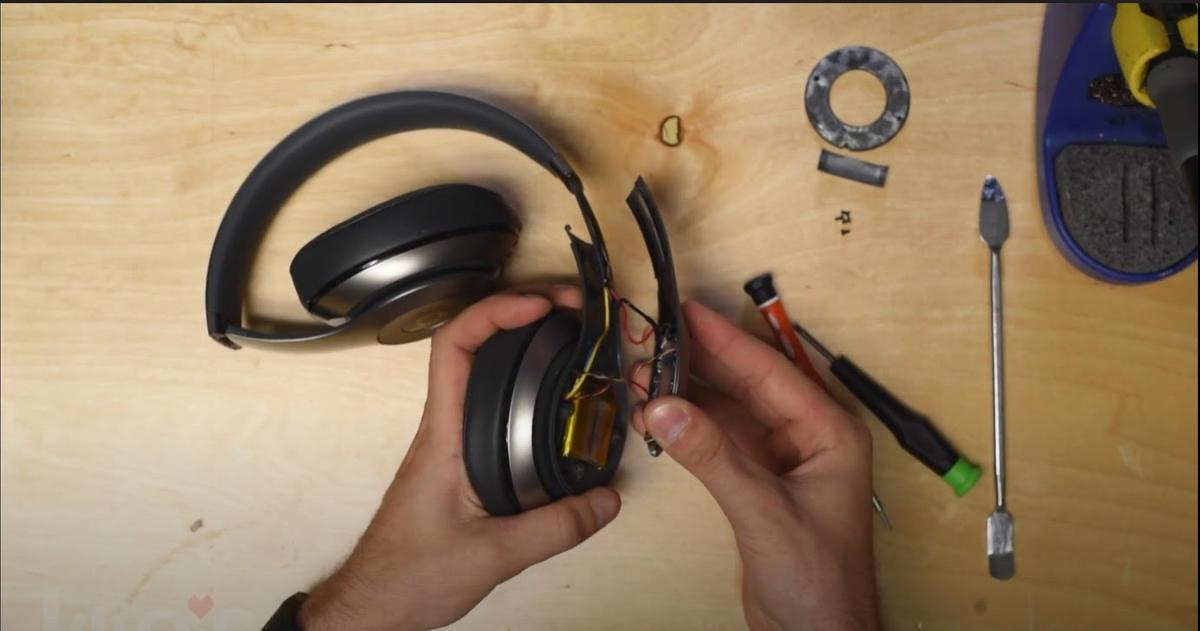
- Inspect internal wiring at the hinge for visible breaks; re-soldering can restore connection if you have skill.
In my experience, a loose wire near the earcup hinge is a common cause after drops.
Bluetooth pairing or connectivity issues
Signs: Can’t pair, frequent dropouts, or one ear disconnects.
Steps:
- Forget the Beats in your device Bluetooth settings and re-pair.
- Reset the headphones using the model-specific reset process.
- Update firmware via the companion app or device update utility.
- Move away from interference sources and test with another phone or laptop.
Firmware updates often solve mysterious disconnects. I’ve seen repeated pairing failures fixed by an update.
Distorted sound or low volume
Signs: Crackling, buzzing, low volume at max setting.
Steps:
- Test multiple sources and apps to rule out file or app issues.
- Clean speaker mesh and contact points.
- Disable any audio effects or EQ on your source device.
- If the distortion persists at all volumes, the internal driver may be failing and needs replacement.
A quick test is to use another pair of headphones on the same device. If distortion remains, the source is at fault.
Physical damage and cable replacement
Signs: Frayed cable, broken headband, missing ear cup padding.
Steps:
- Replace removable cables with official or high-quality third-party cables.
- For non-removable cables, carefully open the earcup and splice or re-solder the wire if you can match colors and insulation.
- Replace ear pads with authentic or compatible pads to restore comfort and sound isolation.
- For structural cracks, use plastic-safe adhesive or order replacement parts.
I replaced a worn cable on a wired Beats model and restored full function in under an hour.

When to seek professional repair or replacement
Know your limits to avoid further damage. If the battery is bulging, stop and seek professional help immediately. If internal solder joints or drivers are damaged and you lack steady hands and skill, a certified technician is safer.
If repair cost approaches the price of a new pair, weigh replacement. For rare vintage or high-end limited models, professional repair preserves value. I recommend official service for water damage or complex board-level failures.

Preventative maintenance and tips
Simple care can prevent many problems and reduce the need to figure out how to fix beats headphones later. Treat your headphones like precision tools.
Practical tips:
- Store in a hard case and avoid tight pockets that bend cables.
- Wipe down ear cups and headband after workouts to prevent sweat buildup.
- Charge on stable power and avoid leaving fully depleted for long periods.
- Update firmware regularly and check app notifications for improvements.
- Replace ear pads and cables before they fail to extend overall life.
From my use, small habits like wiping connectors and using a case doubled the lifespan of a pair.

Frequently Asked Questions of how to fix beats headphones
How do I reset my Beats headphones?
Reset steps vary by model but usually involve holding the power and pairing buttons for 10–15 seconds. This clears pairing and often fixes minor firmware glitches.
Why does one ear have lower volume?
Lower volume in one ear can be a balance setting, dirty speaker mesh, or a loose internal wire. Try cleaning the earcup and testing a wired connection to diagnose.
Can I replace the battery in Beats headphones?
Some Beats models have replaceable batteries via service centers or DIY guides, but many require opening the earcup and careful soldering. Battery replacement is possible but may void warranty.
My Beats won’t pair with Bluetooth—what should I do?
Forget the device in Bluetooth settings, reset your Beats, then re-pair. Also check for firmware updates and test with another source to isolate the issue.
Is it worth repairing old Beats or better to buy new?
If repair costs are under half the price of a new pair and are for a single part, repair is often worth it. For multiple failures or costly board repairs, replacement may be more cost-effective.
How long do Beats headphones last?
With good care and occasional part replacements, Beats can last several years. Heavy use and sweat exposure shorten lifespan, so maintenance matters.
Conclusion
You now have clear, practical ways to diagnose and learn how to fix beats headphones for the most common issues. Start with simple resets and cleaning, move to targeted repairs when comfortable, and choose professional help for battery or complex board issues. Take action: test the basic fixes first, document your steps, and decide whether DIY or service fits your situation. If this guide helped, share your experience, ask a question below, or subscribe for more step-by-step repair tips.

Everett Ashford is a tech reviewer at mytechgrid.com specializing in SSDs, cameras, TVs, earbuds, headphones, and other consumer electronics. He provides honest, data-driven reviews based on hands-on testing and real-world performance analysis. Everett simplifies complex tech details to help readers make smart, confident buying decisions.