Turn on the earbuds, enter pairing mode, then select "JVC" from your device's Bluetooth list.
I’ve paired dozens of earbuds, including many JVC models, and I’ll walk you through clear, tested steps to pair JVC earbuds with phones, tablets, and laptops. This guide explains simple pairing steps, model differences, common problems, fixes, and practical tips from real use so you can get reliable audio fast. Read on to master how to pair jvc earbuds with confidence and avoid the common pitfalls.

Step-by-step pairing guide for JVC earbuds
Follow these simple steps to pair most JVC true wireless earbuds. The exact buttons can vary by model, but the flow is the same.
- Charge the earbuds and case
- Ensure both earbuds and the charging case have some charge. Low battery often blocks pairing.
- Remove earbuds from the case
- Many JVC models turn on and enter pairing when you take them from the case.
- Enter pairing mode
- If they don’t auto-pair, press and hold the earbud buttons for about 3–7 seconds until the LED flashes red/blue or blue. This indicates pairing mode.
- Open Bluetooth on your device
- On iPhone: Settings > Bluetooth and keep the screen open.
- On Android: Settings > Bluetooth or Connections > Bluetooth.
- Select the JVC name
- Look for a name like "JVC" or a model code. Tap to connect.
- Confirm and test
- You’ll hear a voice prompt or tone. Play audio to confirm stereo sound.
Tips:
- If one earbud connects and the other does not, return both to the case and repeat the process.
- For pairing to a second device, turn off Bluetooth on the first device or use the earbuds’ multipoint features if supported.
how to pair jvc earbuds is mostly about knowing where the pairing button is and ensuring the earbuds have power. Try these steps first for a quick win.

Model variations and specific tips
JVC makes many styles. Some use touch controls, others use physical buttons. These small differences change how you enter pairing mode.
Common variations:
- Case-activated models
- Earbuds enter pairing when removed from the case. Close the lid and try again if it fails.
- Button-press models
- Press and hold either or both earbud buttons until LEDs flash.
- Touch-control models
- Tap and hold the touch surface for several seconds until voice prompts start.
Personal experience:
- I once paired a pair of JVC earbuds that would not show up on my laptop. Resetting them by holding both controls for 10 seconds cleared the issue. After that, pairing was instant. Small resets often fix odd behavior.
how to pair jvc earbuds varies by model but follows a predictable pattern. If you’re unsure, check the quick start guide that came with your earbuds for model-specific timing.

Troubleshooting common pairing issues
If pairing fails, try these quick fixes. They are simple and solve most problems.
Issue: Earbuds do not appear in Bluetooth list
- Make sure earbuds are in pairing mode. Hold the buttons longer. Turn Bluetooth off and on on your device.
Issue: Only one earbud connects
* Place both in the case, close the lid for 10 seconds, then repeat pairing. Some models require you to pair the primary bud first.
Issue: Previously paired to another device
- Turn off Bluetooth on the other device or forget the earbuds on that device. Then reconnect.
Issue: Intermittent audio or dropouts
- Move closer to the source. Remove interference from Wi-Fi routers or other Bluetooth devices. Update device Bluetooth drivers if on a laptop.
Reset steps (general)
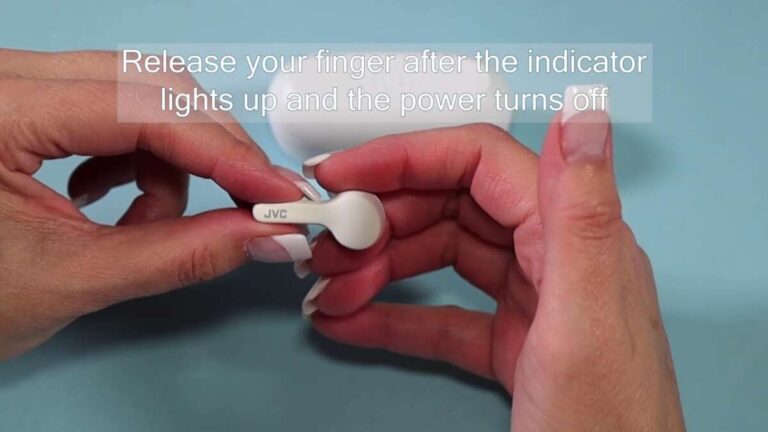
- Power off earbuds. Press and hold both controls for 10–15 seconds until LEDs flash or turn off. Reboot and try pairing again. If unsure, consult the manual.
how to pair jvc earbuds often comes down to a few reset or forget-reconnect steps. These fixes are quick and effective.

Best practices and maintenance
Good care makes pairing faster and more reliable. Follow these habits to keep your JVC earbuds working well.
Daily use tips:
- Keep the case charged. A charged case helps with firmware updates and restores.
- Keep software updated. Check your phone or JVC app for updates if available.
- Store earbuds in the case when not in use to keep them paired and charged.
Cleaning and storage:
- Clean contacts on earbuds and case with a dry cloth. Dirt can stop charging and block pairing.
- Avoid extreme heat or cold. Batteries hate temperature swings.
Battery tips:
- If earbuds won’t enter pairing mode, charge for at least 15–30 minutes.
- Do not fully drain batteries daily. Partial charges keep cells healthy.
how to pair jvc earbuds is easier when the hardware is well cared for. Regular maintenance avoids many common issues.

Features to know: mono mode, multipoint, and codecs
Understanding features helps you pair and use earbuds the right way.
Mono vs stereo
- Most models let you use a single earbud in mono. The primary bud usually handles pairing and audio routing.
Multipoint
- Some JVC earbuds support connecting to two devices at once. This allows phone calls on one device and audio on another. Not all models support it.
Audio codecs
- JVC earbuds may use SBC or AAC. Higher-end models may support advanced codecs. Codec choice affects latency and sound quality but not basic pairing.
Auto on/pair
- Many JVC models auto power on and enter pairing when removed from the case. If that fails, use manual pairing steps.
how to pair jvc earbuds with advanced features is still rooted in the same basic Bluetooth steps. Know your model’s features to use them well.
Frequently Asked Questions of how to pair jvc earbuds
How do I enter pairing mode on my JVC earbuds?
Press and hold the earbud buttons for 3–7 seconds until the LED flashes or you hear a voice prompt. If your model uses the case, remove both earbuds and keep the case open to trigger pairing.
My device won’t find the earbuds. What should I try?
Turn Bluetooth off and on, restart your device, and ensure the earbuds are in pairing mode. If that fails, forget any old pairing entries and try again.
One earbud connects but the other stays silent. How do I fix it?
Place both earbuds back in the case, close it, then re-open and repeat pairing. If the issue persists, perform a reset following the manual’s steps.
Do JVC earbuds work with iPhone and Android the same way?
Yes. Pairing steps are the same for iPhone and Android. Differences are mostly in Bluetooth menu locations and OS prompts.
How can I reset my JVC earbuds if pairing fails?
Typically, power off buds and press and hold both controls for 10–15 seconds until LEDs change. Model-specific reset steps are in the manual. A reset often restores pairing functionality.
Can I pair JVC earbuds to two devices at once?
Some models support multipoint, but many do not. Check your model’s specs. If multipoint is supported, follow the model-specific instructions to enable it.
Conclusion
You can pair JVC earbuds quickly by ensuring they have power, entering pairing mode, and selecting the JVC device from your Bluetooth list. Use resets and forget-reconnect steps when pairing stalls. Keep earbuds clean, updated, and stored in the case for best results. Try the steps above and you’ll likely be listening in minutes.
Take action now: try the basic pairing steps, and if you hit trouble, run the reset routine. If this guide helped, subscribe for more hands-on tips or leave a comment about your JVC model and pairing experience.

Everett Ashford is a tech reviewer at mytechgrid.com specializing in SSDs, cameras, TVs, earbuds, headphones, and other consumer electronics. He provides honest, data-driven reviews based on hands-on testing and real-world performance analysis. Everett simplifies complex tech details to help readers make smart, confident buying decisions.