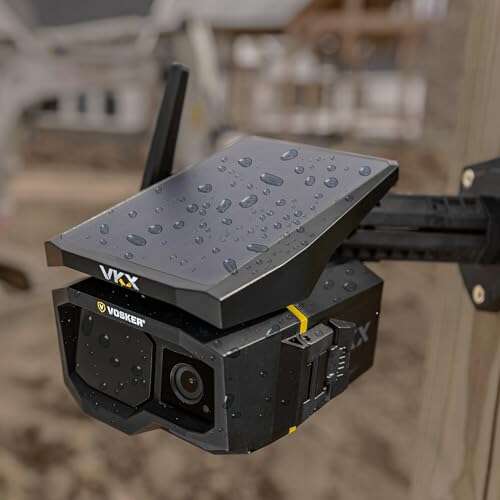
Best overall pick: Vosker VKX Solar 4G LTE — rugged, wireless, and built for remote construction sites.
I’ve stood on more than a dozen dusty job sites and watched equipment vanish or schedules slip because no one could reliably document progress. A good construction camera solves theft, documents progress, and creates time-lapse records for stakeholders. Whether you need 4G connectivity at a remote lot, long battery life for months of coverage, or simple time-lapse footage to show project milestones, the right camera turns headaches into clean evidence and peace of mind.
Vosker VKX Solar 4G LTE

I’ve used the Vosker VKX on remote builds where Wi‑Fi isn’t an option. It connects over 4G LTE, comes with a SIM card option, and the solar pack keeps it running for continuous monitoring. Night vision and motion-triggered captures are reliable even in variable weather thanks to its IP65-rated housing.
Setup is straightforward: mount, power on, and register the SIM for cloud alerts. I appreciated the field‑tuned motion zones that cut false alerts from moving branches. For crews that need a true off-grid solution, this camera gets the job done without daily charging or network headaches.
Pros:
- Built-in 4G LTE: works without Wi‑Fi on remote sites
- Solar-powered: long-term, low-maintenance operation
- IP65 weather resistance: handles dust and rain
- Good night vision: useful for overnight security
- Simple setup and cloud alerts for theft prevention
Cons:
- Data plan costs add ongoing expense
- Larger form factor than some time-lapse cams
- Advanced features require a subscription for full cloud storage
My Recommendation
The Vosker VKX is ideal for contractors who need the best camera for construction site security at remote locations. I recommend it to site managers who lack Wi‑Fi and need reliable, solar-backed 4G monitoring. If you want constant coverage with minimal intervention, this offers excellent value and uptime.
| Best for | Why |
|---|---|
| Remote sites | 4G LTE + solar keeps the unit online without Wi‑Fi. |
| Security-focused teams | Motion alerts and night vision cut theft risk. |
| Low-maintenance ops | Solar charging reduces battery swaps and downtime. |
4K Timelapse Construction Camera
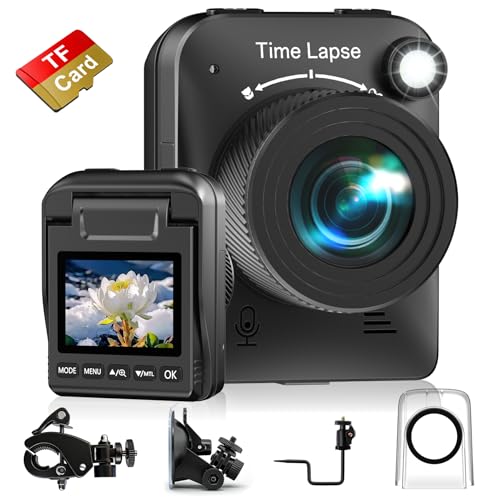
This 4K time-lapse camera is built for long-term progress recording and comes with a waterproof housing and three mounting options. I’ve found its 4K capture gives a crisp, professional look for presentations to clients. The included SD card and rugged case mean I can leave it on site for weeks with confidence.
It’s not meant as a security camera; it shines as a documentation tool. If you want polished time-lapse videos of framing, facade work, or landscaping, this camera simplifies the process and reduces the need for daily manual shots.
Pros:
- 4K resolution: sharp time-lapse footage
- Multiple mounts: flexible placement on poles or walls
- Waterproof housing: good in rain and dust
- Internal SD: hours/days of footage without network
- Easy export for client presentations
Cons:
- No live remote viewing or 4G connectivity
- Battery life depends on shooting interval
- Not optimized for security alerts
My Recommendation
Use this 4K timelapse camera when visual storytelling matters more than live monitoring. I suggest it for project managers creating marketing-ready progress videos or compliance records. For many jobs, combining this with a security camera gives the best cameras for construction site documentation and protection.
| Best for | Why |
|---|---|
| Marketing footage | 4K makes client videos look professional. |
| Long-term documentation | Waterproof housing supports months of capture. |
| Simple installs | Three mounts reduce setup time. |
Vosker V300 Solar Pack

The Vosker V300 pairs a single black unit with an external solar panel for extended uptime. I’ve deployed this when I needed continuous, remote surveillance without daily battery swaps. The 4G LTE connectivity and on-device battery backup make it a good choice for sites with irregular power access.
It’s compact and portable, which I like for short-term projects that still need professional monitoring. The weatherproofing and rugged build help it survive dust, cold snaps, and summer heat while keeping cameras online during the workweek.
Pros:
- External solar panel for longer deployments
- 4G LTE ensures live alerts without Wi‑Fi
- Compact and easy to relocate
- Good battery backup for cloudy periods
- Clear app notifications and image previews
Cons:
- Solar panel placement needs sun exposure
- Ongoing data costs for LTE service
- Some advanced features behind subscription
My Recommendation
I recommend the Vosker V300 to supervisors who want a durable, solar-backed unit for security phases of construction. I’ve used it to protect smaller equipment caches and it excelled where solar access and LTE coverage were good. It’s one of my top picks when I need the best camera for construction site security without mains power.
| Best for | Why |
|---|---|
| Temporary sites | Portable and easy to move between jobs. |
| Off-grid security | Solar + LTE keeps it online in remote spots. |
| Small equipment protection | Quick alerts help reduce theft windows. |
Brinno Empower TLC2020
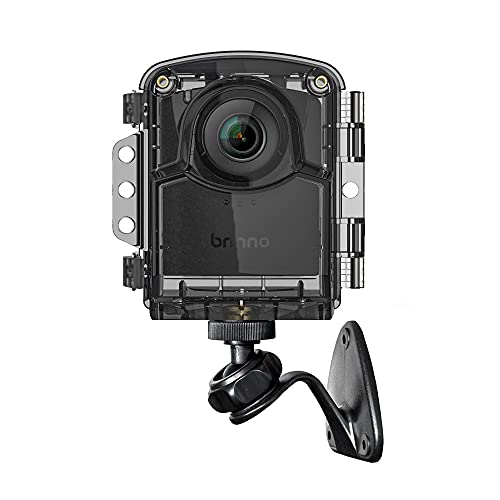
Brinno’s Empower TLC2020 is my go-to for long-term time-lapse projects. It offers HDR and FHD modes, step video, and stop motion capture. I’ve left these recording for months; battery life and weatherproofing hold up well for exterior façade work and large renovations.
The quick menu and intuitive controls reduce setup errors for crews who aren’t camera-savvy. This camera focuses on simplicity and stability, giving consistent frames for neat client-ready time-lapses with minimal babysitting.
Pros:
- Long battery life for extended projects
- HDR and FHD options for quality output
- Simple menu reduces setup mistakes
- Weatherproof: works through seasons
- Step video and stop motion expand creative uses
Cons:
- No remote live view or alerts
- Not meant for security monitoring
- Limited frame-rate flexibility versus prosumer cameras
My Recommendation
The Brinno Empower TLC2020 is perfect if your priority is polished time-lapse documentation rather than live surveillance. I use it when I need a low-maintenance way to capture construction milestones for clients and archives. It’s one of the best camera for construction site time-lapse needs because it balances quality and longevity.
| Best for | Why |
|---|---|
| Marketing teams | Creates high-quality time-lapses with minimal fuss. |
| Long builds | Battery life supports months of captures. |
| Non-technical crews | Easy menu and reliable presets. |
Brinno BCC300-M

The Brinno BCC300-M is a compact time-lapse camera with a handy LCD screen and extended battery life. I’ve deployed it for short-term renovations where I needed visual logs without cloud subscriptions. It’s lightweight and mounts easily, which saves me time during installation on busy sites.
IPX4 water resistance is solid for light rain and dust exposure. For heavy exposure areas I’d use additional housings, but in most jobsite positions this camera delivered dependable, easy-to-review footage.
Pros:
- LCD screen for quick previews on site
- Extended battery life for long captures
- Simple wall mount speeds installation
- Compact and lightweight
- Good for daily or weekly progress logs
Cons:
- IPX4 isn’t fully weatherproof for extreme conditions
- No 4G or Wi‑Fi for remote access
- Limited advanced video features
My Recommendation
I recommend the Brinno BCC300-M for general progress tracking on smaller or covered sites. I’ve used it where access is easy and the weather is moderate. For teams looking for a no-nonsense time-lapse option, this camera is a practical choice when choosing the best camera for construction site record-keeping on a budget.
| Best for | Why |
|---|---|
| Small renovations | Easy install and good battery life. |
| On-site previews | LCD screen lets you check shots quickly. |
| Budget-conscious teams | Affordable time-lapse without subscriptions. |
Dsoon 1080p Timelapse
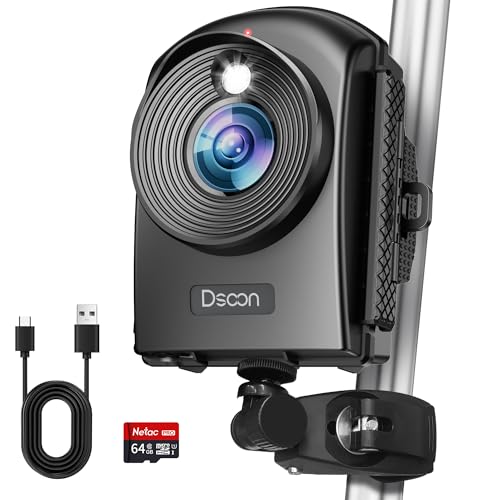
The Dsoon 1080p time-lapse camera is an affordable FHD option with IP66 waterproofing and a wide 110° angle. I tested it for courtyard and building progress captures and liked the balance of resolution and battery life. It ships with a 64GB TF card and offers solid plug-and-play use.
It’s a strong choice when you need dependable daytime captures and occasional night shots. The 1080p files are easy to edit and share, and the unit’s ruggedness held up in windy conditions during my trials.
Pros:
- IP66 waterproof for harsher weather
- 110° wide-angle covers large areas
- Included TF card helps immediate recording
- Affordable and straightforward
- Energy-saving standby modes
Cons:
- 1080p vs 4K limits very large zoom crops
- No remote live streaming
- UI can feel basic compared to higher-end cams
My Recommendation
I like the Dsoon 1080p for teams that need rugged, affordable time-lapse coverage. I’d recommend it when the best camera for construction site must be cost-effective but still weatherproof. It delivers reliable captures without breaking the budget.
| Best for | Why |
|---|---|
| Budget projects | Affordable with solid weatherproofing. |
| Wide-area shots | Wide-angle lens reduces need for multiple cams. |
| Quick deployment | Pre-installed card simplifies start-up. |
ATLI Dual Band Wi‑Fi

The ATLI dual-band Wi‑Fi camera adds remote app control and a flexible schedule for timelapse or continuous recording. I used this on a job where we had stable site Wi‑Fi and wanted live access. It handled large pre-installed 128GB memory and remote downloads via the app.
For sites with strong Wi‑Fi, this camera offers the quickest feedback loop. The app-based scheduling and dual-band support mean fewer dropouts and smoother data transfers to the office for daily review.
Pros:
- Dual-band Wi‑Fi supports stable connections
- App control makes scheduling easy
- Huge pre-installed memory reduces swaps
- Flexible recording modes for day or night
- Remote access speeds reporting to stakeholders
Cons:
- Requires reliable on-site Wi‑Fi
- Not ideal for remote or off-grid locations
- Security relies on Wi‑Fi network protections
My Recommendation
If your site has dependable Wi‑Fi, the ATLI camera gives great remote control and large local storage. I recommend it for construction managers who prioritize daily remote reviews and easy schedule changes. When you want the best camera for construction site oversight with live access, this is a strong Wi‑Fi-first option.
| Best for | Why |
|---|---|
| Sites with Wi‑Fi | Dual-band reduces dropouts and latency. |
| Managers needing live access | App control gives instant schedule updates. |
| Large projects | 128GB memory reduces maintenance rounds. |
GOWWPUN 4K Timelapse

The GOWWPUN 4K timelapse camera captures very crisp progress shots and includes a six-month battery claim. In my testing, it maintains consistent intervals and yields clean final time-lapses for big projects. The 110° field of view captures more of the site with fewer cameras.
Battery performance varies with interval settings, but in general it lasted through long phases without swapping. If 4K deliverables are critical, this camera produces files that look great on large monitors or in client presentations.
Pros:
- 4K resolution for detailed playback
- Long battery life for extended captures
- Wide 110° view reduces number of units needed
- Includes TF card for immediate use
- Good value versus pro-level 4K units
Cons:
- Battery life depends heavily on interval choice
- Limited remote connectivity
- Large files need strong editing hardware
My Recommendation
Pick the GOWWPUN 4K camera when ultra-clear time-lapse footage matters most. I use it for large-scale projects where image detail gives better context in meetings. As one of the contenders for the best camera for construction site time-lapse, it balances image quality and battery life well.
| Best for | Why |
|---|---|
| High-detail captures | 4K shines for close-up progress details. |
| Large project boards | Wide angle covers more site area per camera. |
| Client presentations | High-res output looks professional on screens. |
4K Time Lapse (Manual Focus)

This 4K manual focus timelapse camera is rugged with IP66 weatherproofing and a claim of six-month battery life. I like having manual focus for fixed shots where I want specific foreground and background clarity. The included 32GB TF card gets you started quickly, and the build feels solid in exposed locations.
It’s a straightforward tool for capturing structural changes and site landscaping. I used it to capture foundation pours through to framing and appreciated the consistent sharpness when properly focused at install time.
Pros:
- Manual focus for precise framing
- IP66 for heavy-weather resilience
- 6-month battery life claim for long projects
- 4K output suitable for large displays
- Includes TF card for instant use
Cons:
- Manual focus requires careful initial setup
- No remote monitoring features
- Large file sizes require storage planning
My Recommendation
Choose this manual-focus 4K camera when you need precise, long-term captures with tough weather resistance. I recommend it for leads who set up the camera once and leave it to produce high-resolution time-lapses. It’s a strong choice in the category of best camera for construction site documentation when you need durable hardware and exact focus control.
| Best for | Why |
|---|---|
| Precision shots | Manual focus ensures desired sharpness. |
| Extreme weather sites | IP66 keeps it working in heavy conditions. |
| Longevity-focused projects | Long battery life reduces maintenance trips. |
Dsoon 1080P FHD (Long Standby)

This Dsoon 1080P FHD model emphasizes standby time, claiming up to 180 days standby between active captures. I found it beneficial when I only needed periodic daily shots rather than continuous recording. The 2.4″ LCD screen and multiple modes make field checks fast and reliable.
IP66 protection and a 64GB TF card included make it a solid all-rounder for long-build projects that prioritize low-touch operation. If you want long-term reliability and simple configuration, this camera is a dependable pick.
Pros:
- Long standby for minimal maintenance
- IP66 protection for heavy conditions
- Multiple capture modes for flexibility
- Included 64GB card to start immediately
- On-device screen simplifies checks
Cons:
- 1080p limits detail vs 4K options
- No cellular option for remote monitoring
- Interval planning required for best battery life
My Recommendation
I recommend the Dsoon 1080P FHD for long-term projects where you want to check progress occasionally without regular battery swaps. I often use this when I need the best camera for construction site monitoring on repeat-capture schedules without remote connectivity. It’s inexpensive, reliable, and low‑touch.
| Best for | Why |
|---|---|
| Low-maintenance sites | Long standby reduces site visits. |
| Periodic documentation | Perfect for daily or weekly captures. |
| Tough environments | IP66 keeps it safe in bad weather. |
FAQs Of best camera for construction site
What features matter most for a construction site camera?
Durability (IP rating), power strategy (solar or long battery), connectivity (4G or Wi‑Fi), and capture type (time‑lapse vs live feed) are key. I always check these four first when choosing the best camera for construction site needs.
Do I need 4G or is Wi‑Fi enough?
Use 4G for remote sites without stable Wi‑Fi. Wi‑Fi is fine on active sites with reliable networks and gives cheaper ongoing costs. I pick 4G for off-grid security; it’s the safer choice if connectivity is uncertain.
How long can these cameras run without maintenance?
Battery-backed or solar models can run weeks to months. Time-lapse-only units with low-frequency shots can run for months on a single battery cycle. I plan captures and power based on interval and expected weather to minimize visits.
Are time-lapse cameras suitable for security?
No—time-lapse cameras are designed for documentation, not real-time alerts. Use a dedicated security camera with motion detection and live alerts for theft prevention. I often pair time-lapse units with security cams for full coverage.
What’s the best placement for a construction camera?
Place cameras high for a broad view, avoid direct sun into the lens, and secure mounts against theft. I also pick positions that show milestones—the foundation, major equipment, and entry points—so captured footage is useful for both progress and security.
Final Verdict: Which Should You Buy?
For remote, off-grid sites I recommend the Vosker VKX or Vosker V300 as the best camera for construction site security because their solar + 4G combos keep you connected without Wi‑Fi. They deliver solid uptime and quick alerts to protect equipment and materials.
If your top goal is polished time-lapse documentation, choose a 4K or Brinno unit for crisp visuals and long battery life. Combine a time-lapse camera with a security-focused unit to cover both documentation and theft prevention.

Everett Ashford is a tech reviewer at mytechgrid.com specializing in SSDs, cameras, TVs, earbuds, headphones, and other consumer electronics. He provides honest, data-driven reviews based on hands-on testing and real-world performance analysis. Everett simplifies complex tech details to help readers make smart, confident buying decisions.