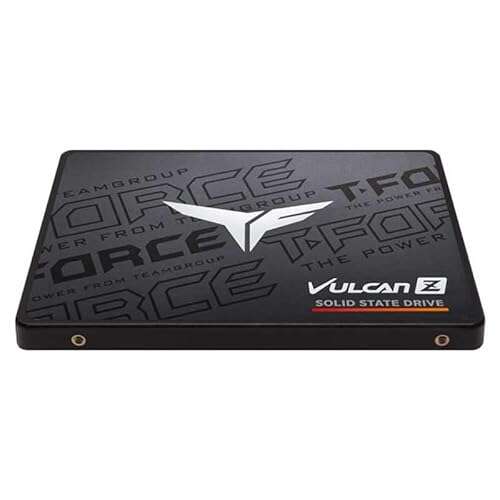
Wipe, test, update firmware, grade, and securely package SSDs before resale.
I’ve prepared thousands of drives for resale and built processes that protect data, boost margins, and keep buyers happy. This guide covers exactly how to prepare SSD for bulk resale business step by step. You’ll get practical workflows, legal and data-security checks, testing and grading methods, packaging and inventory tips, pricing strategies, and real-life lessons to help you scale with confidence. Read on to learn the exact tasks, tools, and quality checks that turn raw SSD lots into trusted inventory.

Why preparing SSDs matters for resale
Preparing drives cuts risk and raises value. SSDs store private data and degrade differently than hard drives. If you skip proper preparation, you face legal risk, unhappy buyers, and returns. Proper prep helps you sell faster, charge higher prices, and build a repeat customer base.
Benefits of good preparation
- Reduces data breach risk and compliance exposure.
- Increases buyer trust and lowers return rates.
- Helps you price by condition and performance.
- Lets you move inventory faster in bulk deals.
How this guide helps
- Clear checklist you can repeat at scale.
- Tools and methods that work for SATA and NVMe drives.
- Practical tips from real batches I processed.

Legal and data-security essentials
Data wipes are non-negotiable. Laws and contracts often require certified erasure. Follow recognized data-sanitization standards and document every step.
Key rules to follow
- Perform a secure erase or crypto-erase that is verifiable.
- Keep records: serial, date, erase method, operator initials.
- Comply with local e-waste and data-protection laws.
- If a drive is defective or cannot be erased, process it for destruction or recycling and log the action.
Practical verification
- Use tools that produce an audit log or certificate.
- Randomly re-check a sample of drives after wiping.
- Retain logs for the time period required by law or customer contract.

Step-by-step process to prepare SSDs for bulk resale business
This step list is what I used when prepping 1,000+ drives for resale. It scales with simple stations and scripts.
- Intake and triage
- Inspect packages and note visible damage.
- Record model, capacity, serial, firmware, and POH (power-on hours).
- Separate drives that show physical damage.
- Inventory and labeling
- Assign internal ID labels. Track in a spreadsheet or inventory system.
- Note original vendor and lot number.
- Secure erase and data sanitization
- Prefer vendor secure-erase tools when available.
- Use PSID revert for some encrypted NVMe drives and ATA Secure Erase for SATA.
- If secure erase is not supported, do a full overwrite or use encryption followed by key destruction. Document method.
- Produce and store an erase log for each drive.
- Firmware updates
- Check vendor firmware notes and update batches when safe.
- Test a small group after firmware updates to avoid mass bricking.
- Health check and performance testing
- Run SMART checks and record keys: reallocated sectors, media and controller errors, wear level, and power cycles.
- Run short performance benchmarks to catch major slowdowns.
- Grading and sorting
- Assign grades (A, B, C) based on health, performance, and TBW used.
- Group drives by grade, capacity, and model for simpler listing.
- Reformat and final prep
- Repartition and format for the intended market (ex: exFAT, NTFS).
- Remove proprietary labels if required and safe.
- Seal with anti-static bag and pack with cushioning.
- Documentation and warranty labels
- Add a simple spec card: model, capacity, grade, health score, firmware, and warranty period.
How to scale
- Use docks and multi-bay stations for parallel erases.
- Automate logs with scripts and barcode scanners.
- Batch firmware updates and tests by model.
Testing and grading: tools and checks
Testing is where you prove value. A clear grading system speeds sales and reduces disputes.
Essential tests
- SMART health readout to spot reallocated sectors or media errors.
- Read/write spot tests or short FIO runs to verify throughput.
- Full surface scan for suspect drives when buyers require it.
- TBW and power-on hours comparison to expected lifespan.
Grading example
- Grade A: SMART healthy, >90% performance of new spec, low POH.
- Grade B: Minor wear, small performance drop, functionally good.
- Grade C: Significant wear, slower speeds, sold for parts or low-cost use.
Tools I recommend
- smartctl for deep SMART reads.
- Vendor utilities for secure erase and firmware.
- CrystalDiskMark or FIO for quick speed checks.
PAA-style questions
What is the best erase method for SSDs?
- Use vendor secure-erase or PSID revert for encrypted drives when available. If not available, use authenticated overwrite methods and keep logs.
Can firmware updates damage drives?
- Yes. Update a small sample first. Keep firmware files from trusted sources and follow vendor instructions.
Cleaning, labeling, packaging, and inventory management
Presentation matters in resale. Clean, labeled, and documented drives sell better.
Packaging checklist
- Anti-static bag for each drive.
- Box or pouch with padding to avoid shock.
- A printed spec card with grade, capacity, and health summary.
Inventory fields to track
- Internal ID, vendor model, capacity, serial number, firmware, grade, POH.
- Erase method, operator, date, and audit log link.
- Sale date and buyer info for warranty tracking.
Warranty options
- Offer short warranties for graded drives. For example, 30-day limited warranty for Grade B, 90 days for Grade A.
- State clearly what the warranty covers and how to return.

Pricing, channels, and sales strategies
Where you sell affects how you prepare. B2B buyers expect different proof than end users.
Channels and approaches
- B2B bulk sales: use grade sheets and erasure certificates. Offer samples.
- Marketplaces: list detailed specs and photos. Highlight tested health.
- Auctions and lots: sell mixed-grade lots at discount.
Pricing tips
- Base price on comparable listings and adjust by grade, capacity, firmware, and health score.
- Create a simple formula: Base market price × Condition factor × Age factor.
- Offer tiered discounts for larger lots to move inventory faster.
Value-adds that boost price
- Erasure certificate and audit logs.
- Short warranty and return policy.
- Clean packaging and clear grade labels.
Common pitfalls and how to avoid them
I learned these the hard way. Avoid these mistakes to save time and money.
Pitfall: Incomplete wipes
- Mitigation: Use verifiable tools and keep logs. Recheck random samples.
Pitfall: Bricking during firmware update
- Mitigation: Test updates on a small sample first. Keep backups and stable power.
Pitfall: Fake or counterfeit SSDs
- Mitigation: Verify serials with vendor tools and compare firmware IDs.
Pitfall: Poor inventory control
- Mitigation: Barcode every drive and use batch IDs to trace problems.
Personal experience: lessons from scaling SSD prep
When I started, I wiped drives manually. That cost time and caused errors. Later, I built a six-bay staging rack. I created a script that records serials, runs secure erase, and uploads logs to cloud storage. That one change cut processing time by 70% and reduced disputes.
What I learned
- Automate small tasks. Save hours every week.
- Keep good records. They are your proof if a buyer disputes.
- Sample-test every batch. A single bad firmware release can ruin a whole lot.

Frequently Asked Questions of how to prepare ssd for bulk resale business
How do I prove an SSD was securely erased?
Provide an erase log or certificate generated by the tool you used, and keep chain-of-custody records for the lot. Randomly re-test samples to back up your claim.
Can I use software overwrite for SSDs?
Overwrites can work but are less reliable on SSDs due to wear-leveling. Vendor secure-erase or cryptographic erase is preferred and more defensible.
What tests should I run before selling an SSD?
Run SMART checks, a short read/write benchmark, and a surface scan if buyers request it. Record TBW and power-on hours to grade health.
Is firmware updating necessary before resale?
Not always. Update when firmware fixes critical bugs or improves performance. Always test updates on a sample group first to avoid mass failures.
How should I package and label SSDs for resale?
Use anti-static bags, padded boxes, and include a spec card showing model, capacity, grade, health score, and warranty. Label each drive with an internal ID and keep the inventory list.
Conclusion
Preparing SSDs for bulk resale business means following repeatable steps: intake, secure erasure, testing, grading, and careful packaging. Do this well and you reduce risk, increase value, and build customer trust. Start small, automate what repeats, and keep clear records for every lot you sell. If you apply these practices, you’ll move inventory faster and protect your business reputation. Ready to streamline your SSD prep? Start by mapping your intake-to-shipment workflow, pick one automation to add this week, and track the time you save — then scale from there.

Everett Ashford is a tech reviewer at mytechgrid.com specializing in SSDs, cameras, TVs, earbuds, headphones, and other consumer electronics. He provides honest, data-driven reviews based on hands-on testing and real-world performance analysis. Everett simplifies complex tech details to help readers make smart, confident buying decisions.