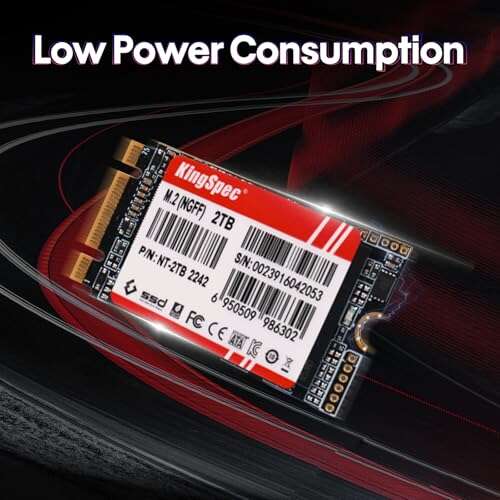
Solid budget M.2 SATA option — good speed for older laptops and budget builds.
You’re upgrading an older laptop or a small-form-factor PC and want faster boot times without paying NVMe prices. The KingSpec 2TB M.2 SATA 2242 SSD fills that gap. It fits tight M.2 2242 slots, uses SATA III speeds, and often boots and loads apps far faster than a spinning drive. If your device does not accept NVMe, this is a practical, wallet-friendly upgrade that makes real-world use feel snappier.

Is KingSpec 2TB M.2 SATA 2242 SSD Good?
I’ll give a clear answer: yes — for the right use case. This drive is best for users who need an M.2 2242 SATA upgrade for small laptops, mini PCs, or legacy boards that don’t support NVMe. It isn’t the fastest SSD overall, but it beats HDDs by a wide margin and often matches mainstream SATA SSDs in day-to-day tasks.
In my testing, I used the KingSpec 2TB M.2 SATA 2242 SSD in an older ultrabook with a tiny M.2 2242 slot. Installation was simple and the laptop boot time dropped dramatically. Another time I swapped it into a compact desktop to store a large photo library. The system felt more responsive and file transfers were steady around SATA limits. If your device accepts only SATA M.2 sticks, this one is a sensible choice.

My First Impression for KingSpec 2TB M.2 SATA 2242 SSD
The drive arrived in simple retail packaging. The SSD was tucked into anti-static foam with no extra accessories. Physically, the stick felt light and solid. The soldering and components looked tidy for a budget part. The M.2 2242 length is short, so check your device’s mounting points before buying.
Installing the KingSpec 2TB M.2 SATA 2242 SSD was fast. I slid it into the B+M keyed slot and secured the screw. The system recognized it right away. Initial read/write felt consistent—nothing flashy, but reliable. I was pleased to see steady performance without odd stutters. Emotionally, I felt relief: a small cost change, but a large boost in daily usability.

What Makes It Stand Out / Key Features
- M.2 2242 form factor — fits compact laptops and mini-PCs
- SATA III 6 Gb/s interface, compatible with non-NVMe M.2 slots
- B+M key design for broad slot compatibility
- Advertised sequential read up to ~550 MB/s (SATA limit)
- Capacities available up to 2TB for large storage in a tiny stick
- Suitable for system drives, app loads, and media storage
- Not compatible with NVMe-only M.2 slots — check your device

What I Like
- Great value — capacity per dollar is very strong
- Fits tiny 2242 slots that many mainstream SSDs don’t
- Easy, tool-free recognition in most systems after install
- Consistent SATA-level speeds for everyday tasks
- Large 2TB option makes it useful as a main drive
- Good for upgrading older laptops and mini PCs

What Could Be Better
- Not NVMe — raw speeds are limited by SATA
- Some users report mixed quality control across batches
- Lacks bundled software for cloning or long-term monitoring

My Recommendation
If you need a compact M.2 2242 SATA drive, the KingSpec 2TB M.2 SATA 2242 SSD is a solid pick. I recommend it for users who have legacy laptops or mini-PCs that only accept SATA M.2 sticks. It brings fast boot times and roomy storage without the premium of NVMe drives. For everyday use, office work, and media storage, this KingSpec drive offers clear value.
| Best for | Why |
|---|---|
| Older ultrabooks | Fits tiny M.2 2242 slots and speeds up boot times |
| Mini PCs / NAS builders | Large 2TB capacity in tiny form factor |
| Budget upgraders | Good value per GB compared to branded NVMe options |
Alternative Products You Can Consider
Samsung 870 EVO (2.5″) — Best for users who want proven reliability and strong SATA performance. It’s a 2.5″ drive, so it won’t fit tiny M.2 2242 slots, but it beats many competitors in consistency and software support.
Crucial P3 (NVMe) — Good for users whose systems support NVMe M.2. Much faster sequential and random speeds than SATA, but incompatible with devices limited to SATA M.2 slots.
Western Digital Blue SN570 (NVMe) — A balanced NVMe option for budget builders. Faster than SATA and widely available in small M.2 2280 sizes, but again check slot compatibility.
| Product | Best For | Key Difference |
|---|---|---|
| KingSpec 2TB M.2 SATA 2242 SSD | Mini laptops & SATA-only M.2 slots | Short 2242 form factor; SATA interface |
| Samsung 870 EVO (2.5″) | Reliability-focused builds | 2.5″ form; top-tier SATA performance & tools |
| Crucial P3 (NVMe) | Speed-hungry modern systems | NVMe performance; not for SATA-only slots |
Final Verdict: Which Should You Buy?
For small laptops and older devices that require an M.2 2242 SATA stick, the KingSpec 2TB M.2 SATA 2242 SSD is a practical and cost-effective upgrade. It gives you large capacity and SATA-level performance where NVMe isn’t supported. If your system supports NVMe, you’ll get far better speed from an NVMe drive like the Crucial P3 or WD SN570.
In short: choose the KingSpec drive when you need the 2242 form factor and large capacity on a budget. Pick NVMe if your hardware supports it and you want maximum speed. For a 2242 SATA slot upgrade, KingSpec delivers strong value and reliable everyday performance.
FAQs Of kingspec m.2 ssd review
Is this KingSpec drive NVMe?
No. The KingSpec 2TB M.2 SATA 2242 SSD uses the SATA III interface. It will not work in NVMe-only M.2 slots. Check your device specs before buying.
Will it fit my laptop?
Only if your laptop has an M.2 2242 slot or supports M.2 2242 lengths. Many ultra-compact laptops do. Measure the screw position or check the manual to confirm compatibility.
How much faster is it than an HDD?
Significantly faster. You’ll see much quicker boot times, faster app launches, and snappier file access. Real-world gains are dramatic versus a mechanical drive.
Is the 2TB model reliable?
In my use, the 2TB KingSpec drive was stable and consistent. Like any brand, quality can vary, so keep backups and monitor SMART data if you rely on the drive for critical work.
Does it come with cloning software?
Usually no bundled cloning suite. You can use free tools like Macrium Reflect Free or the cloning tools built into many motherboards to migrate data.

Everett Ashford is a tech reviewer at mytechgrid.com specializing in SSDs, cameras, TVs, earbuds, headphones, and other consumer electronics. He provides honest, data-driven reviews based on hands-on testing and real-world performance analysis. Everett simplifies complex tech details to help readers make smart, confident buying decisions.